Lessons · Lesson 3 of 5
Four failures the sheet cannot warn you about
Take nine real incidents apart, find the one property they all share, and price the three controls that would have stopped them.
Lesson 3 of 5 · 20 min
Nine incidents, and who found them
Ghita pulled eighteen months of the department's incident log. She kept every entry whose root cause was a spreadsheet. There were nine.
| Mechanism | Cost | Days undetected | Found by |
|---|---|---|---|
| A column was inserted; a total went on summing the old range | 2,240 | 31 | An outcome in the factory |
| A constant was typed over a formula | 18,470 | 96 | An outcome in the factory |
| A filter was left on; a total was read as if it covered everything | 1,180 | 4 | A person, by eye |
| A range stopped growing when rows were added below it | 6,905 | 58 | A reconciliation |
| One column was sorted on its own; every row's pairing broke | 3,120 | 12 | An outcome in the factory |
| A lookup counted across to a column that had moved | 940 | 22 | An outcome in the factory |
| A filter was on when rows were pasted, so they landed elsewhere | 410 | 1 | A person, by eye |
| A constant was typed over a formula | 168 | 74 | A reconciliation |
| A range stopped growing when rows were added below it | 51,300 | 143 | An outcome in the factory |
USD 84,733 over eighteen months, at a median of 31 days undetected.
Now read the last column. It is the point of the table. Five incidents were found by something going wrong in the factory. Two were found by checking the sheet against another record. Two were found by a person who happened to look. Found by the spreadsheet itself: none. Not one of the nine produced a warning, a colour, a message or a contradiction. In every case the file was perfect inside itself and agreed with itself completely.
Two incidents account for 69,770, which is 82.3% of the total. Both are near the top of the detection-time column. That is not a coincidence, and it is not a separate finding. A wrong number costs money by being used, so the cost builds up with time. Course 10.1 follows one wrong value through six decisions and prices each of them. This course only needs the shape.
The one property they share
Four different mechanisms appear in that table. They look like four different kinds of carelessness. They are one.
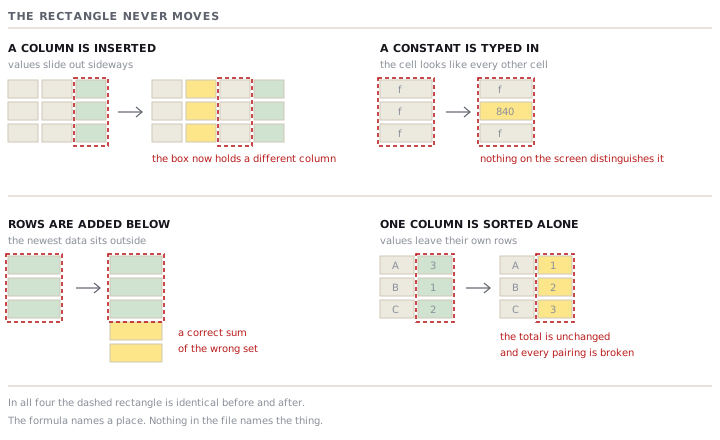
A spreadsheet formula names a place, not a thing. =SUM(D4:D250) is not a statement about committed metres. It is a statement about a rectangle. Every mechanism above changes what is inside the rectangle without changing the sentence that describes it:
- Inserting a column moves values across the rectangle's edge. The sentence is unchanged, and it now describes different values.
- Typing a constant over a formula removes the sentence and leaves its last answer sitting in the cell, looking exactly like a computed one.
- Adding rows below the range puts data outside the rectangle. The sentence is still true about the rectangle and no longer true about the data.
- A lookup that counts across from a corner is measuring a distance. A moved column changes the distance without changing the count.
- Sorting one column alone moves values out of their rows while the rectangle stays exactly where it was.
The filter is the fifth entry, and it belongs in a different category. That matters when you go to fix things. A filter changes nothing about the computation. The total is correct. What changed is what the person can see while reading it. So four of these are defects in what the sheet computes, and one is a defect in what a person reads. No single control covers both.
The one that was worth sixty thousand
The largest incident is worth walking through, because it happened in the most ordinary file in the department.
The fabric-commitment sheet has one row per booking and one total at the top: committed metres, =SUM(D4:D250). In April of the previous year the autumn programme grew and bookings reached row 251. Nothing happened. Nothing could happen. The total went on being a correct sum of rows four to two hundred and fifty.
By the time it was found, one hundred and forty-three days later, thirteen rows sat below the range. Eleven were live bookings and two were cancelled lines. The committed total was understating by 32,600 metres.
For those hundred and forty-three days Tazerdine believed it had 41,900 metres of uncommitted cloth, and sold capacity against it. The shortfall came out when a cut plan failed. Recovery cost 33,800 in air freight on replacement cloth, and 17,500 in discount granted for a nine-day delay: 51,300.
Three controls, priced against these nine
Working out what nine incidents at one factory would have cost under different rules is weak evidence, and Ghita said so when she presented it. It was still the only evidence anybody had.
Name the range instead of drawing it. Convert the sheets that matter into defined tables, so a formula refers to a column by name and the range grows with the data. This turns three of the mechanisms into either correct behaviour or a loud, visible error. Twenty-six of the sixty-one sheets have formulas worth converting, at about twenty-five minutes each: 10.8 hours, USD 123.50. It would have prevented four of the nine incidents, worth 61,385, or 72.4% of the eighteen months' cost.
Run a formula census. One monthly pass over each sheet that matters. For every computed column, list how many of its cells are formulas and how many are constants. A constant sitting among formulas is the only visible symptom the second mechanism ever produces. Six minutes a sheet. It would have prevented 18,638, or 22.0%.
Put a second total beside the first. One total computed over the whole column, whatever is filtered, sitting next to the one that follows the filter. When they disagree, a filter is on and you can see it. It costs one row. It would have prevented 1,590, or 1.9%.
Together those three cover 96.3% of the eighteen months. The rest is the sorted column, 3,120 or 3.7%. No control fixes that one. Only a habit does: sort the table, never a column.
Check yourselfA sheet's totals have been correct for three years. What does that tell you about the four mechanisms in this lesson?Show the answer
Almost nothing, because none of them is a fault that develops over time. Each one is created by a single ordinary edit: inserting a column, pasting a value, adding a row below the last one, sorting to look at something. Before that edit the sheet is genuinely correct. Three clean years measure how long it has been since somebody last restructured the file, not how safe the file is. The question that carries information is a different one: when was this sheet last edited by somebody other than the person who built it, and what did they change?
Prompt · Audit one sheet for the failures it cannot report
On any sheet that more than two people read, before you trust a total on it again.
Act as a spreadsheet reviewer who assumes the file is consistent inside itself, and is looking only for the failures a file cannot report about itself. Here is the sheet: [DESCRIBE ITS COLUMNS AND WHAT EACH ONE MEANS, AND PASTE THE FORMULAS USED IN ANY TOTAL, SUBTOTAL OR LOOKUP, WITH THE ROW AND COLUMN REFERENCES EXACTLY AS THEY ARE WRITTEN]. The data currently runs to [NUMBER] rows. The file was built by [WHO] and has been edited since by [WHO]. Do the following. First, for every formula I gave you, say what place it names, and what would have to happen for that place to stop holding what the formula was written to describe. Second, look specifically for a range whose end is a fixed row number, and tell me how many rows of my current data sit outside it. Third, tell me which of my lookups counts across to a column by position rather than by name, and what a moved column would do to each one. Fourth, tell me what evidence would show that a constant has been typed over a formula in a computed column, and how I would gather it in under ten minutes. Fifth, say which of my totals would read differently to a person with a filter applied, and design the second total that makes a filter visible. Sixth, rank everything you have found by what it would cost me if it were already wrong and had been wrong for three months, and say which one you would check first. Do not rewrite my formulas, and do not suggest a different tool.
AI can make mistakes — check anything you act on.
What you own at the end of this lesson
A cause rather than a list. All four computation failures are the same defect wearing different clothes: a formula that names a place while the data moves underneath it. That is why the repair is one repair, and why it is cheap. And an honest business case, with the figure driven by one large event shown next to the figure without it.
Next: the sheets that survived the audit, and what each of them is asking the system to build.