Lessons · Lesson 2 of 5
From a shortage to a purchase order
The two doors into a purchase request and why they ask for different quantities, what the submit gate checks, and what the bridge to purchase orders builds.
Lesson 2 of 5 · 24 min
Two ways in, and they do not agree
A shortage is not an order. Somebody has to ask for the goods. Somebody has to approve the asking. Only then does a purchase order exist. MerchandiserOS has two separate doors into that first step. They sit on different screens and belong to different roles. They also compute different quantities for the same material, and that is the part that catches people. This lesson walks one shortage through both doors and out the other side.
Every screen, field label and refusal message on this page was read out of the application itself. Where the screen in front of you disagrees with the page, the screen is right and the page is out of date.
Door one: from the order
Open an order, go to its Materials tab, and press Request what this order needs. That builds a Draft purchase request, pre-filled from the style. Every bill line that is not a trim arrives at consumption grossed up for wastage, times the order quantity. The trim requirements arrive too, split out per colour, each with a suggested supplier where one can be found.
Three things about this door.
- It is gross. Nothing is subtracted. It asks for the order's whole need whether or not the material is sitting in your store.
- It covers one order and every material on it, so one request can name several suppliers.
- It needs write access to orders, which the merchandiser and the Owner have and the sourcing officer does not.
It refuses two things outright, and both refusals name what to do instead. A second order-level request on the same order is blocked, because an exact duplicate would double-order the same materials. The message names the existing request and its status. A style with no bill of materials and no trims is blocked as well, rather than producing an empty request, because an empty request with a number on it reads as progress.
Door two: from the buy list
Sourcing at /sourcing, the What to buy tab, has one button at the top. It reads Raise requests for all suppliers when nothing has been raised yet. Once some have, it names a count instead.
That door is net, it is cross-order, and it makes one request per supplier. Each request is anchored to the earliest-need order among the ones it covers, and its note records what it is.
MRP cross-order materials plan for Sahiwal Weaving Mills. [MRP s:4]MRP stands for materials requirement planning, which is the arithmetic lesson one walked through. The tag in square brackets is how the screen knows not to offer the same supplier twice. A supplier that already has an open request, Draft or Submitted, is skipped, and the row shows a tick instead of an invitation.
Nilufar presses it on the morning of 8 Dec 2026 and gets two requests and one refusal.
| Request | Supplier | Lines | What it asks for |
|---|---|---|---|
| PR-1027 | Sahiwal Weaving Mills | 3 | 25,776.8 m of twill and pocketing |
| PR-1028 | Baixiang Trims | 2 | 50,000 pc of buttons, 5,712 m of tape |
| — | Unassigned | 0 | skipped |
The skip is not silent. It is reported with its reason and its fix in the same sentence: no supplier set, assign one on the materials, then re-plan. The woven care label stays unbought until somebody does that.
Each line also carries a note recording which orders it covers, and the minimum-order round-up if there was one.
covers ORD-1178, ORD-1181 · rounded up to MOQ 50000 pcThat note is the only place the cross-order fact is written down in a form a person reads. Hold on to it. Lesson three shows what happens to the order that is not the anchor.
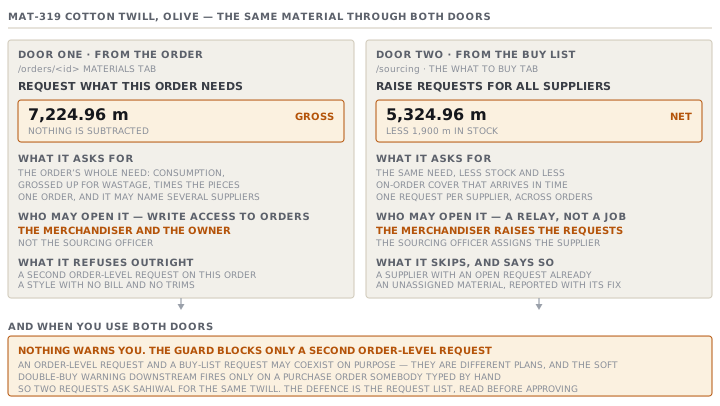
The same material, two answers
Qumtepa has 1,900 metres of olive twill in the store from a cancelled order.
| Door | Arithmetic | Asks for |
|---|---|---|
| The order's Materials tab | consumption × wastage × ordered pieces | 7,224.96 m |
| Sourcing → What to buy | the same, minus stock and timely on-order | 5,324.96 m |
Neither number is a bug. The order-level request answers what does this order consume. The buy list answers what do we still have to acquire. They are different questions and both are worth asking. The danger is asking them one after the other and buying both answers.
The gate on submitting
A request moves Draft → Submitted for approval → Approved to buy. Cancel is available from either of the first two. Approved and Cancelled are both terminal.
Committing means submitting or approving, and both are gated on the same thing: the request must ask for something. The button is greyed with the reason on it, rather than opening a panel that then refuses.
| The request | The reason shown |
|---|---|
| Has no lines | This request has no items yet — add what to buy before submitting it |
| Every line at zero | Every item on this request has a quantity of 0 — fill in how much to buy |
| Some lines at zero | Names how many, and the first few by description, and says fill or remove |
Approve re-runs the same check rather than trusting the submit. That is not redundant. A submitted request's lines stay editable, so a quantity can be zeroed between the two clicks, and the attesting act has to check its own preconditions.
Cancel is never gated. Cancelling an empty request is exactly the escape that has to stay open.
The confirmation panel states what is being committed before you commit it.
Approves buying 3 items — 25,776.8 m, and stamps your name + the date.The bridge to purchase orders
Once approved, a second button appears: Create purchase order(s). It groups the request's un-ordered lines by their suggested supplier and creates one multi-line Draft purchase order per supplier.
What it builds is worth spelling out, because several of its choices come back as puzzles later.
- Every line goes onto the purchase order, whether it links to a material or is free text.
- Every price starts at zero. A request carries no money, so sourcing prices the Draft before issuing it.
- The required-by date is the earliest required-by among the grouped lines.
- The header takes a copy of the first line that has a material, with its quantity and its unit.
- The note reads
Created from PR-1027. The purchase order also stores the request's id, which matters later. - Each request line is stamped with the purchase-order line it became, so pressing the button twice never orders the same line twice.
Lines with no supplier, and lines at a quantity of zero, are not converted. They stay pending and are counted back to you. So a line that was missing a supplier can be given one and converted afterwards, rather than being stranded.
PR-1027 produces PO-1051 with three lines. PR-1028 produces PO-1052 with two.
The price that has to be filled in
Jahongir opens PO-1051 and finds three lines at zero. He prices them.
| Line | Material | Quantity | Unit price | Line value |
|---|---|---|---|---|
| 1 | MAT-318 Cotton twill, sand | 16,858.24 m | 2.85 | 48,045.98 |
| 2 | MAT-319 Cotton twill, olive | 5,324.96 m | 2.85 | 15,176.14 |
| 3 | MAT-327 Pocketing | 3,593.6 m | 1.15 | 4,132.64 |
A purchase order with any line still at zero cannot be issued at all. That refusal is hard. It names how many lines and the first few materials, and no override applies to it. A purchase order commits a quantity and a price, and no authority fills in a missing number. The soft gates that sit beside it on the same button, and the one override they share, are the subject of course 25.2 and are not repeated here.
The threshold, and what it is measured in
Issuing a purchase order can require an approval. The flow is called Issue purchase order. It is on by default, its approver is the Owner, and its threshold is 5,000.
The amount compared against that threshold is what the purchase order actually commits: every line's quantity times that line's own price, added up. PO-1051 commits 67,354.76, so pressing Issue does not issue it. It asks for Bekzod's approval and writes a line into the activity log saying so. PO-1052 commits 4,085.28, so it issues with no friction at all.
Which doors your factory has at all
Not every factory runs all four steps here. The Factory profile carries a switch per step — purchase requests, purchase orders, receiving, material issue — and three presets that set them together.
| Preset | Requests | Purchase orders | Receiving and issue |
|---|---|---|---|
| The app runs everything | yes | yes | yes |
| The app handles purchasing | yes | yes | in your ERP |
| The app raises requests only | yes | in your ERP | in your ERP |
The set is kept coherent rather than free. Receiving and material issue move together, because either the app runs the store or it does not. And receiving needs purchase orders switched on, because you receive against one. On a requests-only factory the Create purchase order(s) button is not offered, the approved request is the handoff, and the banner on the request says so.
Two rules to take away
Pick one door per order and stay in it. The two doors ask different questions, and the app will happily let you buy both answers. Decide as a team which one your factory books from, and use the other only to read.
Approving is not ordering. An approved request has committed nobody to anything. The commitment happens when a priced purchase order is issued. That is a different person on a different screen, and lesson three is about reading that screen correctly.
Check yourselfYou raised a request from the buy list on Monday and your colleague raised one from the order's Materials tab on Tuesday. Both are approved and both became purchase orders. Why did nothing warn either of you?Show the answer
Because the only duplicate guard on the request side blocks a second ORDER-LEVEL request, and one of yours was a buy-list request, which is deliberately allowed to sit beside an order-level one. The soft double-buy warning on the purchase order would have caught a hand-typed purchase order against an order that already has an open request. Both of yours were created from requests, and a request-born purchase order is the planned path, so the warning never fires. Nothing in the app compares two approved requests. The place to catch it is the request list, before the second approval.
Prompt · Check whether I have asked for the same thing twice
Before approving any purchase request, and at the end of any week in which more than one person raised one.
Help me find duplicate buying across purchase requests before anybody approves one.

I will paste, or describe: every open and recently approved purchase request, with its code, the order it is anchored to, whether it was raised from an order or from a cross-order materials plan, and each line's material, quantity, unit, required-by date and suggested supplier. I will also paste the purchase orders already raised against the same orders.

First, group every line by MATERIAL rather than by request. For each material that appears on more than one request, lay out which requests ask for it, how much each asks for, and which orders each request says it covers. Tell me the total that would be bought if every one of them were approved.

Second, for each of those materials, work out what is actually needed. Take the orders involved, their quantities and the consumption, subtract stock on hand and any quantity already on an open purchase order that lands in time, and state the honest requirement. Then tell me the difference between that and the total above, in the material's own unit and in money.

Third, tell me which single request to keep and what to do with the others, and say what evidence you used. Where two requests overlap only partly, say which lines to remove rather than telling me to cancel a whole request.

Three rules. Do not assume a request raised from a cross-order plan and a request raised from one order are duplicates without checking the quantities. Do not treat a cancelled request as live. And if you cannot tell whether two lines are the same material because one is free text and the other is a material code, say so and ask, rather than matching them on the words.
AI can make mistakes — check anything you act on.