Lessons · Lesson 3 of 5
The header is only line one
How a multi-line purchase order is stored, which numbers on its screens are the whole order and which are only its first line, and the order it is not attached to.
Lesson 3 of 5 · 24 min
One record, two shapes
A purchase order in this app comes in two shapes, and they look identical on screen. One is a single material, typed by hand. The other carries several materials on numbered lines. That second shape is what the bridge from a request always builds. It keeps a copy of its first line in the record's own columns, and several screens read that copy instead of the lines. This lesson is about telling, at a glance, which number you are looking at.
Every field, label and message on this page was read out of the application itself. Where the screen in front of you disagrees with the page, the screen is right and the page is out of date.
What the bridge actually stored
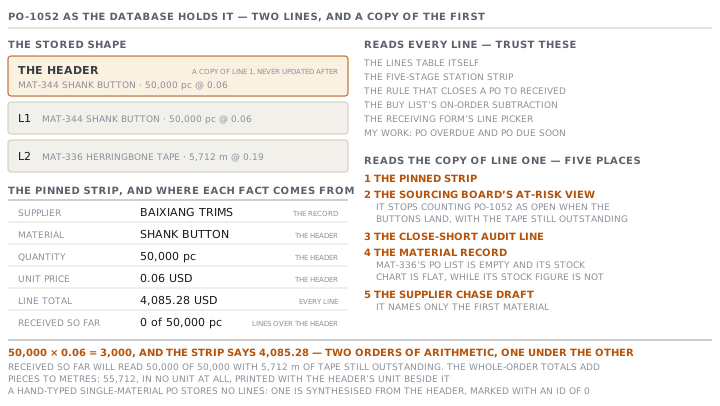
PO-1052 came out of PR-1028 with two lines. Its stored shape is this.
| Where | Material | Quantity | Unit | Unit price |
|---|---|---|---|---|
| The record's own columns | MAT-344 Shank button | 50,000 | pc | 0.06 |
| Line 1 | MAT-344 Shank button | 50,000 | pc | 0.06 |
| Line 2 | MAT-336 Herringbone tape | 5,712 | m | 0.19 |
The first row is not a third line. It is the header, and it is a copy of the first line that has a material on it, taken when the purchase order was created. Nothing keeps it in step with the lines afterwards.
A hand-typed single-material purchase order stores no lines at all. When something asks for its lines, the app makes one up from the header on the spot and hands that back, so every reader can treat both shapes the same way. That made-up line is marked with an id of zero, which is how the code tells a real line from an invented one.
The strip that reads only line one
Open PO-1052 and the pinned panel at the top shows six facts. It never scrolls, which is the point of it. The record's identity stays in front of you.
| Fact | Shows | Read from |
|---|---|---|
| Supplier | Baixiang Trims | the record |
| Material | Shank button | the header |
| Quantity | 50,000 pc | the header |
| Unit price | 0.06 USD | the header |
| Line total | 4,085.28 USD | every line |
| Received so far | 0 of 50,000 pc | every line, over the header |
Read those three money-and-quantity facts together and they do not reconcile. Fifty thousand at six cents is three thousand dollars, and the strip says the line total is 4,085.28. Neither figure is wrong. The line total is the real commitment, summed across both lines at each line's own price. The quantity and unit price above it are a copy of line one. They are two different sums, sitting one under the other with nothing to say so.
Received so far is the sharpest of the three. Its top number counts every receipt against the whole purchase order, across every line. Its bottom number is the header's quantity. So when the buttons arrive it reads fifty thousand of fifty thousand, and it reads that while 5,712 metres of tape are still on the water.
What to read instead
Scroll past the strip and the Lines section is line-by-line and correct. Each row carries its own quantity, its own unit, its own price and its own Received figure, and the received figure there is that line's receipts and nothing else. On a multi-line purchase order the Receiving section above it does not even try to give you a total. It says the purchase order has several materials, points you at the Received column in the Lines table, and stops.
That is the habit. On a multi-line purchase order, the Lines table is the record and the strip is a caption.
Several other things in the app are already line-aware. It is worth knowing which, so you can trust them.
- The station strip across the top of the Overview, which lights the five stages, measures against the real ordered total.
- The rule that closes a purchase order to Received requires every line to have arrived, not the total to have been reached.
- The buy list's on-order subtraction is per line, per material.
- The receiving form makes you pick which line you are receiving, and shows each line's own outstanding quantity next to it.
- The exceptions on My Work — purchase order overdue, purchase order due soon — test every line before they decide the goods are in.
Where the copy still shows
Five places still read the header. Each one is a specific reading habit rather than a general warning.
One. The pinned strip, as above.
Two. The Sourcing board's At-risk view. It treats each purchase order as open until its total received reaches the header's quantity. So PO-1052 stops counting as open the moment the buttons land, with the tape still outstanding. On ORD-1178 there are two other purchase orders keeping the row amber, so nothing looks odd. On an order whose only purchase order is a multi-line one, the row turns green and the reason reads all ordered materials received. My Work, reading the same purchase order line by line, still calls it overdue. When those two disagree, My Work is the one that counted properly.
Three. The close-short audit line. Lesson five closes PO-1051 short. The line it writes into the activity log reads received 25,440 of 16,858.24 m. That is a shortfall note in which the received figure is larger than the ordered one. The ordered figure is line one. The received figure is all three lines added up regardless of unit.
Four. The material record. Open MAT-336 Herringbone tape, which is line two of PO-1052, and its Stock tab shows three things about the same material that do not agree. Stock on hand counts the tape correctly, because stock traces each receipt back to its line's material. The list of purchase orders for this material is empty, because that list matches on the header material only. The stock-movement chart beside it is flat for the same reason, while the number above it is not zero. A material that is never anybody's line one looks, on its own page, as though it has never been bought.
Five. The supplier chase. The purple Draft supplier chase panel builds its facts from the header, so on a multi-line purchase order it names only the first material. Read the draft before you send it, which you have to do anyway. Nothing in this app sends a message by itself.
The order it is not attached to
There is one more consequence of the bridge, and it has nothing to do with lines.
PR-1027 was raised for Sahiwal across both live orders, and it was anchored to the earlier of them. So PO-1051 is attached to ORD-1178 and to nothing else. ORD-1181's twill is on that purchase order, physically and commercially, and ORD-1181 cannot see it.
| Screen | ORD-1178 | ORD-1181 |
|---|---|---|
| Purchase orders on the order | PO-1051, PO-1052, PO-1046 | none |
| Sourcing At-risk verdict | judged on its purchase orders | No POs raised yet |
| Recording production | allowed once something is received | refused, no purchase orders raised |
ORD-1181 will sit on the At-risk board saying No POs raised yet — confirm whether materials are needed, and it will say that with its fabric in the store. Anyone who tries to record production against it is told there are no purchase orders for this order yet, and is sent to raise a purchase request. That would buy the twill a second time.
The practical answer is not to stop consolidating. Consolidating is right, and it is what earns the price break. The answer is to know that the second order's materials picture is wrong, and to say so where somebody will read it. Put a note on ORD-1181 naming PO-1051, before its planner meets a refusal nobody can explain.
Two rules to take away
Count the lines before you read a number. If a purchase order has a Lines table, every whole-order figure above it is either a copy of line one or a sum across units that cannot be added. If it has no Lines table, all of them are sound.
Follow the anchor. When a request covers more than one order, write down where the goods actually landed. The app records it once, in a note, in words, and nothing reads that note but you.
Check yourselfA three-line purchase order for one supplier has had its first line delivered in full. The Sourcing board's At-risk view shows the order green with all ordered materials received, and My Work is showing the same purchase order as overdue. Which is right?Show the answer
My Work. The overdue test walks every line of the purchase order and only calls it fully received when each line has arrived. The At-risk board measures the total received against the purchase order's header quantity, which on a multi-line purchase order is a copy of line one. One delivery of that size satisfies it, and the purchase order stops counting as open. Two lines are still outstanding. Read the Lines table on the purchase order, and treat the green as a bug you can see through, not as evidence.
Prompt · Read this multi-line purchase order back to me correctly
Whenever a purchase order carries more than one material, and before you quote any total off its top strip.
Help me read a multi-line purchase order without being misled by its whole-order figures.

I will paste, or describe: the purchase order's header quantity, unit and unit price, then every line with its material, quantity, unit, price and quantity received so far, then the receipts booked against it and the order it is attached to.

First, tell me which of the header figures are a copy of line one and which are worked out from every line. Compute the real ordered quantity per unit, so metres and pieces are reported separately and never added. Compute the real committed value as the sum over lines of quantity times that line's own price. Show both, and show what the header alone would have said.

Second, produce a completion table: for each line, ordered, received, outstanding, and whether that line is complete. Then answer one question in one sentence — is this purchase order fully delivered — and answer it only from the per-line rows, never from a total.

Third, tell me what a reader looking only at the top of the screen would believe, and where that belief would be wrong. Be specific about which figure misleads and by how much.

Fourth, if the purchase order was created from a request covering more than one order, tell me which orders those were and warn me that only the anchor order can see this purchase order. Suggest the exact wording of a note to leave on the other orders.

Two rules. Never add quantities in different units, even to give me a rough total: say the units differ and give me one figure per unit. And never describe a line as received because of a whole-order number.
AI can make mistakes — check anything you act on.