Lessons · Lesson 5 of 5
What one receipt writes
The two refusals a goods receipt has to get past, the five records it writes at once, and the gates it opens for the cutting room.
Lesson 5 of 5 · 20 min
The smallest form with the widest reach
Booking goods in looks like the least interesting screen in the app. It is a short form with a quantity and a date on it. It is also where a plan stops being a plan. The numbers it writes are read by the buy list and by the cutting room. They are read by the supplier's record and by every dashboard that mentions stock. This lesson is about what that form refuses, what it writes, and what it unlocks.
Every field, refusal and setting on this page was read out of the application itself. Where the screen in front of you disagrees with the page, the screen is right and the page is out of date.
The form
Receiving (GRN) sits at /receiving, and Receive goods opens the form. GRN stands for goods received note, which is the paper this form replaces. Its lead line is one sentence: record raw material arriving against a purchase order.
| Field | Required | What it is for |
|---|---|---|
| Against PO | yes | only Issued, Acknowledged and Dispatched purchase orders are offered |
| Which line (material) | yes on a multi-line PO | attributes the goods to the right material |
| Received quantity | yes | what physically arrived |
| Received date | yes | the day it arrived, defaulted to today |
| Dye-lot | no | the dyehouse lot of these goods |
| Shade band | no | the QC shade grade |
| Notes | no | anything else |
The purchase-order dropdown does the reading for you. Each option names the purchase order, then the real ordered total and how much has already come in. On a multi-line purchase order it names the line count instead of a material, because the header material is only the first of several. Choose one and the line picker appears, and each line shows its own outstanding quantity beside it.
That line choice is not cosmetic. It is what makes the receipt count towards the right material's stock, the right line's completion and the right row of the buy list.
Two refusals before anything is written
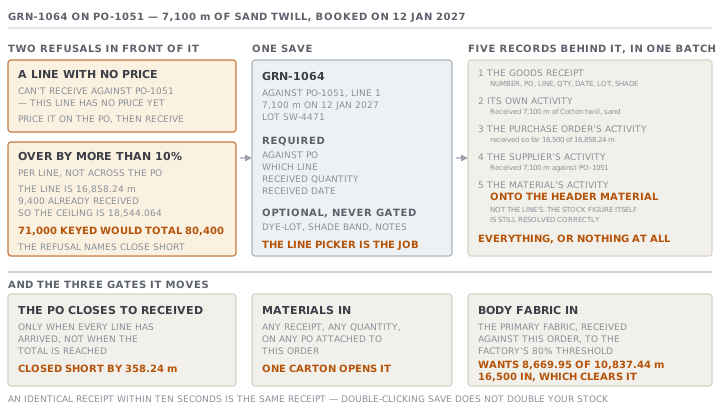
A line with no price cannot receive. Try it and the app refuses by name.
Can't receive against PO-1051 — this line has no price yet.
Price it on the purchase order first, then receive.
The reason is arithmetic rather than paperwork. A receipt against a zero-priced line values the stock at nothing. Everything downstream that reads a price — the shortfall figure, the closing arithmetic — then reads a price nobody ever agreed. The way out is named in the refusal, and it takes a minute.
A line may be over-received by a tenth, and no more. The over-receipt tolerance is 10%, applied per line rather than across the purchase order, so one line running over cannot hide behind another running under.
Feruza books the second twill delivery on 12 Jan 2027 and keys 71,000 where she meant 7,100. Line one is for 16,858.24 metres, so the most it may ever total is 18,544.064. And 9,400 metres are already in. The app refuses and shows its whole working.
PO-1051 is for 16,858.24 m; 9,400 already received. Receiving 71,000
would total 80,400 — more than 10% over. Check the quantity, or use
"Close short" for a shortfall.
Two details in that message repay a second look. The quantity it quotes as what the purchase order is for is the line's quantity, printed under the purchase order's number. That is right for the check, and it reads oddly the first time. And the refusal names the escape hatch itself, because a genuine mismatch is nearly always a shortfall rather than a surplus.
There is also a quiet third protection. An identical receipt — same purchase order, same quantity, same date — booked within ten seconds of the last one is treated as the same receipt rather than a second one. Double-clicking Save does not double your stock.
What one Save writes
Feruza corrects the figure and saves. One receipt writes five records, in a single all-or-nothing batch. Either everything below happens or nothing does.
| Record | What it says |
|---|---|
| The goods receipt | its own number, the purchase order, the line, the quantity, the date, the lot and shade |
| Its own activity | Received 7,100 m of Cotton twill, sand · lot SW-4471 |
| The purchase order's activity | Received 7,100 m (GRN-1064) — received so far 16,500 of 16,858.24 m |
| The supplier's activity | Received 7,100 m of Cotton twill, sand against PO-1051 |
| The material's activity | Received 7,100 m into stock (GRN-1064, PO-1051) |
The batch matters more than it sounds. Before it, a crash between the receipt and the activity rows could leave a receipt with no number that still counted in the stock sums the cutting gate reads. Now the receipt, its number and every log line arrive together or not at all.
Closing, and closing short
A purchase order closes itself to Received only when every line has arrived. Not when the total is reached. Every line. A three-line purchase order whose first line lands in full is still open, still receivable, and still counted as on order by the buy list.
There is one honest exception. If any receipt on the purchase order was booked without a line — a legacy receipt, or one written directly — the app cannot know which line it belonged to, and it refuses to guess. It falls back to comparing the total received against the real ordered total, which is the best test available once the line is gone.
Sahiwal's twill lands 358.24 metres short on line one, and Jahongir decides it is not worth chasing. Close short accepts the shortfall, moves the purchase order to Received, and writes a line into the activity log.
Closed short — accepted shortfall (received 25,440 of 16,858.24 m)That line is the header-copy problem of lesson three, in its most awkward dress. 25,440 is every receipt on all three lines added together, in three lines' worth of metres. 16,858.24 is line one alone. A shortfall note in which the first number is bigger than the second is not a contradiction. It is two different quantities printed side by side. On a single-material purchase order the same line reads exactly as it should.
The short-delivery and over-delivery notices on the Overview only appear on a single-material purchase order. On a multi-line one there is no whole-order figure worth showing, so the app shows none and points at the Lines table instead.
Lots, shades, and what they do
Dye-lot and shade band are captured, displayed and never gated. The app will not stop you receiving a lot, issuing across two lots, or leaving both blank.
What you get for filling them in is a Stock by dye-lot panel on the material. The panel says plainly what it is: available per lot from receipts against issues, advisory only, with the material's total on hand named as the real figure planning uses. Its own note carries the rule that matters on the floor. It is lot-level and not roll-level, so keep each cutting lay to a single lot.
Treat the lot field as the cheapest shade-continuity insurance in the building. It costs four keystrokes at the gate, and it cannot be recovered afterwards.
What the receipt unlocks
Stock on hand for a material is every receipt of it minus every issue of it. It is traced per line, and counted across the whole factory rather than per order. As the twill lands, three things move.
- The material's stock rises, and the buy list's In stock column with it.
- The purchase order's outstanding falls, and with it the buy list's On order column.
- Production against the order becomes possible, in two steps rather than one.
That third one has a shape worth learning, because it is where a materials problem turns into a production argument.
| Order | Gate | What it needs |
|---|---|---|
| first | materials in | any receipt, of any quantity, on any purchase order attached to this order |
| second | body fabric in | the order's primary fabric received to at least the factory's threshold of its need |
The first gate is deliberately coarse, and it is worth knowing how coarse. One receipt of anything opens it. A carton of care labels booked against the order satisfies materials have been received, which is why the second gate exists at all.
The second gate picks the fabric line on the style's bill with the largest need for this order. It requires that material to be received against this order to at least the factory's cut-fabric threshold. That threshold defaults to 80% and is a Factory profile setting. For ORD-1178 the primary fabric is the sand twill, its need is 10,837.44 metres, and the gate wants 8,669.95 in. The 16,500 metres Sahiwal delivered clear it comfortably.
The gate refuses to guess when it cannot compute. No style, no fabric line on the bill, a fabric line with no material linked, or a need of zero, and it steps aside and lets the first gate's answer stand. That is deliberate. A factory that is physically cutting fabric should never be dead-ended by a gap in its bill of materials.
Two rules to take away
The line picker is the whole job. Everything a receipt is good for — the right stock, the right closing, the right buy list — hangs on choosing the right line. It is the one field on the form that nothing downstream can repair.
Close short is a decision, so write down why. It moves the purchase order to Received, ends the chasing, and leaves a note whose numbers are hard to read. Put the reason in the notes beside it, in words, for whoever costs this order.
Check yourselfYou receive a carton of care labels against an order whose fabric has not left the mill. The planner immediately records production against it and it is accepted. Which gate let that through, and what should have stopped it?Show the answer
The first gate let it through, and it did exactly what it was written to do. It asks whether anything at all has been received against the order, and a carton of labels is something. The gate meant to stop it is the second, which requires the order's primary body fabric to be in to at least the factory's cut-fabric threshold. It did not fire, and the reason will be something it steps aside for. No style linked to the order, no fabric line on the bill, a fabric line with no material record behind it, or no consumption set. Fix the bill of materials and the gate starts working, because the gate refuses to invent a blocker out of missing data.
Prompt · Reconcile what arrived against what was ordered
At the end of any purchase order you are about to close, and before anybody costs the order it belongs to.
Help me reconcile a purchase order's receipts against what was ordered, line by line.

I will paste, or describe: each line of the purchase order with its material, ordered quantity, unit and price, then every goods receipt booked against it with its number, date, quantity, the line it was attributed to, and its dye lot and shade band where recorded.

First, build a line-by-line reconciliation: ordered, received, difference, and the difference as a percentage of the line. Flag any line received over its ordered quantity and say by how much, and any line short and say by how much. Report each in that line's own unit and never combine units.

Second, list any receipt that was not attributed to a line, and tell me plainly that its material cannot be known from the record. Do not guess which line it belongs to.

Third, value the shortfall and the over-delivery at each line's own price, and give me one money figure for each. Then tell me whether the shortfall is enough to stop the order being cut, given the consumption and the order quantity I will give you.

Fourth, look at the dye lots. Tell me how many lots one material arrived in, how much is in each, and whether any lot is too small to cover a full cutting lay. Say which lots must not be mixed in one lay.

Three rules. Never add quantities across lines that use different units. Never describe a purchase order as complete because its total matches — check every line. And if a shortfall is being accepted, write me the one sentence that should go in the note, naming the quantity, the reason and the person who decided.
AI can make mistakes — check anything you act on.