Lessons · Lesson 5 of 5
Qualified is something a person says
What a supplier's standing gates and how softly, why a certificate never changes it, and what arrives on your list when you import a supplier book in one afternoon.
Lesson 5 of 5 · 18 min
The word on the record
A supplier record can hold a certificate, a scanned proof and an expiry date. None of that decides whether you may buy from them. A person decides, and the app records who. This lesson is about what that decision gates, how softly, and what a bulk import does to it.
Every supplier has a Qualification tab, and at the top of it a standing. There are five, and the wording on each is the wording the app uses.
| Standing | How it shows | What it means |
|---|---|---|
| Pending — not yet assessed | grey | Nobody has looked. The default for a new record |
| Provisional — conditionally approved | amber | Approved with conditions attached |
| Qualified | green | Assessed and accepted |
| Suspended | red | A compliance issue is open |
| Exempt — buyer-nominated | green | The buyer owns this supplier's compliance, not you |
Two of the five are honest in a way worth naming. Pending is what an unset value reads as, so a record nobody has assessed can never look assessed. Exempt is not an excuse. The tab's own note says the buyer owns that compliance and the factory still records the evidence.
Every screen, field and rule named on this page was read out of the application itself. Where the screen in front of you disagrees with the page, the screen is right and the page is out of date.
The gate is soft, and that is a decision
Take a purchase order to Issue on a supplier who is not qualified, and the app does not refuse. It stops, tells you which supplier and what is wrong with its standing, and offers to issue anyway.
| Standing | Issue behaves as |
|---|---|
| Qualified | issues, no interruption |
| Exempt — buyer-nominated | issues, no interruption |
| Provisional — conditionally approved | warns, override available |
| Pending — not yet assessed | warns, override available |
| Suspended | warns strongly, override available |
Suspended warns harder than pending, and it still does not block. The reasoning is written into the code: over-gating procurement kills adoption. A factory that cannot buy urgently on a Friday afternoon stops using the system, and a system nobody uses records nothing at all.
The override is not free. Taking it writes a line into the purchase order's activity log that begins with the word override and then names the gap. That line does not go away, and it is what an auditor reads.
Before the click, the purchase order screen shows the same wording as a banner, with a link straight to the supplier's Qualification tab. You are told before you try, not after, which is the pattern the whole application follows.
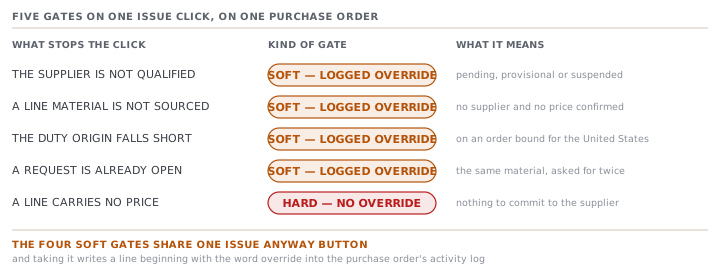
Three other soft gates sit alongside this one on the same button, and all four share one override.
- A line material that sourcing has not yet set up with a supplier and a price.
- A duty-origin shortfall on an order bound for the United States.
- A direct buy that duplicates a purchase request already open for the same material.
Any of them can be open at once, and the refusal names every one that is.
The one refusal that is not soft
There is exactly one thing on that button that cannot be overridden, and it is not a judgement at all.
A purchase order with a line carrying no price is refused outright. The message names how many lines and the first few materials. The code beside it says why in one phrase: data-completeness, not a judgment gate — the Issue anyway override never applies here.
The distinction is the useful part of this lesson. Compliance is a judgement, and a judgement can be overruled by somebody who signs for it. A missing price is a hole in the document, and no amount of authority fills it in. A purchase order commits a quantity and a price to a supplier. Without the price there is nothing to commit.
A certificate proves nothing on its own
The Qualification tab also holds certifications, and this is where people expect an automatic answer and do not get one.
Adding one asks for a Type and nothing else. The type comes from a dropdown fed by the certification-type list, which is one of the thirty vocabularies from lesson three that nobody may add to inline. A compliance scheme is not a value you invent in a form. Certificate number, issuer, valid-from, valid-to, notes and a proof file are all optional.
The expiry date is the field with arithmetic behind it, and the arithmetic refuses to be reassuring.
| Valid to | Reads as | Colour |
|---|---|---|
| not recorded | No expiry recorded | grey |
| 2027-05-11 | Expired | red |
| 2027-05-12 | Expiring soon | amber |
| 2027-07-11 | Expiring soon | amber |
| 2027-07-12 | Valid | green |
The window is sixty days, so anything falling on or before 2027-07-11 is expiring. And a certificate with no expiry recorded is never called valid. It gets its own grey state, because not knowing when something ends is not the same as it not ending.
Now the part that surprises people. Adding a certificate does not change the standing. Not one of them does. Marking a certificate verified is a separate manual toggle, and it does not change the standing either. The standing is a dropdown a human chooses, and choosing it is the attestation. Every other field on the tab is evidence for that choice, not a substitute for it.
Kavi imports the old supplier book
Riche Terre kept its suppliers in a spreadsheet for eleven years. Settings → Import at /settings/import takes a CSV or a workbook and creates buyers, materials or suppliers from it. It is Owner-only, so Yashvin runs it while Kavi reads over his shoulder.
The wizard maps columns, then runs a dry run that writes nothing. Every row is sorted into one of three outcomes, and the same engine produces the preview and the real import, so the numbers cannot disagree.
| Outcome | Rows | Reason |
|---|---|---|
| Rejected | 9 | No supplier name in the row |
| Skipped | 12 | A supplier of that name already exists |
| Skipped | 4 | The same name appears twice in the file |
| Created | 122 | |
| Total | 147 |
Duplicates are matched on the name, ignoring case, both against the existing library and within the file itself. Nothing is overwritten, ever. A duplicate is skipped, not merged.
There is a second thing the import does not do, and this one is correct. None of the one hundred and twenty-two arrives qualified. Every one is Pending — not yet assessed, because nobody has assessed them, and a bulk paste is not an assessment.
The backlog, and what to do with it
One hundred and twenty-two pending suppliers means the soft gate opens on the first purchase order raised on any of them. That is either a nuisance or the point, depending on how you use the next hour.
Kavi sorts the library by how much Riche Terre actually spends. Fourteen suppliers carry almost all of it. He works those fourteen: reads the file, records the certificates, sets the standing. The remaining one hundred and eight stay pending, and that is an honest answer rather than a backlog he is pretending not to have.
The certificates he loads for the fourteen tell their own story on the review date.
| Reads as | Certificates |
|---|---|
| No expiry recorded | 8 |
| Expired | 2 |
| Expiring soon | 5 |
| Valid | 16 |
| Total | 31 |
Eight of thirty-one have no expiry date on the paper Riche Terre holds. The app will not call them valid, and it is right not to. Those eight are eight emails to write, and the grey chip is the only thing in the building that was going to remind anybody.
Two are already expired, on suppliers Kavi was about to raise purchase orders on. Neither had shown up anywhere before, because nobody had typed the dates in. Recording evidence is not paperwork. It is the only way the arithmetic gets to run.
What the word means here
Read the whole tab together and the design is consistent.
The app will hold your evidence, date it, warn you before it lapses, and refuse to call an undated certificate valid. It will tell you a supplier's standing before you commit to them, name it in plain words, and link you to the place it can be fixed. What it will not do is decide. Nothing in this application turns a folder of certificates into the word Qualified.
Somebody at Riche Terre has to read the file and say so, and the record keeps their name against the day it matters. That is not a limitation of the software. It is what the word means.
Check yourselfA supplier has four verified certificates, all valid for another two years, and its standing still reads Pending. Is that a bug?Show the answer
No. Certificates are evidence and the standing is an attestation, and the app deliberately never turns one into the other. Adding a certificate changes nothing about the standing, and neither does ticking it verified. Somebody with access to Suppliers has to read the evidence and set the standing, and the record then carries that decision. Until they do, a purchase order on this supplier will warn and offer a logged override, which is the app telling you the assessment has not happened rather than guessing that it went well.
Prompt · Turn a pile of imported suppliers into a defensible standing
Straight after a bulk import, and before the first purchase order is raised on any of them.
Help me work through a supplier library I have just imported, and end with a standing on each one that I could defend to a buyer's auditor.

I will give you: the import result, meaning how many rows were created, skipped as already existing, skipped as duplicated in the file, and rejected with a reason; my spend by supplier for last season; and, for the suppliers I actually buy from, the certificates I hold with their issuer, number and expiry date.

First check the import itself. Ask me whether the country and category columns in my source file used values the system recognises, and warn me that unrecognised values may have been silently substituted with a default rather than rejected. Tell me to sort the library by category and by country and see whether the answer is plausible before doing anything else.

Then triage by spend, not alphabetically. Rank the suppliers by what I actually spent, and find the smallest set that covers most of it. That set is this week's work. Tell me plainly that the rest stay unassessed, and that unassessed is an honest answer rather than a backlog to hide.

For each supplier in the working set, go through the certificates. Sort them into expired, expiring within sixty days, valid, and no expiry recorded. Do not describe an undated certificate as valid under any circumstances — treat it as unknown and give me the email to send. For each expired one, tell me whether I am about to buy from that supplier.

Then, and only then, help me set a standing. Ask what evidence supports it, who is deciding, and what conditions attach if it is conditional. Remind me that no number of certificates sets the standing by itself, and that a person's decision is what the record is actually storing.

Two rules. Never infer a standing from the evidence — propose one and make me confirm it. And where I choose to buy from a supplier that is not qualified, tell me to record the reason at the moment I do it, because that sentence is the only thing an auditor will have to read.
AI can make mistakes — check anything you act on.