Lessons · Lesson 3 of 5
Two doors into a list
Which dropdown lists you may add to from inside a form, which ones only an Owner may touch, why the locked ones are locked, and what a value costs once records point at it.
Lesson 3 of 5 · 20 min
The lists behind the dropdowns
Almost every dropdown in this application is a list somebody can edit. A few of those lists you may add to yourself, from inside the form you are already filling in. Most of them you may not, and the refusal is on purpose. This lesson is about which is which, and what a change costs later.
There are forty-nine such lists. They live on one screen, Settings → Lists and codes at /settings/reference-data, which describes itself accurately: the editable lists behind the app's dropdowns. Add, rename, or archive values (archive keeps existing records valid — nothing is deleted). Owner only.
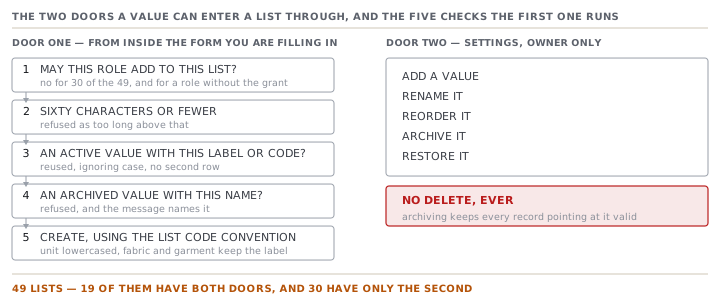
Nineteen of the forty-nine can also be added to from inside a form, by somebody who is not the Owner. The other thirty cannot be, by anybody, including the Owner. Nineteen and thirty make forty-nine, and the split is not arbitrary.
Every screen, field and rule named on this page was read out of the application itself. Where the screen in front of you disagrees with the page, the screen is right and the page is out of date.
The door inside the form
Open a material's unit dropdown, or a style's fabric type, and the last option in the list is + Add a new value…. Choose it and a small box appears. Type, save, and the value is created and selected in one move.
That option is not always there. The page decides whether to offer it by asking one question about the person and the list together: may this role create a value of this type? The answer is a single function call, and that one call is doing two jobs at once.
- It is the allowlist. The map it reads holds only the addable list types. Ask it about a type that is not in the map and the answer is no, whoever is asking.
- It is the role gate. Each addable type is keyed to the module that owns it. Fabric type and garment type belong to Styles, so somebody with write access to Styles may add one. Unit belongs to Materials.
Eighteen of the nineteen addable lists are owned by Styles. They are the tech pack's own vocabulary, and they group into four families.
- Cloth and shape: fabric type, garment type, fabric construction.
- Stitching: needle type, thread type, thread ticket, thread colour rule, back tack, bartack.
- Finishing: wash and finish care, dyeing method, colour fastness grade, wash test standard, wash cycle, hand feel, fold type.
- Labelling: care instruction, care language.
The nineteenth is unit, owned by Materials.
A floor supervisor has write access to neither, so the option never appears for them. If they somehow called the action anyway it would refuse, in words: You don't have access to add a value here — ask the Owner to add it in Settings → Reference data. The screen and the server ask the same question, which is the pattern to expect everywhere in this app.
What the inline door does before it creates anything
It is a find-or-create, and the finding is more thorough than it looks.
- The text is trimmed and its runs of spaces collapsed to one. Longer than sixty characters and it is refused as too long.
- It looks for an active value in that list whose label or code matches, ignoring case. A hit is reused and returned. No second row is ever inserted.
- Only then does it look for an archived match. If it finds one it refuses, and names it: "Ripstop" was retired by an admin. Ask the Owner to restore it in Settings → Reference data.
- If nothing matched, it creates. The code it stores follows the list's own convention. For a unit, the label lowercased with anything that is not a letter or digit stripped out, capped at sixteen characters. For a fabric or garment type, the label itself is the code, Title case and all, because that is how the seeded values are written.
Step three is the interesting one. Reviving an archived value is a governance decision, and a form is not where governance decisions get made. So the door that lets you add is deliberately not the door that lets you undo somebody's retirement.
The door in Settings
The Owner's door does the three things the inline door does not: rename, reorder, and retire.
There is no delete. The row's only lifecycle action is Archive, which flips a flag and hides the value from every dropdown, and Restore, which puts it back. The screen says why in its own words: archiving keeps existing records valid, and nothing is deleted.
That is the right shape, because a reference value is not a label on a menu. It is a value stored on records, and the next lesson is about what happens to those records when the value under them changes.
A season of typing, at Riche Terre
Over one season, the people building tech packs at Riche Terre chose + Add a new value… on the fabric type list thirty-one times. Here is what the four checks did with those thirty-one attempts.
| Outcome | Attempts | What the person saw |
|---|---|---|
| Reused an active value, matched on label or code | 19 | The value selected, no new row |
| Refused, an archived value has that name | 2 | The name, and who to ask |
| Created a new value | 10 | The value selected, one new row |
| Total | 31 |
The list grew by ten, not thirty-one. People typed a name a little over three times for every genuinely new fabric type they introduced, and the case-insensitive match on label or code absorbed the difference silently. Poplin, poplin and POPLIN are one value here, and nobody had to be told off about it.
That ratio is worth measuring on your own workspace. If it is close to one, so that nearly every attempt creates a new row, your vocabulary is being invented rather than reused, and your dropdown will be unusable within a season.
Why thirty lists are locked
The thirty locked lists are not a random remainder. Read them and a pattern falls out.
| Kind | Examples from the thirty | Why a form may not add one |
|---|---|---|
| Fixed international vocabulary | currency, incoterm, care symbol | The codes are defined elsewhere and we do not get a vote |
| Engine input | AQL plan, AQL inspection level, AQL level | A value off the table would break the sampling arithmetic |
| Compliance and evidence | certification type, compliance regulation, test standard | These name real schemes with real issuers |
| Cross-cutting | supplier country, payment term, size scale | One team's convenience becomes everyone's data |
| Structured with a parent | size, which belongs to a size scale | A form has nowhere to ask which parent |
The guard is mechanical rather than a matter of policy. The list of addable types is a partial map, so a type that nobody added to it is closed by default. Nobody has to remember to lock a new vocabulary. It arrives locked and stays that way unless somebody deliberately opens it.
And the reason is stated in the code beside the AQL entries: minting an off-list AQL from a form would break the sampling engine. That is not tidiness. An AQL is an input to an arithmetic that decides whether a shipment leaves. A value the arithmetic has never heard of has no acceptance number, and no acceptance number means no decision.
The one list that is narrowed again at the point of use
Currency is a good example of a lock applied twice, and the second one is easy to miss.
The seeded currency list holds eight codes: US dollar, Egyptian pound, euro, pound sterling, Chinese yuan, Turkish lira, Indian rupee, Bangladeshi taka. Open a money field, though, and you are offered four of them. The costing and exchange-rate engine understands exactly four currencies today, and the app filters the list down to that set before it draws the dropdown.
The comment beside that filter states the reasoning better than a lesson can: offering a code the engine would silently treat as US dollars is a lie. So the list stays honest at eight, and the dropdown stays honest at four, and the difference is a limit you can see rather than a wrong number you cannot.
The duplicate a naming convention created
Riche Terre will not meet this, because its workspace was created after the fact. It is still the best available illustration of what a reference code costs, and it happened to this application rather than to a hypothetical one.
The seeded lists were written more than once as the app grew, and the code convention changed between writings. Early values used Title case and underscores — Tee, skipped_stitch. Later ones used lowercase and hyphens — tee, skipped-stitch. The seeder only updates a row when the code matches exactly. A changed code therefore did not replace the old row. It inserted a second one, and the never-delete rule kept both.
The result was near-identical pairs in the pickers. The repair had to pick a survivor from each same-label group, and the rule it uses is a two-part score, one point for each legacy marker:
| Code | Has a capital letter | Has an underscore | Score |
|---|---|---|---|
skipped-stitch | no | no | 0 |
poplin | no | no | 0 |
Poplin | yes | no | 1 |
skipped_stitch | no | yes | 1 |
Skipped_Stitch | yes | yes | 2 |
Lowest score wins, and where two tie the older row wins. Then every record pointing at a loser is repointed, and the loser is archived rather than deleted.
Two details in that repair are the real content of the next lesson. Styles store a garment or fabric value that may be the code or the label, so the repair has to match both. Defect records store the label, not the code, so the repair deliberately never rewrites one into a code.
A vocabulary is not a menu. It is a set of keys other tables are holding on to.
Check yourselfA merchandiser needs a fabric type called Ripstop, types it into the inline box, and is refused with a message naming an administrator. What has actually happened, and why is refusing better than creating it?Show the answer
An archived value already carries that name. The inline door reuses an active match silently but refuses an archived one, because someone deliberately retired it and a form is not where that decision gets reversed. Creating a second Ripstop would give the vocabulary two rows with one name, which is exactly the duplicate the app has already had to repair once, and it would quietly overturn a governance decision. The Owner can restore the original in Settings, which keeps every record that already points at it valid.
Prompt · Audit my dropdown lists before they become unusable
Once a season, and before anybody renames a value that records already point at.
Help me keep my reference lists small, reusable and safe to change.

I will export or paste: one reference list with every value's code and label, marking which are archived; a count of how many records currently point at each value; and, if I can get it, how many times people typed a brand new value into that list over the last season against how many new values the list actually gained.

First, the reuse ratio. Divide the attempts by the genuinely new values created. Tell me the number and tell me what it means: close to one and my vocabulary is being invented rather than reused, comfortably above one and the find-before-create is doing its job.

Second, near-duplicates. Group values whose labels differ only by case, spacing, punctuation or an obvious spelling variant. For each group, tell me which one is the canonical entry and why, and count the records pointing at each. Never suggest deleting one — the safe move is to repoint the records and archive the loser.

Third, and this is the one that goes wrong: before I rename anything, ask me what stores it. If records store the value's CODE, a rename of the label is cosmetic. If records store the LABEL, a rename splits my history into two series that no report will ever add back together. Make me answer that question for each list before you agree to any rename, and if I do not know, tell me to archive and add rather than rename.

Finally, tell me which of my lists should not be editable by everybody at all: fixed international vocabularies, anything an arithmetic consumes, and anything that names a real compliance scheme with a real issuer.

One rule. Do not propose a tidy-up whose benefit is that the list looks nicer. Every change has to name the report, screen or calculation it improves.
AI can make mistakes — check anything you act on.