Lessons · Lesson 2 of 5
The record you made to get past a form
What an on-the-fly material, supplier or buyer quietly carries, which of the three the app will remind you about, and why an inline create may only ever invent a reference.
Lesson 2 of 5 · 22 min
The record nobody meant to create
Every form eventually asks for something that does not exist yet. A fabric nobody has added, a customer nobody has set up. The system lets you make one on the spot, so the job in front of you is not blocked. This lesson is about what that new record quietly carries, and which of them anything ever reminds you about.
The design intention is stated plainly in the application's own rules: capture is permissive, commitment is gated. You should never be stopped from writing down what happened because a lookup value is missing. What you should be stopped from doing is treating the thing you invented as though somebody had checked it.
Three records at Riche Terre get created that way in one busy week in March 2027. All three behave differently afterwards, and the differences are the lesson.
Every screen, field and rule named on this page was read out of the application itself. Where the screen in front of you disagrees with the page, the screen is right and the page is out of date.
Stub one, a material
Devina is building the bill of materials for STY-127 and needs a woven fusible interlining that is not in the library. The material picker offers a last option: + Add a new material…. It reveals three boxes — a name, a unit and an optional weight — and nothing else.
Behind it the app does a find before it does a create. It looks for a material whose name matches exactly, ignoring case. If one exists it links that record and tells her so: Linked MAT-217 — already in your library. If none exists it creates one and says something different: Added MAT-244 — new material, sourcing to confirm.
The second message is the one that matters. The new record is created provisional, and provisional means a specific, small thing:
- it has a name, a unit and a code, so a bill of materials can point at it;
- it has no supplier, no price and no minimum order quantity;
- and it is flagged, so other screens can find it.
That flag is not decoration. Every provisional material becomes an amber card on the sourcing officer's My Work feed. The card is titled New material to source, and it names the material and up to three styles that use it. It links straight to the To source view on the Sourcing screen. Kavi did not have to be told. The record announced itself.
Clearing the flag is a deliberate act with a gate on it. The Mark sourced button refuses until both a supplier and a unit price are set, and the refusal says so in words. One detail in that gate is worth reading twice: a price of zero is accepted. Zero means buyer-supplied or free of charge, which is a real commercial fact, and the app declines to force a made-up price onto a free trim. Absent is refused. Zero is allowed. They are not the same thing, and here the app can tell.
Until somebody clears the flag, the material carries a consequence. Put a provisional material on a purchase order and the Issue step will not just go through. It stops, names the material, and offers to issue anyway as a logged override. When several lines are provisional, the message names the first three and then counts the rest, so a six-material purchase order gives you three names and a number rather than a wall of text.
Stub two, a supplier
A supplier created in a hurry gets a different treatment, and it is easy to miss because there is no flag at all.
Every supplier carries a qualification standing, and the column is simply not set when the record is inserted. Reading it back, the app turns anything unset into Pending — not yet assessed. That is a deliberate honest default. It does not read as approved, and it does not read as blank.
Pending is not a stub marker. It is a standing, and a standing does work: it is what lesson five is about. For now the point is only this. The supplier's incompleteness is held as a state on the record, not as a task on somebody's list.
Stub three, a buyer
The order form has the same control and almost the same wording. The buyer dropdown ends with ➕ Add a new buyer…, and choosing it reveals a name box under a one-line note: This name will be created as a new buyer.
The find-before-create is the same. A name that matches an existing buyer, ignoring case, links that buyer. A name that matches nothing creates one. And here is where the third stub parts company with the other two.
A new buyer is inserted carrying values nobody agreed:
| Field | Value it gets | Where it came from |
|---|---|---|
| AQL — major | 2.5 | The app's standard buyer profile |
| AQL — minor | 4.0 | The app's standard buyer profile |
| AQL — critical | 0 | The app's standard buyer profile |
| Inspection level | II | The app's standard buyer profile |
| Quantity tolerance band | ±3% | The column default on the buyers table |
| Zero-tolerance critical defects | empty | Left null on purpose |
| Quality notes | empty | Left null on purpose |
Five numbers, none of them agreed with the buyer, and two fields correctly left blank. The two blanks are the app behaving well. They are genuinely per-buyer, so it declines to guess. The five are the app treating a common apparel convention as though it were this customer's contract.
There is no provisional flag on a buyer. There is no worklist. Nothing appears on anybody's My Work feed. The record looks exactly like a buyer somebody set up carefully in Settings, because in the database it is one.
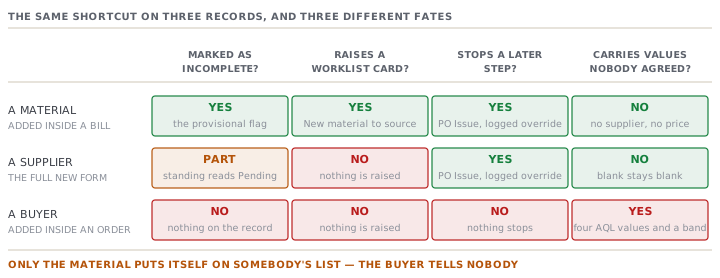
Where those five numbers go
They do not sit still on the buyer record. Two mechanisms carry them outward, and both are worth knowing because both write only into a blank.
Onto a style. When a style is created for a buyer, the app copies that buyer's quality profile into the style's own Quality tab, but only into fields that are still empty. A value a merchandiser has already typed always wins. The copy is written to the style's activity log in full, naming the buyer and every value taken. That log line is the only trace, and it is the thing you search for later.
Onto an order, at confirm. When an order is confirmed the buyer's tolerance band is copied onto the order, but only when the order's own band is still zero. The application's comment on that rule is unusually candid, and it names a real trade-off. A deliberate zero set before confirm looks identical to an unset zero, so a genuinely zero-tolerance order gets overwritten with the buyer's default. The copy is logged on the order, and the buyer screen carries a hint telling you to set the buyer to zero and re-check the order afterwards.
Lesson one argued that a blank stays visible while a zero looks like an answer. This is the exception that shows the shape of the rule. On this one field the app has no null to work with, so it cannot tell absent from zero. Rather than pretend otherwise, it logs what it did.
What it cost on ORD-1189
Torrelano Basics was one of the three buyers Devina created that week. Its signed terms, which live in a folder and not in the app, say two things the default disagrees with: major defects at AQL 1.5, and no quantity tolerance at all.
Order ORD-1189 is 9,600 shirts. Take the sampling arithmetic through both AQLs, at the general inspection level the buyer profile supplied.
| Lot | Code letter | Sample | Accept on | Reject on | |
|---|---|---|---|---|---|
| The buyer's contract, AQL 1.5 | 9,600 | L | 200 | 7 | 8 |
| The record's default, AQL 2.5 | 9,600 | L | 200 | 10 | 11 |
The lot size lands in the band that gives code letter L and a sample of 200 garments. The two acceptance numbers are 7 and 10, so the window between them is 3 defects wide.
Clency's final inspection finds 9 major defects in the sample of 200. Against the record's 2.5 that is an accept, comfortably, with one to spare. Against the contract's 1.5 it is a reject, by two. The shipment left. The claim arrived seven weeks later.
The tolerance band did the same kind of quiet work. Three per cent of 9,600 is 288 garments. The order was carrying 288 pieces of short-ship room that the contract does not grant, and the number never came up in a conversation because nobody typed it.
Two facts, five numbers, one busy afternoon. The arithmetic is not hard. The problem is that nothing in the app ever asked.
The line the app will not let you cross
It would be easy to conclude that inline creation is the villain here. It is not, and the boundary the app draws is a good one.
Inline creation exists for references — the things other records point at. A material, a buyer, a style, a colourway, a handful of list values. Those are names for things that already exist in the world, and refusing to let you write one down blocks real work for no gain.
What can never be created inline is an attestation: a confirmed price, a passed inspection, a qualified supplier, a received quantity, a released specification. Those come from evidence. There is no control anywhere in the app that mints one, and that absence is deliberate rather than accidental.
Which is why the honest reading of Torrelano Basics is not that the buyer record should have been harder to create. It is that an AQL is an attestation wearing a reference's clothes. It arrived through a door built for names.
Check yourselfYou add two materials and one buyer inline on the same afternoon. A week later, how many of the three will something in the app still be telling you about?Show the answer
Two. Each provisional material raises an amber "New material to source" card on the sourcing officer's My Work feed, naming the styles that use it, and it stays there until somebody sets a supplier and a price and marks it sourced. The buyer raises nothing at all — no flag, no card, no badge — and by then it looks identical to a buyer set up properly in Settings.
Prompt · Find the records I made in a hurry and never finished
At the end of any week in which a lot of orders landed at once.
Help me find the master records somebody created on the fly this season, and work out which ones are still carrying values nobody agreed.

I will give you: my buyer list with each buyer's AQL major, minor, critical, inspection level and quantity tolerance band; my material list marking which are still flagged as not yet sourced; and the signed terms I actually hold for my three or four biggest buyers.

Start with the buyers, because nothing in the system will remind me about them. Flag every buyer whose AQL values are the common apparel defaults rather than something written in a contract, and say plainly that you cannot tell the two apart from the data alone. For each flagged buyer, ask me one question: do I hold a signed document that states these numbers?

Where I do hold the document and it disagrees, do the arithmetic. Take one real order quantity, give me the sampling code letter and sample size, and give me the acceptance and rejection numbers at BOTH the recorded AQL and the contracted one. Tell me how many defects wide the window between them is, and what a lot landing inside that window would do.

Then do the tolerance band. Multiply it by a real order quantity and tell me how many garments of short-ship room the record grants. Compare that against what my contract grants. If the contract grants none, say so in units, not in percentages.

Finish with the materials, which are the easy half: list the ones still flagged, name the styles that use them, and tell me which are blocking a purchase order today.

Two rules. Never tell me a default is probably fine. And never invent what my contract says — if I have not given you the document, ask for it and stop.
AI can make mistakes — check anything you act on.