Lessons · Lesson 2 of 5
A menu shaped like a working day
Why the sidebar is ordered by when work happens rather than by what a record is, and how that lets you find a screen you have never opened.
Lesson 2 of 5 · 16 min
Two ways to group a menu
Every application has to decide how to group its screens. The obvious way is by the kind of record each one holds. The other way is by when the work happens. The choice looks cosmetic and is not. It decides what a newcomer has to know before they can find anything.
Nesrine's second question on her first morning, after "what is a fire", was "where do I put the buyer's enquiry". It is the question every new joiner asks, and the shape of the menu is the answer to it.
What grouping by record type costs you
A menu grouped by record type reads like a filing cabinet: Orders, Styles, Materials, Suppliers, Purchase Orders, Inspections. It is tidy, it is easy to build, and it is unusable by somebody who has been in the building for four hours.
The reason is that it asks the newcomer for something they do not have. To find a screen in a filing cabinet you must already know which kind of record your job produces. Nesrine knows the job: a buyer has asked for a price on an overshirt. She does not yet know that the job produces a thing called a request for quotation. Nor that it lives with cost sheets, which are not the same as prices.
The sidebar here is grouped the other way, by when. It has ten headings, and seven of them are stages of one job in the order that job runs.
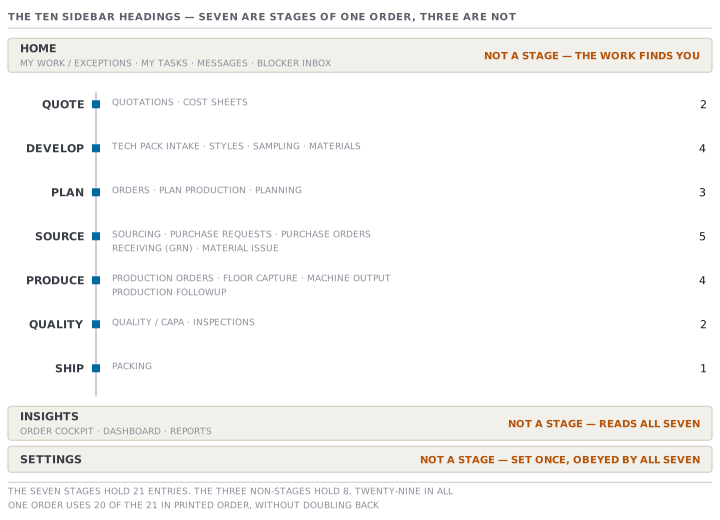
The seven stages
| Heading | Screens | The moment |
|---|---|---|
| Quote | Quotations · Cost sheets | A buyer has asked what it costs |
| Develop | Tech pack intake · Styles · Sampling · Materials | The garment is being specified and proved |
| Plan | Orders · Plan production · Planning | The order is real and needs a shape and a slot |
| Source | Sourcing · Purchase Requests · Purchase Orders · Receiving (GRN) · Material Issue | The materials are being bought, received and issued |
| Produce | Production orders · Floor capture · Machine output · Production followup | The factory is making it |
| Quality | Quality / CAPA · Inspections | Somebody is checking it |
| Ship | Packing | It is going out of the door |
Read the Heading column downwards and you have read the life of an order. That is the single most useful thing to know about this application on day one, because it turns an unanswerable question into an answerable one. "Where do I do X" becomes "when does X happen". Nesrine's enquiry happens before anything is made, so it is at the top, under Quote.
One order, top to bottom
ORD-1042 is worth walking, because it uses the menu in almost exactly the printed order.
Larkspur's enquiry arrives and becomes a request for quotation under Quotations. Its price is built on a Cost sheet. Larkspur's tech pack lands in Tech pack intake and becomes a record under Styles, whose fabric and trims are picked from Materials. The proto and fit samples run under Sampling. When Larkspur commits, the buyer order is created under Orders, split into factory work under Plan production, and given a slot on a line under Planning. What has to be bought is worked out under Sourcing, asked for under Purchase Requests, placed under Purchase Orders, booked in under Receiving (GRN) and given to the floor under Material Issue. The work documents live under Production orders, the output is captured under Floor capture and followed under Production followup. Defects are logged under Quality / CAPA and the AQL check happens under Inspections. AQL is the sampling rule that decides how many garments an inspector pulls and how many faults are allowed. Then the cartons are planned under Packing.
That is twenty of the twenty-one entries the seven stages hold, used once each, reading downwards and never doubling back. The one it skips is Machine output, which carries something only on a factory that feeds the app machine-captured output.
The three headings that are not stages
The other eight entries sit in three headings that are deliberately outside the sequence. Confusing them with stages is the commonest way to get lost.
- Home holds four: My Work / Exceptions, My Tasks, Messages and Blocker inbox. It is not a stage. It is where the work comes to find you, which is lesson 1.
- Insights holds three: Order Cockpit, Dashboard and Reports. It is not a stage either. It reads all seven of them and shows the result.
- Settings holds one entry, which opens onto a page of cards. It is what the factory decides once and every stage then obeys, which is lesson 5.
Four plus three plus one is eight. A general manager's sidebar carries twenty-nine entries in all, so the seven stages hold twenty-one between them. The arithmetic is worth doing once, because it makes the claim checkable rather than decorative: open your own sidebar and count.
The screen you have never opened
An unfamiliar screen with no records on it is the hardest thing in any application, because an empty list looks identical to a broken one. Every entry in this menu carries two sentences for exactly that moment: what the screen holds, and how the very first record gets onto it.
They are worth reading rather than skipping. Purchase Requests says its first record arrives this way: "Open an order → Materials tab → 'Request what this order needs'. We pre-fill the materials and trims from the style." Planning says: "Add a production line (Planning → Manage lines) or flag a supplier as a subcontractor, then allocate orders from each order's Planning tab."
Both answer the question an empty screen usually leaves hanging, which is not "what is this" but "what do I do to make something appear here".
Two ways to skip the menu entirely
Once you know the shape, you will mostly stop using it.
The command palette opens on Ctrl+K, or ⌘K on a Mac. Type, and it offers screens, records that match, and a short list of create actions. Arrow keys move, Enter opens, Escape closes. It is worth learning on day one because it is faster than the sidebar for everything except learning the sidebar.
The New button sits in the top bar and lists the create actions your role can reach.
Both of them only navigate. Neither creates anything: choosing "New order" takes you to the order screen's own create flow, which has its own confirm panel before anything is written. That distinction matters and lesson 4 is about it.
Check yourselfA colleague asks where to record that a roll of fabric physically arrived from the mill this morning. Answer it using only the rule in this lesson, and then say which heading you would look under if you wanted to see what that arrival did to the order's cost.Show the answer
Ask when it happens. Goods arriving from a mill happen while materials are being bought and taken in, which is the Source stage, and the screen there is Receiving (GRN) — goods received notes. The second half deliberately breaks the rule, and that is the point: "what did it do to the cost" is not a moment in the job at all, it is a view across moments. So it is not under Source. It is under Insights, which reads all seven stages — the Order Cockpit for that one order, or Reports for the pattern across many. If a question has no "when", it is almost always an Insights question.
Check yourselfSomeone argues the menu should be alphabetical, because everybody knows the alphabet and nobody has to be taught it. Give the strongest version of that argument, and the answer to it.Show the answer
The strongest version is genuinely strong. An alphabetical list needs no training, has no arguable ordering, never gets stale when a process changes, and is the fastest possible lookup for somebody who already knows the name of the screen they want. The answer is that the last clause is the whole problem. Alphabetical order is best for retrieving a name you already have, and worthless for discovering one you do not, and a new merchandiser's first two weeks are entirely the second case. She does not know that her enquiry becomes a "quotation", so she cannot find Q. What she does know is that pricing comes before making. Note also that the app already gives her the alphabetical case: the command palette matches on the name the moment she knows it, which leaves the sidebar free to do the job the palette cannot.
Prompt · Where does this job live, and what will it not let me do
Any time you know the job and not the screen, especially in your first fortnight.
I will describe a job I have to do in MerchandiserOS in plain words. Work out where it lives and what will stop me.

Do not start by naming a screen. Start by asking me WHEN the job happens in the life of an order: before a price is quoted, while the garment is being specified, once the order is real, while materials are being bought, while it is being made, while it is being checked, or as it leaves. Say which of those it is and why, and if my description is ambiguous between two of them, say so and ask me one question that would settle it.

Then name the sidebar heading that stage corresponds to, and only then the screen. If the job is not a stage at all — if it is a view across stages, or something set once for the whole factory — say that instead. Those live in different places entirely, and looking for them among the stages is the commonest way to waste ten minutes.

Then do the part I will not think to ask for. Tell me what has to exist BEFORE that screen will let me do anything: which record the job hangs off, and what state that record has to be in. Tell me what the screen is likely to show me if none of that exists yet, and what the first step would be.

Three rules. If you are not certain a screen exists under that name in my version, say so and tell me how to check rather than guessing a plausible label. Do not invent a button. And where the job could be done in two places, say which one leaves a record somebody else can find.
AI can make mistakes — check anything you act on.