Lessons · Lesson 3 of 5
One app, six different apps
What a sign-in role actually decides — the menu, the feed, the create actions and whether money is visible — and where the check is enforced.
Lesson 3 of 5 · 18 min
The same address, a different application
Two people at the same factory sign in to the same address and see different applications. That is not a fault, and it is not a preference either. A role is a statement about what somebody is answerable for, and the software treats it as one. Knowing what your role hides is as useful as knowing what it shows.
At half past eight Nesrine and Mehdi are sitting at adjacent desks with the same page open. Her sidebar has eighteen entries. His has twelve. Six of hers he cannot reach at all, and four of his are missing from hers. Neither of them has changed a setting.
Seven roles
There are seven roles in the system. The labels below are the ones the app prints, not paraphrases of them.
| Role | Label in the app | Who it is at Zeramdine |
|---|---|---|
| Owner | Owner / GM | Hatem Jaziri |
| Merchandiser | Merchandiser | Nesrine Chebbi |
| Sourcing | Sourcing officer | Mehdi Ferjani |
| Planner | Planner | Rym Bouazizi |
| QA | QA lead | Hela Ouerghi |
| Floor | Floor supervisor | Mondher Gharbi |
| Supplier | Supplier (portal) | Larkspur's mill, not a Zeramdine employee |
Six of those are internal and one is not. A supplier login never reaches the factory application at all. That role can open the supplier portal and nothing else, which is a different shell with its own screens. It is the only role in the list that belongs to somebody outside the building, and it is separated by a different mechanism from the other six: not a narrower menu, but a different address.
Four narrowings, not one
The Owner sees everything, so the Owner's app is the whole app and makes a good ruler. Measured against it, a role narrows four separate things. Take them one at a time, because people run them together.
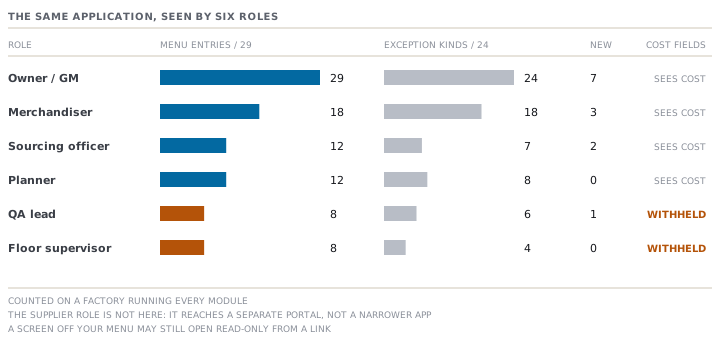
| Role | Menu entries | Exception kinds | Create actions | Sees cost |
|---|---|---|---|---|
| Owner / GM | 29 | 24 | 7 | Yes |
| Merchandiser | 18 | 18 | 3 | Yes |
| Sourcing officer | 12 | 7 | 2 | Yes |
| Planner | 12 | 8 | 0 | Yes |
| QA lead | 8 | 6 | 1 | No |
| Floor supervisor | 8 | 4 | 0 | No |
Two of those columns need care before you check them against your own screen. The menu count assumes a factory running every module, and lesson 5 shows a single setting that changes it for everybody at once. The exception count is a count of kinds the role is shown, not of cards it will see on a given morning.
The menu
The role holds a list of module paths, and an entry appears only if its address is on that list. A heading whose entries are all filtered out disappears with them. So the difference is not a greyed-out list: whole sections are simply absent. Mondher, on the floor, has no Quote heading, no Develop, no Plan, no Source and no Ship. He has Home, Produce and Insights, and that is his application.
The feed
This is lesson 1's step 3. Twenty-four kinds are registered and each names the roles that own it, so the same morning produces very different boards. Nesrine is shown eighteen of the twenty-four. Rym is shown eight, Mehdi seven, Hela six and Mondher four.
Mondher's four are worth naming, because they explain something a floor supervisor notices in the first week: a stalled production line, a blocked production document, an approval waiting on him personally, and a blocker somebody has addressed to him. Two of those four only ever appear when something is directed at him by name. His board is often empty. That is a known thinness rather than a sign that nothing is wrong on his lines.
The create actions
The New button in the top bar lists seven create actions in total, each role-filtered. The Owner gets all seven. Nesrine gets three: New order, New style, New RFQ. Mehdi gets two: New purchase order, Receive against PO. Hela gets one, New inspection. Rym and Mondher get none, and the button is not shown to them at all rather than shown empty.
That last point is a small piece of honesty worth copying. A menu that opens onto nothing teaches a user that the software is broken.
The money
This one is a field-level rule rather than a screen-level one, and it catches people out. Cost, price, margin and target price are withheld from the QA lead, the floor supervisor and the supplier portal. Everybody else sees them. So Hela can open a style she is inspecting against and read every measurement, tolerance and defect class on it, and the same screen will not show her what the garment costs.
The screen that is not on your menu
Here is the distinction that saves the most confusion. A screen missing from your menu is not always a screen you cannot open.
Three of the roles carry a read-only grant on top of their own modules. The sourcing officer, the planner and the QA lead may all view orders and styles. The floor supervisor may view styles. None of those appear in their sidebars, because a sidebar lists what you work in. But a link from a production order to the buyer order behind it will open, and the page will render, and every button on it that would change something will refuse.
The reasoning is worth stating, because it is the general shape of this application. Planners and inspectors need to see the order they are planning or inspecting against. None of them needs to edit it. Read and write are separate questions and the app answers them separately.
Previewing another role
The Owner, and only the Owner, has a View as control in the top bar. Choosing a role reloads the app as that role: the sidebar shrinks, the feed changes, the create actions change. While previewing, the control turns amber and reads "Viewing as" plus the role, so it is never possible to forget you are in somebody else's view. Choosing Owner again exits.
Six roles are offered, not seven. The supplier is deliberately absent, because the portal is a different shell with no top bar, so previewing it would leave the Owner with no way back.
It is worth knowing what this control is not. It cannot raise anyone's access. The session's signed identity keeps the real role throughout, and the preview is an overlay on top of it that is honoured only when the real role is Owner. It is a way for Hatem to see what Mondher sees before deciding whether Mondher can do his job.
One more list your role decides
My Tasks is a separate screen from My Work, and it is filtered by a different mechanism worth knowing about. It shows critical-path milestones from every active order, filtered by the department tags that role owns.
| Role | Owns the milestones tagged |
|---|---|
| Owner / GM | Everything |
| Merchandiser | Merchandising |
| Sourcing officer | Sourcing · Sourcing / R&D · Warehouse |
| Planner | Production |
| QA lead | QC · QC / Buyer |
| Floor supervisor | Production |
Read the last two rows together. The planner and the floor supervisor own the same tag, so Rym and Mondher see an identical task list from two very different chairs. That is a real property of the current setup rather than an oversight to work around, and it is the kind of thing worth checking on your own factory before assuming a task has an owner.
Check yourselfHela, the QA lead, needs the FOB price of STY-118 for a conversation with the buyer's technologist. She can open the style. Explain in one sentence why she cannot read the price, and say what the right way to get it is.Show the answer
Because commercial visibility is a field-level rule attached to the role, not a screen-level one. The QA lead, the floor supervisor and the supplier portal never see cost, price, margin or target price. So the style opens and the commercial fields simply are not on it. FOB is the free-on-board price, the price the buyer pays with the goods loaded at the port of export. The right way to get it is to ask somebody whose role includes it: the merchandiser who owns the buyer relationship, or the Owner. That is not a workaround, it is the design. The app has decided that a price leaving the building should pass a person who is answerable for prices, and going round the role would defeat the only control there is.
Check yourselfMondher says the app is broken because his board has been empty for three days while two of his lines are behind. Is he right? Work through the four narrowings.Show the answer
He is probably not seeing a fault, and he is right that something is wrong. Take them in order. The menu is not the problem: production orders and floor capture are both on it. The create actions are not the problem: he has none, by design. Cost is not the problem. The feed is the problem, and in two ways at once. First, only four of the twenty-four kinds reach a floor supervisor, and two of those four only fire when something is addressed to him by name, so his board is thin by construction. Second, and more usefully, a line running behind raises a fire only if the system can tell that it is behind, which needs output captured against the order. If the last three days of output went onto paper, the app has no evidence of a stall and honestly raises nothing. The answer is lesson 1's: check that the thing which would raise the fire exists, before reading silence as good news.
Prompt · Is this person in the right role
Before adding a user, and after anybody complains that the app is hiding something from them.
Help me decide which MerchandiserOS role a person should hold, and be willing to tell me the answer is none of them.

I will give you: what the person actually does in a week, what they are answerable for, what they need to SEE but never change, and whether they are an employee or somebody outside the building.

Work through the four narrowings separately, because I will conflate them if you let me. First the menu: which screens does the job genuinely need, and which is the smallest role that covers them. Second the exceptions feed: which kinds of problem should land on this person's board first thing in the morning, and would the role you are proposing actually deliver them. Third the create actions: does this person need to bring records into existence, or only to advance ones somebody else created. Fourth commercial visibility: does this job require seeing cost, price and margin, and can you justify that in one sentence to somebody who will have to defend it.

Then check the read-only case explicitly, because it is the one people get wrong. If the person needs to LOOK at something they must never edit, say so, and say whether a read-only view of it already comes with the role rather than assuming they need write access to it.

Then give me a recommendation with its cost stated. Name the role, then name what that person will NOT be able to do and who they will have to ask instead. If the honest answer is that the job spans two roles and the app has no combination for it, say that plainly and tell me which half to give them and which half to route through somebody else.

One rule. Do not recommend the Owner role to make a problem go away. An access complaint solved by making somebody an Owner is an access control removed, not an access control set up.
AI can make mistakes — check anything you act on.