Lessons · Lesson 1 of 5
The app opens on the work
Why MerchandiserOS opens on a list of things going wrong, what the Fires and To do lists hold, and how the app decides what to put in front of you.
Lesson 1 of 5 · 16 min
The first screen is an argument
Most business software opens on a menu and waits. You are expected to know what needs doing and to go and find it. This one opens on a list of things that are already going wrong. That is a design choice. It has a cost as well as a benefit, and this lesson covers both.
Zeramdine Confection makes woven outerwear and shirts in Monastir, Tunisia. It employs 340 people on four sewing lines and sells almost entirely into Europe. Six people appear in this course. They are not a random cast: each one signs in under a different role, and the whole of lesson 3 is about what that changes.
- Nesrine Chebbi joined this morning as a merchandiser. The course follows her first day.
- Hatem Jaziri is the general manager. He owns the workspace.
- Mehdi Ferjani is the sourcing officer.
- Rym Bouazizi plans the lines.
- Hela Ouerghi leads quality.
- Mondher Gharbi supervises the finishing floor.
The order carried through all five lessons is ORD-1042 for Larkspur Retail, a European high-street chain: style STY-118, a men's cotton twill overshirt, 9,000 units.
Say the basis once, because the whole course rests on it. Every heading, button label, message and count named here is read out of the application itself. None of it is read out of a description of it. Where a figure counts screens or alert types, you can check it against your own sidebar in under a minute. Where it depends on how your own factory is set up, the lesson says so and tells you where the setting lives.
Work by exception
The address the app opens on is /, and the screen there is called My Work / Exceptions. It is not a dashboard. A dashboard tells you how things are going. This tells you what is going wrong and who has to move.
The app's own one-line description of the screen puts it plainly: "Where you start every day. Fires are what's going wrong right now; the to do list is everything else. It all appears here automatically — you won't have to go looking."
The last clause is the whole bet. In a factory the merchandiser's day is not a plan. It is a queue of interruptions, and they arrive from every direction at once. A mill misses a delivery date. A buyer sits on a fit sample. A line runs behind. A lab dip fails. The old way of finding them is to open eight screens each morning and read each one. The bet here is that the software can do that reading and hand you the result.
What is on the screen
Nesrine signs in at ten past eight. The board that loads has a fixed shape. It is worth naming the parts, because the rest of the course refers to them.
At the top is a briefing line: a greeting with her first name, the date, and three counts. How many fires need her now, how many things are on her to do list, and how many orders are affected. Beside them sits a thirty-day trend, so a bad morning can be read against a normal one.
Under that is Start here: the single most urgent fire, with a button that goes straight to the control that fixes it rather than to the record's front page. The app picks it, not her. Under that is Fires by area, a row of counts you can tap to filter the lists below.
Then the two lists that are the point of the screen.
| Section | The app's own description | What it means for Nesrine |
|---|---|---|
| 🔥 Fires | "Late or blocked — drop what you're doing. Click a card to open the record; resolve the underlying issue and it clears itself." | Something has already gone wrong. Red. |
| ✓ To do list | "Required checks + items at risk — work through them when the fires are handled." | At-risk items, plus the checks the app requires of her role. Amber. |
At the bottom sits a small key headed What the colours mean: green is on track, amber is at risk, red is blocked or late, grey is draft or inactive. Four colours, one meaning each, used the same way on every screen in the application. Learn them here and you will not have to learn them again.
Where a fire comes from
Nothing on that board was typed by anybody. Every card is worked out, as the page loads, from records elsewhere in the system. The path from a record to a card runs through six steps. Knowing them explains most of the surprises a newcomer has in the first week.
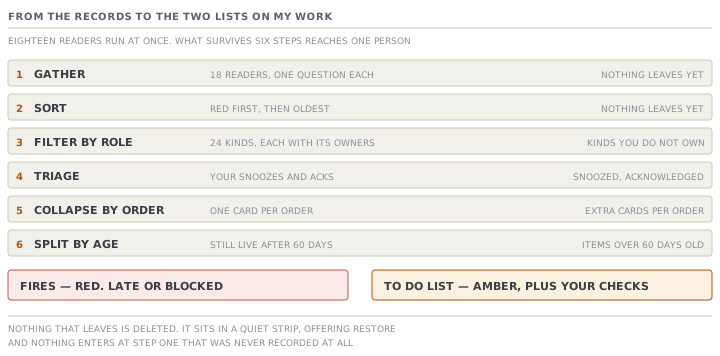
- Gather. Eighteen separate readers run at once. Each asks one question of one part of the system: are any purchase orders late, has any ship date passed, is any line overloaded, is any approval waiting, has any lab test gone missing.
- Sort. Red before amber, and within a colour the oldest first.
- Filter by role. Every kind of exception has a list of the roles that own it. A kind that is not on your list never reaches your screen.
- Triage. Anything you have snoozed to a date, or acknowledged, drops out of the live list into a quiet strip further down. It is never deleted, and every row in the strip offers Restore.
- Collapse by order. All of one order's exceptions become a single card carrying the worst of them, with the rest counted behind it.
- Split by age. Anything still live after sixty days folds into one card that offers a choice: review it or retire it.
What survives all six is split by colour. Red goes to Fires. Amber goes to the To do list, together with the cross-function checks the app requires of your role.
Why the fifth step matters more than it looks
ORD-1042 is a good example. In Nesrine's second week it carried four separate exceptions at once. A purchase order was past its due date. A milestone was overdue on the critical path. A sample approval was waiting on the buyer, and the shipment date had gone by. Four readers, four exceptions, one order, one merchandiser.
Without the fifth step her board would have said four fires. With it, the board says one, and the card carries the worst of the four with +3 more printed on it. The number at the top of the screen counts orders that need attention, not alerts raised. That is a deliberate choice. It is why the count on a bad Monday is a number a person can act on, rather than a number that makes them close the tab.
The registry, and what it cannot see
The list of exception kinds is not open-ended. There are twenty-four registered kinds, and each one names the roles that see it. Here are a few, so the shape is concrete.
| Kind | Raised when | Owned by |
|---|---|---|
| Purchase order overdue | A purchase order has passed its due date | Merchandiser, sourcing officer |
| Ship date passed | An order's ship date has gone by | Merchandiser, planner |
| Line overloaded | A week's load exceeds a line's capacity | Planner |
| CAPA overdue | A corrective action has passed its date | QA lead |
| Material to source | A material added inline still has no supplier or price | Sourcing officer |
Two honest qualifications go with that number.
The first is that twenty-four is the number of kinds the application is prepared to raise. It is not the number any one factory will see. Several of them are registered and have no live data behind them yet — the payment and letter-of-credit kinds say so in the source itself. A registered kind with nothing feeding it is silent, and silence from it means nothing at all.
The second is larger. The feed can only be as good as the records. An exception is worked out from data somebody entered: a purchase order with a due date, a milestone with a plan, an inspection with a result. An order that nobody has created raises nothing. A purchase order with no due date can never be late. The screen that promises you will not have to go looking is telling the truth only about work the system knows about. A quiet board on a factory whose orders are on paper is not good news.
Check yourselfNesrine's board says 3 fires and 11 to do. Mehdi, signed in beside her at the same minute, sees 1 fire and 4 to do. Neither number is wrong. Give two separate reasons why, using the six steps.Show the answer
Step 3 and step 5. Step 3 is the role filter: they own different kinds, so most of each other's exceptions never reach the other's screen at all — lesson 3 puts real numbers on that gap. Step 5 is the collapse. Both counts are counts of ORDERS carrying at least one exception of a kind that role owns. They are not counts of exceptions. So the same pile of problems produces different totals, depending on how it spreads across orders. A third reason is available too: step 4, triage. If Mehdi snoozed a purchase-order chase to Thursday, it has left his live list and is sitting in his quiet strip, while Nesrine — who also owns that kind — still has it.
Check yourselfA general manager says the board is proof the factory is under control, because it has shown fewer than two fires every day for a month. What is the strongest version of that argument, and what is the answer to it?Show the answer
The strongest version is real. The trend line exists precisely so that a run of quiet days can be read as a pattern rather than as luck, and a factory that genuinely closes its exceptions will show exactly that shape. The answer is that the board is worked out from records, so a low count has two possible causes and the screen cannot tell them apart. Either the work is going well, or the work is not being recorded — no due dates on the purchase orders, no critical path applied to the orders, no inspections logged. Before reading a quiet board as good news, check that the things that would raise a fire actually exist. Open one live order. Confirm it has a ship date, a critical path, and purchase orders with due dates on them. A board is evidence about the records first and about the factory second.
Prompt · Tell me whether my exceptions board is honest
In your first month, and any time a quiet board is about to be reported upwards as good news.
Help me work out whether my MerchandiserOS My Work board is telling me the truth about my factory, or only about my records.

I will give you: the number of fires and to-do items my board shows today; my sign-in role; the number of orders currently open; and, for three of those orders picked at random, whether each has a ship date, a critical path applied, purchase orders with due dates on them, and any production output recorded in the last week.

First, separate the two questions. Tell me what my board CAN see given my role, and what it cannot see at all because those exception kinds belong to somebody else. Do not tell me my board is complete; tell me whose exceptions are missing from it and who I would have to ask.

Then test the records rather than the board. For each of my three sample orders, list the exceptions that WOULD be raised if the underlying data existed, and mark each one raisable or unraisable with the reason. A purchase order with no due date can never be late; say so plainly rather than counting it as fine.

Then give me a single verdict in one of two forms. Either: the records are complete enough that a low count is evidence, and here is why. Or: the count is low because of these specific gaps, and here are the three records to fix first.

Two rules. Never treat the absence of an exception as evidence that something is going well — say unknown. And do not suggest I change a threshold, snooze anything, or turn off a kind of alert; the point of this exercise is to find out what is true, not to make the screen calmer.
AI can make mistakes — check anything you act on.