Lessons · Lesson 4 of 5
The habits the app enforces
The four behaviours that work the same way on every screen: the confirm panel, the activity line, the button that names its blocker, and the record whose actions are dimmed.
Lesson 4 of 5 · 18 min
Four things that never vary
Software teaches habits whether it means to or not. If a destructive action is one click away, people learn to click carefully and then stop being careful. This application takes the opposite bet on four specific behaviours, and applies all four everywhere. Learn them once here and the rest of the system stops surprising you.
The four are worth naming up front, because every later lesson in this track assumes them. Nothing commits on the click. Every change is signed and dated. A button that cannot run says why. And a finished record stops offering to change.
One: nothing commits on the click
Press a button that would create or change a record and no record changes. A panel opens in the middle of the screen, headed What happens after you confirm, with a numbered list of consequences underneath. There is a Go back, and there is the real button, which carries the name of the action rather than the word OK.
Nesrine confirms ORD-1042 on her fourth day. The panel says three things. They are the application's own words with the order's own number put in:
- "Marks ORD-1042 as Confirmed."
- "ORD-1042 then appears on the Order Cockpit and can be planned and sourced against."
- "Recorded in ORD-1042's activity log — you can still edit or cancel it afterwards."
Read what those three lines are actually doing. The first states the change. The second states the consequences elsewhere — the parts of the system that will start behaving differently, which is the half a new user cannot possibly know. The third states that it is recorded and, in this case, reassures that it is reversible.
Compare the panel for marking the same order shipped:
- "Marks ORD-1042 as Shipped — a final status it can't move on from."
- "Stamps today as the actual ex-factory date on ORD-1042's shipment(s)."
- "Closes ORD-1042 on the cockpit and the exceptions list. Recorded in its activity log."
Same three-part shape, different content, and the first line now warns instead of reassuring. The panels are not boilerplate. They are written per action, from the actual record.
The approval variant
Some panels have no single confirm button. Where the decision is a human judgement rather than a step — a quality verdict, a sample approval, a cost sign-off, a clearance to ship — the panel offers Approve and Reject side by side. There is no third option and there is no automatic path. Somebody's name goes on it either way.
Two: every change is signed and dated
Every record that matters carries an activity log, and a change writes one row to it. The row holds five things: which record, what kind of change, a one-line summary of it, who, and when.
The who is worth a sentence of its own, because it has a third value most people never think about. It is the signed-in person's name; failing that, their email address; and failing both, the word System. A line attributed to System is a line no person is standing behind — an automated step, or something that ran outside a session. On a line that matters, that is a thing to notice rather than to read past.
The summary is written by the action, not by the user, so it is consistent. Confirming an order writes "Status: Draft → Confirmed". Shipping one against a gate that was not met writes something longer, and the next section is about why.
Three: a button that cannot run says why
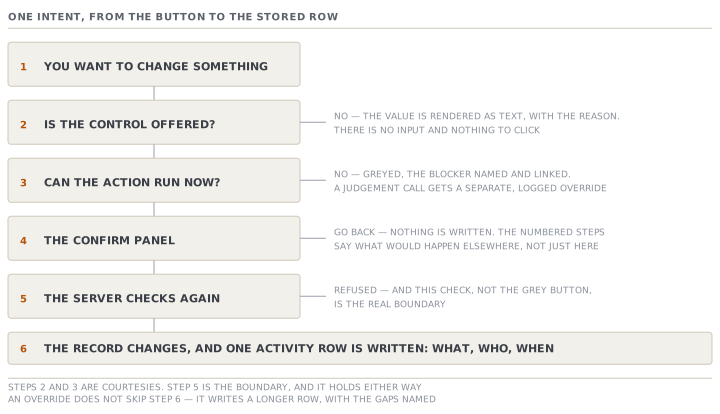
This is the habit that most changes how the software feels, and it is the exact opposite of the common pattern. A button whose preconditions are not met is not left clickable so it can refuse you afterwards. It is greyed, its reason becomes its hover text, and the reason is printed again beside it with a link straight to the thing that is blocking it.
So a Mark shipped that cannot run does not open a dialogue that says no. It sits greyed with a note next to it reading, in the app's own shape, ⛔ followed by the reason and then Open production →.
Three tiers of no, which look identical and are not
The mark-shipped gate is the clearest example in the system, and it has three genuinely different tiers behind one grey button.
| Tier | Example blocker | Can it be overridden |
|---|---|---|
| Hard floor | Nothing has been produced on this order | No. By nobody, ever. The override is not even offered |
| Safety gate | The buyer requires a final AQL inspection and none has passed | Yes, by an Owner or a QA lead only, and it is logged |
| Judgement | The order is short, or no shipment is booked | Yes, by the roles the factory has configured, and it is logged |
AQL is the sampling rule that decides how many garments an inspector pulls from a lot and how many faults are allowed before the lot is rejected.
The design rule behind the table is the one worth carrying into every screen you meet. A hard rule disables. A judgement offers a separate, deliberate, logged override. Shipping early against a short production run is a real commercial decision a factory makes every season, so refusing it outright would be the software pretending to know better. Shipping an order on which nothing at all has been made is not a decision, so there is no button for it.
When somebody does take the override, the panel reframes. It stops explaining the step and starts explaining the choice. Its first line reads "Ships ORD-1042 now — even though …" with the gaps named, and its last line says the override is recorded with those gaps named in the log. The activity row then reads "Status: In production → Shipped (override — ship gate not met: …)".
That last detail is the point of the whole tier system. A factory that overrides a gate has not broken a rule. It has made a decision, and six months later the log can say who made it and what they knew at the time.
Four: a finished record stops offering to change
A record is inactive when it has been archived, or when it has reached a status it cannot move on from. For an order those statuses are Shipped, Received and Cancelled. On an inactive record every action that would change or advance it is greyed, with one line saying why and how to get back. The wording is fixed: "This order is archived — Restore it to make changes." for the first case, and "This order is shipped — no further changes." for the second.
What stays live is exactly what should: the reactivation itself, and everything read-only. You can still print it, open it, look at its history and copy it into a new draft.
Two things about this are worth more than the rule itself.
It is enforced twice. The screen dims the control, and the action behind it refuses independently. The dimming is a courtesy, so nobody wastes a click. The refusal is the boundary, and it holds whether or not the screen did its job.
It also runs backwards. You cannot archive a record that other live work depends on, and the message names the dependency rather than saying no. Trying to archive a live ORD-1042 produces "Can't archive ORD-1042 — it's confirmed (active). Cancel it, or finish and ship it, before archiving." A draft order with purchase requests or purchase orders hanging off it gets the same treatment, with those documents listed by code, and with a way out that always exists.
The fifth thing, which is the fourth in a different clothing
There is one more, and it belongs with the others because it comes from the same principle. The app will not offer you a field you cannot save.
Where a value is frozen — a released style specification, a closed order, a record you can read but not write — the field is rendered as text with no edit control at all, and the reason is shown. It is not an input box that accepts your typing and then rejects it on save. That is the field-level version of the greyed button: do not offer what you will not accept.
Check yourselfA supervisor is annoyed that Mark shipped is greyed on an order the buyer is collecting tomorrow. Describe, in order, what you would look at, and say what determines whether this is fixable by him.Show the answer
Look at the note beside the button first. It names the blocker and links to it, so the diagnosis is already on the screen. Then place the blocker in one of the three tiers. If it is that nothing has been produced, it is the hard floor: no override exists for anyone, and the honest answer is that the output has not been recorded, so the fix is to record the real production first. If it is a required final AQL or metal detection with no pass, it is a safety gate. The override exists, but only an Owner or a QA lead may use it, so it is not his to do. Running the inspection is usually faster than finding somebody senior. If it is a short quantity or an unbooked shipment, it is a judgement. An override exists, scoped to whichever roles the factory has configured. Taking it is a decision that will carry his name and the named gaps in the log. So what determines whether it is fixable by him is the tier, and the tier is readable from the wording of the blocker.
Check yourselfSomebody proposes removing the confirm panel from the ten most common actions, arguing that experienced users know what Confirm does and the panel is friction. What is the strongest version of the argument, and what would you actually lose?Show the answer
The strongest version is real and should not be dismissed. A panel that always appears stops being read, which is a documented weakness of every confirmation dialogue ever built, and a panel nobody reads is friction that buys nothing. If that were all the panel did, removing it would be right. What you would lose is the second line. The panel's job is not to ask "are you sure". It is to state the CONSEQUENCES ELSEWHERE, which is the one thing a user cannot see from where they are standing. "ORD-1042 then appears on the Order Cockpit and can be planned and sourced against" is information, not friction, and it is exactly what an experienced user of a different system would not know. A better response to the real complaint would be to keep the consequence lines and attack the sameness. The panels that say nothing beyond "this will do the thing you clicked" are the ones that trained people to stop reading.
Prompt · This button is greyed out — what kind of no is it
The moment an action you expected to work is disabled, and before anybody is asked to override it.
A control in MerchandiserOS is disabled and I need to know what kind of refusal it is before I ask anybody for anything.

I will paste the exact wording of the note beside the button, the record it is on, that record's status, and my role.

First classify it. Is this a HARD rule that nobody can pass, a SAFETY gate that a named senior role can override with a log entry, a JUDGEMENT the factory has scoped to certain roles, or simply a record that has finished and stopped accepting changes? Say which, and quote the words in the note that made you decide. If the wording is genuinely ambiguous between two of them, say so rather than picking the comfortable one.

Then give me the shortest honest route. For a hard rule, the route is never a person — it is the missing fact, so tell me what has to be recorded and where. For a safety gate, tell me both routes and say plainly which is faster: doing the thing the gate is asking for, or finding the person who may override it. For a finished record, tell me whether reopening it is legitimate here or whether the right answer is a new record.

Then, if an override is genuinely the right call, write me the two sentences I should put in the reason box: what I am overriding, and what I know that the gate does not. Assume somebody will read them in six months with no memory of today.

Two rules. Never advise me to work around a gate by editing the record into a state where the gate no longer fires — that is the same decision with the evidence removed. And if the note names a blocker I have not given you enough information about, ask for it rather than guessing what it means.
AI can make mistakes — check anything you act on.