Lessons · Lesson 2 of 5
Where the sample size comes from
The chain that fixes an order's AQL standard, the arithmetic the sampling plan is built from, and the two numbers on the screen that come from different places.
Lesson 2 of 5 · 24 min
What this lesson is about
An inspector pulls a handful of garments from a lot and judges the whole lot by them. How many to pull is not a matter of opinion. Nor is how many faults are too many. Both come from a table, and the table is fed by a chain of settings that starts on the buyer record. This lesson follows that chain. Get it wrong and you inspect to a standard your buyer never agreed. That is an argument you lose after the goods have gone.
Nigora confirms ORD-1427 on a Tuesday morning. Four thousand eight hundred pieces of STY-486 for Ostrella, shipping in eleven weeks. What she does not see is that the confirmation has just frozen the quality standard the whole order will be judged against.
Four places, one number
The AQL level an inspection runs at is resolved, not typed. It travels along a chain, and every step of the chain behaves differently.
On the buyer. The buyer record carries a quality profile: an AQL for major faults, one for minor, one for critical, an inspection level, a critical-defect list, notes, a set of required inspections and a list of special tests. A buyer created with the standard profile starts at major 2.5, minor 4.0, critical 0 and level II.
On the style, and only where the style is blank. When a style is linked to a buyer, the app fills the style's empty quality fields from that buyer's profile. Filled fields are never overwritten. That is deliberate: something a merchandiser typed always beats a template. The buyer is matched by name, because a style stores a buyer name rather than a link. So an unknown or free-text buyer copies nothing at all. The copy is written to the style's activity log, naming every value it brought over.
On the order, once, at confirmation. Moving the order from Draft to Confirmed takes a snapshot of the style's quality fields onto the order. The snapshot is exact, with no rounding and no conversion, and it happens once. Editing the style afterwards cannot move it. That is the whole point: a confirmed order's agreed standard must not drift when somebody edits the style next season.
On the inspection, when it is created. A sampled inspection reads the order's resolved plan and builds its own numbers from it.
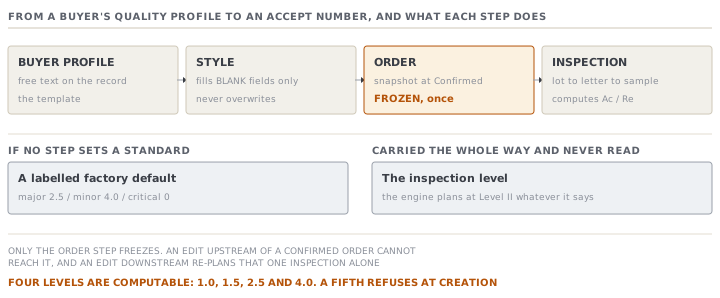
Two details in that chain repay knowing.
The snapshot freezes the required inspections and the special tests even when the style carries no AQL standard at all. Those are independent: a buyer can demand a pre-shipment check without ever naming an AQL. Lesson four is about what that demand does.
And when nothing along the chain sets a standard, the inspection does not stop. It falls back to a labelled factory default of major 2.5, minor 4.0 and critical 0. The plan records that it came from nowhere, so a screen can say so rather than presenting a default as the buyer's specification.
Four levels, and what happens to a fifth
The engine supports exactly four AQL levels: 1.0, 1.5, 2.5 and 4.0. Ask it for anything else and it refuses with a message naming the four it knows.
That matters because the two forms do not match. On the style, the AQL fields are a dropdown built from those four values. On the buyer, the same field is free text. So a buyer profile can hold a perfectly real Z1.4 level that the engine cannot compute. The style inherits it into a blank field, and the order freezes it. The failure then surfaces much later, when somebody tries to create the final inspection and gets a refusal instead of a plan.
The fix is on the buyer record and it costs nothing. If you use anything other than the four, ask whether the engine can price it before the order is confirmed.
The plan for ORD-1427
The engine implements single sampling, normal inspection, at General Inspection Level II, from the master table shared by ISO 2859-1 and ANSI/ASQ Z1.4. The lot size chooses a code letter, the code letter chooses a sample size, and the sample size crossed with the AQL gives an accept and a reject number.
Four thousand eight hundred pieces falls in the band that runs to ten thousand, which is code letter L, sample size 200.
| Class | AQL | Accept | Reject | What it means |
|---|---|---|---|---|
| Critical | 0 | — | any | Zero tolerance. One critical fault rejects the lot |
| Major | 2.5 | 10 | 11 | Ten or fewer majors in the sample of 200 passes |
| Minor | 4.0 | 14 | 15 | Fourteen or fewer minors in the same sample passes |
One sample, judged three times. That is the real garment rule, and the app does it directly: the three classes share a single sample size, and each gets its own acceptance number off it. More minors are allowed than majors, and no criticals are allowed at all. Critical never goes through the AQL table. Its level is a flag value of zero, and any count above zero rejects.
The sample size moves in steps, which surprises people. A lot of 900 and a lot of 1,200 both land on code letter J, and both give a sample of 80. A lot of 2,400 and a lot of 3,200 both give 125. Adding three hundred garments to an order often changes nothing about how many get inspected. Crossing a band boundary changes it a great deal.
When the plan's sample size meets or exceeds the lot, the app caps the sample to the lot and marks the inspection as 100% inspection. A lot of 30 pieces at AQL 1.0 resolves to a sample of 32, which is more than the lot holds, so the plan becomes an inspection of all 30.
The setting that is carried and never used
The chain faithfully copies an inspection level from the buyer to the style to the order. Read the engine and you will find it takes a lot size and an AQL, and nothing else. The code letters it uses are the General Inspection Level II ranges, written into the code.
So the inspection level on your order is a recorded intention, not a control. It prints on the tech pack and it tells a human reader what the buyer asked for. It does not change a single sample size. If your buyer specifies Level I or Level III, the plan the app builds is still Level II, and somebody has to notice.
The other sample, the one nobody sizes
A measurement section has a sample of its own, counted in garments rather than in pieces of a defect tally. The printed sheet lays out blank garment columns for the inspector to fill, and it prints six of them.
The record has a field for a different number, and the model that defines it says the inspector can change it. Search the application for anything that writes that field and you find nothing. No form, no button, no action. It is always empty, so the sheet always prints six columns. You can add more garments in the capture grid afterwards, one at a time, up to a limit of twenty.
Check yourselfOstrella tells Nigora their AQL for majors is 1.5 rather than 2.5, and she updates the buyer record that afternoon. ORD-1427 was confirmed last week. Which inspections will run at 1.5?Show the answer
None of them, on this order. The buyer edit changes the buyer record only. It reaches a style through the blank-only copy that runs when a style is linked, and that copy will not overwrite a style field that already holds 2.5. And even if the style did change, ORD-1427 took its snapshot at confirmation and the snapshot cannot move. The new level will apply to styles whose quality fields are still empty and to orders confirmed after those styles are set up. To apply it to ORD-1427 the inspector has to set the level on the inspection itself, which re-plans that inspection and nothing else.
Check yourselfDilnoza is planning the final AQL on a delivery of 620 pieces rather than the whole order. What sample does she get, and why is that not simply the whole-order plan scaled down?Show the answer
Six hundred and twenty falls in the band that runs to 1,200, which is code letter J, sample size 80. The whole order of 4,800 would have given letter L and a sample of 200. The relationship is deliberately not linear. A sampling plan buys a level of confidence, and a smaller lot needs proportionally more of itself inspected to reach the same confidence. So four deliveries of 1,200 inspected separately means four samples of 80, which is 320 garments, against the 200 a single lot of 4,800 would have needed. That is more work, and it is the correct amount of work, because four deliveries are four chances to ship a bad one.
Prompt · Trace the AQL standard my order will actually be judged against
Before confirming an order, and any time a buyer tells you their AQL has changed.
Help me work out which quality standard a MerchandiserOS order will really be inspected against, rather than the one I think I set.

I will tell you: the AQL values on the buyer record; the AQL values on the style; whether the order is still Draft or already Confirmed; and what the buyer has told me their standard is.

The chain works like this. The buyer's profile fills only the EMPTY quality fields on a style, matched by buyer name, and never overwrites a value somebody typed. Confirming an order copies the style's values onto the order, once and exactly, and later style edits cannot move it. If no standard is set anywhere, inspections fall back to a labelled factory default of major 2.5, minor 4.0 and critical 0. The engine supports only four AQL levels: 1.0, 1.5, 2.5 and 4.0.

Work through the chain step by step with my values, and tell me the number an inspection created today would actually use. Show me which step decided it.

Then check three failure modes explicitly. Is any AQL value outside the four the engine supports, which will fail when somebody creates a sampled inspection? Is the order already confirmed, so a buyer change cannot reach it? Is the style carrying a value that is silently blocking the buyer's profile from filling it?

Finally, tell me what I have to do to change it on THIS order, given where it is in the chain. Do not tell me to update the buyer record if the order is already confirmed.
AI can make mistakes — check anything you act on.