Lessons · Lesson 1 of 5
Ten types on one frame
What a quality inspection is inside MerchandiserOS, the ten types it can be, which sections each one captures, and what the printed sheet does and does not carry.
Lesson 1 of 5 · 22 min
What this lesson is about
Most factories run several kinds of quality check. Each one usually lives on its own paper form. This app keeps all of them on one record shape. What changes is which sections you are asked to fill in, and whether the check needs a sampling plan. Get this wrong and you open the wrong kind of check. You then find no place to put what you measured, and the work is recorded nowhere.
Chortoq Knitwear is a children's-wear knit factory at Chortoq, in the Namangan region of Uzbekistan. It runs three sewing lines and sells almost entirely into the European Union. Five people appear across this course.
- Ulugbek Tursunov owns the business and is the workspace Owner.
- Dilnoza Rasulova manages quality and is the only person besides the Owner who can record a verdict.
- Jasur Qodirov keeps the fabric store and runs the incoming checks.
- Nigora Salimova is the merchandiser who answers to the buyer.
- Sardor Yodgorov runs finishing and pack-out.
The garment carried through all five lessons is STY-486, a child's long-sleeve cotton-jersey top for Ostrella, a European children's-wear chain. Its order is ORD-1427.
Say the basis once, because the whole course rests on it. Every heading, button label, field name, message, count and threshold in these pages was read out of the application's own code, not out of a description of it. Where a lesson gives an arithmetic result, the working is shown so you can redo it. Where something depends on how your own factory is set up, the lesson says so and names the setting.
One record, ten labels on it
Dilnoza clicks New inspection. What she is really choosing is a type. The type is not a category for filtering later. It decides three things at once, and it decides them at the moment the record is created.
It decides the phase the check belongs to, which is one of pre-production, in production, or final and shipment. It decides which capture sections appear on the screen. And it decides whether the app asks for a lot size and an AQL level — AQL is the Acceptable Quality Limit, the share of faults a lot may carry and still pass. That last one is the difference between a check you sample and a check you simply perform.
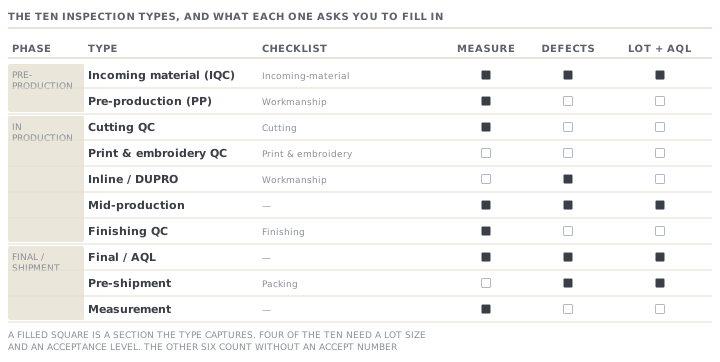
The catalogue holds ten types and eight possible sections. No type uses more than three sections.
| Type | Phase | Sections it captures | Sampled? |
|---|---|---|---|
| Incoming material (IQC) | Pre-production | Incoming-material checklist · Measurement · Defect tally | Yes |
| Pre-production (PP) | Pre-production | Workmanship checklist · Measurement | No |
| Cutting QC | In production | Cutting checklist · Measurement | No |
| Print & embroidery QC | In production | Print & embroidery checklist | No |
| Inline / DUPRO | In production | Workmanship checklist · Defect tally | No |
| Mid-production | In production | Defect tally · Measurement | Yes |
| Finishing QC | In production | Finishing checklist · Measurement | No |
| Final / AQL | Final / shipment | Defect tally · Measurement | Yes |
| Pre-shipment | Final / shipment | Defect tally · Packing checklist | Yes |
| Measurement | Final / shipment | Measurement | No |
Three things in that table are worth pausing on, because each one catches somebody out.
Only four of the ten are sampled. Incoming, mid-production, final AQL and pre-shipment ask for a lot size and produce an accept and reject number. The other six do not. So a DUPRO check — DUPRO is short for during production — has a defect tally with no acceptance number behind it. You count what you find, and the count is evidence rather than a verdict against a plan.
Pre-shipment does not measure. It captures a defect tally and a packing checklist. If you want the garment measured again before it leaves, the type that does that is finishing QC or a measurement check, not the pre-shipment one.
Measurement is a type of its own, and it behaves differently from all the others. Everything in lessons three and four turns on that difference.
The suggestion, and where it comes from
Dilnoza does not usually pick a type from a list of ten. The app suggests one. The suggestion is read off the order's current production stage, not off a calendar and not off a milestone.
The mapping is fixed and short. Fabric in suggests incoming. Knit or dye suggests pre-production. Cut suggests cutting QC. Print or embroidery suggests print and embroidery QC. Sew suggests inline DUPRO. Wash suggests mid-production. Finish suggests finishing QC. The QC stage suggests final AQL. Pack suggests pre-shipment.
When the order has no active stage the app falls back to its status. A shipped or received order suggests pre-shipment. An order in production suggests final AQL. Anything else suggests pre-production.
This is a suggestion and nothing more. It cannot block you, because you can pick any of the ten. What it can do is quietly pick a type with no defect tally on a day when the defect tally is the thing you needed.
Two lifecycles, and a status that means less than it says
A typed inspection moves through planned, then printed, then in progress, then completed. A measurement inspection uses a different pair, open and analyzed, and never enters the other three.
The word printed deserves a warning. It is set when somebody opens the print page, not when they press the print button. The page marks the record as soon as it loads. So a record showing printed means one thing only: a person looked at the blank sheet on a screen. It does not mean paper exists, and it does not mean anybody carried it to the floor.
Above the capture screen sits a three-station strip: Set up, Inspect, and a Decision marked as a gate. It is honest about progress. The decision station turns green only on an accept. It shows an attention state on any other recorded verdict, and stays pending while nothing has been captured.
What the printed sheet carries
The blank sheet is a real document, laid out for a clipboard. It prints your factory name, the inspection number, the order, the buyer and the style. For a sampled type it also prints the lot size, the sample size with its code letter, the AQL level, and the accept and reject numbers. Then it prints the defect list with a count column, and a measurement grid with a fixed handful of blank garment columns to fill in.
Two lines on that sheet are worth knowing before an auditor finds them.
The line labelled Printed carries the date the inspection record was created, not the date the sheet came out of the machine. Open a three-week-old inspection and print it today, and the sheet is dated three weeks ago.
The line labelled Inspector is an underscore. It is a blank for a pen. The application never asks who inspected, never stores it, and never reads it back off the paper. Lesson three is about how far that goes.
Check yourselfJasur is about to check a delivery of jersey against the approved lab dip. He opens a new inspection, the app suggests the type, and he accepts it. What has he got, and what will he not be able to record?Show the answer
If the order's current stage is fabric in, he has an incoming material check: an incoming-material checklist of five items, a measurement section, and a defect tally with a sampling plan. That is the right tool for shade, weight, width, trims and supplier documents. If the order has moved on and the stage is now cut or sew, the suggestion will have handed him a cutting or a DUPRO check instead, and there is no incoming-material checklist on either of those. The suggestion reads the production stage, not the job he actually has in front of him, so on a delivery that arrives late he should override it.
Check yourselfAn auditor asks Dilnoza to show who performed the final inspection on a shipped order, and when the blank sheet was issued. What can she produce from the app, and what has to come from somewhere else?Show the answer
She can produce the inspection number, the order, the style, the sampling plan, every defect count and every measurement reading, and the computed result with the date it was analysed. She cannot produce the inspector's name, because the app never captures it. The only place it exists is a handwritten line on the paper sheet, if the sheet was kept. She also cannot produce the issue date of the sheet: the line labelled Printed shows the date the record was created. If the audit needs both, then the paper file is the record and the app is the working copy. That is the wrong way round for a compliance system, and it is worth knowing before somebody asks.
Prompt · Which inspection type should I actually open?
Before creating an inspection, when the app's suggestion and the job in front of you might not be the same thing.
Help me choose the right MerchandiserOS inspection type for the job I actually have, rather than accepting the suggested one.

I will tell you: what I am about to check and why; the order's current production stage; whether the goods are on the dock, on the line, in finishing, or packed; and whether my buyer requires any specific gates on this order.

The application offers ten types. Incoming material (IQC) captures an incoming-material checklist, a measurement section and a defect tally, and it is sampled. Pre-production captures a workmanship checklist and measurements. Cutting QC captures a cutting checklist and measurements. Print and embroidery QC captures a print checklist only. Inline DUPRO captures a workmanship checklist and a defect tally. Mid-production captures a defect tally and measurements, and is sampled. Finishing QC captures a finishing checklist and measurements. Final AQL captures a defect tally and measurements, and is sampled. Pre-shipment captures a defect tally and a packing checklist, and is sampled. Measurement captures measurements alone.

First tell me which sections I will need to record my findings in, based on what I said I am checking. Then name the type that has all of them. Say plainly if no single type covers it and I need two inspections.

Then warn me about anything I will NOT be able to record in the type you recommend. Be specific about the section that is missing rather than reassuring.

Finally, tell me whether the type you recommend is one of the two the ship gate reads: final AQL or pre-shipment. Only those two affect whether the order can be marked shipped. If it is neither, say so, so I know this inspection is a record and not a gate.
AI can make mistakes — check anything you act on.