Lessons · Lesson 1 of 5
The one money field
Which money the application stores against an order, where that one number comes from, and why every later question in this course is about a number kept somewhere else.
Lesson 1 of 5 · 22 min
What this course is about
Something goes wrong on an order. The buyer wants money off. Or the mill has to be paid for a fault that was not its own. Or the owner wants to know whether the job earned anything at all. Each of those is a question about money attached to one order.
This lesson asks a narrower question first, and the answer to it decides all the rest. What money does this software actually hold? Not what a factory system usually holds. What this one holds, in its own tables, today.
The stakes are simple. Suppose you believe the app keeps a running account of an order. If it does not, you will look for a number that was never written, and you will find a blank. Worse, you may read a screen as a settled position when it is only a plan. The way out is not to distrust the software. It is to know which of your questions it was built to answer.
Ratmalgoda Apparels is a knit and woven casualwear factory in Katunayake, Sri Lanka. It runs six sewing lines and sells into northern Europe. Five people appear across this course.
- Sanjeewa Amarasinghe is the owner. He signs in as Owner / GM, and lesson 5 shows why that matters more here than anywhere else in the app.
- Nadeesha Gunaratne is the merchandiser who owns the order.
- Thilini Senanayake leads quality.
- Chaminda Dissanayake is the sourcing officer.
- Chathura Rajapaksha plans the lines.
The order followed through all five lessons is ORD-1358 for Brekstad Retail, a Norwegian outdoor and casual chain. The style is STY-347, a women's brushed-cotton hooded sweat, 12,000 pieces.
Say the basis once. Every field name, label, message and count in this course was read out of the application's own source. None of it comes from a description of what software like this usually does. Where something is set per factory, the lesson says so and names where the setting lives. Where the application does not do a thing at all, the lesson says that too, because on this subject the absences are the lesson.
Sixty-one columns, one amount
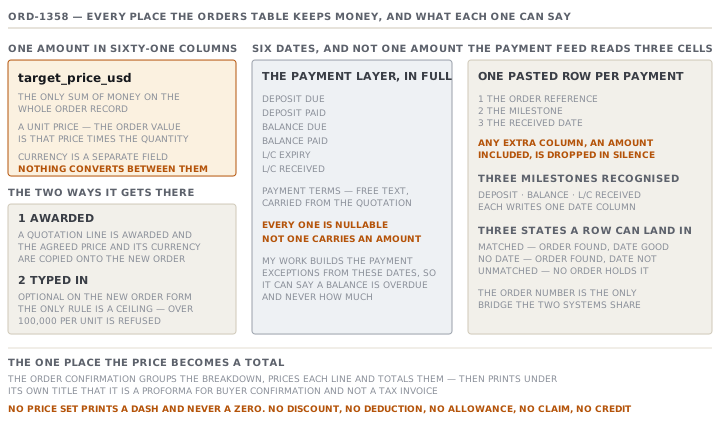
The orders table has sixty-one columns. Codes, dates, references, statuses, quality settings, document flags, tolerance, the buyer, the style. Exactly one of them holds a sum of money, and its name is target_price_usd.
That is not an oversight. The order model's own comment on the payment block says so in plain words. The app is not an ERP and it never moves money. It tracks when a payment milestone is due, and whether a human recorded it as settled.
So the single money field is a unit price, and the order's value is that price multiplied by the quantity. Nothing on the order records what was invoiced, what arrived, what was held back, or what the job cost to make.
Where the number comes from
There are two ways it gets there, and they are not equally reliable.
The first is an award. When a quotation line is awarded, the app creates the order and copies the agreed price across. A comment beside that line in the source says so directly: the agreed price becomes the order target. The quotation's currency is copied with it, so the pair stays coherent.
The second is a person typing it. On the New Order form the target price is marked optional, and an order can be created without one. The rule that guards the field is a ceiling rather than a requirement. It refuses anything above a hundred thousand per unit as implausible.
What the proforma proves
The one place the app turns that price into a total is the order confirmation document. You reach it from the order and print it for the buyer. It groups the colour and size breakdown into lines, prints a quantity and a unit price against each, and totals them.
Two details on that page are worth more than the arithmetic.
The first is what the document calls itself. Under the title it prints a line saying it is a proforma for buyer confirmation and not a tax invoice. The application is telling you, on its own commercial document, that no invoice exists in here.
The second is what it does with a blank. If no unit price is set, every amount prints as a dash, and a note underneath says the price must be set to value the proforma. It does not print zero. An absent price stays absent, which is the honesty rule the whole app applies to a missing number.
| On the page | Where it comes from |
|---|---|
| Quantity per colourway and size | The order's own breakdown lines |
| Unit price | The single target-price field |
| Amount, and the total | Quantity multiplied by that one price |
| Buyer PO reference, L/C reference | Reference fields on the order, text only |
| Incoterm, basis, line-feed date | Order terms |
| Two signature lines | Printed blank, for a pen |
Notice what is not in that table. There is no discount line, no deduction line, no allowance, no claim, no credit note. The document can express one price and one quantity. Nothing that happens afterwards can change what it prints.
Money as dates
The payment side of an order is real and useful, and it is made entirely of dates. There are six of them, plus the buyer's agreed payment terms as free text.
| Field | What it records |
|---|---|
| Payment terms | The buyer's agreed terms, as text, carried from the quotation at award |
| Deposit due, deposit paid | When the deposit was due, and the date a human recorded it received |
| Balance due, balance paid | The same pair for the balance |
| L/C expiry, L/C received | The credit's expiry, and the date it arrived |
Every one of them can be left empty, and an absent date stays absent. None of them carries an amount. The payment exceptions on My Work are built from these dates. So the app can tell you a balance is overdue, and it can never tell you how much it is.
The money line, enforced in code
The clearest statement of all this is in the ERP integration. A factory can paste a payment feed exported from its accounting system, one row per line, and the app matches the rows to orders by order number.
The parser reads three cells from each row. The order reference, the milestone, and the received date. The comment above it calls this the money line, and says any extra column is ignored, an amount included. It is not that an amount would be awkward to store. The app is built to drop it.
Three milestones are recognised, each spelled several ways: deposit, balance, and letter of credit received. Each writes to one date column on the order. Every row lands in one of three states. Matched, when the order resolves and the date is valid. No date, when the order resolves and the date is not. Unmatched, when no order carries that reference.
Check yourselfNadeesha opens ORD-1358 and wants to know what Brekstad still owes on it. Walk through what the app can and cannot tell her, and name the field behind each answer.Show the answer
It can tell her the agreed unit price, from the single target-price field, and the quantity. So it can multiply them into an order value on the proforma. It can tell her whether a deposit and a balance were recorded as received, and on what dates, from the four payment-clock dates. It can tell her the agreed payment terms as text. It cannot tell her the amount of the deposit, because no field holds one. It cannot tell her what was invoiced, because the app issues a proforma and says on the document that it is not an invoice. It cannot tell her whether anything was deducted, because there is no deduction field anywhere on the order. The honest answer is that the app knows what was agreed and when money moved. The amount of every movement lives in the accounting system.
Check yourselfA consultant proposes recording chargebacks by pasting them into the ERP payment feed as an extra column. Say why that will not work, and say what it tells you about the design.Show the answer
The parser reads exactly three cells and ignores everything after them, and the comment above the function says so as a deliberate rule rather than a limitation. The column would be dropped silently, which is worse than being refused, because the paste would appear to succeed. What it tells you is that the boundary is intentional. The application owns dates, statuses, records and evidence. The ledger belongs to the accounting system. Anything that puts an amount inside the app is working against a line the authors drew on purpose. The right move is to record the fact and the evidence here and the money there, joined by the order number that the feed already matches on.
Prompt · What money does the app actually hold on this order?
Before you promise anyone a number that sounds financial, and before you go looking for a field that may not exist.
Help me work out which of my money questions about a MerchandiserOS order the application can answer, and which have to be answered somewhere else.

I will tell you: the order number, whether it came from an awarded quotation or was typed by hand, whether a target price is set on it, which payment dates are filled in, and what I am actually trying to find out.

The application holds exactly one money amount against an order, the target unit price, plus the currency the order is in. Nothing converts between them. An order created by awarding a quotation gets that price copied from the awarded line. An order typed by hand may have no price at all, because the field is optional. The order confirmation document multiplies that one price by the quantity, and prints on itself that it is a proforma and not a tax invoice. With no price it prints a dash rather than a zero. The payment side is six dates and a free-text terms field, and no amount. The ERP payment feed reads three cells per row and deliberately ignores any amount column.

First tell me plainly whether my question is answerable inside the app. If it is, name the exact field it comes from.

If it is not, say so in one sentence rather than suggesting a workaround. Then name where the number really lives, and what key joins it back to the order.

Finally, warn me about any number I might mistake for an answer. Be specific about which screen would mislead me, and why.
AI can make mistakes — check anything you act on.