Lessons · Lesson 2 of 5
Where a claim begins
The three gates that stand between a fault and a shipment, what each one refuses, what each one lets a human override, and the exact sentence the app writes when they do.
Lesson 2 of 5 · 24 min
What this lesson is about
A claim almost never starts with a claim. It starts months earlier, when somebody decides to carry on. The fabric was off shade and the line had to run. The order was short and the container was booked. Each decision was probably right at the time. What decides whether it becomes an argument later is whether anybody can show why it was taken, by whom, and against what evidence.
This lesson walks the three places where this application stops that decision and asks for it in writing. It is deliberately exact about the words on screen, because a defence built later is built out of exactly those words. It is just as exact about what the app does not keep, and that turns out to be the important half.
The gate that names a document it cannot hold
The first gate is the incoming inspection. When an order's most recent completed incoming inspection has computed a reject, the fabric on the floor failed its inbound check, and two things happen.
A red exception appears on the My Work board of the merchandiser and the QA lead. Its description reads, with the real inspection and order numbers filled in: "MINS-1017 on ORD-1358: re-inspect it or get the buyer's concession before cutting."
Then, when somebody tries to issue that material to the line, the issue form refuses with a longer version: "Brushed cotton fleece can't go to the line yet — incoming inspection MINS-1017 FAILED for this order. Re-inspect it, get the buyer's written concession — or tick 'Issue anyway' to record an override."
Read those two messages together and something is missing. Both name a buyer's written concession as the honest way forward. The application has no field for one. No column, no table, no status, no record type. The word appears in these two messages and nowhere else a user can see.
Three tiers, and what each one writes
The application's rule for a blocked action is not a single rule. There are three tiers, and knowing which tier you are standing in tells you whether an override exists at all.
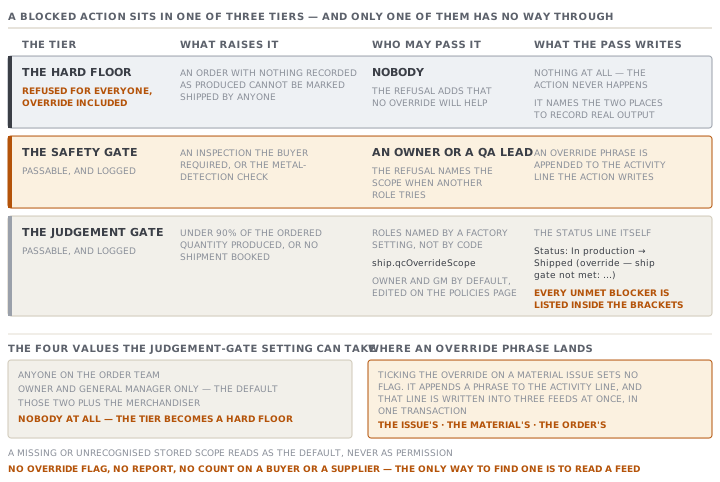
| Tier | What happens | Who may pass it |
|---|---|---|
| Hard floor | Refused for everyone, override included | Nobody |
| Safety gate | Passable with a deliberate override, logged | Owner or QA lead only |
| Judgement gate | Passable with a deliberate override, logged | Roles named by a factory setting |
The hard floor on shipping is the cleanest example in the app. An order with zero garments recorded as produced cannot be marked shipped by anyone. The refusal says so, and adds that no override will help: nothing has been produced, and an order with no production cannot be shipped even with an override. The message then tells the person to record the real output first, and names the two places to do it.
The safety tier covers the inspections a buyer required, and the metal-detection check. Passing one of those is possible, and the app scopes it. Overriding a required safety gate needs an Owner or a QA lead, and the refusal says so by name when a different role tries.
The judgement tier is the ordinary ship-early decision, and the gate it passes is a real one. Production must have reached 90% of the ordered quantity, and a shipment must be booked. Its scope is a factory setting rather than a rule fixed in the code. It is stored as a policy under the key ship.qcOverrideScope, and the Owner edits it on the policies page under settings. It defaults to Owner / GM only. When a role outside that scope tries, the refusal names the limit and tells them to ask one of the permitted people.
That setting has four values, and one of them is worth knowing before you need it. Anyone on the order team. Owner / GM only. Owner / GM plus the merchandiser. Or nobody at all, which the setting itself calls a hard gate with no override. Choosing the last one turns the judgement tier into a hard gate for the whole factory, with no override left anywhere. A missing or unrecognised stored value reads as the default, never as permission.
What the override actually records
This is the part worth memorising, because it is the whole audit trail.
Ticking the override on a material issue does not set a flag. It appends a phrase to the activity line the issue writes, and that line goes into three separate feeds at once, in one transaction: the issue's own activity, the material's activity, and the order's activity. The phrase reads "(override — Brushed cotton fleece issued despite failed incoming inspection MINS-1017)".
Marking an order shipped past its gate does the same thing to the status line. Instead of "Status: In production → Shipped" the order's activity records "Status: In production → Shipped (override — ship gate not met: …)", with every unmet blocker listed inside the brackets.
The shortfall the gate warns about and never blocks
The last piece is the one most likely to become a chargeback, and the app treats it as a warning on purpose.
Produced is not the same as shippable. The produced total counts pieces coming off the line before anyone has graded them. When a grade breakdown has been reported, the app compares first-quality pieces against what was ordered, and writes a named warning onto the ship gate. It says, with the real numbers in place, that only so many of so many are first quality. It breaks down what the rest are, and points at the order's Production tab.
Two settings decide how loud that warning is, and both are worth knowing before an argument starts.
- The buyer's quantity tolerance band is a percentage on the buyer record. It defaults to 3%, and is copied onto the order at confirmation, into a field the order then owns.
- A separate allowance decides when seconds and scrap are enough to raise an amber alarm rather than a green one. It is a fixed 3% in the source, not a setting.
The warning never blocks the shipment. The comment beside it gives the reason, and the reason is commercial rather than technical. A short shipment inside the agreed tolerance band, or one the buyer has conceded, is legitimate. The app will not turn a legitimate commercial outcome into a refusal.
There is a matching honesty rule underneath. With no quality data at all, the alarm reads unknown rather than green, and no warning is produced. Silence from this gate is never a claim that everything is fine.
Check yourselfORD-1358 ships eight days early on Sanjeewa's decision, with the final inspection not yet recorded. Six weeks later Brekstad raises a claim. Reconstruct what the app can show, and name the one thing it cannot.Show the answer
It can show the order's activity line for the status change. That line records the move to Shipped with the word override, the phrase saying the ship gate was not met, and every blocker that was outstanding, spelled out. It can show who was signed in when it happened and when, because the activity row carries an actor and a timestamp. It can show the ship gate's own warnings alongside, including any first-quality shortfall against the ordered quantity. What it cannot show is the money. There is no field for what Brekstad is claiming, no field for what was conceded in exchange for shipping early, and no link between the override and any later deduction. The defence exists in full, and the settlement does not exist at all.
Check yourselfChaminda wants a monthly report of every override taken in the factory. Say why the app cannot produce one, and what the cheapest honest substitute is.Show the answer
An override is not stored as a field. It is a phrase appended to the text of an activity line, so there is nothing to filter, count or group by. Three feeds carry the material-issue phrase, and the order's activity carries the ship phrase, so even the sources are scattered. The cheapest honest substitute is a discipline rather than a screen. Agree that every override is also written as a comment on the order, with a one-line reason and the buyer's response attached. Then one record per override exists in a place a person can list. That is a factory habit, and it should be described as one rather than presented as something the software does.
Prompt · Rebuild the record behind an override
When a buyer or an auditor asks why something shipped or was cut, and the answer is months old.
Help me reconstruct, from MerchandiserOS, the full record behind a decision to carry on past a blocked gate.

I will tell you: the order number, roughly when it happened, and what I think the decision was.

In this application an override is not a flag. It is a phrase appended to the text of an activity line. A material issued past a failed incoming inspection writes a phrase naming the material and the failing inspection number, into three separate feeds at once: the issue's activity, the material's activity, and the order's activity. An order marked shipped past its gate writes a status line that adds the word override and lists every blocker that was outstanding. Safety-gate overrides are restricted to the Owner or the QA lead. The ordinary ship-early override is restricted by a factory policy setting that defaults to Owner / GM only.

Walk me through where to look, in order, and tell me what phrase to look for in each feed.

Then help me write the reconstruction as a short factual note: what was blocked, what the app refused, who passed it, when, and what the app recorded as the reason.

Then name what is missing from that note and cannot be recovered from the app. Be blunt about it rather than filling the gap with something plausible.

Finally suggest one sentence I could add to our own working practice, so the next override leaves a record that does not need reconstructing.
AI can make mistakes — check anything you act on.