Lessons · Lesson 3 of 5
Codes, matches, and the row a human reads
How the app matches its own records to another system's codes, the five verdicts it returns, and which of them it refuses to act on.
Lesson 3 of 5 · 22 min
Two systems, two names for one supplier
Every system keeps its own names for the same things. A mill is one row here and another row in the ledger. The two rows agree about nothing except that the mill exists. Until somebody joins them, a document handed over is a document nobody can file.
Joining by name sounds simple, and it is the part that goes wrong. Names are neither unique nor stable. This lesson is about how the app joins them, and about the rows it refuses to join for you.
Corina has an export from Mirela: a list of the ledger's own codes and the names beside them. Three lists, in fact, because the app matches three kinds of thing.
Three lists, one field
The card is called Map to ERP data, and it holds three mappings. Each one is labelled with both sides of the join.
| In this app | In the ledger | Label on the card |
|---|---|---|
| Buyers | Customers | Buyers → ERP customers |
| Suppliers | Vendors | Suppliers → ERP vendors |
| Materials | Items | Materials → ERP items |
Each mapping writes one field on the app's record, and the card shows a count of how many carry it and how many do not. Nothing else about the record changes. The app is not importing the ledger's data. It is writing down what the ledger calls something the app already has.
The input is text, pasted. One code and one name per line, separated by a comma or a tab, quotes optional. Blank lines are skipped.
A header row is skipped too, but only when it looks like one on both sides at once: the first cell has to read like a code column and the second like a name column. A header that says something else is read as data. It will appear in the preview as a row that matches nothing, which is the honest outcome. The app cannot tell a strange header from a strangely named supplier.
Five verdicts, and only one of them acts
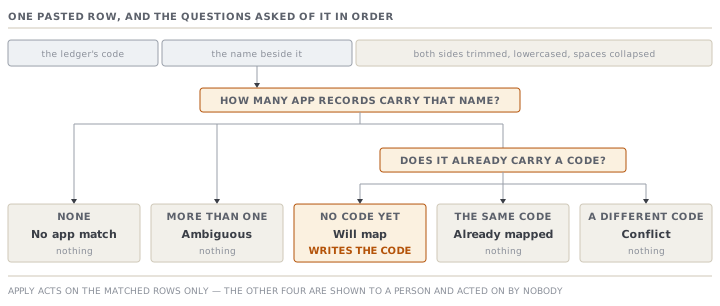
Matching is by name. Both sides are trimmed, lowercased, and have runs of spaces collapsed to one. Then every pasted row gets exactly one of five verdicts.
| Verdict | Label shown | Meaning | On apply |
|---|---|---|---|
| Matched | Will map | One app record with that name, and it has no code yet | Writes the code |
| Already mapped | Already mapped | One match, already carrying this same code | Nothing |
| Conflict | Conflict — a different code | One match, carrying a different code | Nothing |
| Ambiguous | Ambiguous — several matches | More than one app record shares the name | Nothing |
| No app match | No app match | No app record has that name | Nothing |
Read the last column and the design becomes clear. The count of what apply will do is defined as the count of matched rows, and nothing else. Four of the five verdicts are shown to a person and acted on by nobody.
That is a deliberate refusal, and it is the interesting half. Two of those four are the cases where guessing would be actively harmful. A conflict means the app already believes this record has a different code, and picking a winner automatically would silently repoint every future document at a different account. Ambiguous means two of Corina's suppliers are called the same thing, and the app cannot know which one Mirela meant. The pasted list has a code and a name, and nothing else to break the tie. A wrong guess there is worse than no guess, because it will look mapped.
What an unmapped record costs at export
A record without a code is not blocked from anything. It exports, and the cell where its code would be says ⚠ not mapped.
That flag has three states, and the difference is worth reading. On a purchase-request line, the item cell shows the code when the material has one. It shows the flag when the line has a material with no code. It shows a blank when the line has no material at all, which is a free-text line somebody typed. Blank and flagged are different claims. Flagged means a thing exists and has not been joined. Blank means there is nothing to join.
The export counts the flagged cases and the button reports the number. A sales order counts as one unmapped when its buyer has no code. A purchase-request line counts as one when either its item or its vendor is flagged.
There is one more thing worth knowing about how a sales order finds its buyer's code. The mapping writes the code onto a specific buyer record, by record. The export then looks the code up by the buyer's name on the order. So two buyers sharing a name — the very case the ambiguous verdict refuses to touch — would also be indistinguishable at export time. The two halves of the system are consistent about their weakness, which is better than one of them pretending to be stronger.
The other direction: three verdicts, and a date
The inbound feed is the mirror image, and it is smaller. Mirela sends a list of orders and payment milestones. Corina pastes it into Import from ERP — payment status, previews, and records.
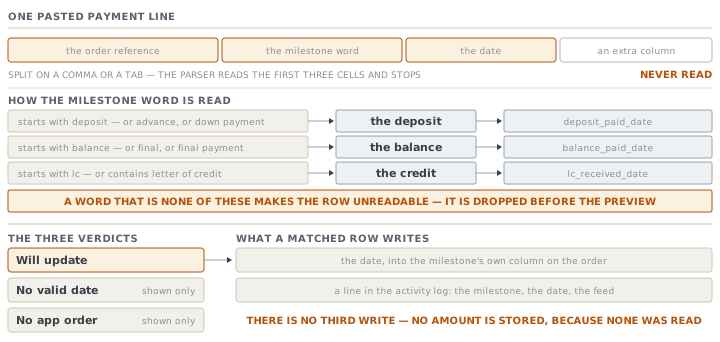
A line is an order reference, a milestone, and a date. The milestone is read loosely, because finance systems do not agree on words. Anything starting with deposit, plus advance and down payment, is a deposit. Anything starting with balance, plus final and final payment, is the balance. Anything starting with lc, or containing letter of credit, is the credit. A word that is none of these makes the row unreadable, and the row is dropped before it reaches the preview at all.
| Verdict | Label shown | Meaning |
|---|---|---|
| Matched | Will update | The order was found and the date is a real date |
| No date | No valid date | The order was found, the date is missing or malformed |
| Unmatched | No app order | No order in this app carries that reference |
Applying a matched row does two things and no more. It writes the date into the milestone's own column on the order. And it writes a line into the order's activity log naming the milestone, the date, and that it came from the status feed. There is no third write. No amount is stored, because no amount was read.
Two limits are worth naming while the mechanism is fresh. First, matching is by order number, so the clock this feed can reach is the order's clock. A part-shipped order with two invoices has one deposit date and one balance date here, and the feed has no way to say which shipment a payment belongs to. Second, a date that is present but written in another format is not a matched row. The parser accepts one shape and treats anything else as no date at all. That is a refusal rather than a guess, and the preview says which rows it applies to before anything is written.
Check yourselfCorina pastes 40 vendor rows. The preview says 31 will map, 4 already mapped, 3 conflict, 1 ambiguous, 1 no app match. She presses apply and the app reports 31. Where did the other 9 go, and which of them is a data-quality problem she should fix in this app rather than in the ledger?Show the answer
Nowhere — they are still on screen and nothing was written for them. Apply acts on the matched rows only, and its count is defined as exactly that. The four already-mapped rows are a genuine no-op and need nothing. The one with no app match is usually a vendor that exists in the ledger and not here, which is normal and not a problem to fix. The three conflicts are a human decision about which code is current, and the answer usually lives in the ledger. The one that is her problem in this app is the ambiguous row. It means two supplier records share a name, and that duplication causes trouble far beyond this mapping. It will confuse the export's lookup, every picker in the app, and anyone reading a purchase order. Merge or rename them here, then paste the list again and it will settle on a single match.
Check yourselfMirela's export has five columns, and the fourth is the amount paid. Alina says they should strip that column before pasting, to be safe. Is she right?Show the answer
She is not wrong to be careful, and she does not need to. The parser reads the first three cells and stops. There is no fourth read, no validation of the fourth cell, and no place the value could be stored — the app has no column for an amount on this path. Stripping it changes nothing about the result. What is worth doing instead is checking the preview, because the parser is loose in a different place. It splits on commas and tabs. An amount written with a thousands separator inside a comma-separated file shifts every cell after it by one place. That does not put an amount into the app, but it can turn a good date into no date. That is a formatting problem, and the preview will show it to her before anything is recorded.
Prompt · Plan my master-data mapping before I paste it
Before the first mapping paste, especially where the two systems have grown their supplier lists separately for years.
Help me plan a master-data mapping between MerchandiserOS and my finance system so the first paste does as little damage as possible.

I will give you: how many buyers, suppliers and materials I have here, roughly how many rows the finance export has, and a sample of twenty name pairs from both sides.

Matching is by name, normalised for case and spacing, and nothing else. For my sample, predict the verdict on each row: will map, already mapped, conflict, ambiguous, or no app match. Show your reasoning where a pair is close but not identical. Near-misses are the whole problem.

Then separate the work into two lists. One is work in the finance system. The other is work in MerchandiserOS, and it is the one people skip: duplicate records that share a name, trailing legal suffixes on one side only, and abbreviations nobody standardised.

Finally, tell me what I should fix BEFORE pasting rather than after, and why fixing an ambiguous pair afterwards is harder.

Do not invent a matching rule the app does not have. There is no fuzzy match, no code match and no address match here.
AI can make mistakes — check anything you act on.