Lessons · Lesson 5 of 5
Mail that becomes work
How a mailbox becomes a queue of triaged work, the allow-list that decides what is read, and the four changes the app may propose from a message.
Lesson 5 of 5 · 18 min
The last integration is the messy one
The other connections in this course exchange rows with a machine. This one reads what people wrote to each other. That is a different problem.
A supplier does not send a status field. She sends a paragraph, in her own words, about a delay she would rather not spell out. Turning that into work means guessing. The app is built around what happens when a guess is wrong. This lesson is about the gate before the guessing. It is also about the short list of things a guess may touch.
Alina's suppliers write to a shared mailbox. Corina connected it. Two of the emails in this lesson do something useful, and one of them nearly does something wrong.
Two ways in, one pipeline
There are two mailbox cards, because company email is not all in one place.
A Google mailbox connects by consent, and the scope the app asks for is read-only. Any other mailbox connects with an address and a password, and the order of operations there is the design. The app works out the likely settings, proves one of them with a real login, and only then stores anything. Nothing is saved on a failed login. So a card that says connected can never mean that the app kept what somebody typed.
It also refuses in the one case where accepting would be worse. Type a Google address into the password form and the app declines, sending you to the consent path instead. There is a better route already built, and taking it means the app never holds that password at all.
After the fetching, the two routes are the same code. There is one pipeline that turns a parsed email into a stored message. The comment on it explains why: two copies of that loop would drift, and the same drift has already happened twice elsewhere in this codebase.
The gate, and the empty list
Before anything is stored, a message passes four tests in order. Three of them are hygiene. The fourth is the one that matters.
- Seen before? A message whose external id is already stored is a duplicate and stops here.
- Anything in it? No subject and no body, and it stops here.
- Is it ours? The connected account's own address is not inbound mail, so its sent copies stop here.
- Is the sender on the list? If not, it stops here — and is counted rather than kept.
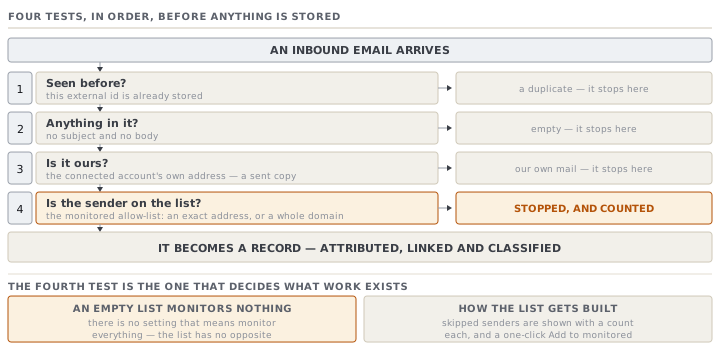
The list is the Monitored accounts card, and it is an allow-list with no opposite. There is no setting that means monitor everything. An entry is an exact address or a whole domain, and it can be linked to a buyer or a supplier so that mail from it is attributed without guessing.
The consequence is stated in the card's own words: an empty list monitors nothing. Connecting a mailbox and stopping there ingests no mail at all, and the screen will look broken to somebody who does not know that. The app helps rather than hiding it. Senders it skipped are shown with a count each, and each has a one-click Add to monitored. So the way you build the list is by connecting, waiting, and approving the senders that actually wrote.
From a paragraph to a record
A message that gets through is attributed, linked and classified.
Attribution prefers the list. If the monitored entry names a buyer or a supplier, that is the party, with no guessing at all. Only an unlinked entry falls back to matching the address against contacts.
Linking is by code in the text. The app looks for an order, purchase order, style or request code in the subject and body together, and resolves the first order or purchase-order code it finds to a real record. When nothing resolves, the message is stored anyway, labelled Unmatched — needs review, and counted as needing a human.
Classification is by keyword, into one of six intents: ship date, price, delay, quality, approval, and general. The keywords are literal and the first match wins, in a fixed order that puts quality and delay ahead of approval.
That crudeness is deliberate, and it is the reason for everything in the next section. A keyword list has no idea what a sentence means. "We cannot approve this yet" contains the word approve. It matches nothing earlier in the order, so it is classified as an approval.
The four things a message may propose
When a message looks like it would change a record, the app proposes the change rather than making it. There are exactly four changes it may ever propose.
| Proposal | Raised when | What it would write |
|---|---|---|
| Approve the pending development round | An approval message on an order with a round awaiting a decision | A decision on that round |
| Log a T&A milestone actual | A shipping or delivery word matches an open milestone of that kind | An actual date on the milestone |
| Update the PO required-by date | A delay message on a purchase order, with a date that differs | The new required-by date |
| Flag the order at risk | A delay or quality message on an order, when none of the above fit | A comment on the order |
Three properties make that list safe, and all three are needed.
It is short. Four kinds, closed, and every one of them either reversible or a note. Nothing on it issues, ships, prices or pays.
It is never automatic. The proposal sits on the message with an Approve and a Dismiss, and a person decides. The wording is a suggestion — the round is proposed for approval because the buyer appears to have signed it off, and it is Alina who has to agree that they did.
It is re-checked on the way out. The apply path does not trust the stored proposal. It reloads it, refuses one that is not pending, refuses a kind that is not on the list, and routes each permitted kind to the same tested action a person would have used by hand. So the change is logged and undone the same way any manual change is.
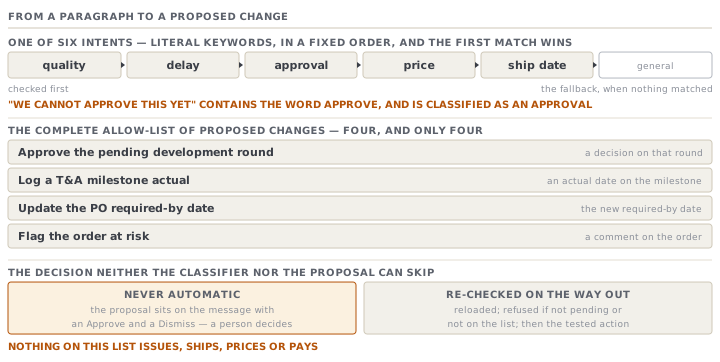
Put the keyword problem beside that list and the design reads properly. Yes, "we cannot approve this yet" is classified as an approval, and yes, it will propose approving the round. And then it stops, and shows Alina a sentence saying the buyer signed it off, next to the message that says the opposite. The protection is not a cleverer classifier. It is that the classifier was never allowed to be the last step.
One sentence to be careful with
There is one place in this pipeline where the app says more than it has established, and an advanced reader should know it.
Every triaged message gets a summary. When the assistant is not running live, the summary is composed from real record data — the order's status, its ship date, the days remaining. Then it adds a verdict about risk. If the app found an exception raised against that order, the summary names it. If it found none, the summary says the order is on track.
That is a reassuring claim made from the absence of a negative, which is precisely the reasoning this application forbids elsewhere. It has one function whose whole job is to answer that question, and it answers from positive evidence. An order is on track only when sourcing has started, the quantity is confirmed and production has been recorded — and nothing is flagged. Missing all of that returns unknown rather than green. This summary does not call it. A brand-new order with no purchase orders and nothing produced will therefore be described to Alina as on track, in the same breath as a supplier's delay notice.
Read the summary as what it is — a note about whether an exception exists — and it is useful. Read it as a verdict on the order and it will mislead you, in exactly the direction that costs the most.
Check yourselfA supplier who has written every week for a year sends a delay notice, and it never appears in Messages. The mailbox card says connected and last checked ten minutes ago. Name three possible causes in the order you would check them.Show the answer
First, the allow-list. This is the most likely cause by a distance, and it is not a fault. Either the sender is not on it, or the entry was made for a different address. Or an exact entry was made where the supplier writes from several addresses on one domain. Check the skipped-senders list on the same screen — if she is there with a count beside her, that is the answer, and there is a one-click button to fix it. Second, duplication. If the message was somehow already stored once, a second delivery of the same external id is dropped as a duplicate, so check whether it is in Messages under an earlier date. Third, the self test. If the mail reached you as a copy from your own connected address, for example because it was forwarded internally rather than sent to you, it is treated as your own outbound and skipped. Notice that none of the three is a broken connection, which is why "connected" and "reading your mail" are shown as two separate facts on that card.
Check yourselfCorina wants triage to apply its proposals automatically for the two suppliers she trusts most, to save Alina the clicks. What does she gain, and what does she lose?Show the answer
She gains very little. The clicks she is removing are the review, not the work — the proposal is one line on a card that is already on screen, and approving it is a single button. What she loses is the only place a wrong guess can be caught. The classifier is keywords and the record match is a code in a paragraph, so both can be wrong in ways nothing downstream detects. A message saying approval is being withheld reads as approval. A supplier who quotes last season's order number links the change to the wrong record. Applied automatically, the first records a buyer sign-off that never happened and the second logs a milestone on somebody else's order — and both are then real records that other screens believe. Trust in the supplier is not the relevant variable. The failure is in the reading, not in the sender.
Prompt · Build my monitored-sender list from what actually arrived
In the first fortnight after connecting a mailbox, when nothing is appearing and it is not obvious why.
Help me build a monitored-sender allow-list for MerchandiserOS from the mail that has actually arrived, rather than from a list I imagine.

I will give you: the skipped-sender list from Settings with a count beside each address, my buyer and supplier names, and any addresses I have already added.

Sort the skipped senders into three groups and explain each one. Group one is people who write about orders and should be added. Group two is machines and notifications that would only add noise. Group three is the ones you cannot tell from the address alone, and for those, tell me exactly what to look at before deciding.

For each address I should add, say whether it should be an exact address or a whole domain, and why. A supplier who writes from three people at one company is a domain entry. A shared mailbox at a large group is not.

Then tell me which entries should be linked to a buyer or a supplier record, and what that link changes about how their mail is attributed.

Do not suggest monitoring everything. There is no such setting, and there is a reason for that.
AI can make mistakes — check anything you act on.