Lessons · Lesson 4 of 5
The machine feed, and two counts that must not merge
How machine-captured output enters the app, where each row lands, what stops it being counted twice, and why produced is not the same as shippable.
Lesson 4 of 5 · 24 min
The floor is already counting
A shop-floor tracking system counts pieces at the operation, all day, without anybody typing. That beats a supervisor's clipboard, so bringing it in is obviously worth doing.
The danger is not the feed. It is that the app is also counting, by hand. Two counts of one thing are worse than one count of anything. This lesson is about how the feed gets in and where each row lands. It is also about the two places the app refuses to let the counts merge.
Doru has the floor system running on ORD-1362. Corina set the connection up, because only she can. This lesson follows one row of machine output from the export file to the produced total on the order. Then it asks a harder question: what does that total actually entitle anybody to ship?
Two rooms, on purpose
The connection and the daily work are in different places, and the split is deliberate.
The connection lives in Settings, with the other integrations, and is owner-only. It is set once: an address, a company slug, a factory id, a login and a password. The daily upload lives in Produce → Machine output, where the planner and the floor can reach it. The menu describes that page as the daily upload of machine-captured output, deduped so a re-upload never double-counts.
Doru drags the export file onto the page. He can paste rows instead, behind a fold. Either way, the app reads and previews before it records anything.
What a row must carry
A line is split on commas or tabs, and needs at least four cells: the order reference, the pieces, the date, and an external id. A fifth cell, if present, names a department.
Three of those are conditions rather than fields. A row without an order reference is dropped. A row whose piece count is missing, zero or negative is dropped. A row without an external id is dropped. They are dropped before the preview, silently, along with a header row — which is the same treatment, because a header fails the same tests. So the first thing to check after a preview is whether the number of rows shown matches the number of lines in the file.
The external id is the only one of the four that has no meaning to a person, and it is the most important. It is the dedup key, and everything below depends on it existing.
Four verdicts, and where a good row lands
Each surviving row gets one of four verdicts.
| Verdict | Label shown | Meaning |
|---|---|---|
| Matched | Will record | The order was found and this external id has not been seen |
| Duplicate | Already recorded | This external id is already in the ingest ledger |
| Closed | Order closed — won't record | The order exists but is shipped, received or cancelled |
| Unmatched | No app order | No order in this app carries that reference |
The closed verdict is worth pausing on, because refusing looks unhelpful. The reasoning in the source is that machine output landing on a settled order is almost always a matching error, and recording it would change the book on an order somebody has already closed out. So it is shown, counted, and not recorded.
A matched row then has to land somewhere, and the app tries three routes in order.
- The named department's job card. If the row names a department, the app looks for one open job card on that order whose department or stage code matches, case-insensitively. Exactly one. Two matches is ambiguous and falls through.
- The order's sewing card. With no department named, the app looks for a single open sewing card on the order's live production orders. Again, exactly one.
- The order total. With no production orders, or with more than one candidate card, the row is recorded against the order itself.
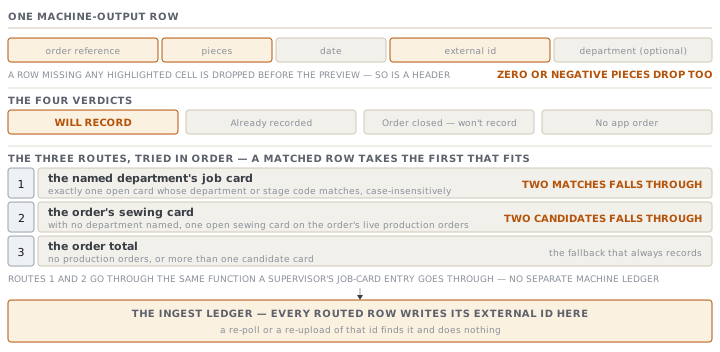
The first two routes matter because they go through the same function a supervisor's job-card entry goes through. There is no separate machine ledger. The comment in the source is explicit that a future bridge writes through that one function and never becomes a fourth ledger, and the ingest honours it.
A row the production rules refuse is skipped, counted in the result, and the batch continues. The commonest refusal is the overrun ceiling. An order's recorded output cannot pass its quantity plus a five per cent allowance, so ORD-1362 stops at 12,600 pieces. One bad row does not abort a good file.
Two guards against counting twice
The feed and the hand are two ways of recording the same pieces, so the app guards the boundary twice.
The first guard is the ingest ledger. Every routed row writes its external id into a table of its own, and a re-poll or a re-upload of that id finds it and does nothing. The ledger is checked together with the floor captures, and the reason is precise. A job-card route that is not sewing writes no floor capture at all. A check that only looked at captures would miss it and let the row in twice.
The second guard is the tracked-order lock. An order can be flagged as machine-tracked, and while it is, manual entry is refused in both places a person could type. The kiosk says the order's floor output comes from the machine feed, and so does the job-card worklist. Both messages name the way out: turn the tracking off on the order.
The live connection, and what it says about itself
Corina can connect the floor system properly, and the app is unusually candid about how far that gets her.
Connecting refuses before it asks for anything it cannot protect. If the server has no key to encrypt a stored password, the panel says so first. The note it shows names no server setting — it tells the customer this is something switched on at our end. When the details are accepted, the password is encrypted at rest with the same primitive the multi-tenant database tokens use. Any previous session token is cleared, so the next call signs in fresh.
Test connection really does sign in. It forces a login rather than reporting success from a cached token, because reporting success from a cache would prove nothing. On success it names where it landed, and then says, in its own words, that the machine feed switches on in the next step.
That sentence is doing real work, and reading the poll confirms it. The scheduled poll and the in-app check both call one function. That function reads the stored connection and fetches with the session token it finds there. But connecting deliberately cleared that token, and nothing on the poll path refreshes it. So the login the Test button proves and the credential the poll sends are not yet the same thing. The module's own comment says the poll still runs the earlier path until the fetcher is swapped.
The behaviour when it cannot reach the other system is the part that is finished. A poll that is not connected records nothing and says the connection is missing. A poll whose fetch fails records nothing, leaves the sync clock untouched, and says it will retry. Neither ever claims to have moved data it did not move.
Produced is not shippable
The last part of this lesson is the one that costs money, and it is a separate surface from everything above.
The feed's piece counts are pieces off the line. They are not a claim about quality. A grade snapshot is a different read from the same system, arriving at a different moment, and the app keeps it strictly apart. It never touches the produced total, the floor captures or the ingest ledger. Mixing them would corrupt the count that the two guards above exist to protect.
Grades are free text and often not in English. And whether a second may ship is a matter of the buyer's contract rather than a property of the grade. So the app refuses to infer. Corina classifies each grade herself, once, in Settings, into one of three meanings.
| Bucket | Comes from | Counts as shippable |
|---|---|---|
| First quality — ships | A grade the owner classified as shipping | Yes |
| Second grade | A grade the owner classified as second | No |
| Scrap | A grade the owner classified as scrap | No |
| In repair | A piece state the machine reports, not a grade | No |
| Grade not classified | A grade with no classification yet | No |
Two of those five are the whole point. A grade nobody has classified counts as unknown, never as shippable. The default is the cautious one, so forgetting to classify understates rather than overstates. And a piece in repair is not counted as a future first, because projecting one would mean inventing a recovery rate. It stays at risk until a later poll moves it.
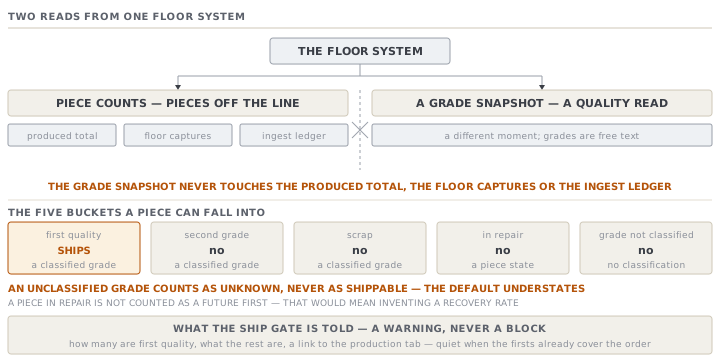
What the ship gate gets is a warning, not a block. It names how many of the ordered pieces are first quality, lists what the rest are, and points at the order's production tab. A short shipment inside an agreed tolerance is legitimate, and so is a buyer concession, so the app declines to decide. It also stays quiet when the firsts already cover the order, because seconds beyond a complete order are waste rather than a shipping problem.
Check yourselfA file records 900 pieces on ORD-1362 with a department cell reading 'Finishing'. The order has two open finishing job cards. Where does the row land, and what is the cost of that answer?Show the answer
On the order total. The department route needs exactly one open matching card, so two candidates is ambiguous and the app falls through rather than guessing. The row is still recorded, the produced total is still right, and the external id still goes into the ingest ledger — so nothing is lost or double-counted. What is lost is the resolution. Neither finishing card advances, so the worklist still shows both as having the same work outstanding, and anyone reading the cards will think the finishing stage has not moved. The fix is not in the integration at all: it is to stop having two open cards for one department on one order, or to have the feed name something more specific than the department. The app is right to prefer a correct order total over a guessed card, because a wrongly advanced card is harder to notice than an unadvanced one.
Check yourselfDoru says the produced total and the grade snapshot should be reconciled, so the order shows one number everybody trusts. Argue both sides.Show the answer
For: two numbers on one screen is exactly the confusion this course keeps warning about, and a merchandiser asking 'how many have we made' does not want to be handed a choice. Against, and the reason the app does not do it: they are answers to different questions, taken at different moments, and neither is wrong. Produced is pieces off the line, recorded through the capture path, and it is what the guards and the overrun ceiling apply to. The grade snapshot is a quality read that arrives later and may move as repairs re-pass. Reconciling them means picking one to overwrite the other, and either choice destroys real information — overwrite produced and the floor's own count becomes unauditable, overwrite grades and every repair silently disappears. The app therefore shows both and reconciles neither, and the ship gate reads the grade side because shipping is a question about first-quality pieces rather than about output.
Prompt · Is my machine feed being counted twice
In the first month of a shop-floor feed, and any time an order's produced total looks higher than the line could have made.
Help me check whether machine-captured output in MerchandiserOS is being counted twice, or lost.

I will give you: which orders are flagged as machine-tracked, which orders appear in the last output file, the preview counts from that upload, and whether anybody has been entering output by hand on the same orders.

Work through three separate risks and keep them separate.

First, double counting. An order that receives feed rows while it is NOT flagged as tracked keeps manual entry open. List every order in that state, because those are the ones where the same pieces can be recorded twice by two honest people.

Second, silent loss. Rows are dropped before the preview when they carry no external id, no order reference or no positive piece count. Compare the number of lines in my file with the number of rows the preview showed, and tell me whether anything vanished.

Third, the wrong landing place. Tell me which of my orders have more than one open job card for the same department, because a feed row naming that department will fall back to the order total and leave the cards unadvanced.

Do not reconcile the produced total against the quality grades. They are different reads and neither is wrong.
AI can make mistakes — check anything you act on.