Lessons · Lesson 1 of 5
Two seams, and the line neither crosses
Where the app's connections to other systems live, what may cross the money line, and what the app refuses to keep.
Lesson 1 of 5 · 22 min
An integration is a promise about who owns what
This app gives facts to other systems. It reads a narrow set of things back. It does not own money. It does not own the machine on the floor. Draw that boundary in the wrong place and two systems both believe they own the same number. Then nobody can say which one is right, and the loudest voice wins. This lesson is about where the line sits, what may cross it, and what the app refuses to keep.
Agnita Garment Works is a woven and jersey factory in Agnita, in Sibiu county, Romania. It runs five sewing lines. It sells almost entirely into Germany and Austria. Five people appear in this course, and one of them is deliberately not a user of this app.
- Corina Radulescu owns the workspace. Everything in this lesson is on a screen only she can open.
- Vlad Cojocaru is the sourcing officer.
- Alina Pintilie is the merchandiser.
- Doru Zaharia plans the lines.
- Mirela Antonescu is the finance manager. She runs the ledger, and she has no sign-in here at all.
The order carried through all five lessons is ORD-1362 for Grabenfeld, an Austrian outdoor and workwear chain: style STY-352, a men's cotton-canvas work jacket, 12,000 units.
Say the basis once, because everything in this course depends on it. Every heading, button label, message and column named here is read out of the application's own source. None of it is read out of a description of the application. Where behaviour depends on how the workspace is set up, the lesson says so and names the setting.
One screen, and only one person on it
Every connection this app owns is set up in one place: Settings → Integrations. The page checks the session, then checks the role. Anyone who is not the owner is sent to the refusal screen. Vlad cannot open it. Neither can Alina or Doru.
That is not a convenience. A connection carries a password or a token. So the app treats the right to create a connection as a different thing from the right to use what it brings in.
The page says what it is for in its own subtitle: "Connect the systems that hold your money and your data. Money systems return status only — MerchandiserOS hands over operational documents but never keeps an amount, an invoice, or a ledger."
Corina sees a stack of cards. On a paying workspace there are seven of them. On a demo or trial workspace there are eight. The extra one is a sample material catalogue that exists to fill an empty demo. It is hidden the moment the subscription goes active. The action behind it refuses as well, so a forged call cannot seed thousands of invented materials into a real factory.
An ERP is the accounting and finance package a company runs its books on. Here it is Mirela's system, and this course calls it the ledger.
| Card | What it connects | Who is on the other side |
|---|---|---|
| ERP — money system | Hands over operational documents, sets who issues purchase orders | Mirela's ledger |
| Load the sample material master | Demo and trial only, hidden once subscribed | Nobody — a built-in catalogue |
| Map to ERP data | Buyers, suppliers and materials to the ledger's own codes | Mirela's ledger |
| Import from ERP — payment status | Deposit, balance and letter-of-credit dates | Mirela's ledger |
| Garment.io — shop-floor output | Machine-captured pieces off the line | The floor tracking system |
| Your company mailbox — inbound email | A mailbox that is not on Google | Suppliers and buyers |
| Gmail — inbound email | A Google mailbox, read-only | Suppliers and buyers |
| Monitored accounts | The allow-list of senders that may be read | Nobody — a list |
Two seams, and they do not touch
Read that table again and the shape of the page appears. Three of the cards face the ledger. One faces the floor system. Three are about mail. The eighth is the demo catalogue, which faces nothing.
The application is built the same way. There are two integrations here, on different axes, and they are deliberately independent.
The money seam lives in its own part of the code. It has to, because it reaches across sourcing, orders, logistics and materials with no single owner. The production-data seam lives inside the production code. It has exactly one owner, and it must write through the same function that a hand-entered job card writes through.
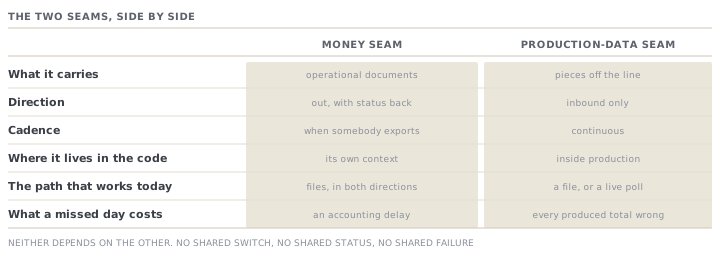
The practical consequence for Corina is worth stating plainly. Connecting the ledger does nothing for the shop floor. Connecting the floor does nothing for the ledger. If one of them is down, broken or never set up, the other is unaffected. There is no combined switch and there is no combined status.
The line, and the three things that cross it
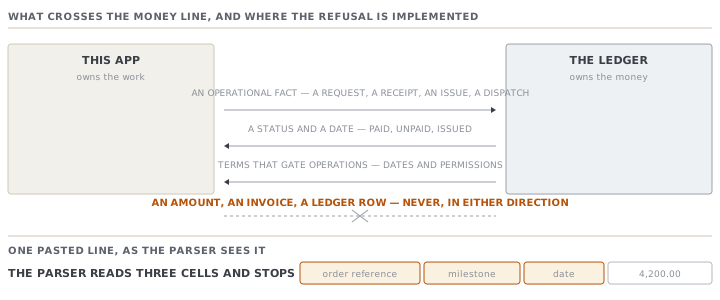
The rule the money seam is built on is short. The app owns the work. It never owns an amount or a ledger. Money status comes back as a flag. Three kinds of thing cross, and only three.
| Direction | What crosses | What never crosses |
|---|---|---|
| Out to the ledger | An operational fact — a request, a receipt, an issue, a dispatch | A booked amount, an invoice, a journal |
| Back in — status | Paid, unpaid, issued — a flag and a date | The sum that was paid |
| Back in — terms | The dates and permissions that gate operations | The value the terms are written against |
The interesting part is not the rule. It is where the rule is enforced.
It would be easy to enforce it in the connector. That would be the wrong place. A connector is written against somebody else's product, so it gets replaced, and the next one might be chattier. The enforcement therefore sits one layer in: at the point where a pasted line becomes a record the app understands.
Read the payment-feed parser and you can watch it happen. A line arrives, split on commas or tabs. The parser reads the first cell as an order reference, the second as a milestone, the third as a date. There is no fourth read. If Mirela's export puts the amount in the fourth column, the amount is not rejected, or warned about, or logged. It is simply never looked at. The panel above the box says so in the same words: "Any amount column is ignored — the ERP owns the ledger; this records the payment status on the order's clock."
What is honestly not built yet
An advanced course about integrations owes the reader the other half: what a card promises, and what it currently does.
The money seam has one entry point for sending bytes, and three ways it could work. There is a preview mode, file exchange, and a live connection. Only file exchange is real work today.
Ask the app to sync and it answers with one of two sentences. Both are honest refusals. In preview mode it reports the number of documents waiting, and says "nothing sent". In any other mode it says the adapter "is not wired yet" and, again, that nothing was sent. Neither ever claims to have moved anything.
So the working path today is files, and it runs in both directions. Corina clicks Export for ERP and gets one downloadable file per document type. Mirela sends back a list of orders and payment dates. Corina pastes it into Import from ERP, previews it, and records it.
That is not a placeholder for a real integration. Many factories run their finance on an accounting package, a spreadsheet and a bank portal. For them, files are the integration. The app is built to say so, rather than to promise a connector it does not have.
Check yourselfCorina asks why the app cannot simply hold the invoice value, since the ledger sends it anyway and it would make the order screen more useful. Give the two strongest arguments for holding it, and then the answer.Show the answer
The strongest arguments are real. First, a merchandiser looking at an order genuinely wants to know what it is worth, and sending them to another system to find out is friction. Second, the ledger is already sending the number, so the app is discarding data it has been given, which feels wasteful. The answer is that a number held in two systems is a number that will disagree, and the disagreement will surface at the worst moment. The ledger's copy changes when a credit note is raised, a shipment is short, a tolerance is applied or the currency is revalued. None of those events reach this app, so its copy would be stale and nobody would know which was which. The app instead keeps the thing that does not go stale — that a deposit was received, and when. And notice the design does not simply trust itself to remember the rule: the parser physically cannot read the amount column, so a future writer who disagreed would have to change the parser rather than just forget.
Check yourselfDoru says the two seams should be merged, because both are 'integrations' and both live on one settings page. What is he missing?Show the answer
He is right that they share a page and wrong that they share anything else. They differ in direction, in cadence, in what a failure costs and in who owns the other end. The money seam is document handoff, mostly outbound, and a missed day is an accounting inconvenience. The production seam is a continuous feed of pieces off the line, entirely inbound, and a missed day means the order's produced total is wrong on every screen that reads it. Merging them would give one status, one connection and one failure — so a ledger outage would stop the floor feed, which has nothing to do with it. The code keeps them apart deliberately, in different parts of the tree, and the production feed is required to write through the same function a hand-entered job card writes through so that there is never a second production ledger.
Prompt · Which of my connections is actually carrying data
Before telling anyone the app is integrated with something, and any time a connection card says connected but nothing seems to arrive.
Help me work out which of my MerchandiserOS connections are really moving data, and which are only configured.

I will give you, for each card on Settings -> Integrations: whether it shows connected, what its last export or last sync says, and whether anybody has downloaded or pasted a file in the last week.

Do not treat connected as working. For each connection, separate three different facts and report them separately: (a) is it configured, (b) has it moved data at all, (c) has it moved data recently. A card can be green on the first and empty on the other two, and that is the state I most need to find.

Then tell me, for each one, what a person still has to do by hand for it to be useful this week. Name the screen and the button, not the concept.

Two rules. Never tell me a connection is fine because it says connected. And where I have given you no evidence either way, say unknown rather than assuming it works.
AI can make mistakes — check anything you act on.