Lessons · Lesson 3 of 5
A spec value is not a measurement
How the measurement grid grades a size run, why Fill from base rewrites the whole row, and why the name you give a measurement point is data rather than a caption.
Lesson 3 of 5 · 26 min
What this lesson is about
A tech pack carries two kinds of number that look identical on the page. One is what the garment should be. The other is what a garment turned out to be. They live in different places in this app. They are entered by different people. Only one of them can be edited on the style. This lesson is about the first kind. It is also about two ways to change it by accident, one of which costs money quietly.
Prabhjot Randhawa runs the pattern room at Malerkotla, and the measurement spec on STY-204 is his. Simran can read it. What she does with it, when she is in a hurry, is the subject of the second half.
The basis for the arithmetic in this lesson. Every figure is worked from the formulas the application uses, and the inputs are named so you can redo it. Measurements are in centimetres and money is in US dollars.
The grid
The Measurements section is a single wide table. Each row is one point of measure. The fixed columns, in order, are Point of measure, How to measure, Base size, Grade/step, +tol and −tol. After those comes one column per size in the style's scale, then a Fill button and a delete control on each row.
Above the grid is a cm / inch toggle with an explicit note beside it: it relabels the grid, and the numbers do not change. That is exactly what it does. The unit is a property of the style, the stored numbers are unit-agnostic, and switching is a relabel rather than a conversion. If your buyer's pack is in inches, set the unit before anybody types, not after.
There is a second note under the grid that people skip, and it settles a question that comes up constantly. It says the spec is the master, and that measured actuals are recorded on a measurement inspection on the order, not here. A spec edit re-opens the Measurements sign-off. A captured actual reading does not, because a reading is quality reality rather than a change of specification.
The point of measure is a controlled list, narrowed to the garment
The Point of measure cell is a dropdown when the workspace has the vocabulary loaded. The shipped list holds 44 points in four families: 16 for tops, 12 for bottoms, 4 for dresses and one-piece garments, and 12 for hosiery.
The narrowing rule is deliberately blunt. A knitted-to-shape leg garment sees the hosiery family. Everything else sees everything except hosiery. The reasoning in the source is worth quoting in spirit. A sock factory should not have to scroll past a shirt's vocabulary to find its own. Every wrong entry in a list is a chance to record a measurement that means nothing.
And it fails open. A point whose family is missing or unrecognised is shown, not hidden. That includes anything the factory added itself. Hiding a point somebody needs is the worse failure, because it is invisible.
Grading is one straight line
Set a Base size, put the spec value in at that size, set a Grade/step, and press Fill. The button's tooltip says what it does: fill the spec across the scale from the base.
The arithmetic is one line:
value at a size = base value + (steps from the base) × (grade per step)
Steps are counted along the scale. Below the base they are negative. Above the base they are positive. That is the whole model. There is one grade per row, and it applies evenly in both directions.
Real grading is often not like that. Many packs grade in smaller steps through the middle sizes and larger steps at the top, and a body-length grade frequently differs above and below the base. The app has no way to express that on a row. Where the buyer's grade is not a straight line, the buyer's own numbers are the spec and Fill is the wrong tool.
What Fill actually does to the row
Here is the part that costs money. Fill does not fill the blanks. It replaces every size in the scale, including the ones already holding the buyer's numbers, and there is no undo on the grid.
Kilbraken's pack grades the half-chest on STY-204 like this, with a stated tolerance of ± 1.0 on the point.
| Size | Buyer's spec | After Fill from base at M, grade 2 | Difference |
|---|---|---|---|
| XS | 48 | 48 | — |
| S | 50 | 50 | — |
| M | 52 | 52 | — |
| L | 55 | 54 | 1.0 narrower |
| XL | 58 | 56 | 2.0 narrower |
| XXL | 61 | 58 | 3.0 narrower |
Simran did nothing careless. She typed the base, typed the grade the pack states between S and M, and pressed the button on a row that already had six values in it. The three sizes below the base were unaffected, because there the buyer's grade happens to be 2. The three above were not, because there it is 3.
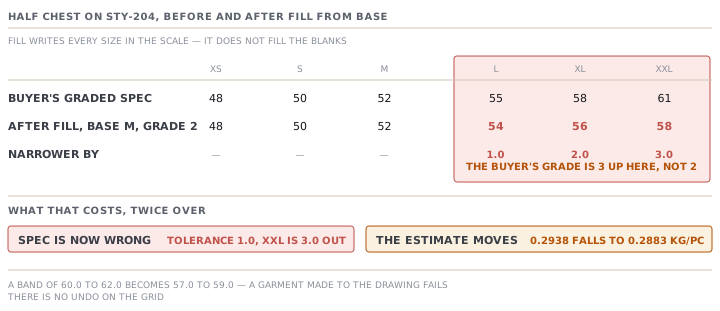
Two consequences, and the smaller one is the one people notice first.
The measurement spec is now wrong. The stated tolerance on this point is ± 1.0. An XXL cut to the buyer's 61 would now measure 3.0 outside a spec that says 58, so it fails against the factory's own tech pack. Every XXL in the order is a defect by paperwork.
The consumption estimate moves too, because the chest feeds the area formula from lesson 2. Rerun the six-size table with the overwritten chest values and the average falls from 0.2938 to 0.2883 kilograms a garment. That is 0.0055 less, 33.0 kilograms across six thousand, and 247.50 of fabric at 7.50 a kilogram that nobody has bought.
A third effect is worth naming because it is silent. Fill writes a value for every size in the scale, not only the sizes the buyer specified. If your alpha scale carries more sizes than the pack does, Fill invents specs for the extra ones. They then count in the consumption average, which weights every size with a value equally.
The name of a row is data
Now the part that surprises everybody, and it is the reason lesson 2 told you to read the matched points.
The consumption engine does not ask you which measurement is the chest. It finds its three inputs by matching the text of the point-of-measure name, and it takes the first row that matches, in the order the rows were added.
| Input | Matches a name containing | Notes |
|---|---|---|
| Chest flat | chest, or bust | Any occurrence, anywhere in the name |
| Body length | body length, or centre back length, or cb length, or hps and length in either order | |
| Sleeve length | sleeve length | Optional — absent means a sleeveless garment and zero |
Nothing else is looked at. There is no field that says "this row is the chest".
STY-204's pack lists both sleeve measurements, which is completely normal on a shirt or a polo. The first is Sleeve length (from shoulder), which on this short-sleeve polo runs 22 at M. The second is Sleeve length (from CB), measured from the centre-back neck out along the shoulder and down the arm, and it runs 43 at M.
Both names contain the words the engine matches. So the estimate uses whichever row was added first.
| Row the engine matched | Average kilograms a garment | On six thousand garments | At 7.50 a kilogram |
|---|---|---|---|
| Sleeve length (from shoulder) — 22 at M | 0.2938 | — | — |
| Sleeve length (from CB) — 43 at M | 0.3537 | — | — |
| Difference | 0.0599 | 359.4 kilograms | 2,695.50 |
That is a fifth more fabric than the garment needs, on a quote, from adding two rows in the order the buyer's pack printed them.
It is also completely visible. The calculation panel lists which points it matched, by name, above the per-size table. Reading that line takes two seconds and it is the single highest-value habit in this module. A dress spec has the same shape of hazard from the other direction. A point named "Bust / waist / hip" matches on the word bust and feeds the width of the area formula, whatever else is in that row.
Tolerance is two magnitudes, and the edges pass
The +tol and −tol columns are stored as two positive numbers, not as a signed pair. So an asymmetric tolerance of plus one and a half, minus one is entered as 1.5 and 1. A negative number is refused with a plain message.
The check itself is inclusive at both ends. A reading exactly on the upper or lower bound passes. Given a spec of 61 with a tolerance of 1.0 either way, the accepted band is 60.0 to 62.0 and both endpoints are in it.
Put that beside the Fill accident above. After the overwrite the frozen band at XXL becomes 57.0 to 59.0. A garment made exactly to the buyer's drawing measures 61 and is rejected by 2.0, by a spec the factory wrote over itself.
Check yourselfPrabhjot adds the two sleeve rows in the other order, so Sleeve length (from shoulder) is added first and the estimate comes out at 0.2938. Is the problem fixed?Show the answer
No. It is currently producing the right answer for a reason nobody controls. The engine takes the first matching row by insertion order, so the number depends on the order two rows were typed in, not on a decision anybody recorded. Delete and re-add the shoulder row while tidying the grid and the answer changes again, silently, with no edit to any value. The durable fix is to read the matched-points line in the calculation panel every time you estimate, and to treat a change there as a change to the estimate. If you want to be certain, keep only one row whose name contains the words sleeve length, and put the other measurement under a name that does not. That trades one kind of clarity for another. It is a judgement for your pattern room rather than a rule.
Check yourselfA merchandiser proposes a shortcut: enter the buyer's spec only at the base size, set the grade, and let Fill do the rest for every row. What does that gain, what does it cost, and when is it defensible?Show the answer
It gains real time. On a row whose grade genuinely is a straight line it costs nothing at all, because Fill reproduces exactly what the buyer wrote. It costs the top and bottom of the run on any row where the grade changes across the scale, which is common on chest and body length and rare on a neck drop. It also costs you the evidence: once the row is regenerated you can no longer see what the buyer actually asked for, and the pack you compare against is a PDF somebody has to go and find. It is defensible on a new style you are drafting yourself, where the grade is your decision, and on rows you have checked are linear. It is not defensible as a way to enter somebody else's graded spec, because the buyer's numbers are the specification and a regenerated approximation of them is not.
Prompt · Check a measurement grid against the buyer's pack before it is frozen
After entering or importing a size run, and before anyone estimates consumption from it.
Check a MerchandiserOS measurement grid against the buyer's own pack with me. Assume the grid may have been generated rather than typed.

I will give you, for each point of measure: its name, the base size, the grade per step, the two tolerance magnitudes, and the value at every size. I will also give you the buyer's stated values for the same points, if I have them.

Start with the grade, not the values. For each row, work out whether the increments across the scale are constant. Where they are not, say so — a row with a changing grade cannot have come from Fill from base, and a row with a perfectly constant grade may have been generated over the buyer's numbers. Where I have given you the buyer's figures, name every size that disagrees and by how much, and compare each difference against that row's own tolerance.

Then look at the names, because the software reads them. Tell me which row the consumption engine will treat as the chest, which as the body length, and which as the sleeve. It matches on the words chest or bust; on body length or centre back length or cb length or hps with length; and on sleeve length. Where two rows match, it takes whichever was added earlier. If more than one row could match any of the three, say which and warn me that the answer depends on the order they were typed in.

Then tell me which sizes carry values that the buyer never specified, if any, and remind me that those still count in the estimate's average.

Two rules. Do not recompute a grade to make a row look tidy — the buyer's numbers are the specification. And if you cannot tell whether a difference matters, give me the tolerance and let me decide.
AI can make mistakes — check anything you act on.