Lessons · Lesson 1 of 5
One window, nineteen sections
What a style record is inside MerchandiserOS, how its one window is laid out, and why the printed pack is an output rather than the record itself.
Lesson 1 of 5 · 22 min
What this lesson is about
A tech pack is usually a document. In this app it is not. It is a record with parts, and the document you print is made from that record. This lesson is about the difference. Get it wrong and you keep two copies of the truth. One is on the screen. The other is in a file somebody emailed. Within a week they stop agreeing, and nobody can say which one the factory cut from.
Malerkotla Knitwear is a knitted-tops factory in Ludhiana, in the Indian Punjab. It runs four sewing lines and sells into northern Europe. Five people appear across this course.
- Harjit Sekhon owns the business. He is the workspace Owner.
- Simran Bhandari is the merchandiser. She builds the styles.
- Prabhjot Randhawa runs the pattern room. He owns the measurement spec.
- Tanvir Chadha is the sourcing officer.
- Meher Sahni manages quality.
The garment carried through all five lessons is STY-204, a men's cotton-jersey polo for Kilbraken Stores, a northern European retail chain. Its first order is ORD-1310.
Say the basis once, because the whole course rests on it. Every heading, button label, field name, message and count in these pages was read out of the application's own source, not out of a description of it. Where a lesson gives an arithmetic result, the working is shown so you can redo it. Where something depends on how your own factory is set up, the lesson says so and names the setting.
A style is a row with parts hanging off it
Simran clicks New style. What gets created is one row in the styles table, plus a set of spec tables that hang off it by its id. Nothing else. There is no document, no template file and no copy.
The row holds the identity and the style-level standards: name, code, category, season, buyer, fabric type, garment type, segment, size scale, counting unit, measurement unit, target cost, status. It then holds a long tail of tech-pack fields that are single values rather than tables. The care-label content, the wash recipe, the stitching standards, the packaging spec, the compliance summary.
The tables hanging off it are the parts that have rows. The bill of materials, the measurements, the operations, the per-seam construction, the artwork, the labels, the testing list and the colourways. There is also a catch-all called additional specifications, for anything with no typed home of its own.
Two things follow from this shape, and both matter more than they sound.
The first is that the code is not the row id. When a style is created the app asks a per-company counter for the next code and writes it back onto the row. So your codes are yours. Two factories in two workspaces can both have a STY-204 without anything colliding.
The second is that every screen that needs the spec reads these same tables. The cost sheet does not hold its own copy of the bill. The order does not hold its own copy of the measurements. There is one set of rows, and everything else is a view of it.
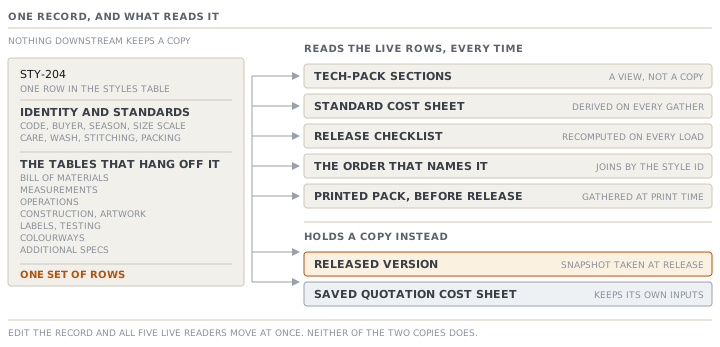
The one window
The style record used to be several screens. It is now one window, with a pinned identity strip at the top and a single grouped menu down the left. The strip carries the code, the name, the status chip and the main-record buttons. It does not scroll away.
The left menu has nine groups over nineteen sections.
| Group | Sections in it |
|---|---|
| Start here | Overview |
| Design | Colourways · Artwork · Images |
| Materials | Bill of materials · Fabric spec · Measurements |
| How it's made | Construction · Operations · Wash |
| Labels & packaging | Labels · Packaging |
| Quality & compliance | Quality · Compliance · Care · Additional specs |
| Cost & commercial | Cost |
| Samples & approvals | Samples |
| History | History |
Three notes on that table, because each one saves somebody ten minutes.
Measurements sits under Materials, not under a heading of its own. That is deliberate. The measurements are what the consumption estimate is built from, which is lesson 3's subject.
There is no Trims section. Fabric and trims live in one bill now. An old link that says trims lands on the bill.
Care sits under Quality & compliance rather than under labels. Care-label content is a regulatory statement, not a piece of artwork.
Three statuses, and two more the code knows about
A style's status is one of three: Development, In review, Released. Those are the values the app offers, and the values a user can move between. Development goes to In review with Send for review. Either one goes to Released with Release style.
The source also names two closed statuses, Discontinued and Cancelled, and treats them as terminal wherever they appear. They are not in the pickable list today. Read them as prepared-for rather than available.
Separate from status is archived. Archiving hides a style from the default lists, and it is reversible. It is not a status, and a style can be archived from any status. Lesson 4 covers what each of those two locks actually stops.
Structured, against a PDF
The buyer sends a PDF. The factory needs a record. The gap between them is the whole reason this module exists, so it is worth being exact about what the record can do that the file cannot.
| Question | The PDF the buyer sent | The record in the app |
|---|---|---|
| What is the chest spec at L? | A number printed in a table | A value in a spec map, keyed by size |
| What does the fabric cost? | Not in the file | A unit cost on a bill line, in a currency |
| Can it price itself? | No | The cost sheet reads the bill and the operations |
| Can a gate check it? | No | The release checklist reads the same rows |
| Can you reprint last season's exact spec? | Only if you kept the file | Every released version is stored and reprintable |
The app still makes a document. /styles/<id>/print renders the pack for printing, with a Print / Save as PDF button that opens the browser's own print dialogue. The sheet carries a version label at the top: the released version number when the style is Released, or a working-draft label when it is not.
That is the right way round. The document is an output of the record. It is not a second copy of it.
The check that shouts and stops nothing
Open the Overview of a style whose bill has been started. The app may show a small panel headed with what the garment should have, checked against the bill.
It knows, for example, that a knit polo needs a collar and needs buttons. It knows that a garment whose name says elastic ought to have elastic somewhere in the bill. When one is absent it prints a flag: a red one for a component the garment is defined by, an amber one for a component the description implies. The wording is plain. A polo needs a collar, and none is in the bill.
Now the part worth remembering. That red flag blocks nothing. It is not a release gate, it is not a signature, and nothing in the app will refuse an action because of it. It is a reader looking over your shoulder. The check also stays completely silent until the bill has at least one line, so a brand-new style is never nagged.
This is the first of several places in this module where the loudest thing on the screen is advisory and the quiet thing is the gate. Lesson 5 is about the gate.
Check yourselfSimran edits the fabric weight on STY-204 at four o'clock. Which of these change immediately, and which do not: the style's standard cost sheet, a quotation cost sheet she saved last week, and a PDF she emailed the buyer in March?Show the answer
The standard cost sheet changes immediately. It is derived from the style's live rows every time it is gathered, so there is no stored copy to go stale. The saved quotation cost sheet does not change, because a stored cost sheet keeps its own inputs. That is a different mechanism from the style, and it is what makes a quote a quote. The emailed PDF obviously does not change, and that is the honest problem with sending one. From the moment it leaves, it is a claim about a spec rather than the spec. If the buyer needs the current sheet, print it again from the record.
Check yourselfA colleague says the app is missing a Trims tab, and asks where trims were moved to. What do you tell him, and what should he watch out for once he finds them?Show the answer
Fabric and trims are one bill now, in the Materials group, and an old link that points at trims lands on the bill. What to watch out for is how the bill decides what a line IS. It reads the line, rather than looking at which section it was typed into. A line routes to the fabric layer, the decoration layer or the trim layer from its category and its own words. Anything carrying no trim signal at all defaults to fabric. So a thread line filed with no category and an unhelpful name can end up costed as a fabric. The fix is to set the category on the line, not to argue with the classifier.
Prompt · Tell me what my style record is missing, and what nothing is checking
On any style you are about to work on, and especially on one somebody else built.
Help me read a MerchandiserOS style record honestly, rather than confirming that it looks finished.

I will paste, or describe: the style's status and whether it is archived; its garment type, fabric type, segment, buyer and size scale; how many bill lines it has and how many of those have a unit cost; how many measurement points it has and how many of those carry a value at more than one size; how many colourways there are and each one's lab-dip state; whether the operations list has anything in it; and anything the Overview is flagging.

First separate what the app CHECKS from what it merely shows. Tell me which of the things I gave you feed a release gate and which are advisory. Do not tell me the style is in good shape; tell me which parts of it nothing in the software is looking at.

Then work through the record in the order a reader would meet it: what the garment is, what it is made of, how it is measured, what colours it comes in, and what it costs. For each, say whether the data present is enough for the NEXT person to act on — the pattern room, the sourcing officer, the cutter — rather than whether a field is filled.

Then give me the three things I should fix first, in order, each with the reason it beat the others.

Three rules. Never treat a filled field as a correct field: if the value could be a placeholder, say so. If something depends on how a particular factory is configured, say that rather than guessing. And do not tell me to release; that is a decision, and this exercise is about what the decision would be resting on.
AI can make mistakes — check anything you act on.