Lessons · Lesson 4 of 5
Released means frozen
What Release actually writes, what the freeze does and does not protect, and the legitimate way to change a released spec.
Lesson 4 of 5 · 28 min
What this lesson is about
Somewhere between drafting a spec and cutting cloth, a spec has to stop moving. This app draws that line with a status called Released. It is not a label. Pressing the button copies the whole tech pack into a stored version and locks the live one. This lesson is about what that lock actually covers. Most of the surprises come from people expecting it to cover more than it does.
Harjit Sekhon presses Release style on STY-204 in the second week of March. The order from Kilbraken is placed a fortnight later. In April the buyer asks for a heavier collar rib, and everything in the second half of this lesson follows from that.
The basis. Every message, button label, log line and rule quoted here was read out of the application's own source.
What Release writes
Before it writes anything, the release action checks the gates. Those are lesson 5's subject. Assume for now they pass. What happens next is four steps.
- The app gathers a snapshot of the whole working tech pack. That means the style's own header fields, every row of the bill, the trims projection, the operations, the measurements, the construction, the artwork, the additional specs, the testing list, the labels and the colourways with their lab-dip states.
- It inserts that snapshot as the next version row, with the time and the person who released it.
- It bumps the style's released version number. A style that has never been released carries zero, so the first release is v1.
- It sets the status to Released, which is what freezes the live spec.
Then it writes one line to the activity log. On a clean release it reads: Status: Development → Released — spec frozen as v1.
The confirm panel before all this tells you three things in plain words. It freezes the spec as the released version. It makes the style available to put on orders. It is recorded on the activity log. Hold on to that middle claim, because the last section of this lesson checks it.
What the freeze locks
The freeze has two layers. It is worth knowing both, because they fail differently.
The server layer is a guard every spec-changing action runs first. If the style is Released it refuses with a message that names the version and the way out: This style is Released (v1) and its spec is frozen. Start a new version to change it. That is the real boundary. A request that bypasses the screen still hits it.
The screen layer simply stops offering the edit. The tech pack renders in one of three modes: the editor, the read-only snapshot, or a frozen note when there is no snapshot to show. The rule is that read-only alone decides there is no editor. The source records why. The guard used to require read-only and a snapshot, so a frozen style with no snapshot fell through to the editor and showed an Add button the server then refused.
Archived is a different lock with a different message. An archived style says This style is archived — Restore it to make changes. A style in a terminal status says it is closed with no further changes. Both dim the actions, and only the reactivation route stays live.
The way out
On a Released style the header carries one button: Start a new version. Its confirm panel spells out four consequences.
- It re-opens the style for editing as v2.
- Everything from v1 is carried forward, and nothing is blanked.
- v1 stays frozen, and orders and cost sheets already built on it are unchanged.
- When you finish, release again to freeze v2.
Here is what it does mechanically, and the gap between the two lists is this lesson's point.
It sets the status back to Development. That is all it does.
Carry-forward is automatic because there is nothing to carry. The live tables still hold exactly what v1 was snapshotted from, and unfreezing them makes them editable again. No second version row exists yet. The style is on v1, editing a draft that will become v2 the next time somebody releases. The header says so — Editing v2 — draft (carried forward from v1) — and the activity log records Started new version — editing v2 (carried forward from the last release).
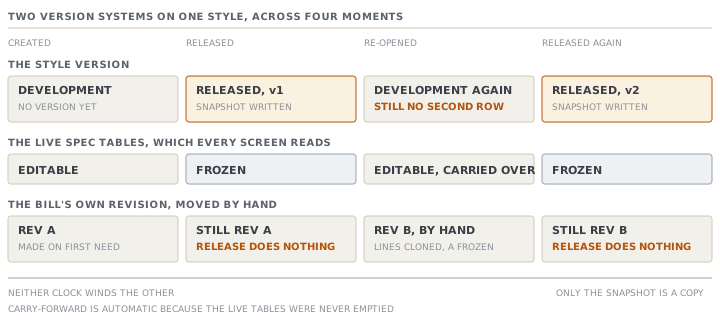
The snapshot is a record, not a shield
Now the counter-intuitive half.
Read the second bullet of that confirm panel again: v1 stays frozen, and orders and cost sheets already built on it are unchanged. The first clause is exactly true. The stored snapshot is immutable, it is listed under History, and it can be reprinted on its own.
The second clause needs care, because everything else in the app reads the live tables. The bill, the measurements, the tech-pack sections and the style's standard cost sheet are all derived from the current rows every time they are gathered. There is no copy.
So during the weeks when STY-204 sits re-opened as a v2 draft with a heavier rib in it, the standard cost sheet on the style shows the heavier rib's price. It is not showing you what the order was placed against. It is showing you what the style costs today. That is a different question and also a useful one, but only if you know which one you are reading.
What genuinely does not move is a stored cost sheet. A saved quotation cost sheet keeps its own inputs, so the quote you sent stays the quote you sent. That protection comes from the quotation, not from the style's freeze.
And one honest limit on that reprint. The printed sheet's spec comes from the frozen snapshot. But the approvals, the images and the cost block on the same sheet are read current, because those are a process rather than a specification. A v1 reprint is a v1 spec on a page that also shows today's approvals. Read the version label at the top and know which half is which.
Two clocks, and neither winds the other
There is a second versioning system in the same module, and confusing the two is common.
The style version is v1, v2, v3. It freezes on Release, snapshots the whole tech pack, and is the thing the History section lists.
The BOM revision is Rev A, B, C. BOM is the bill of materials, and this revision belongs to the bill alone. One revision is current, and the bill reads it by default. Creating a new revision clones every line forward into the new letter, so nothing is blank, and marks the outgoing one released so it stops being editable. You can also make an older revision current again, which is how you restore.
| Style version | BOM revision | |
|---|---|---|
| Labelled | v1, v2, v3 | Rev A, B, C |
| Covers | The whole tech pack | The bill of materials only |
| Created by | Releasing the style | Creating a new revision by hand |
| On creation | Snapshots the current spec | Clones every line into the new letter |
| Freezes | The whole live spec, via the status | The previous revision |
They do not talk to each other. Releasing a style does not create a BOM revision. Creating a BOM revision does not create a style version, and it does not change the style's status. A first revision, Rev A, is created quietly the first time anything needs one, and any loose lines are adopted into it.
The claim worth checking yourself
The Styles list carries a one-line explanation of what the module is for, and one clause of it is a claim about a rule. It says a style must be Released before it can go on an order. The release confirm panel says something close: that releasing makes the style available to put on orders.
Go and look at the New order screen.
The style picker lists every non-archived style, and it prints each one's status inside the option, in the form name, then code, then status. There is no filter on Released, and the action behind the form resolves the style by its id without checking its status. You can also type a style name that does not exist, and it creates one.
So a Development style can be put on an order today. What stops you later is elsewhere, and it is real. The order's readiness meter treats a developed style as a hard requirement of the Ready to cut stage. Until then the order plans, quotes and sits there quite happily.
Contrast that with a place where the app does filter. The style-creation funnel's "Reorder of…" picker offers only Released styles, and the source says why. A blank Development draft would duplicate to a phantom, with nothing carried. One screen filters because copying an empty style produces nothing. The other does not, because putting an unfinished style on an order is a legitimate thing to do early.
Both behaviours are defensible. The list page's sentence is the part that is out of step, and it is exactly the kind of line this course asks you to check rather than believe.
Check yourselfSTY-204 is Released at v1 and re-opened for a v2 draft. Meher asks which spec the factory should cut ORD-1310 to. Where do you look, and what do you tell her?Show the answer
Print v1 from the History section, and cut to that. The live screens are showing the v2 draft. Every section of the tech pack reads the live tables, and there is no order-level copy of the spec. So the bill and the measurements on screen are the heavier-rib draft, not what the order was placed against. Two cautions with the printout. The version label at the top is what tells you which spec you are holding, so keep it on the page. And the approvals, images and cost block on that sheet are current rather than frozen, so treat only the spec as v1. If the buyer has actually accepted the change, the cleaner answer is to finish and release v2 before the line starts, so the live spec and the cutting instruction agree again.
Check yourselfA colleague argues that starting a new version is dangerous and the team should instead archive the old style and create a new one for each change. Make the strongest case for him, then answer it.Show the answer
His case is real. A new style gets a new code, so nothing can be confused, and last season's record cannot be edited by anyone even by accident. Everybody can see at a glance which record is which. The answer is that it throws away the two things versioning is for. First, the history. A version chain says this garment changed in these ways, whereas two style codes say nothing about their relationship, and the reorder picker, the cost variance view and the activity log all sit on one record. Second, the carry-forward. Starting a version keeps every row, while a new style starts from nothing and somebody retypes a bill and a measurement grid, which is where errors come from. There is also a practical block: a style with active orders cannot be archived at all, and the refusal names the orders. Use a new style when it is genuinely a different garment. Use a version when it is the same garment, changed.
Prompt · Rehearse a release, including what it will not protect
Immediately before pressing Release, and again before re-opening a released style.
Walk me through what releasing this MerchandiserOS style is about to do, and what it will not do.

I will tell you: the style's current status and released version number, whether any order already names it, whether a quotation cost sheet has been saved against it, and what the release checklist is showing.

First, the mechanics. Tell me in plain words what pressing the button writes: a snapshot of the whole tech pack as the next version, a bumped version number, a status change that freezes the live spec, and one line on the activity log. Tell me what the activity line will say if any data advisories are outstanding.

Second, the freeze. List what I will no longer be able to edit, and name the one legitimate way back — starting a new version. Tell me what starting a new version does. Then tell me, just as importantly, what it does not do. It sets the status back to Development. No second version row appears until I release again. And the bill's own revision letter does not move.

Third, and this is the part I will forget. Tell me which screens keep reading the LIVE tables while a released style is re-opened, so I know that the style's standard cost sheet will show my draft rather than what an order was placed against. Tell me what genuinely does hold still and why.

Fourth, ask me one question before we finish: is this the same garment changed, or a different garment? If it is different, a new style is the right answer and a version is not.

Two rules. Do not tell me a release is safe. Tell me what it freezes, what it leaves moving, and who downstream is relying on which.
AI can make mistakes — check anything you act on.