Lessons · Lesson 5 of 5
Six rows, and one that never blocks
What the release checklist really tests, which of its rows can hold a style and which cannot, and why a green row is not the same as a finished tech pack.
Lesson 5 of 5 · 28 min
What this lesson is about
The release button is guarded by a short checklist. It looks like a list of approvals, and on most days it behaves like one. But each row is really a question the software asks the data, and the questions are narrower than the words suggest. This lesson works through what each row actually tests. If you skip it, you will trust a green list that only says the tech pack is not empty.
Harjit is ready to release STY-204. The checklist beside the button shows six rows. Simran believes all six must be green before anything happens. She is wrong about one of them, and about what two of the others are asking.
The basis. Every row label, message and test on this page was read out of the application's own source.
The six rows
The gate is one checklist of six signatures over the eleven parts a style is built from. Five of them are always applicable. The sixth is conditional.
| Row | What it says it attests | Holds the release? |
|---|---|---|
| Spec complete | Measurements graded and the construction spec set | Yes |
| Fabric & trims costed | Fabric and trims specced and priced | Yes |
| SMV set | Sew sequence and SMV confirmed | No |
| Colours submitted | A lab dip submitted for every colourway | Yes |
| Costing reviewed | The FOB build-up reviewed and firmed | Yes |
| Compliance signed | Fibre %, care and any required test evidence | Only when required |
On a yarn-based product the wording changes without the gate changing. A sock or a sweater reads Yarn & trims costed and Machine time set, and the spec row talks about the knit construction rather than the sewing one. Same tests, different vocabulary, because a sock is not sewn.
Read the third row again. SMV is the standard minute value, which is the sewing time one garment takes. SMV set never blocks a release. The reasoning is in the source, and it is a deliberate product decision. The sewing minutes are a cost-readiness input rather than a buyer-facing specification. A small owner-run factory should not have to sign an operation-by-operation breakdown to release a style. An unset SMV leaves the price an estimate. It never holds the garment.
That has a visible consequence. The release-readiness rail beside the button lists only the rows that can actually hold you, so SMV never appears there. The row itself still shows in the checklist, open and grey. A style can be Released with an empty operations list, and its cost sheet will carry no make cost.
Nobody signs these
Now the part that changes how you read the whole list.
The app has two factory shapes. In team mode each part of a style is routed to the team that owns it, and each team confirms its own cell, so a signature really is somebody's confirmation. In solo mode there are no cells, no seats and no per-part confirm step. The merchandiser fills the style, and readiness is derived from the data.
The function that decides which mode you are in returns solo as a constant. Its own comment says why. No customer runs team mode yet, and hard-coding it keeps the change free of a migration. Team mode is built and it is not switched on.
So on every workspace running today, the six rows are not signatures at all. They are recomputed from the records on every page load. Nobody's name is attached, nothing is stored, and a row that is green this morning goes back to open the moment somebody deletes the row it was reading.
That is not a criticism. Deriving a gate from data is more honest than a tick, because a tick can be applied to an empty cell and data cannot. It does mean the word on the screen is doing work the mechanism does not, and it is worth knowing which one you are relying on.
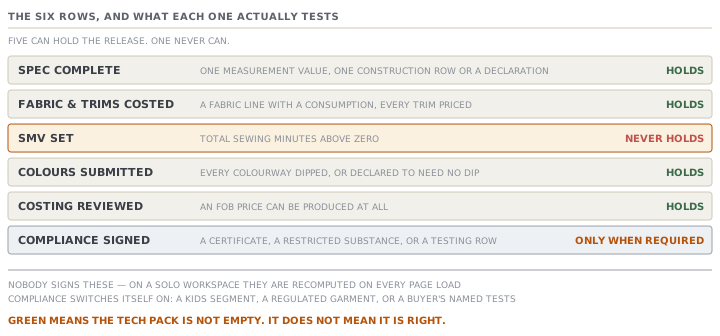
What each row is really asking
Here is each test, in the app's own terms.
Spec complete asks two things. At least one measurement point has at least one spec value against a size. And the construction section has at least one row, or somebody has made the logged declaration that no construction spec is needed. One row of each satisfies it.
Fabric & trims costed asks that the bill has at least one line the classifier calls fabric, that at least one of those has a consumption greater than zero, and that every trim line carries a unit cost. That last clause is the strictest test on the whole list. One unpriced trim holds the release, and the refusal counts them for you. The alternative to a priced trim list is the logged declaration that the style has no trims. It only counts while the list is actually empty. Add a real trim row and the declaration is superseded on the spot.
Colours submitted asks that there is at least one live colourway, and that every one of them has a lab dip that has been submitted. A lab dip is a small trial dyeing of the fabric, sent to prove the shade. Requested counts. Approved counts. So does a declared "Not required (standard)", which is the honest way to record a continuity shade nobody dips. Not started does not count, and rejected does not count.
Costing reviewed asks one thing: can the app produce an FOB price for this style at all. FOB is the free-on-board price, the price of the goods loaded at the port of shipment. When the app cannot produce one, the refusal names the gaps rather than showing a zero.
Compliance signed, when it applies, asks whether there is any compliance evidence on the style: a required-certificates entry, a restricted-substances entry, or at least one row on the testing list.
The row that appears out of nowhere
Compliance is the conditional one, and it catches people because it can switch itself on without anybody touching it.
It becomes required in any of three ways.
- The style's segment is a children's one — girls, boys or baby.
- The garment type carries a mandatory regime whatever the wearer's age. The app's list covers sleepwear and its relatives, and high-visibility and other protective wear. An adult pyjama set still has to prove flammability.
- The buyer named required inspections.
The third is the surprising one, because of when it happens. A buyer profile can carry a set of required inspections, and creating a style against that buyer copies them onto the style. Nobody sees it happen. From then on, that style's compliance row is a blocking gate, and the only way to satisfy it is real evidence.
And when compliance is required but there is nothing on the style, the row is open, not not-applicable. That is the opposite of the usual rule. Everywhere else in this app an absent thing is honestly absent and does not block. Here, absence on a required signature is treated as a gap, because the alternative is a children's garment released with no evidence at all.
Blocked, and the way through
When a blocking row is open, the Release button is disabled rather than clickable. Beside it is the reason, in the form of an instruction: sign the open rows, naming up to three of them and counting the rest.
The readiness rail on the same screen lists one item per blocking open row, and links each to the section that fixes it. Colours goes to the colourways section, fabric and trims to the bill, costing to the cost section, measurements to the measurement grid. On a solo workspace it also names the actual missing data rather than restating the row.
An Owner, and only an Owner, gets a second control: Release anyway (override). It is a separate, deliberately red button with its own confirm panel, and it writes what it did into the activity log. The release line names the signatures that were still open when it went through. Anyone who is not an Owner is refused, and the refusal names the open rows.
There is a second, weaker kind of blocker that people confuse with a signature. The style's readiness meter also checks that a bill exists and that measurements exist. Those come through as data advisories on the release panel, listed under a heading that says you can override them, and they are written into the release's activity line. They are recorded, not enforced.
What green actually means
Put the tests together and total up the minimum.
One measurement point with one value against one size. One construction row, or a declaration that none is needed. One fabric line with a consumption. A trims list where everything is priced, or a declaration that there are none. One colourway marked as needing no dip. Enough on the bill for an FOB to compute at all.
That is a tech pack nobody could sew a garment from, and every blocking row is green.
Meanwhile the things that would actually tell you the pack is right are all somewhere else, and none of them is a gate. The industry-logic check from lesson 1 will print a red flag saying a polo needs a collar, and it stops nothing. The measurement spec can have been overwritten by Fill, as in lesson 3, and no row notices. Every trim can be priced in a currency the style is not costed in, so the bill has no single total, and the trims row is still satisfied because each line has a unit cost.
Green here means the tech pack is not empty. It does not mean it is right. The checklist is a floor, and it is a good floor. It is much harder to release nothing than it used to be. It is not a review.
Check yourselfHarjit's checklist shows SMV set open and everything else green, and the Release button is enabled. Simran thinks this is a bug. What do you tell her, and what will she notice afterwards?Show the answer
It is not a bug, it is a decision recorded in the source. SMV is the one row of the six that never holds a release. The sewing minutes are treated as a cost-readiness input rather than a buyer-facing specification, so a small factory is not forced to sign an operation-by-operation breakdown before it can freeze a spec. That is also why SMV never appears in the readiness rail beside the button, which lists only the rows that can hold you. What she will notice afterwards is on the cost side. With no operations there is no total sewing time, so there is no make cost, and the price the style carries is an estimate rather than a firm figure. If the style is about to be quoted, fill the operations in even though nothing is making you.
Check yourselfA style for a children's buyer has been sitting for a week with Compliance signed open, and nobody can work out what changed. Nothing was edited. Trace how the row could have become blocking, and say what would satisfy it.Show the answer
Two of the three ways in need no edit at all. If the style's segment is girls, boys or baby, compliance is required from the moment the segment was set, which may have happened at creation and never been looked at again. If the buyer's profile names required inspections, those were copied onto the style when it was created for that buyer, invisibly, and that alone makes the row blocking. A third way is the garment type: sleepwear and its relatives, and protective wear, force it regardless of age. What satisfies it is evidence on the style rather than a tick — a required-certificates entry, a restricted-substances entry, or at least one row on the testing list. And the row stays open rather than turning not-applicable while there is nothing, which is deliberate: on a children's garment the app would rather block than assume.
Prompt · Work out what is actually blocking a release, and what a green row proves
When the Release button is disabled, and when it is enabled and you are not sure it should be.
Help me read a MerchandiserOS release checklist for what it is testing rather than for what it is called.

I will give you the state of each of the six rows, plus: how many measurement points carry a value, how many construction rows exist or whether a declaration was made, whether the bill has a fabric line with a consumption, whether every trim carries a unit cost, each colourway's lab-dip state, whether an FOB price is computing, the style's segment and garment type, and whether the buyer named required inspections.

For each open row, tell me the smallest piece of real data that would satisfy it, and where in the app that data lives. Be specific: not "add measurements" but which grid and what has to be in it.

Then do the opposite for each GREEN row. Tell me exactly how little would have been enough to turn it green, and ask me whether that is actually true of my style. A row that is green because one measurement point has one value is telling me something much weaker than the row's name suggests.

Then handle the two rows that behave unlike the others. If the sewing-minutes row is open, tell me it will not hold the release and what that costs me on the price instead. If compliance is required, work out which of the three routes made it required — a children's segment, a regulated garment type, or the buyer's named inspections — and say that evidence, not a tick, is what clears it.

Finally, list what a fully green checklist still does not prove about this tech pack.

Two rules. Never tell me the style is ready — tell me what is unchecked. And if I ask you how to get past a row rather than how to satisfy it, refuse and say why.
AI can make mistakes — check anything you act on.