Lessons · Lesson 3 of 5
A confidence number is a claim
Where the percentage on a chip comes from, what it falls back to when the model says nothing, and the one kind of error it can never show you.
Lesson 3 of 5 · 26 min
What this lesson is about
Every extracted field wears a percentage. It looks like a measurement of accuracy. It is not one. It is the model's own statement about its own work, passed through untouched, with a stand-in value filled in where the statement is missing. This lesson is about reading it properly. Believe it and you will approve a wrong number wearing a green badge.
Where the number comes from
The model returns two things in one answer: the extraction, and a matching block of confidences. One number per header field, one per construction field, and one per row of colourways, bill lines and measurements. Nothing in the app measures those numbers against anything. They are reported, carried, and shown.
The review screen draws each one as a small chip beside its field, rounded to a whole percentage, in one of three colours.
| Chip colour | The value it stands for | What the screen does with it |
|---|---|---|
| Green | At or above 0.85 | Nothing. It is not listed anywhere |
| Amber | At or above 0.7 and below 0.85 | Listed in "Needs review" at the top of the screen |
| Red | Below 0.7 | Listed in "Needs review" at the top of the screen |
So the amber band and the red band together are exactly the "Needs review" list. The screen heads that list with its count and the words "below 85%". Read out of the source code, the list is built at or below the threshold, so a field sitting exactly on it is listed too. That is a detail rather than a lesson. It is here because this course promises that you can check it.
Each entry in the list is a button. Press it and the screen switches to the right tab and scrolls the field into the middle. So a run with a dozen flagged fields is a worklist rather than a hunt.
The number that means nothing was said
Now the part that is worth the price of the lesson.
When the model's answer is forced into the app's shape, a row confidence that is missing or unreadable is replaced by 0.8. Colourways, bill lines and measurements all work this way. A header or construction confidence is treated differently. A missing one is simply dropped, and the field then has no chip at all.
Two things follow, and both change how you read the screen.
A bill line showing 80% may mean the model claimed exactly that. Or it may mean the model said nothing about that line and the app filled the gap. You cannot tell them apart from the chip. And 0.8 sits in the green band, so a line the model never assessed arrives looking assessed.
A header field with no chip is not a field with low confidence. It is a field the model gave no opinion on. The chip is absent rather than red, and absence reads as calm.
The overall percentage, and the arithmetic that flatters it
The number at the top of the review, beside the words "Overall confidence", is the plain average of every per-field and per-row confidence that exists. No weighting. No grouping by section.
Two things follow.
A large section dominates. A pack with nine measurement rows and six header fields is scored mostly on its measurements, because there are more of them. The header is the part a wrong value hurts most, and it is a minority of the average.
An omission cannot lower it. A field the model never returned has no confidence, so it is not in the average. A row it never returned is not in the list. Work the arithmetic on CV-4482.
Suppose the read comes back with confidences on six header fields, four colourways, eleven bill lines, four construction fields and nine measurement rows. That is 34 numbers. Suppose they average 0.89, so the chip at the top reads 89%. Their total is 34 multiplied by 0.89, which is 30.26.
Now suppose the pack actually listed thirteen bill lines, and the two the model missed would have been read at 0.55 each. Add them and the total becomes 31.36 over 36 values, which is 0.8711. The chip would have read 87%.
The missing rows raised the headline by two points. That is not a bug and it is not a trick. It is what an average over the things you found does. It is the reason the overall figure is a summary of the read's own opinion of itself, and nothing more.
The error a chip can never carry
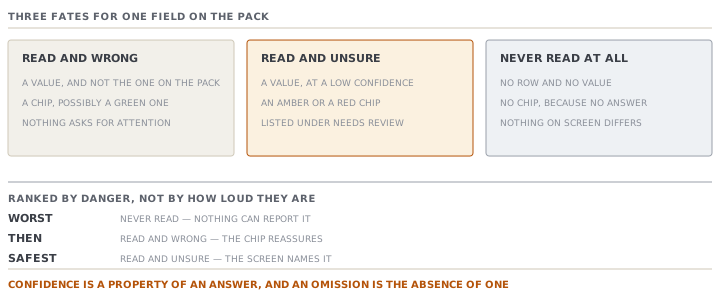
Line up the three ways an extraction can be wrong about one thing.
- Read and wrong. The pack says a body length of fifty-two centimetres and the model returns fifty-seven. There is a chip, and it may well be green, because the model is confident and mistaken.
- Read and unsure. The model returns fifty-two at a low confidence. The chip is amber or red, and the field is on the "Needs review" list. This is the case the screen is built for, and it is the one that will not hurt you.
- Never read at all. The row is absent. There is no chip, no list entry and no colour. Nothing on the screen looks any different from a pack that never had that row.
The third is the dangerous one. No confidence system can see it, because confidence is a property of an answer, and an omission is the absence of one.
The screen does catch the extreme case. If no colourways at all came back, the colourways tab shows an amber panel saying so. It tells you to check the source files in the preview and add the colours by hand, because otherwise the style will have none. That is a good guard, and notice its shape: it fires at zero. Seven colours read out of nine produces seven green chips and no warning anywhere.
Which is why the source sits beside the fields
The review is two columns for exactly this reason. The extracted data on the left, in five tabs: header, colourways, BOM, measurements, construction. Tabs that hold rows carry a count. The source document is pinned on the right, and it scrolls with you.
When a run was built from several files, the pane carries a switcher. You can page through every document the extraction was built from, not just the one it leads with. An image gets a zoom control. A spreadsheet that was read in the browser has no stored document to preview at all, and the pane says so plainly rather than showing an empty frame.
There is also a separate panel for a PDF's drawings. The pages are turned into images in your browser, shown as thumbnails with a count, and attached to the style when you save. When none can be read, the panel says so, and adds that the structured data above still applies.
And when nothing at all is flagged, the screen does not congratulate you. It says: no low-confidence fields, still, check each tab against the source before saving. That sentence is the whole of this lesson, and it is already on the page.
Check yourselfZawadi's read shows an overall confidence of 89% and an empty Needs-review list. She has fifteen minutes. Where does she spend them, and why not on the fields with the lowest chips?Show the answer
There are no low chips. That is what the empty list means. So the fifteen minutes go on comparing the source pane against the tabs, looking for what is not on the screen. Count the colours on the buyer's colour page against the rows in the colourways tab. Count the components on the pack's bill against the bill lines. Check that the measurement grid has as many rows as the pack's. Omissions are the only failure the confidence system is unable to report, and a clean list makes them more likely to be missed rather than less, because nothing on the screen is asking for attention. The header is worth a look too, since a header field the model had no opinion on shows no chip rather than a red one.
Check yourselfTwo bill lines both show a chip of 80%. One is a fabric line, one is a thread line. What can Zawadi conclude about how sure the model was, and what should she do differently for each?Show the answer
About the model's certainty she can conclude nothing, for either. A row confidence of 0.8 is also what the app writes when the model returned no number for that row. So the two lines may both be real claims, or both be gaps the app filled, or one of each. The chip cannot tell them apart. What separates the two lines is not the number but the consequence. A wrong fabric line moves the cost of the garment and the quantity to buy. A wrong thread line moves very little. So she reads the fabric line against the pack and accepts the thread line. The reason is the money at stake, not anything the screen told her. That is the general rule for a section where a stand-in value looks exactly like a claim.
Prompt · Read this confidence screen back to me honestly
On a finished extraction, before you start correcting anything, when the percentages are tempting you to trust the green ones.
Help me read an extraction review screen without being reassured by it.

I will paste or describe: the overall confidence, the list of fields flagged for review with their percentages, how many rows are in each section, and anything the screen is warning me about.

Start by refusing to rank my work by the percentages. Do this instead.

First, tell me what the overall figure is arithmetically, which is an average over the fields that exist, and therefore what it cannot include. Ask me directly whether I have counted the colours, the components and the measurement rows on the source document against the counts on the screen. If I have not, say that is the first thing to do, and that nothing on the screen will ever tell me the answer.

Second, take my flagged list and re-order it by consequence rather than by percentage. What does a wrong value in each of these fields cost downstream, in money or in a garment that cannot be cut? A low-confidence field nobody uses is less urgent than a high-confidence one the cost sheet reads.

Third, name the fields that carry no confidence at all in my description, and say why an absent chip is not a good sign.

Fourth, give me a stopping rule. What would have to be true for me to be finished checking? State it as things I have done, not as a number on the screen.

Do not tell me the extraction looks good. Do not treat a percentage as a probability that a field is right. It is the model's own claim, and nothing has checked it.
AI can make mistakes — check anything you act on.