Lessons · Lesson 5 of 5
Save is the commitment
What one press of Save writes, which side-effects the reversibility promise does not cover, and the verification pass that belongs before it.
Lesson 5 of 5 · 22 min
What this lesson is about
Up to now nothing has left the draft. Save is the moment it becomes the factory's data, and it reaches further than the screen you are looking at. It writes rows. It creates records in other modules. It starts work for other people. This lesson is what that press does, in order, and what it does not undo.
Two picks the app will not let you skip
Before the gate opens, the review wants two things chosen by a person: the fabric type and the garment type. Both are dropdowns filled from the factory's own reference lists. Both may already be pre-selected. The first choice is the code the model matched out of the pack, in whatever language it was written in. The fallback is a fixed keyword match. Either way the suggestion is labelled as read from the pack, and you can change it.
Leave either blank and the save is refused. The message names both, and the screen jumps you to the field. The server refuses the same call for the same reason, so the block is not merely a screen behaviour.
One label to expect. For a yarn-based construction, such as socks, sweaters or seamless, the field is titled Yarn type rather than Fabric type. It changes as you change the garment type, and the confirm panel changes its wording with it.
There is a third pick that is not required: who it is for. The model reads the pack's gender and age target in any language and matches it to one of six values. The review shows it as read from the pack, and you can change it. Blank is allowed, and blank is honest.
The tray that shrinks the catch-all
Above the tabs sits a purple panel. Its heading says the AI was not sure, and it carries a count. It lists every spec the model captured but could not place, and offers each one a destination.
There are eight destinations: trims, artwork, labels, compliance and testing, construction, wash, care, and keep as a spec. The last is not a failure. It is the right answer for a genuine note or a cross-reference, and the panel says so. Nothing is lost either way, because a row you leave unsorted saves under additional specifications.
The dropdown arrives pre-selected from the model's own guess at a section name, and construction is tested first on purpose. A row the model labelled as a construction detail used to fall through to a looser keyword and land nowhere. That is how a sock specification reached a dead end with no valid destination. Sorting a row moves it out of the catch-all immediately, in the draft, before anything is saved.
Two panels that shout and stop nothing
Two more things appear on the review, and neither blocks the save.
The spec check compares what the garment ought to have against what the bill contains, and prints a flag when something a polo needs is absent. It is advisory only. Nothing refuses because of it.
The standard structure offer is the one to be careful with. When the extraction looks like a known garment type, a purple panel says the standard kit has some number of further components and measurement points that the pack did not spell out, and offers a button to complete the structure.
Press it and it adds those rows to your draft. Read what they contain. Each added bill line carries a consumption of zero and a unit of pieces. Each added measurement point carries no values at all. They are a shape, not data. They then save exactly like any other row. And here is the part to know: every one of them also creates a material in your library, because that is what saving a named bill line does. Use the button when you intend to fill the rows in. Do not use it to make a thin extraction look complete.
The ballpark card is different again, and its difference is deliberate. It gives a price range for the garment from your own past cost sheets. It is drawn in ordinary colours rather than purple, because purple in this app means AI, and this is arithmetic over your own history. With no comparable history it says so, and says a firm cost sheet is the honest next step, rather than stretching a number to fit.
The gate, and then the fan-out
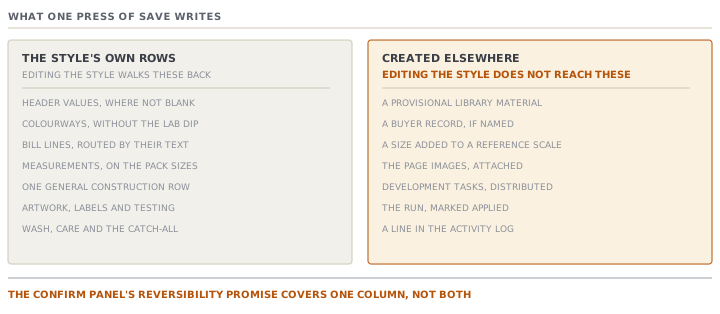
The save opens a confirm panel with three numbered steps. It counts the colourways, the lines and the measurements it is about to write. It says the pack will be attached, and that construction and anything you sorted will land in their own sections. And it says the work is reversible and logged.
Then the press.
The header, but only where it is not blank. A blank name or season does not wipe what is there. Fit and silhouette are joined into the style's fit notes, because there is no silhouette column yet, and the source says so rather than dropping the value.
The colourways, minus one field. Each colour is created with its name, code and Pantone. The lab-dip status the model may have returned is thrown away on purpose. A lab-dip state is earned from approval rounds, and an AI guess is not an approval. This is the clearest example in the module of the line between a reference the app will happily accept from a machine and an attestation it will not.
The bill, split by reading each line. Every line's own text decides its material category. A category that rolls up to trims, decoration or packaging sends the line to the bill's trim sections rather than its fabric ones. Fabric stays fabric, and a line with no category signal at all defaults to fabric. The trims the model sorted separately go the same way.
A library material for every named line. Each material name is looked up in the library and created if it is not there. A newly created one is provisional. It has no confirmed supplier and no confirmed price, it appears on the materials-to-source worklist, and it feeds the requirement calculation. The lookups run one after another rather than all at once, so two lines naming the same material cannot both create it.
The measurements, on the pack's own sizes. The best-matching reference scale is adopted. Any size the pack uses that the scale lacks is added to it. The style's scale is set, and every value is stored. A note afterwards says how many sizes were added and where to review their order. The base size is the medium when the pack has one, and otherwise the middle of the run. The source records why: a children's pack's sizes were once silently dropped against a default alphabetic scale.
One construction row, headed as general construction, with topstitch, neck tape and label attach folded into its notes.
The sorted sections. Artwork, labels and testing each land in their own tables. A label kind is matched onto the section's vocabulary, and a kind that does not match, such as a carton marking or a price ticket, is kept exactly as written rather than forced. A test status is matched the same way, and left blank when it does not clearly match, because inventing a status is worse than leaving one empty.
Wash and care. Anything you sorted to those two is added to the style's wash recipe and care instructions, one string each.
Everything else goes to the catch-all. Then one line in the activity log names the file and every count.
There is one more write that is easy to miss. The style's data timestamp is bumped once at the end. That is what makes a quotation cost sheet built before this extraction correctly show as out of date.
The new-style path does more
Creating a style from a pack, rather than extracting into one that exists, adds four things around the same fan-out.
- The style is created through the ordinary creation path. So its category comes from the garment type rather than the fabric type, and its counting unit is set the way a hand-made style's would be.
- The uploaded document is moved from pending onto the new style.
- If the pack named a buyer, that buyer is created as a real record, so it appears in the buyers list and the order dropdown. This step is deliberately non-fatal. A failure here is logged and ignored, because losing the style over a buyer would be the wrong trade.
- The development tasks are sent out to every owning team, exactly as they would be for a hand-created style.
What "reversible" covers, and what it does not
The gate's third step is true, and it is narrower than it reads. Archive a colourway, delete a row, edit the header, and the style's own data can be walked back.
| Written | Undone by editing the style |
|---|---|
| Header values, bill lines, trims, measurements, construction, artwork, labels, testing, additional specs | Yes — archive, delete or edit them |
| Colourways | Archived rather than deleted, which is the usual reversal here |
| Provisional materials created in the library | No. They are library records now, and they sit on the sourcing worklist |
| A buyer created from the pack | No. It is a buyer record |
| A size added to a reference scale | No. It is reference data for the whole workspace |
| Page images attached to the style | No, not by editing the spec |
| Development tasks sent out to the teams | No. People have been given work |
| The run itself | No. It is marked applied and kept as the record of where the data came from |
That second column is the reason the verification happens before the press rather than after it. Undoing a bill line takes a minute. Explaining to the sourcing officer why four materials she is chasing do not exist takes an afternoon.
Two refusals worth knowing
A frozen or retired style refuses the save. An accept into a released, closed or archived style is refused by the server, through the same guard every specification edit passes through. The screen does not offer it either, but the server is the real boundary.
An applied run cannot be applied again. Reopen one and the whole review is read-only, with a line saying it is already applied and pointing you at the style's own tabs. Re-running an extraction into a developed style would overwrite real work, so the app removes the door rather than warning you at it.
Check yourselfZawadi saves CV-4482. Ten minutes later she notices the bill has a line for a drawcord that the pyjama set does not have. She deletes the line. What has she actually undone, and what is still true?Show the answer
She has undone the bill line and nothing else. The material the save created in the library for that drawcord is still there, still provisional, still on the materials-to-source worklist, and still feeding the requirement calculation. Naliaka will chase a supplier and a price for a trim no garment uses, unless somebody tells her. The activity-log entry recording what the extraction wrote is also unchanged, which is correct. It is a record of what happened, not of what is currently true. The lesson is not that deleting was wrong. It is that the fan-out is wider than the tab she deleted it from, so an invented row costs more than the row.
Check yourselfThe extraction reads a colourway with a lab-dip status of approved, straight off the buyer's colour page. Zawadi saves. What is the colourway's lab-dip state afterwards, and what would have been wrong with keeping the buyer's word for it?Show the answer
It starts at none, like every other colourway, because the extraction's lab-dip status is deliberately discarded at the write. Nothing has been lost. The pack still says it, and the pack is attached to the style. But the app will not accept an approval as a field read off a page. A lab-dip state is an attestation. It means somebody at this factory submitted a dip and somebody at the buyer signed it off, and it is earned by the approval rounds that record who decided and when. Carrying it in from an extraction would create a signed-off approval with no signature behind it, and the first person to rely on it would be relying on a sentence a model read in a PDF. A reference the app will take from a machine and a decision it will not are two different things, and this field is where the module draws that line.
Prompt · Walk me through the pass before I press Save
On a reviewed extraction, in the last five minutes before you commit it to a style.
Be the second pair of eyes on an extraction I am about to commit. Assume I am tired, and that everything on my screen looks finished.

I will describe: what the pack contains, what the review screen now holds section by section, which fields I edited, and what is still sitting in the unsorted catch-all.

Run the pass in this order, and make me answer each step before you move on.

Counting first. For colours, components and measurement points, ask me for the number on the pack and the number on the screen. Stop on any pair that does not match. Do not let me explain a gap away without opening the source.

Then the expensive fields. Ask me to read back the fabrication line, every consumption figure and every unit cost. For each one, say what it moves downstream if it is wrong.

Then the placeholders. Ask whether any row on my screen was added by a fill-the-standard-structure offer rather than read from the pack. Remind me that a row with a zero quantity still saves as a row.

Then the unsorted items. For each one, ask me where it really belongs, and whether keeping it as a loose note is the honest answer.

Then the things a save reaches that an undo does not. Ask me to list what will be created outside this style: library records, reference-data entries, work sent to other people. Then ask me to confirm I am willing to own each one.

Finish with a single sentence I could defend to a colleague, stating what I checked and what I did not.

Do not tell me it is ready. Tell me what I have not looked at.
AI can make mistakes — check anything you act on.