Lessons · Lesson 2 of 5
Three readers, one screen
Which of the app's three readers your file gets, what each one can and cannot know, and why the file format decides how accurate the numbers are.
Lesson 2 of 5 · 24 min
What this lesson is about
The same review screen is fed by three different readers. One looks at a page and works things out. One reads cells and copies them. One sorts a pile of files first, then does both. Which one you get is decided by the file you drop, not by which is best. Miss that and you argue with a guess the app never needed to make.
The three doors
Zawadi has three files from Corvely. A pack PDF of fourteen pages, an artwork supplement of three, and a size spec as a spreadsheet. Dropped in different places, they take different routes.
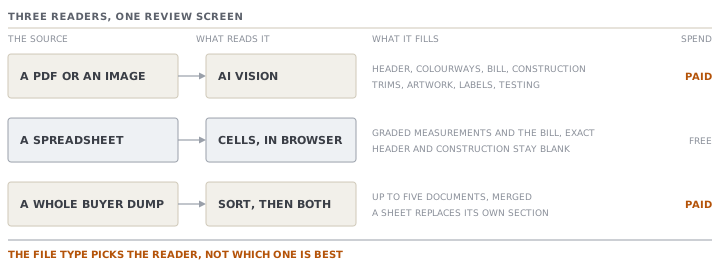
A PDF or an image goes to the vision reader. This is the only route that can fill the header, the colourways, the construction notes, and the sorted trim, artwork, label and testing sections. Those are prose and pictures on a page. It is also the only route that costs money.
A spreadsheet is read in your browser. The workbook is opened by a reader that runs inside the page. Every worksheet is scanned for a table, and only the extracted cells travel to the server. The file itself is never uploaded. So the upload limit does not apply to it, and no model is called. Nothing is spent.
Batch intake takes the whole pile. You drop everything at once. The files are sorted and grouped into styles. You correct the grouping. Then each group is extracted as one run. Inside, that run uses both of the other two readers and merges what they find.
What the vision reader is told
The instructions the model receives are worth reading once. They explain most of what you will see on the review screen.
It is told to return strict JSON and nothing else. JSON is a plain text format for structured data. It is told that consumption, unit cost, wastage, fabric weight and width must be plain numbers rather than text, so a cell reading two hundred and forty grams becomes a number. It is told to read every colour the pack offers, whether from a colour list, a colour card or a swatch grid, and never to leave the colourways empty when the pack shows any colours.
It is told to sort rather than dump. Hardware, closures, elastic and sewing thread go to trims. A print or an embroidery goes to artwork. A main label, a care label or a size label goes to labels. A colourfastness requirement goes to testing. There is a catch-all for a labelled spec that genuinely fits none of those. The instruction closes by saying that when in doubt, the sorted section wins.
Then the sentence that matters most. Use null for anything not on the pack. Do not invent data. A missing value with low confidence is better than a guess.
The spreadsheet reader, and the letter that decides everything
The sheet reader does not guess. It looks for a header row, then reads what is under it. All of its usefulness turns on whether it recognises that header.
For a measurement grid it needs a row containing two or more size-like tokens. What counts as a size is a fixed list, and it is narrower than most people assume.
| Kind | Accepted | Not accepted |
|---|---|---|
| Alpha | XXS through XXXL, 2XL to 6XL, OS, one size | Anything else, including a size written with a slash |
| Numeric | A one- or two-digit number from 28 to 60, the waist range | A number below 28 or above 60, or any three-digit number |
| Kids | A year form such as 2-3y, 6Y or 4-5 yrs | The same range with the year letter left off |
Read the third row again with a European children's pack in front of you. Corvely's own size spec is headed by body heights in centimetres. Those are the numbers a European kidswear buyer uses. Not one of them is a size token. Three-digit numbers are rejected outright, and the two-digit ones sit outside the waist range. So the sheet is classified as neither a measurement grid nor a bill of materials, and the app says exactly that: the sheet was not recognised, and no fields were extracted.
Zawadi asks Corvely's technologist for the same sheet with the year equivalents in the heading row. It comes back headed with the year form. The grid is recognised, and every graded value arrives as the buyer typed it.
That is the lesson of this whole module in one exchange of emails. One letter in a column heading is the difference between the buyer's own numbers and a model's reading of a picture of them. It costs an email.
The bill-of-materials side works the same way and fails in its own places. The header is found by keywords. It needs a material, description or item column, plus at least one of consumption, placement, supplier, price or unit. A row only becomes a structured line when its quantity is a number and its unit maps onto kilograms, metres or pieces. A line quoted in yards is left out. The app names it and says to review it on the sheet. Nothing is padded with an invented value.
Where the sheet reader does work, its numbers carry a confidence of 0.98, and the review says why: read straight from the cells, no AI guessing. The header and the construction notes stay blank on purpose, because a spreadsheet almost never carries them.
Batch intake, and the five it reads
A buyer dump is not three tidy files. It is nineteen, named by whoever exported them.
Batch intake creates a batch and moves it through three states: sorting, extracting, done. Every file is given one classification out of six, and a group key. The six are tech pack, measurement sheet, BOM sheet, artwork, fabric detail, and other. The group key is the style cluster the file belongs to.
The sorting is done by a model, but it is never trusted on its own. Whatever comes back is checked against the batch's real files, one file at a time. An entry for a file that is not in the batch is ignored. A classification outside the six falls back. A blank group key falls back. A confidence outside its range falls back. What it falls back to is a fixed clusterer that reads the file names. It uses a style code such as CV-4482 if there is one, otherwise the name with the document words stripped out. That same clusterer is what runs when there is no live AI at all, so an offline workspace sorts the same pile into the same groups.
Then you correct it. That is the point of the review step.
When a group is extracted, four rules apply. The confirm panel states them before you press the button.
- Every PDF and image in the group goes to the vision reader, and the results are merged. A spec sheet and an artwork page can no longer crowd each other out.
- At most five documents are read. Files classified as tech packs are sorted to the front, so a spec sheet is never the one dropped. The panel says how many of how many will be read.
- Every spreadsheet in the group is parsed cell by cell, and it replaces its section outright. A measurement sheet overwrites the merged measurements. A BOM sheet overwrites the merged bill. Both arrive at the sheet reader's own confidence.
- One extraction run comes out. It is named after the richest document, with the merged sources listed after it.
| Part | Rule |
|---|---|
| Header and construction | The highest-confidence value that is actually present wins, field by field. A tie goes to the richer document |
| Colourways | Combined, matched on the name or on the Pantone code's core, so one shade named twice collapses to one row |
| Bill lines | Combined on material plus placement. A later duplicate only fills gaps the earlier one left |
| Measurements | Combined on the point of measure. The first reading wins, since a sheet usually replaces the whole section anyway |
| Size set | The longest one wins |
| Everything sorted or catch-all | Combined, with duplicates removed. Nothing is dropped |
Notice what "richest" means, because it decides the tie-breaks and the preview. It is a count. Bill lines are worth double, then colourways, measurements, and each filled header and construction field. The document that read the most spec content leads the merge, and it is the one shown in the source pane. Not the first file, and not the biggest.
Check yourselfCorvely sends the graded spec twice — once as a table inside the pack PDF and once as a spreadsheet — and both go into the same intake group. Which numbers end up on the review screen, and what should Zawadi check?Show the answer
The spreadsheet's. Vision runs on the PDF and produces a set of measurements. Then the sheet parse replaces the measurement section outright and stamps it at 0.98. She should still check two things. First, that the sheet was actually recognised. If its header row was not accepted, nothing replaced anything, and what she is looking at is the model's reading of the PDF table at whatever confidence it claimed. The run's file name tells her, because a merged source is named in it. Second, that the two agreed. The app does not compare them and will not tell her they differed. The sheet simply wins, silently. That is right when the sheet is the buyer's own file, and wrong on the day somebody sends last season's.
Check yourselfA group holds seven documents: two tech packs, three artwork pages, a photo of a label, and a spreadsheet. How many are read, and which ones?Show the answer
Six of the seven are read, by two different readers. The spreadsheet is parsed cell by cell and does not count against the vision limit. Of the six non-spreadsheet files, five are sent to vision, which is the cap. They are chosen after the tech-pack files are sorted to the front. So both packs are certainly read, and one of the four remaining images is not. The confirm panel says this in a full sentence before you commit. It names how many of how many will be read, and it advises you to keep a group to its real tech-pack documents. If the label photo matters, the fix is to split the group rather than to hope.
Prompt · Which reader gets my file, and what should I ask the buyer for
When a buyer's files arrive and you have a choice about which of them to use, or a chance to ask for a different one.
Help me plan what to ask a buyer for, so that the numbers I end up with are theirs rather than a reading of a picture of theirs.

I will list the files I have been sent: file name, type, and roughly what each one contains.

First, sort my files into three groups. Those a vision reader would have to interpret. Those a structural reader could read cell by cell. And those that carry nothing a tech pack needs. Say which group each file is in, and why.

Second, go through every part of a tech pack: the header, the colourways, the bill of materials, the graded measurements, the construction notes, the trims, the artwork, the labels, the testing requirements. Tell me which of my files is the best source for each one, and mark the ones where I currently have no good source at all.

Third, and this is the part I actually want. Write me a short, polite request to the buyer's technologist, asking for exactly the files that would move a section from an interpreted source to an exact one. Keep it to one paragraph. Do not ask for everything. Ask for the one or two things with the largest effect, and say briefly why each one helps them as well as me.

Fourth, warn me about anything in a spreadsheet that commonly stops it being machine-readable: heading labels a system may not recognise, merged cells, a units column that is not one of the usual ones, a grid split across sheets.

Do not tell me which reader my particular application will use. Tell me what each kind of source makes possible, and let me check the behaviour on my own screen.
AI can make mistakes — check anything you act on.