Lessons · Lesson 1 of 5
Nothing reaches the style yet
What an extraction run is, what the app refuses before it spends any money, and why an unread draft is treated as work going to waste.
Lesson 1 of 5 · 22 min
What this lesson is about
An extraction is not a save. The app reads the buyer's file and shows you what it thinks it found. That draft sits in a record of its own. It stays there until you accept it or throw it away. This lesson is about that record. Get it wrong and you lose a read you paid for, or you overwrite a style with a guess.
Lukenya Apparel is a knit factory at Athi River, in Kenya. It runs five sewing lines and sells children's wear into Europe. Four people appear across this course.
- Mwikali Nzioka owns the business. She is the workspace Owner.
- Zawadi Kilonzo is the merchandiser. She does the extraction.
- Kimeu Musembi is the second merchandiser. He uploads the same pack twice.
- Naliaka Wekesa is the sourcing officer.
The pack used in all five lessons comes from Corvely, a European children's-wear chain. It is a cotton-jersey pyjama set. The buyer's own number for it is CV-4482, and the style it becomes is STY-317.
Say the basis once, because the whole course rests on it. Every heading, button, field name, message and threshold in these pages was read out of the application's own source code. None of it was copied from a description. Where a lesson gives an arithmetic result, the working is shown so you can redo it. Where something depends on how your own workspace is set up, the lesson says so and names the setting.
The upload is not the transaction
Zawadi opens the style-creation funnel in tech-pack mode. She chooses CV-4482 pyjama set TP v3.pdf and presses Extract. A progress bar appears. Its label keeps changing, and a note says a heavy tech pack can take one to two minutes and asks her to keep the tab open. The labels are honest about themselves. The reading call reports no progress at all, so the bar is only a time-based estimate, shown next to a live seconds counter.
When it finishes, the screen fills with fields. No style has been created. No row of the pyjama set's bill of materials exists. What actually happened is smaller than it looks, and it is worth being exact about.
Two things were written. The file was stored as an attachment, labelled as the source for AI extraction. And one row was created in the extraction-runs table. That row holds the model's raw answer, the mode it ran in, and the fingerprint of the file.
That row is the run. It is the unit this whole module turns on. The rest of this lesson is about what it does for you.
What the app refuses before it spends anything
An extraction costs money. A doomed one costs the same as a good one. So a series of checks runs before the model is called at all. Each refusal names what is wrong instead of failing vaguely.
| Check | Where it runs | What it does when it fails |
|---|---|---|
| File type and size | Browser, then again on the server | Refuses, and gives the file's size and the limit in the same sentence |
| Host upload limit | Browser | Where large-file storage is off, a file over 4 MB is refused. The message says to re-save it as a spreadsheet or split the PDF |
| The model's own document limits | Browser, then the server again | A PDF over 32 MB or over 100 pages is refused, and the per-style splitter is offered instead |
| Same pack already read | Server, on the file's content | Shows what happened to it last time, and offers to run it anyway |
| Monthly extraction allowance | Server, against the workspace | Refuses, and names the allowance. No allowance set means no block |
| Daily spend and AI entitlement | Server, at the single point every live call passes | Refuses in plain English before any request leaves |
Two of those deserve a second look.
The page-count check happens in your browser. It uses the same reader that draws the preview. That is not a security boundary and it is not meant to be. The server checks the size again on its own, and the model's hundred-page limit is the final backstop. The browser check is there so you get a useful sentence instead of a paid failure.
The allowance check fails open. If the control plane that holds your workspace's limit cannot be read, the extraction goes ahead anyway. The reason is written into the source code: over-spending can be put right later, and a factory stopped at two in the morning cannot.
The duplicate warning, and the thing it cannot see
Before anything is stored, the app takes a SHA-256 digest of the file's bytes. A digest is a short fingerprint of the whole file. The app then looks for an earlier run with the same fingerprint.
This is identity by content, not by name. Kimeu renames the pack corvely pyjamas FINAL.pdf and uploads it. Same bytes, same fingerprint. He gets a panel headed "You've already uploaded this tech pack". It tells him the pack was extracted and saved into a style, and on what date. No AI ran.
Now the other half, which matters more. Corvely reissues the pack with one corrected button size. One byte differs, so the new fingerprint has no relation to the old one, and the app sees a completely new file. That is correct. It is a new pack and it must be read. But notice what the guard therefore cannot do. It can tell you two files are identical. It can never tell you two files are similar. Nothing in the app compares version three of a pack against version four. That comparison is your job, and lesson five is where it bites.
The warning is a warning, not a wall. Beside it sit Extract again anyway and a link to the earlier work. Which earlier run you are shown is ordered on purpose: an applied run first, then one in review, then one awaiting review, then a discarded one. Within each group, the most recent comes first.
The run, and its four states
A run is created in awaiting review. Your first edit moves it to in review. From there it ends in one of exactly two places. It becomes applied when you save it into a style, or discarded when you throw the draft away.
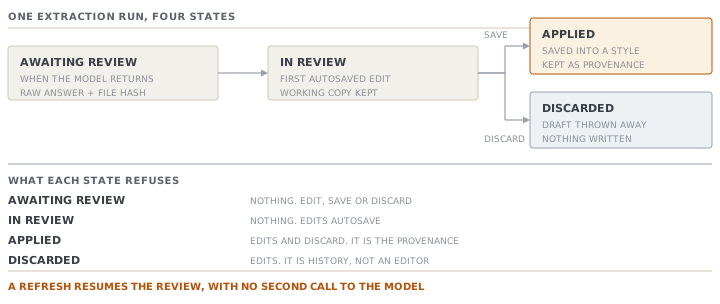
Three things follow, and people get all three wrong.
A refresh is safe. The moment the model returns, the run's id goes into the address bar. Reload the page, close the laptop, come back tomorrow, and the review reopens exactly where it was. There is no second call to the model. Your edits are saved to the run a moment after you stop typing. The strip at the foot of the screen tells you which state you are in, ending at "Draft saved — safe to leave and resume later".
An applied run cannot be edited or discarded. The refusal is explicit: an applied extraction cannot be discarded, because it is the record of where the style's data came from. Open it again and you get a read-only review, with a line saying so and pointing you at the style's own tabs for changes.
A style that came from a pack does not offer to extract again. On the style screen the purple button reads Review extracted tech pack instead of Extract from tech pack, and it opens that read-only run. On a style that was developed by hand the button is not there at all. Re-extracting into a working style would overwrite real work, so the app removes the option rather than warning you about it.
The read that fails, and the read that lies
Sometimes the model returns something the app cannot read. When that happens the app returns blank fields and a message. It never returns a pack that merely looks plausible.
That rule is written in the source code together with the bug that produced it. A jean was uploaded, and the screen showed a heavyweight tee, because an old fallback served a canned sample stamped as a live result. A made-up read is far worse than a failed one. A failed read sends you back to the upload. A made-up read sends you to the buyer.
There is one corrective retry. The second attempt tells the model plainly that its previous answer was unusable. If the retry also fails, the first message is the one you see, and no run is stored at all. The file is stored, but the run is not. So uploading the same file again does not trip the duplicate warning, which is exactly what you want after a read that produced nothing.
One more label to learn. In a workspace where live AI is not switched on, the extractor still works. It returns a realistic canned pack so the screen can be learned and demonstrated. It says so, next to the draft heading: (sample — no live AI). If you see that chip, nothing on the screen came from your file.
Nothing rots quietly
An unreviewed run is work somebody paid for, sitting still. So every open run, whether awaiting review or in review, appears on My Work as an amber exception, with a link straight back into the review. Applying it or discarding it clears the item.
There is also a register. The Tech pack files page lists every upload as one row, newest first. Each row reads file, then style, then status, with a resume link while the run is still open. Several runs against one style are that style's revisions.
Check yourselfZawadi extracts CV-4482, edits three fields, then closes the tab without saving. Nothing was written to a style. So what exists in the system tomorrow morning, and who is told about it?Show the answer
Three things exist. The uploaded PDF, stored as an attachment. The run, holding the model's original answer untouched plus her saved working copy in a separate column. And an amber item on My Work saying a tech-pack review is in progress. It names the file, and its link reopens her exact review, with her three edits. No style, no bill line, no measurement row. The run's own state moved from awaiting review to in review the moment her first edit was saved. That is the app's way of recording that a person has started, rather than that a file has landed.
Check yourselfA read fails with the unreadable-response message. Zawadi immediately uploads the identical file again. Does she get the duplicate warning, and why is the answer the right design?Show the answer
She does not, because no run was stored. The duplicate check looks for an earlier RUN with the same content fingerprint, and the failure path returns before the run is created. That is the right behaviour. Warning her off a file that has so far produced nothing would strand the pack behind a message about work that does not exist. Note what did get stored, though. The attachment was saved before the extraction was attempted, so a workspace that fails several reads on one pack will collect copies of it on the record.
Prompt · Is this pack ready to extract, or ready to be refused
Before you upload a buyer's file, especially a heavy one or one you suspect you have seen before.
Help me decide whether a tech-pack file is worth uploading to an extractor, and what to expect if it is not.

I will tell you: the file type and extension, its size, its page count if it is a PDF, whether it covers one style or several, whether I have received an earlier version of the same pack, and whether my workspace has live AI switched on.

Work through it in this order, and answer each part separately.

First, the refusals. Which of the size, page-count and file-type limits is this file at risk of hitting? What is the cheapest thing I can do about each one: re-saving it, splitting it, or asking the buyer for a different format? Do not guess a specific limit number for my system. Tell me which limit applies, and tell me to read the number off my own screen.

Second, duplication. If I have an earlier version of this pack, say plainly that a content check can only tell me two files are identical. It cannot tell me two files are similar. Then give me a short manual comparison to run between the two versions before I extract the new one.

Third, expectation setting. Given the file type, say which parts of a tech pack this file can realistically fill and which it cannot. I want to know before I look at the review screen what a blank section means.

Two rules. Do not tell me an extraction will be accurate. And if the answer depends on how my workspace is set up, say so and name what I should check, rather than assuming.
AI can make mistakes — check anything you act on.