Lessons · Lesson 2 of 5
A round is the unit of record
What one submission and one buyer decision store, which control the app offers in each state, and what the record leaves out.
Lesson 2 of 5 · 24 min
What the app is counting when it counts rounds
An approval is not one event. It is a conversation that goes back and forth until somebody says yes. The application splits that conversation into two objects. One stands for the thing needing approval. The other stands for one trip out to the buyer and the answer that came back. Confuse them and you will look for a history that is stored somewhere else.
The thing needing approval is an item. One trip and its answer is a round. An item can have many rounds, numbered from one upward. Nothing else in this module carries state, and that is deliberate.
Ivelina at Maritsa needs the Rope shade on STY-214 approved by Tindermere. She creates one item, a lab dip in the colour Rope. Then she submits rounds against it until the answer is yes.
Creating the item
On the style's Samples tab, the second panel carries a button reading Request an approval. It opens a short form. The fields you get depend on the kind you pick.
| Field | Shown for | Notes |
|---|---|---|
| What needs approval | Always | The four kinds |
| Sample type | Sample only | The nine types |
| Colour | Everything except a shipping mark | A colourway when the style has them, a free text box when it does not |
| Size | Sample only | From the style's size scale, or all |
| Stage | Strike-off only | A process step |
| Requested | Always | During development, With the quotation, or At order placement |
| Label | Always | Free text, such as the name of a chest print |
Two of those repay attention. Requested records why the approval exists at all, and it is the only place that context is kept. And Colour is a dropdown of the style's colourways only when colourways exist. If none do, the app shows a plain text box instead. The record then carries a colour name that joins to nothing. A lab dip logged against a typed colour name will not move a colourway's status, because there is no colourway to move.
The server refuses an item that belongs to neither a style nor an order. It also refuses a Sample with no sample type. Everything else is optional.
The five states a round can be in
A round is created in one state and leaves it once. Here is the whole vocabulary, with the labels the screen actually prints.
| Stored status | Label on screen | Colour |
|---|---|---|
| submitted | Submitted — awaiting buyer | Amber |
| approved | Approved | Green |
| approved_with_comments | Approved with comments | Green |
| rejected | Rejected | Red |
| resubmit | Resubmit requested | Amber |
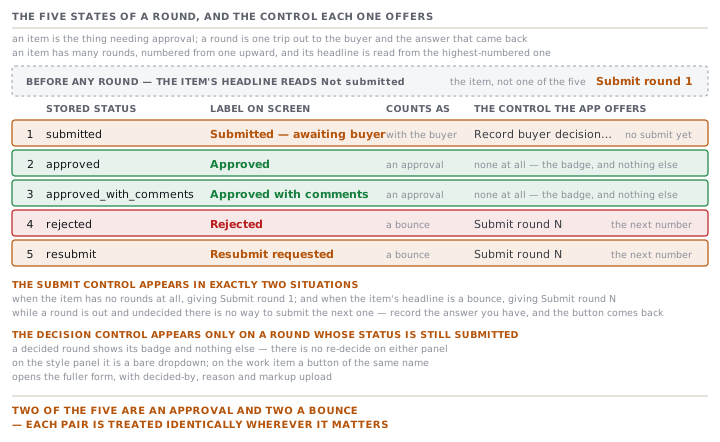
An item has no status column of its own. Its headline is read from its rounds. The app sorts them by round number, takes the highest, and shows that one's status. An item with no rounds reads Not submitted. That is why nothing can drift. There is only one place the answer is written, so there is nothing to keep in step.
Two of the five count as an approval. Approved and Approved with comments both mean yes, and every rollup in the module treats them the same way. The comments are a warning to carry into the next sample, not a condition.
Two of the five are a bounce. A bounce means the buyer has said no and the factory must send another round. Rejected and Resubmit requested are the two, and they differ in tone rather than in effect. The app treats them identically everywhere it matters.
What one round holds
This is the part that separates a record from a note. A round captures what was sent, who sent it, how it travelled, and then what came back.
| Field on the form | Shown for | Filled by |
|---|---|---|
| Submitted by | Every kind | The factory, defaulting to the signed-in user |
| Submission ref | Every kind | The factory's own reference |
| Fabric quality / base | Lab dip only | The factory |
| Size(s) submitted | Any sample | The factory |
| Print method | Strike-off only | The factory |
| Placement | Strike-off only | The factory |
| Sent via | Every kind | The factory |
| Tracking no. | Every kind | The factory |
| Sent date | Every kind | Defaults to today |
| Cover note | Every kind | The factory |
| Photos | Every kind | The factory |
| Decision | Every kind | Recorded from the buyer |
| Decided by (buyer) | Every kind | Recorded from the buyer |
| Reason | A bounce only | Recorded from the buyer |
| Comment | Every kind | Recorded from the buyer |
| Marked-up photo | Every kind | Recorded from the buyer |
The per-kind fields come from one small function, so they are consistent everywhere the form appears. A lab dip asks for the fabric quality or base. A shade reads differently on a different cloth, so an approval that does not say which cloth it was dyed on has approved less than it looks. A strike-off asks for the print method and the placement. Any sample asks which sizes went.
There is one more variation, and it is easy to miss. For a Fit, Size set, PP or TOP sample, the cover-note field is relabelled Cover note / measurement summary. Its placeholder asks what changed and which points are out of tolerance. Tolerance is the allowed range around a measurement. A Proto does not get that wording, because a proto is judged on construction rather than on measurement.
The reason list on a bounce is fixed and short: Shade, Measurement, Construction, Artwork, Other. You cannot record a reason on an approval. The server drops it, so a reason only ever explains a bounce.
Photos are stored in two groups. The factory's submission photos hang off the round under one record type. The buyer's marked-up photo or revised measurement sheet hangs off it under a different one. The screen prints them separately, with the buyer's group labelled Marked-up / revised POM. POM means point of measure, one named place on the garment that gets measured. A photo that fails validation is skipped with a warning and never blocks the round.
Which control the app offers you, and when
Here the screens are more opinionated than they look, and here people conclude a button is missing.
The submit control appears in exactly two situations. When the item has no rounds at all, you get Submit round 1. When the item's headline is a bounce, you get Submit round N for the next number. In every other state there is no submit button.
Read that again in the state that matters. While round 2 is out with the buyer and undecided, there is no way to submit round 3. That is intentional and it is right. Two live rounds on one item would make the headline meaningless. If the buyer has genuinely gone quiet and you want to send again, record the answer you have, either a bounce or an approval. Then the button comes back.
The decision control appears only on a round whose status is still submitted. A round that has been decided shows its badge and nothing else. There is no re-decide on either panel. If the buyer changes their mind, you record a new round, and the item's headline follows the new one.
On the style panel, the decision is a bare dropdown reading Record buyer decision…. On the work-item screen it is a button of the same name. That one opens the fuller form, with the decided-by, the reason and the markup upload. Same act, two levels of detail. And the fuller one is only reachable for approvals that have a milestone, which lesson 1 explained.
What a round does not capture
Three absences, all of them worth knowing before you rely on the record in an argument.
Nobody is named as the decider in the system's own terms. Decided by (buyer) is a free-text box. It is not a person record, it does not join to a buyer contact, and two spellings of the same name are two different strings. It is a note, and a valuable one, but do not expect to filter on it.
The conditions the shade was judged under are not recorded. There is no field for the illuminant, the light box or the viewing geometry. The illuminant is the light source a colour is judged under. There is no field for a measured colour difference either. The record holds a verdict and, if somebody uploaded one, a photograph. The fact under this lesson is about how much that leaves out.
A round has no due date and no owner. Dates in this module come from the Time and Action plan, which is lesson 4. The round itself carries only the date it was sent.
Two rules to take away
Record the answer you actually have. The app will not let you stack a second live round on top of an undecided one. So a submission you never closed silently blocks the next one. A recorded bounce is more useful than an open round nobody will decide.
Put the thing that identifies the parcel in the reference, not the cover note. The reference prints beside the round number, in a monospaced font, on the work item. The cover note does not.
Check yourselfIvelina submitted round 2 of the Rope lab dip eleven days ago and Tindermere has not replied. She wants to send a fresh dip on a corrected recipe. The Submit button is not there. What should she do, and what would be wrong to do?Show the answer
The button is absent because the headline is still Submitted — awaiting buyer, and the app allows only one live round per item. The right move is to record the answer she actually has. If the buyer has asked verbally for another dip, that is Resubmit requested, with the reason Shade and a comment saying who said so and when. The button then returns for round 3. What would be wrong is to create a second lab-dip item for the same colour, just to get a fresh Submit button. The style would then carry two competing histories for one shade, and the colourway's status would follow whichever one was written last.
Prompt · Check a submission before it leaves the building
On the morning a sample, lab dip or strike-off is going out, before the courier is called.
Act as a strict reviewer of one development submission I am about to send to a buyer. Your job is to find what is missing from the record, not to praise what is there.

I will tell you: what kind of approval this is and, for a sample, which type; the style and colour it is for; what is physically going in the parcel; and what I have written down about it so far.

First, tell me what a record of this submission must carry to be worth anything in six months. Cover four things separately and name each: what was sent, who sent it, how it travelled, and what exactly the buyer is being asked to judge. For a shade, insist on the exact cloth or base it was dyed on. For a fit, size set, pre-production or top-of-production sample, insist on which sizes went, and on a measurement summary naming any point outside tolerance. For a print, insist on the method and the placement.

Second, write me a cover note of at most six sentences. It should name the buyer, the round number, what changed since the previous round if there was one, and the specific decision I am asking for.

Third, propose a submission reference in a consistent shape, and explain the shape, so I can reuse it for every future submission.

Two rules. Do not fill a gap with a plausible value. If I have not told you the fabric base, write UNKNOWN and tell me to go and find it. And if what I have described would make the buyer's answer ambiguous, say so and tell me what to add.
AI can make mistakes — check anything you act on.