Lessons · Lesson 4 of 5
Which milestone actually completes
How the plan turns into a work queue, why one approval has two milestones, and which of the two an approved round closes.
Lesson 4 of 5 · 24 min
The plan is the only thing with dates
Everything in this module that has a due date got it from an order's Time and Action plan. The queue, the overdue colours, the chase list on My Work. All of it. The plan is not a report of the sampling work. It is that work's calendar. Anything missing from it has no date and no owner. This lesson is about how a plan row and an approval record find each other. The way they do it is unusual, and you can see the consequences on screen.
They find each other by name. Not by an identifier, and not by a link somebody made. The application reads the milestone's name, applies a set of patterns to it, and decides what kind of approval it is about. Everything else in this lesson follows from that.
Maritsa's plan for ORD-1207
When an order is created, the app picks a Time and Action template from the style's product family, and falls back to its construction. STY-214 is a tee, which resolves to knit tops, so ORD-1207 gets the seeded Basic Knit — 90 days plan. Every lead below is in working days before the ex-factory date, the day the goods must leave the factory. The count skips the factory's own weekend and its holiday list. These are base figures. The app may stretch them for quantity, sourcing and complexity before it writes the dates.
Of the plan's milestones, these are the ones that land on the Sampling board.
| Milestone | Working days before ex-factory | Lane | Owner on the template |
|---|---|---|---|
| Lab Dip Submission | 78 | Lab dips and strike-offs | Sourcing |
| Fit Sample Submission | 78 | Sample room | Pattern Room |
| Lab Dip Approval | 65 | Lab dips and strike-offs | QC / Buyer |
| Fit Sample Approval | 62 | Sample room | QC / Buyer |
| Size Set Sample Submission | 56 | Sample room | Pattern Room |
| Size Set Sample Approval | 50 | Sample room | QC / Buyer |
| PP Sample Submission | 45 | Sample room | Sample Room |
| PP Sample Approval | 35 | Sample room | QC / Buyer |
| TOP Sample Submission | 30 | Sample room | Sample Room |
| TOP Sample Approval | 25 | Sample room | QC / Buyer |
Ten rows, five pairs. Every approval on this plan is scheduled twice, once for the factory sending it and once for the buyer answering. That is good planning, and it is the source of this lesson's main surprise.
The print module, and why the artwork has to exist first
STY-214 is printed, and nothing in the table above mentions a strike-off. It appears only if the app decides the order involves printing, and it decides that by reading text.
At the moment the order is created, the app joins together every string value on the style's operations rows and its artwork rows, and looks for the word print in the result. If it finds one, two milestones are inserted, anchored to the Lab Dip Approval: Print Strike-off Submission at 61 working days and Print Strike-off Approval at 55. A third, Printing Start, is inserted into production.
Two things follow, and both bite in practice.
The derivation runs once, when the order is created. Artwork rows added to the style the following week change nothing on an existing plan. The strike-off approval that everyone knows is coming then has no milestone, no date and no row in the queue. The required list from lesson 3 will not catch it either, because the catalogue has no strike-off requirement.
And it is a text match, so it fires on any operations or artwork row that happens to contain the word. That direction is the harmless one. A spurious pair of strike-off milestones is visible and can be ignored. The silent direction is the one to guard against.
Which milestone an approval closes
Now the part that surprises everybody the first time.
Boyan opens the Fit Sample Approval row from the board. It takes him to the work item at /approvals/<milestone id>. He starts the log, submits round 1, and later records Tindermere's decision as Approved. The screen confirms it with a green line, and the line names Fit Sample Submission.
Here is why. When an order-scoped approval is decided as approved, the app looks for the order's milestones matching that kind, in plan order, and completes the first one that is not already completed. Both fit milestones match the same pattern. The submission sits earlier in the plan. So the submission is what closes, and the approval milestone Boyan was standing on stays open.
That is not a bug so much as an assumption. The design expects the sample room to have already closed the submission milestone when the parcel went out. Where a factory works that way, the sequence is exactly right: the submission is completed by the person who sent it, and the buyer's answer then closes the approval. Where nobody closes submission milestones, every buyer decision lands one row too early, and the plan drifts by exactly one milestone per approval.
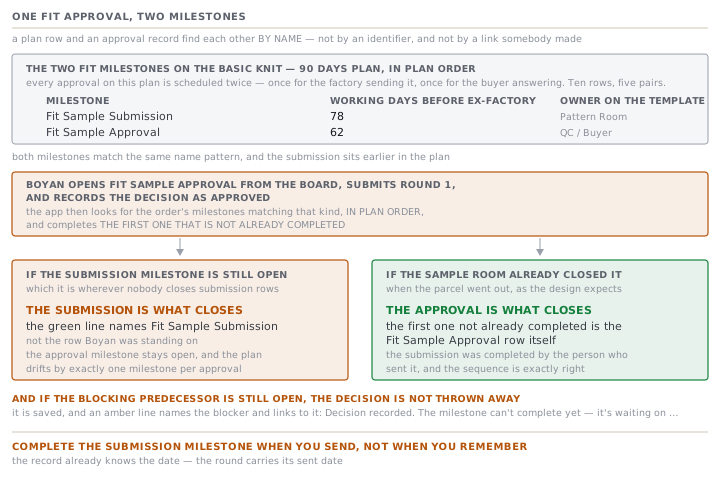
The fix, once you know, is small. Complete the submission milestone when you send, not when you remember. The record already knows the date, because the round carries its sent date.
When the decision is saved and the milestone is not
There is a second outcome worth recognising, because the wording is precise and easy to misread.
Milestones on this plan mostly carry a hard dependency. Fit Sample Submission cannot start until Order Confirmation & Tech Pack Handover is completed, and Fit Sample Approval cannot start until Fit Sample Submission is. If the app tries to complete a milestone whose blocking predecessor is still open, it does not throw the buyer's decision away. The decision is saved, and the screen shows an amber line naming the blocker and linking straight to it: Decision recorded. The milestone can't complete yet — it's waiting on …
Read that as good news. The evidence is in the record, and what is outstanding is a plan row somebody has to close. It is the one message in this module that tells you the two halves have come apart, and exactly where.
Marking a milestone done by hand
The app is deliberately awkward about this, and one of its two surfaces is more awkward than the other.
On the order's Time and Action tab, a milestone that the app can complete from real evidence does not offer Completed at all in its status list. The choice is removed rather than refused. A buyer approval with an approval record behind it is treated the same way.
The work-item screen is different. It always shows a section headed Or complete it directly with a Mark milestone done button, whatever state the approval is in. Press it before the buyer has approved and the server refuses with a named message: "Fit Sample Approval" completes when the buyer approves it — record their decision in Development approvals, don't mark it done by hand. A submission milestone with no round logged gets its own version. It is completed when a development round is submitted to the buyer — it can't be marked done by hand.
So the guard holds on both surfaces, and only one of them tells you before you press. Once the buyer's decision is recorded, the same button works. That is how you close the approval milestone the earlier section left open.
The re-order fast path, and the one place it is caught
A style flagged as a repeat order gets a fast path. The app drops every milestone whose name matches a fit sample or a PP sample, and re-points the dependency chain around the gap. The reasoning is on the face of it sound: the fit was approved on the original order and the spec carried forward.
For the fit sample, that agrees with the requirement catalogue, which marks fit as carryable. For the PP sample it does not. The catalogue marks PP as never carried, for the reason lesson 3 gave. It is judged on this run's bulk on this run's line. So a repeat order arrives with no PP milestone at all, while the approval it must still earn is exactly the one the plan stopped scheduling.
There is precisely one place in the application that notices. The Required for this order panel is drawn from the product rather than from the plan, so the PP row still appears. Having no milestone, it prints the amber line saying nobody has been given a date for it. That is the case lesson 3 promised, and it fires on a perfectly ordinary repeat order.
How the board colours a row, and what reaches My Work
The board grades every row from its own dates. Completed, or carrying an actual date, is Done. A status of Delayed, or a planned date in the past, is Overdue. Within the next seven days inclusive is Due soon. Anything further out is Upcoming. Rows sort most pressing first, and the tally above the grid counts each band.
My Work is stricter, and this is worth knowing before you rely on it. An order contributes one Time and Action exception at most. That is its single most pressing open milestone, overdue before due-soon, and earliest planned date first. If ORD-1207 has a fabric milestone that is more overdue than the lab dip, the lab dip does not appear on the feed at all. The Sampling board shows every row. The exceptions feed shows one per order. Use the board for the module and the feed for the factory.
Two rules to take away
Close the submission milestone when you send. It costs a moment, it is honest, and it makes every buyer decision after it land on the right row.
Read the green confirmation, do not assume it. The app names the milestone it completed. When that name is not the one you were looking at, you have learned something about your plan rather than about the app.
Check yourselfORD-1207 is a repeat of an earlier Tindermere order. Zlatka opens the Time and Action tab and sees no PP milestone anywhere. Is the PP sample no longer needed, and where would the app tell her?Show the answer
It is still needed. A repeat order drops the fit and PP milestones from the plan. But the requirement catalogue marks the PP sample as never carried, because it is judged on this run's bulk material and this run's line. The plan and the catalogue disagree, and the catalogue is right. The place the app says so is the Required for this order panel, at the top of the same tab. The PP row is there, with an amber line saying it is not on the plan and nobody has been given a date for it. She should add the milestone by hand so it gets a date and an owner.
Prompt · Find the milestone pairs on my plan and who closes each half
After a plan is applied to a new order, and whenever a completion lands on a row you were not looking at.
Help me read one order's critical path as a set of approval pairs, rather than as a list of dates.

I will paste the milestone names on the plan, with their dates, owners and current statuses.

First, group them into pairs: the row where the factory sends something, and the row where the buyer answers. Show each pair as two lines, with the gap in days between them. Flag any approval that has only one row. That is either a submission nobody will answer, or an answer nobody will send.

Second, for every pair, name the person or department that should close the first row, and the person that should close the second. If I have not told you, ask. Then tell me plainly what happens to the record if the first row is never closed. Say specifically which of the two rows a recorded buyer approval would complete.

Third, look for buyer approvals on the plan that are not lab dips, print strike-offs, shipping marks or the standard garment sample types. List them separately as work that lives only on the plan.

Fourth, if this is a repeat of an earlier order, tell me which approvals a repeat genuinely inherits, and which must be earned again on this run's bulk and this run's line. Say which of those are missing from the plan I pasted.

Two rules. Do not assume a milestone is complete because a later one is. And where a milestone's name is ambiguous about what it covers, say so rather than deciding for me.
AI can make mistakes — check anything you act on.