Lessons · Lesson 5 of 5
Whose approval is it
The one fact an approval record does not hold, the three places that absence shows, and what to do about it while it is still true.
Lesson 5 of 5 · 20 min
The question nobody asks until the second buyer
An approval is somebody's opinion about an object. It is not a property of the object. A shade one chain signs off is a shade another chain may bounce. A fit one brand accepts is a fit another finds short. So the useful question is not only what was approved. It is also who approved it. This lesson is about a record that stores the first half well and the second half hardly at all.
Everything here was read out of the application as it stands. Where a change is designed and not built, the lesson says so, and does not describe it as though you could use it.
What an approval record holds
An approval item is a row with fifteen columns. It knows what it is and what it is attached to.
- Its kind and, for a sample, its sample type.
- The style it belongs to, and the order when it has one.
- The colourway, or a free colour label when no colourway applies.
- The size and the process stage.
- Whether it was requested during development, with a quotation, or at order placement.
- The quotation it came from, its own label, and whether it is archived.
- When it was created and when it was last touched.
There is no buyer column. There has never been one.
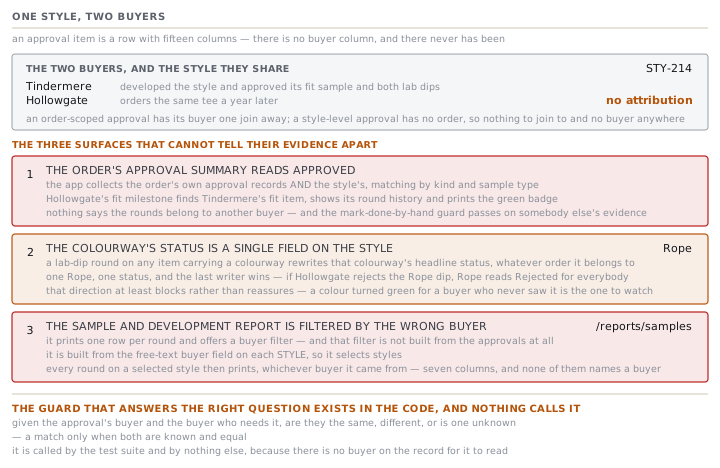
For an approval that belongs to an order, that is survivable. The order knows its buyer, so the buyer is one join away. The work-item screen does exactly that: its header prints the order number and the buyer's name beside the milestone. For a style-level approval there is no order, so there is nothing to join to and no buyer anywhere. Every pre-order lab dip, proto, fit and size set at Maritsa is evidence with no attribution.
Three places the absence shows
Tindermere developed STY-214 and approved its fit sample and both lab dips. A year later Hollowgate orders the same tee. Here is what Hollowgate's order shows.
The order's approval summary reads Approved. When the app builds a work item or an approval summary for an order, it collects the order's own approval records and the style's, and matches by kind and sample type. Hollowgate's Fit Sample Approval milestone therefore finds Tindermere's fit item, shows its round history, and prints the green badge. Nothing on that screen says the rounds belong to another buyer's development.
That has a second effect. Lesson 4 explained that the app refuses to let you mark a buyer-approval milestone done by hand until an approved round exists. On Hollowgate's fit milestone, one does. The guard passes, and it passes on somebody else's evidence.
The colourway's status is a single field on the style. A lab-dip round on any item carrying a colourway rewrites that colourway's headline status, whether approved, requested or rejected. The item may belong to an order for any buyer. There is one Rope, one status, and the last writer wins. If Hollowgate rejects the Rope dip, Rope reads Rejected for everybody, including on Tindermere's screens.
That direction is at least safe. It blocks rather than reassures, and a block gets looked at. The opposite direction is the one to watch: an approval recorded for one buyer turns the colour green on a style another buyer is also buying.
The sample and development status report is filtered by the wrong buyer. The report at /reports/samples prints one row per round, and offers a buyer filter. That filter is not built from the approvals at all. It is built from the free-text buyer field on each style, and it selects styles. Every round on a selected style then prints, whichever order and whichever buyer it came from. The table has seven columns and none of them names a buyer.
So filtering that report to one chain, and reading the result as that chain's approval history, is a mistake the screen will not stop you making.
The release gate, and what it really asks
Be precise here, because this gate is often described wrongly inside factories.
A style's colour component is confirmed when every live colourway's lab dip has been submitted. Submitted means one of three things: a dip is out with the buyer, a dip has been approved, or somebody has declared the colour a standard no-dip shade. Never started blocks. Rejected blocks, and the message names the colours.
Read that again. The style's colour spec freezes at submission, not at buyer sign-off. The buyer-approval gate lives on the order, as the Lab Dip Approval milestone, where a buyer is actually known. That is the right place for it, and it means the style gate is deliberately not a buyer gate at all.
The declaration route is guarded in a way worth knowing. Marking a colour Not required (standard) only ever toggles between not-started and not-required. It refuses on a colour with a round in progress, with a message saying the declaration is only for a standard or no-dip shade. And the generic field editor refuses to write a lab-dip status at all: Lab-dip status is earned from the approval rounds — submit a round in Development approvals, or mark the colour "Not required". There is one way in, and it is a round.
What to do about it this year
Four practices, in the order they pay off.
- Put the buyer in the submission reference. It is free text, it prints beside the round number, and it is the cheapest attribution you will get. A reference that opens with the buyer's short code makes every list in the module readable at a glance.
- Name the buyer in the cover note of round one. The note is stored on the round and printed under it. One sentence saying who asked for this and who is judging it survives every screen in this course.
- Record the buyer's own approver in Decided by. It is free text and nothing validates it, so agree a spelling. It is the only field on the record whose whole purpose is attribution.
- Decide deliberately whether two buyers share a style. A shared style is genuinely cheaper for specification, and it is the case the app handles worst. If the colour differs by buyer, a separate style per buyer costs you duplication and buys you a colour signature that means something.
And one thing to stop doing. Do not read the sample report's buyer filter as a buyer filter. It is a style filter with a buyer's name on it.
Two rules to take away
Attribution is part of the evidence, not a label on it. An approval with no named approver is a claim the factory is making about a buyer. Write the name down while the parcel is going out, because nobody can reconstruct it afterwards from a green badge.
When a screen shows you an approval, ask which record it came from. The order's summary reaches into the style. That is deliberate and mostly useful. It is also the single place one buyer's opinion is presented as another's.
Check yourselfHollowgate's ORD-1310 shows its Fit Sample Approval as Approved, and Zlatka is sure Hollowgate has never seen a fit sample. Is the app wrong, and what should she look at?Show the answer
The app is doing what it was built to do, and the reading is unsafe. An order's approval view collects the order's own records and the style's, so Hollowgate's fit milestone has matched the fit item Tindermere approved during development. She should open the work item and read the round history. The sent dates, the decided-by name and the cover notes will all belong to the earlier development. A fit approval is carryable in principle, so the right response is a decision rather than panic. A person makes it and writes it down. Either Hollowgate accepts the existing fit, or a fresh round goes out to them and the record then holds their answer.
Prompt · Work out which of my approvals can name the buyer who gave them
Before selling a developed style to a second buyer, and before quoting an approval back to anybody.
Help me find out how much of my approval history can actually name the buyer behind it, and decide what to do where it cannot.

I will paste, or describe: my styles that more than one buyer buys; the approvals recorded against each, with whether each one is attached to an order or only to the style; and anything written in the submission reference, the cover note or the decided-by field.

First, sort every approval into three groups and label them: the buyer is recorded on the order it belongs to, the buyer is only recoverable from something somebody typed, or the buyer cannot be established at all. Be strict about the middle group. A name in a free-text note is a clue, not a record, and you should say which it is.

Second, for every style with more than one buyer, tell me what a second buyer would currently see when they look at that style's approvals, and which of those they have never given. Then tell me the practical consequence for the colour signature on a shared colour.

Third, give me a written practice for the next season: exactly what to type where, so the buyer is recoverable from the record without depending on anybody's memory.

Two rules. Never treat an unknown buyer as any buyer. An approval with no named buyer satisfies nobody, and you must say so rather than counting it. And do not propose that I wait for a software change; give me something I can do this week with the fields I already have.
AI can make mistakes — check anything you act on.