Lessons · Lesson 1 of 5
Two tracks, and only one has dates
Where MerchandiserOS keeps a buyer approval, why it is split into two halves, and who can open each one.
Lesson 1 of 5 · 20 min
The room this course happens in
Sampling is the part of an order where a factory and a buyer argue about a real object. A shade. A fit. A print. The first garment off the real line. This lesson is about where that argument is kept in this application. Get it wrong and the argument lives in email, and the order plan never learns what was decided.
Maritsa Knitwear is a knitted-tops factory in Plovdiv, Bulgaria. It runs three sewing lines and a small print room. It employs 240 people and sells into western Europe. Everything in this course happens inside its MerchandiserOS workspace.
Four people appear.
- Kaloyan Zhelev owns the business. He signs in as Owner.
- Zlatka Vulcheva is the merchandiser. She owns the buyer conversation. As you will see, she owns rather more of this than she expects.
- Boyan Draganov runs the sample room.
- Ivelina Kirilova runs the dye house and the print room.
One style carries the whole course. STY-214 is a printed cotton-jersey kids' tee in two colourways, Rope and Ink. A colourway is one named colour version of a style. It was developed for Tindermere, a European children's-wear chain. Later a second buyer, Hollowgate, orders the same tee. Lesson 5 is about what the app does with that.
Say the basis once. Every screen name, route, button label, field, status and message on these pages was read out of the application's own source. Not out of a description of it. Where a lesson counts something, you can count the same thing on your own screen. Where behaviour depends on how your workspace is set up, the page says so and names where the setting lives. Where the application does not do something yet, the page says that too, instead of promising it.
The menu item is called Sampling
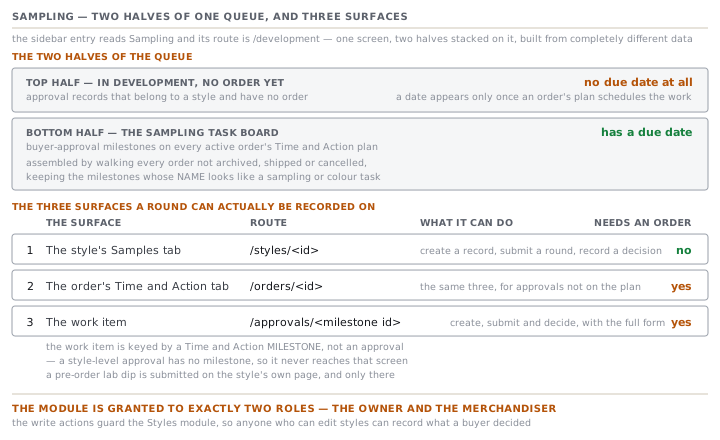
In the sidebar the entry reads Sampling. Its route is /development. That mismatch matters the first time you paste a link to a colleague. The sidebar describes a work queue for two teams: the sample room, and the colour team who run lab dips and strike-offs. A lab dip is a small piece of cloth dyed to a shade for the buyer to judge. A strike-off is a test print of the artwork.
Open it and you get one screen with two halves, stacked. They are built from completely different data. Confusing them is the most common mistake in this module.
| Half | Heading on screen | Built from | Has a due date |
|---|---|---|---|
| Top | In development — no order yet | Approval records that belong to a style and have no order | No |
| Bottom | The sampling task board | Buyer-approval milestones on every active order's Time and Action plan | Yes |
The bottom half is the one people mean when they say "the queue". The app builds it by walking every order that is not archived, shipped or cancelled. It reads that order's Time and Action milestones. A Time and Action plan is the order's calendar of dated steps. The app keeps the milestones whose name looks like a sampling or colour task. Lesson 4 is about that word name, because it does a great deal of work.
The top half is different in kind. It lists approval records that exist against a style with no order behind them. Those rows carry no due date at all. The panel says so in as many words: a date only appears once an order's plan schedules the work. That is honest rather than unhelpful. Nothing has committed the factory to a date, so inventing one would be a promise nobody made.
Four kinds of approval, and nine sample types
Everything in this module is one of four kinds.
| Kind | Screen label | Team the app assigns it to |
|---|---|---|
| Lab dip | Lab dip | Lab dips and strike-offs |
| Strike-off | Strike-off | Lab dips and strike-offs |
| Sample | Sample | Sample room |
| Shipping mark | Shipping mark | Shipping marks |
A shipping mark is the artwork printed on the export carton. It is a real buyer approval, and it belongs to neither development team. So the app gives it a lane of its own rather than filing it under one of the other two.
When the kind is Sample, a second list opens: the sample type. There are nine of them, and they are not all for the same kind of garment.
- The cut-and-sew spine: Proto, Fit, Size set, PP and TOP. PP means pre-production, the sample cut from the order's own bulk cloth. TOP means top of production, a garment pulled off the running line.
- The knit-to-shape additions, for socks and hosiery: Knit-down, Toe closure and Boarding.
- One for a multipack: Pack presentation.
The list you see when you create an approval is the whole vocabulary, all nine, whatever the style is. Which of them a given style actually needs is a separate question with a separate answer. Lesson 3 is about that.
The three places a submission can be recorded
No single screen owns this work. There are three, and each does something the others cannot.
| Surface | Route | What it can do | Needs an order |
|---|---|---|---|
| The style's Samples tab | /styles/<id> | Create a record, submit a round, record a decision | No |
| The order's Time and Action tab | /orders/<id> | The same three, for approvals not on the plan | Yes |
| The work item | /approvals/<milestone id> | Create, submit and decide, with the full submission form | Yes |
Read the third row's route again. The work-item screen is keyed by a Time and Action milestone, not by an approval. You cannot reach that screen for a style-level approval, because a style-level approval has no milestone. So a pre-order lab dip is submitted on the style's own page, and only there.
That has a consequence the founder's own design document names. The style page cannot yet be made read-only, because it is the only surface a development style can earn an approval on. It is worth knowing why a screen you might think of as untidy is still there.
On the style, the Samples tab carries two panels in order. The first, Required lab dips and samples, is a read-only list. The second, Run development approvals, is the working surface with the buttons. On a style in a frozen state, the second panel is view-only.
Who can open any of this
This part surprises factories. It is worth stating plainly rather than discovering it on a Monday.
/development is granted to exactly two roles: the Owner, who reaches everything, and the Merchandiser. Sourcing, Planner, QA lead and Floor supervisor have no grant to it. Neither has the supplier portal. The work-item screen sits under the same grant.
The write actions go further. Creating an approval, submitting a round and recording a buyer's decision all guard the Styles module, not a sampling module of their own. Anyone who can edit styles can record what a buyer decided.
So at Maritsa the picture is this. Boyan runs the sample room and Ivelina runs the dye house. Neither of them has a sign-in that opens the queue named after their work. Zlatka records everything, or Kaloyan does. The screen's own text talks about two teams doing their tasks, and the roles behind it do not yet exist.
Two rules to take away
Ask which half a row is in before you read its date. A row with a date came from a plan. A row without one came from a style, and nothing has promised it to anybody. They sit on the same screen and mean different things.
A menu item is a place, not a permission. The Sampling entry describes two teams. The grant behind it names one role and the Owner. Check who can open a module before you build a process on top of it.
Check yourselfBoyan asks why the Fit sample he submitted last week on STY-214 has no due date, when the lab dip on the same style clearly does. What has happened?Show the answer
The lab dip is almost certainly attached to an order and the Fit sample is not. Or one of them is a style-level record and the other is a milestone on an order's plan. Dates come only from a Time and Action plan. A style-level approval carries none, deliberately, because nothing has committed the factory to a date. Look at which half of the Sampling screen each row appears in. That tells you which world it is in before you read anything else.
Prompt · Work out where each of my approvals can actually be recorded
Before you write a sampling procedure, or the first time somebody says the queue is empty.
Help me map my own buyer approvals onto the places this system can hold them. Do not assume anything about how it works.

I will paste, or describe: the styles I have in development with no order yet; the orders I have running and the buyer approvals each one needs; and the job titles of the people who actually make, send and chase samples, lab dips and print strike-offs.

First, sort every approval I name into one of two groups and label them plainly. It can exist before an order exists, or it can only exist once an order does. For each one, say which of the two it is and why. Give one sentence about what the approval is judging: a specification, or how this run came out. Do not guess. Where I have not told you enough to decide, ask.

Second, for each person I named, tell me what they would need in order to record their own submissions and decisions. Tell me the alternative if they cannot be given it. Ask me who holds which sign-in before you answer.

Third, list the approvals in my set that have no due date and no owner today, and tell me what would give each one both.

Three rules. Do not invent a screen, a button or a permission. If I have not described it, ask me to go and look. Do not tell me an approval is fine because nothing has flagged it; say plainly that no evidence exists. And where a piece of work has no home in the system at all, say so rather than filing it somewhere it does not belong.
AI can make mistakes — check anything you act on.