Lessons · Lesson 4 of 5
Logging an actual, and what moves
Which milestones you may complete by hand, where the rest get their proof, and exactly what a late date does to the plan below it.
Lesson 4 of 5 · 24 min
What this lesson is about
A plan only earns its keep once real dates go into it. This lesson is about that half.
Most of these milestones cannot be ticked off by a person. The ones that can are a short and slightly odd list. When a date goes in late, the app moves everything under it. You need to know which rows moved and by how much. You also need to know which screen to believe.
Two boxes and a button
Click any row in the plan and it opens: an Actual date field, a Status dropdown, Save and Cancel. Nothing else. Above the table a progress bar counts completed milestones, with chips for overdue and at-risk.
Saving writes a line to the order's activity log, and the wording depends on what you saved.
| What you saved | The logged line |
|---|---|
| A date and Completed | T&A milestone "Bulk Fabric In-House" completed — actual 2026-09-22 |
| A date only | T&A milestone "Bulk Fabric In-House" — actual date 2026-09-22 logged |
| Completed with no date | T&A milestone "Bulk Fabric In-House" marked Completed |
| A buyer approval that finished it | T&A milestone "Lab Dip Approval" completed by approval: … |
The last row is the one people forget. Recording an approval elsewhere in the app completes its matching milestone here on its own, and says so in the log.
Most milestones cannot be ticked
Here is the rule the founder set and the app enforces: a milestone is done by doing the real task, not by changing a status. Of the twenty-seven milestones on ORD-1274's plan, twenty-two are closed by something the app can see happen.
| Kind | How many | Completed by |
|---|---|---|
| Backed by an app event | 15 | a purchase order issued, a GRN logged, a round submitted, floor output, an inspection recorded, a shipment ex-factory date |
| A buyer decision with a record | 7 | the buyer's decision logged against that approval |
| Free | 5 | a person, by hand |
A GRN is a goods received note: the record the store makes when material is taken in.
For the twenty-two, Completed is removed from the status dropdown while the proof is missing. The row shows a note instead, naming the event and linking to the tab where you do it: "Completes when the fabric is received (a GRN is logged). · Receive the goods →". A buyer approval says "Completes when the buyer approves it. · Record the buyer's decision →".
Forge the request and the server refuses in the same words: "is completed when the fabric is received (a GRN is logged) — it can't be marked done by hand. Once that happens it appears here to confirm."
The five free ones on this plan are worth naming, because they are exactly the milestones the app has no record for: Packaging & Artwork Approval, Pilot Run, Lab Test / GPT Approval, Shipment Booking and Export Documents Ready. Two of those are buyer approvals. They can be flipped by hand because there is no wash-standard or lab-test record to hold the decision, not because they matter less.
When the app has already seen it
The other half of the same rule is much friendlier. When the evidence does exist, the row shows a green chip and a one-click confirm.
Bassem receives the yarn on 22 September and logs a GRN against the purchase order. Nermin opens the T&A tab and the fabric row now reads:
Looks done — Fabric received — GRN logged (22 Sept 2026) Mark done
She presses Mark done. The actual date written is 22 September, the GRN's own date. Not today's date, and not a date she typed. The app suggests and the human confirms. That order is deliberate, and it is the only reason the suggestion is trustworthy.
One late receipt, eleven dates
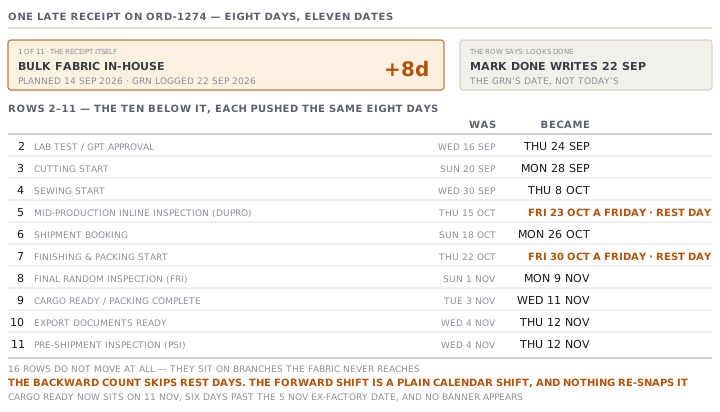
The yarn was planned in the store on 14 September and arrived on the 22nd. Eight days.
Logging that actual pushes every milestone below it. The rule is narrow and worth stating exactly. A milestone with an actual date of its own keeps that date and passes its slip downwards. A milestone without one moves by whatever it inherits.
Eleven dates on the plan are now different. One is the fabric's own actual. The other ten are the rows in the table below. Sixteen rows do not move at all, because they sit on branches the fabric never reaches.
| Milestone | Was | Became |
|---|---|---|
| Lab Test / GPT Approval | Wed 16 September | Thu 24 September |
| Cutting Start | Sun 20 September | Mon 28 September |
| Sewing Start | Wed 30 September | Thu 8 October |
| Mid-Production Inline Inspection (DUPRO) | Thu 15 October | Fri 23 October |
| Shipment Booking | Sun 18 October | Mon 26 October |
| Finishing & Packing Start | Thu 22 October | Fri 30 October |
| Final Random Inspection (FRI) | Sun 1 November | Mon 9 November |
| Cargo Ready / Packing Complete | Tue 3 November | Wed 11 November |
| Export Documents Ready | Wed 4 November | Thu 12 November |
| Pre-Shipment Inspection (PSI) | Wed 4 November | Thu 12 November |
Two of the new dates are in bold because they are Fridays, and this factory does not work on Fridays.
That is not a rounding error. The backwards count that built the plan is careful about rest days and holidays. The forward shift that applies a slip is a plain calendar shift, with no calendar awareness at all, and nothing re-snaps the result. So a slip can park an inspection on a day nobody is in the building, and the plan will show it there.
An early finish moves things too
The same arithmetic runs in both directions. If the buyer's fit approval had come back five days early, the app would have pulled the size set, its approval, the pre-production sample, its approval, the pilot run and both top-of-production rows five days earlier in the plan.
That is arithmetically consistent, and it is not how a factory behaves. An early approval is banked as relief, not spent as an earlier start, and the sample room does not begin a size set five days sooner because a buyer replied on a Thursday. Read a pulled-forward date as capacity you have gained, not as a commitment you have made.
Believe the table, not the bar
Here is the disagreement you will meet on the day of a slip. It is easier to handle if you are expecting it.
When you save the late actual, the shifted dates are written to the plan. The timeline above the table then recomputes the same slip from the same actual and applies it again to the dates that have already moved. So on the afternoon of 22 September the cutting row in the table reads 28 September, and the cutting bar directly above it reads 6 October with a red +8d beside it.
The table is the number to work from. Every other screen — the exception feed, the urgency column, the progress chips — reads the stored plan, which is the table's number. The timeline is the only place that doubles it, and the two agree again as soon as the next milestone below has an actual date of its own.
Check yourselfYou log a late actual on a Sunday and the plan's last milestone lands on a Friday. What do you do?Show the answer
Move it by hand and say why in the row or the order's comments. The forward shift does not know about rest days, so the date is arithmetically right and operationally wrong. Do not re-apply the template to fix one date — that clears every actual on the order, including the one you just logged.
Prompt · Explain why these dates moved
When the plan starts far earlier than the template's name suggests, or when a logged actual has pushed a run of milestones.
I have a garment critical path whose dates are calculated rather than typed. Help me explain them to somebody who did not build the plan.

Paste or describe: the template name and its headline lead time, the order quantity, the fastest line's daily capacity, the longest supplier lead time on the bill, whether any material is imported, how many colourways still need a lab dip approved, and the style's total standard minutes.

Work out, showing each step: how many production days the quantity needs against the capacity, how much of that the template already allowed, and what is left over. Do the same for material sourcing. Then tell me, in one paragraph a factory owner would accept, why the order has to start when it does.
AI can make mistakes — check anything you act on.