Lessons · Lesson 1 of 5
The plan, and where it comes from
Where an order's Time and Action plan lives, which screen owns the template behind it, and what pressing Apply really does.
Lesson 1 of 5 · 22 min
The room this course happens in
A critical path is the short list of dates an order must hit to leave the factory on time. In this app that list is called a Time and Action plan, or T&A for short. It sits on a tab of the order. This lesson is about where the list comes from.
Every plan starts as a template. A person picks the template. The app copies it onto the order. Then nobody looks at it again. Pick the wrong template and every date is wrong, and nothing on the screen will tell you.
Serageldin Knitwear is a knit-tops factory in Mit Ghamr, in the Dakahlia governorate of Egypt. It runs three sewing lines and exports to northern Europe. Everything in this course happens inside its MerchandiserOS workspace.
Four people appear.
- Wagih Serageldin owns the business and is the workspace Owner. Settings are his alone.
- Nermin Dessouki is the merchandiser. The critical path is her screen.
- Bassem Ghoneim is the sourcing officer. He places the yarn and trim orders.
- Kholoud Marzouk plans the sewing lines.
One order runs through all five lessons. ORD-1274 for Vondelmarkt, a Dutch retailer: 24,000 pieces of STY-462, a cotton polo. Ex-factory 5 November 2026, ship 20 November 2026, on CIF terms. Ex-factory is the day the goods leave the building. CIF is the shipping term that makes the factory pay for the sea freight and the insurance.
Say the basis once. Every label, count and rule on these pages was read out of the application's own source code. The factory rests on Friday and Saturday, and that is a setting on its own record rather than a fixed rule in the app. Where the app does not do something, the lesson says so instead of implying it does.
Two screens, and only one of them is yours
The plan and the template behind it live in different places. The second one is not open to a merchandiser at all.
| What | Where | Who may open it |
|---|---|---|
| An order's own plan | the T&A tab on /orders/<id> | anyone with orders access |
| The templates every plan is copied from | /settings/ta | the Owner only |
The templates screen checks who you are and sends anyone who is not the Owner to a refusal page. So when Nermin wants a milestone that no template carries, she cannot add it herself. She asks Wagih.
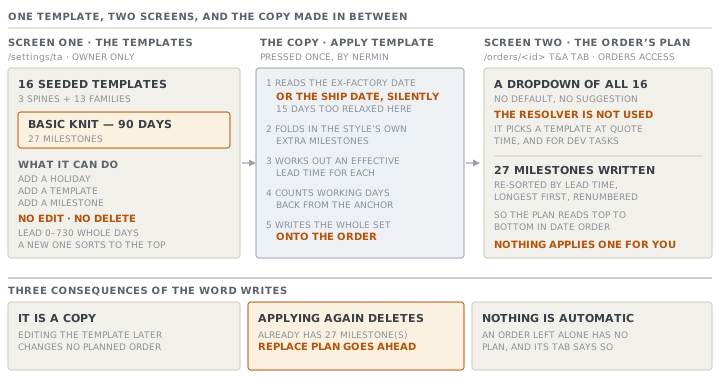
That screen does three things. It adds a factory holiday. It adds a template. It adds a milestone to a template. It does not edit, and it does not delete. A milestone typed with the wrong lead time stays on the template with the wrong lead time, and the only repair is a new template beside it. A lead time there must be a whole number of days between zero and 730.
Sixteen templates, and nothing picks one for you
A fresh workspace arrives with sixteen Time and Action templates. Three of them are construction spines: Basic Knit — 90 days, Woven Shirt / Blouse — 120 days and Denim / Heavy Woven — 150 days. The other thirteen are a product-family library, from Sweater / Flat-Knit — 130 days through Lingerie & Underwear — 105 days to Fast-Track / Repeat Order — 55 days. The number in each name is the lead time of its first milestone. It is a label, not a rule.
The app already knows which template a style implies. There is a resolver that reads the style's garment type, maps it to a product family, and hands back that family's template. A polo maps to knit tops, which maps to the basic knit spine.
Here is the part worth knowing. That resolver runs at quote time and for development tasks. It does not run when a plan is applied to an order. The T&A tab shows a plain dropdown of all sixteen templates, with nothing selected and no suggestion. The quote Nermin sent Vondelmarkt in June was priced against a lead time the app worked out for itself. The plan she applies in the same week is whichever line she clicks.
What Apply actually does
Nermin opens ORD-1274, goes to the T&A tab, chooses Basic Knit — 90 days and presses Apply Template.
The app reads the order's ex-factory date. If there is no ex-factory date it uses the ship date instead, silently. A plan anchored that way is too relaxed by the whole gap between the two dates, which is fifteen days on this order. Then it reads the template's milestones and folds in any extra ones the style calls for. It works out an effective lead time for each. It counts that many working days back from the anchor, and writes the whole set onto the order.
Three things follow from the word writes.
- The order's plan is a copy. Editing the template afterwards changes nothing on any order already planned.
- Applying a template to an order that already has one deletes the existing milestones first.
- Nothing applies a template on its own. An order created and left alone has no plan, and its T&A tab says so.
The second of those is guarded rather than silent. The app refuses the first attempt and shows the count: "This order already has 27 T&A milestone(s). Applying a template will delete and replace them — any actual dates and statuses you logged will be lost." Pressing Replace plan goes ahead.
The twenty-seven milestones, and two orders of the same list
The basic knit spine carries twenty-seven milestones. Twenty came with the original seed. Two were added later as a pair: a pilot run and a fabric lab test. Five came out of a review with a domain expert: a size-set round and its approval, a packaging and artwork approval, a mid-production inspection and a shipment booking.
Those twenty-seven do not appear in the same order on the two screens, and this confuses people.
- On
/settings/tathe milestones are listed by their stored sort order, which is the order somebody authored them in. One later addition sits out of date order there: the pilot run is above the fabric arriving. - On the order, the plan is re-sorted by lead time, longest first, and renumbered. Milestones with the same lead keep their original order, so the applied plan reads top to bottom in date order.
On the order the pilot run has moved below the fabric. Same twenty-seven milestones, two orderings, and only the applied one is a calendar.
Check yourselfNermin asks Wagih to shorten a lead time on the knit template, and he does. What happens to ORD-1274?Show the answer
Nothing. The plan on ORD-1274 is a copy taken at the moment she pressed Apply. The only way to pull the change onto the order is to apply the template again, and that deletes every actual date and status already logged on it. That is the trade the rest of this course keeps coming back to.
Prompt · Which plan template fits this order
Before you apply anything, when the dropdown offers sixteen templates and nothing is preselected.
I am about to apply a Time and Action template to a garment order and the system does not suggest one. Here is what I know about the style and the order:

- Garment type and construction:
- Any print, embroidery, wash or yarn-dye:
- Is this a repeat of a style we have already made:
- Buyer-nominated fabric, or do we buy it:
- Quantity and ex-factory date:

Ask me for anything missing. Then tell me which product family this style belongs to, which template name I should look for, and which milestones I should expect to see that a plain template would not carry. Finish with the two or three things I should check on the plan the moment it is applied.
AI can make mistakes — check anything you act on.