Lessons · Lesson 5 of 5
Who gets told, and what they are told
How a milestone reaches My Work, the two different windows that decide what counts as urgent, and what the feasibility banner does and does not check.
Lesson 5 of 5 · 22 min
What this lesson is about
Nobody watches a critical path all day. The app is supposed to come and find you when a date is close or gone. This lesson is about the part that does the finding.
It also covers two places where the app's own thresholds disagree. The same milestone can look urgent on one screen and calm on another. Neither screen is broken. They are answering slightly different questions, and it helps to know which one you are reading.
One order, at most two rows
The exception feed does not list every late milestone. For each active order it asks two separate questions and raises at most one row for each.
- What is the factory's most pressing open milestone? That is a fire to put out.
- What is the most pressing open milestone we are waiting on somebody else for? That is a call to make.
The split comes from a party recorded on every milestone: the factory, the supplier or the buyer. The app works it out from the name unless someone has set it. Anything with approval in it belongs to the buyer. Lab dip and print submissions, purchase orders confirmed, and anything arriving in the store belong to the supplier. Everything else belongs to the factory.
Only open milestones count. A milestone with an actual date, or with the status Completed, never appears. Shipped and cancelled orders never appear at all.
Within the open ones, overdue beats due soon, and within each group the earliest planned date wins. A milestone whose status has been set to Delayed counts as overdue whatever its date says.
| The factory's row | The row we are waiting on | |
|---|---|---|
| Title | T&A milestone due soon | Awaiting the buyer — T&A milestone due soon |
| Text | ORD-1274: "Cutting Start" is due 28 Sept 2026 (in 6 days) and hasn't been logged. | ORD-1274: awaiting the buyer on "Lab Test / GPT Approval" — it is due 24 Sept 2026 (in 2 days). Chase the buyer. |
| Button | Update Cutting Start | Chase Lab Test / GPT Approval |
| Colour | amber | amber |
The external row also carries a line of attribution: "the buyer owns this milestone — not the factory's delay (no specific buyer linked yet)." The words in brackets are honest. There is no buyer or supplier portal behind that row yet, so the app cannot send anybody anything. It flags the wait and leaves the chasing to a person.
Both rows land you on the order's T&A tab and scroll to the exact milestone. A red row means overdue, an amber one means due soon.
Two windows on the same milestone
Now the disagreement. It is worth ten seconds of your attention, because it looks like a fault and is not.
| Surface | Window |
|---|---|
| The at risk chip above the plan | five days |
| The urgency column on each row | five days |
| The colour of the timeline bar | seven days |
| The exception feed | seven days |
On 22 September, cutting is due on the 28th, six days away. So the plan's own chip counts two milestones at risk, and cutting is not one of them. Its urgency column reads a plain, unalarming In 6d. Its bar is amber. And My Work raises it as the factory's most pressing milestone on the whole order.
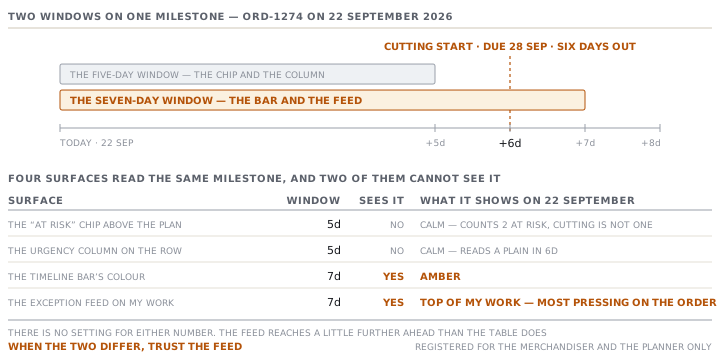
Every threshold like this is a trade. Widen the window and you catch more real problems, and also more that were never problems. Narrow it and the feed stays quiet and starts missing things. There is no setting for either number. So the useful habit is simply to know that the feed reaches a little further ahead than the table does, and to trust the feed when the two differ.
What the feasibility banner is really checking
At the top of the plan sits a coloured banner: On schedule, Tight schedule or Ship date at risk. It checks two things, and it is easy to read more into it than it says.
- Could the plan have started in time? It takes the earliest date in the plan and compares it with today. Slack of more than five days is green, five or fewer is amber, and already past is red.
- Does the shipping term leave room for the voyage? Where the factory arranges the main carriage, the app expects a gap between ex-factory and ship date.
That gap is about twenty-one days for CFR and CIF, and about twenty-eight for the delivered terms. For FOB, FCA and EXW the buyer arranges the carriage, so nothing is required and the check stays quiet.
ORD-1274 is CIF, ex-factory 5 November, ship 20 November. That is fifteen days for a voyage the app expects twenty-one for. So the banner says so from the day the plan is applied: "CIF: only 15 days between ex-factory and the ship date, but factory-arranged transit typically needs ~21."
The first check is the one to be careful with. It compares the plan's earliest milestone with today, and the earliest milestone is order confirmation back in May. So from the moment an order gets going, the banner reads red and tells you the plan needed to start 140 days ago. That is true and useless. The check was written for the moment a plan is first applied, which is when a too-soon ship date can still be argued about. Read it then. After that, read the rows.
Check yourselfThe banner says Ship date at risk, every milestone is on time and the buyer is happy. Who is wrong?Show the answer
Nobody. The banner is comparing today with the plan's start date, which is months behind you on any order in production, so it will keep saying that until the order ships. It is a warning about the shape of the plan at the moment it was made. The rows, the two exception lines, and the last milestone against the ex-factory date are what tell you whether this order is in trouble now.
Prompt · Turn the plan into a stand-up list
Every morning, when the feed shows two rows per order and you need one page for the meeting.
I run a daily meeting on a set of garment orders. For each order I can see its open milestones, each with a planned date, an owner (the factory, the supplier or the buyer) and whether it is overdue.

Paste that list along with today's date.

Give me one page, grouped by who has to act rather than by order. Put anything already late first, then anything due within a week. For each line, write the single sentence I should say out loud, naming the order, the milestone, the date and the person or company who owes it. Keep it to what somebody can act on today. Flag separately any order whose last milestone now falls after its ex-factory date, because nothing in my system checks that.
AI can make mistakes — check anything you act on.