Lessons · Lesson 3 of 5
The chain, the blocker and the path
What a dependency is here, what the blocker flag really means, and why the highlighted path is not the longest one.
Lesson 3 of 5 · 26 min
What this lesson is about
A critical path is more than a list of dates. It is a claim that some dates hold the others up. This lesson is about how that claim is recorded here.
It covers what the app refuses when you run ahead of it. It also covers where the model is thinner than the word suggests. Read the highlighted chain as the whole answer and you will trust a branch that is not safe.
One parent each
Every milestone can point at one other milestone as the thing it comes after. Not two, not a set. One.
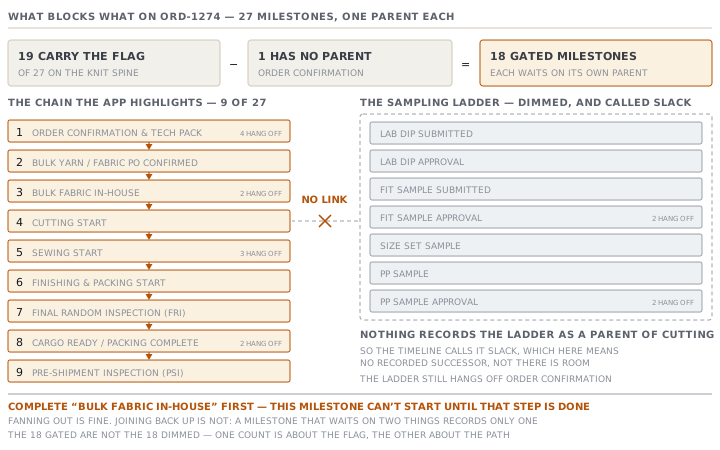
That is enough to build a chain and not enough to build a network. On the knit spine four milestones hang off order confirmation, three hang off the start of sewing, and two each hang off the fit approval, the trims order, the pre-production approval, the fabric arriving and cargo ready. Fanning out is fine. Joining back up is not. A milestone that genuinely waits on two things can record only one of them, and the other dependency exists nowhere in the app.
Keep that in mind for the rest of the lesson. Every conclusion the app draws about what blocks what is drawn from these single links.
The blocker flag is about being blocked
Each milestone also carries a flag. The templates screen shows it in a column headed Blocker?, with two values: Blocker and Partial.
The name reads as though it marks a milestone that holds others up. It does not. When you try to move a milestone forward, the app looks at the flag on the milestone you are moving, and only then at the milestone it points back to. So the flag means this one may not start until its own predecessor is finished. It says nothing about what depends on this one.
Nineteen of the twenty-seven milestones on the knit spine carry the flag. One of them, order confirmation, has no predecessor to wait for. That leaves eighteen gated milestones: cutting, sewing, finishing, both inspections, cargo ready, the yarn order, the fabric arriving, and every approval in the sampling ladder.
What a blocked milestone says
On 20 September Kholoud tries to set Cutting Start to In Progress. The yarn is not booked in. Cutting depends on Bulk Fabric In-House, and cutting carries the flag. So the app looks at the fabric row, finds it is not Completed, and refuses with this:
Complete “Bulk Fabric In-House” first — this milestone can’t start until that step is done.
It names the milestone. That sounds obvious, and it is the whole point. An earlier version of this message said only that a dependency was not met, which left the reader hunting through twenty-seven rows for the one that mattered. The rule the app now follows everywhere is that a refusal must name the thing that is blocking and, where it can, link to it.
Two places carry the linked half.
- On an approval's own work item, the blocker is shown before you try anything: a banner reading "Waiting on Bulk Fabric In-House — it must be completed before this milestone can start", followed by an Open Bulk Fabric In-House link.
- Where the link points depends on the kind of milestone that is blocking. A sampling or colour milestone links to its own work item at
/approvals/<id>. Anything else links to the order's T&A tab, scrolled to that exact row. - That set is matched on the name: lab dip, strike-off, print, wash development, sample, proto, fit, size set, PP and TOP.
There is a third piece, and it is the most useful. When the buyer's approval is recorded on a milestone whose predecessor is unfinished, the decision is still saved. Only the automatic completion of the milestone waits, and the response comes back naming the blocker rather than throwing the approval away. A buyer's answer is expensive to obtain and must never be lost to a scheduling rule.
The path the app highlights
Above the table sits a read-only timeline, which you can collapse. It is headed Timeline & critical path. Each bar runs from the date of a milestone's predecessor to its own date, so the bar is the work window rather than the milestone. A milestone with no predecessor is drawn as a point.
The critical path is worked out like this. Take the milestone with the latest date, breaking a tie by taking the one further down the plan. Walk back through its predecessor, and its predecessor's predecessor, until there is nothing above. That chain is highlighted, everything else is dimmed, and a sentence underneath says: "A slip on any of these moves the ship date. The dimmed milestones have slack."
On ORD-1274 the chain has nine links out of twenty-seven.
| # | Milestone |
|---|---|
| 1 | Order Confirmation & Tech Pack Handover |
| 2 | Bulk Yarn / Fabric PO Confirmed |
| 3 | Bulk Fabric In-House |
| 4 | Cutting Start |
| 5 | Sewing Start |
| 6 | Finishing & Packing Start |
| 7 | Final Random Inspection (FRI) |
| 8 | Cargo Ready / Packing Complete |
| 9 | Pre-Shipment Inspection (PSI) |
It is a good chain. It is the yarn route, and on a knit programme with imported yarn the yarn route usually is the binding one. Read it and you know where to push.
Where the word is doing more work than the model
Now the caution, and it is the reason this lesson exists.
In every formal definition of the term, the critical path is the longest path through the network of activities, and every activity not on it carries a measured amount of float. Float is the number of days a task can slip before it starts moving the end date. Here the highlighted chain is only the ancestor chain of whichever milestone happens to fall last. Those are the same thing only when the network is a single chain, and this one is not.
Look at what is dimmed on ORD-1274. The entire sampling ladder — lab dip submitted and approved, fit sample submitted and approved, the size set, the pre-production sample, its approval — is drawn as having slack. In the app's graph that is true, because nothing in the sampling ladder is recorded as a predecessor of cutting. In the factory it is not true at all. Nobody cuts 24,000 pieces before the buyer has approved the pre-production sample.
The gap is in the data, not in the drawing. The seeded templates simply do not link the approval ladder to the production ladder, and no screen invites you to. Two honest consequences follow.
- A slip in the sampling ladder moves nothing downstream, and no warning appears.
- The word slack on those dimmed bars means "no recorded successor", not "there is room".
Check yourselfYour plan shows nine bars highlighted and eighteen dimmed. What have you actually been told?Show the answer
That nine milestones form the chain of single parents leading back from the last one, and that the other eighteen have no recorded successor along it. You have been told which links exist, not which risks exist. Before you rely on a dimmed bar, check whether the thing it stands for is genuinely allowed to be late, or whether nobody ever recorded what it holds up.
Prompt · Find the dependency nobody recorded
When a timeline shows a branch as having slack and you suspect the link simply was never entered.
Here is a list of milestones from a garment critical path. Each one names at most one predecessor, so a milestone that really waits on two things can only record one.

Paste the milestone names, their lead times in days before ex-factory, and the predecessor each one records.

Tell me which pairs of milestones a garment factory would treat as genuinely dependent but which have no link between them here. Rank them by how much damage a missing link would do. For each one, say what would go wrong if the earlier one slipped and nothing downstream moved. Do not invent a link that is only sometimes true. Say when a dependency is a matter of factory policy rather than physics.
AI can make mistakes — check anything you act on.