Lessons · Lesson 1 of 5
Four records, and none of them is the plan
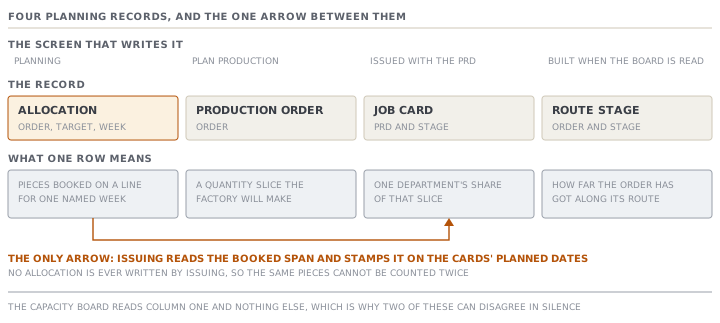
The five planning screens, the four records they write, and the one read-only arrow between them.
Lesson 1 of 5 · 22 min
What this lesson is about
Planning here is not one screen, and it is not one record. It is four separate records, written by four different screens. The app never builds one of them out of another. That is the shape of the whole module, and it is the part people get wrong.
A planner books capacity on one screen. Somebody issues the work on a second. If the two disagree, nothing in the app notices and nothing complains. The board stays quiet because nobody told it anything. From a chair, a quiet board and a good plan look the same.
Ranca Denim is a denim bottoms factory in Padalarang, in West Java, Indonesia. It employs about six hundred and forty people across three sewing lines, and it has its own wash house. Five people appear across this course.
- Asep Wiratma owns the business and is the workspace Owner.
- Dewi Ratnasari is the planner. The board is hers.
- Rina Halimah is the merchandiser who holds the buyer.
- Yudi Suherman supervises sewing and uses the floor kiosk.
- Hendra Permana supervises finishing and the wash house.
The order carried through all five lessons is ORD-1442 for Halverstad, a Dutch workwear chain: 24,000 pieces of STY-318, a men's denim work trouser, in three colourways.
One thing to say once, because the whole course rests on it. Every menu label, button, field name, message and count on these pages was read out of the application's own code, not out of a description of it. Where a lesson gives a result, it shows the working, so you can redo it. Where the behaviour depends on how your factory is set up, the lesson says so and names the setting.
Five screens carry one order
The menu spreads production across two headings. Three of these screens sit under Plan, and two under Produce. A new planner usually meets them in the wrong order.
| Menu label | Address | What you do there |
|---|---|---|
| Plan production | /planning/orders | See every active buyer order, and how much of it is already in production orders |
| Planning | /planning | The weekly capacity board: drag jobs, and read each line's load |
| Production orders | /production-orders | The list of what the factory is making, and every department job card |
| Floor capture | /floor-capture | The dark kiosk where the floor records what it made |
| Production followup | /production | Each order along its route stages, with an on-time signal |
Two notes on that table. Both have cost somebody an afternoon.
The menu entry reads Production followup, with no hyphen. The page heading reads Production (WIP). They are the same screen. Search the menu for the heading and you find nothing.
Plan production is a renamed screen. Its address is still /planning/orders. That is why an old link or an old bookmark labelled "order book" still lands on it correctly.
The four records
Under those screens are four kinds of record. Learning which screen writes which one is most of the job.
| Record | Written by | Keyed on | What one row means |
|---|---|---|---|
| Allocation | Planning, and each order's allocation form | Order, target, week | These pieces of this order are booked on that line in that week |
| Production order | Plan production, when you issue | Order | A slice of quantity the factory will actually make |
| Job card | Created automatically with the production order | Production order, route stage | One department's share of that slice |
| Route stage | Generated for an active order when the board is read | Order, route stage | Where the order has reached along its route |
An allocation is a booking. It says a line is spoken for. It creates no work document, and it tells no department anything.
A production order is the document the factory makes. It carries a code beginning PRD-, a quantity, and the basis it was sliced on.
A job card is one department's share of a production order. Its code is the production order's code, then a slash, then the stage in capitals, so PRD-1041/SEW. Each card carries its own target quantity, its own pieces done, and its own status.
The route stages are a per-order view, used by the follow-up board. They are not the job cards. On an order that has production orders, the quantity shown against a stage is worked out from the job cards when you read the screen. It is not stored.
The single arrow between them
There is exactly one place where issuing production orders reads the planning ledger. It is worth knowing precisely.
When you issue, the app looks up every allocation on that buyer order and takes the span of them: the earliest Monday, and the Sunday that ends the latest booked week. It stamps that one span onto the planned start and the planned end of every job card it has just created. Every department, on every slice, gets the same dated window.
That is a read. Issuing production orders never writes an allocation. The source says so in as many words: allocations stay the only booking ledger, so the same pieces can never be counted twice.
If there is no allocation, the job cards get no planned dates at all. Blank, not today. The activity line the app writes on the order says exactly that, and it ends by telling you to go and plan the order so the job cards can be dated.
What the capacity board can and cannot see
The board Dewi reads every morning is built out of four things: the production lines, the suppliers flagged as subcontractors, the allocations inside the week window, and the orders. That is the whole input list.
It does not read production orders. It does not read job cards. It does not read floor captures.
So two failures are possible. They are opposites, and neither one raises anything.
A factory that issues production orders and never allocates has a floor full of job cards and a capacity board showing nothing. Every cell is grey, and the legend reads grey as empty. Nothing on that screen is false. It is simply not a picture of the factory.
A factory that allocates and never issues has a board full of colour, and no job cards for anybody to work against. The floor kiosk falls back to logging against the order itself, which is lesson 4's subject.
Which orders even appear
Both planning screens filter, and they filter differently.
Plan production lists every buyer order whose status is Confirmed or In production. Nothing else qualifies. A Draft order is invisible there, however urgent it is.
The Orders to plan list at the foot of the capacity board is stricter. It starts from the same two statuses, drops archived orders, and then drops any order that has neither a line-feed date nor a single allocation. The reasoning is in the source: such an order is not relevant to planning yet.
That second filter surprises people. A confirmed order with no line-feed date and no allocation does not appear on the list of orders to plan, because the list is about orders whose planning has begun.
Check yourselfDewi allocates 24,000 pieces of ORD-1442 across five weeks on Monday morning. On Wednesday, Rina issues three production orders for the same 24,000 pieces. Is the order now double-booked, and what dates do the job cards carry?Show the answer
It is not double-booked. Issuing production orders never writes an allocation. So the booking ledger still holds one set of rows totalling 24,000 pieces, and the heat-map still shows one order's worth of load. The job cards carry the span of Monday's allocations: the Monday of the earliest booked week as their planned start, and the Sunday that ends the latest booked week as their planned end. Every card on every slice gets that same window, because a slice carries no week of its own. Had Rina issued first and Dewi allocated afterwards, the job cards would have been created with blank planned dates, and allocating later does not go back and fill them in.
Check yourselfA colleague says the capacity board is wrong because the factory is flat out and the board shows three empty weeks. What do you check first, and what would make the board right without anybody touching a line?Show the answer
Check whether the work is allocated at all. The board is built from production lines, subcontractors, allocations and orders, and from nothing else. A factory whose whole book sits in production orders, with no allocations behind them, will show grey cells honestly. Nothing is broken and nothing is lying: grey means empty, and the cells genuinely are. What makes the board right is somebody entering the allocations, either on the schedule board or from each order's allocation form. Until then the board is a picture of the booking ledger, not a picture of the factory, and reading it as the second is the mistake.
Prompt · Reconcile my allocations against my production orders
Any week where the capacity board and the coverage column seem to be describing two different factories.
Help me find out whether my MerchandiserOS booking ledger and my production orders agree with each other, and where they do not.

I will paste two lists. First, from Plan production: every active order with its quantity, its ship date, and its coverage state and planned quantity. Second, from Planning: for each of those orders, the weeks it is allocated into and how many pieces sit in each week.

For every order, put it in exactly one of four buckets and say which. ALLOCATED AND ISSUED, where both records exist and their totals agree. ISSUED BUT NOT ALLOCATED, where production orders exist and no allocation does, so the capacity board is blind to work the floor is already doing. ALLOCATED BUT NOT ISSUED, where capacity is booked and no department has a job card. NEITHER, which is only a problem if the ship date is close.

Then give me the arithmetic gap on any order in the first bucket whose two totals differ, and tell me plainly which of the two numbers a department is working to.

Three rules. Do not tell me an order is fine because one of the two records looks healthy; a green coverage bar and an empty week are both true at once in bucket two. Do not treat a missing allocation as a zero-capacity problem, because it is a record-keeping problem. And rank your output by ship date, closest first, because that is the order in which these get expensive.
AI can make mistakes — check anything you act on.