Lessons · Lesson 4 of 5
Where a captured piece goes
The two kiosk screens, the rule that decides which ledger a captured piece is written to, and the four ways a number can be refused or quietly capped.
Lesson 4 of 5 · 26 min
What this lesson is about
The floor screens are the only part of this app that a supervisor uses standing up. They are deliberately not built like the office screens. Dark background, huge type, few controls.
Underneath, they are the most carefully wired thing in the module. The same physical garment can be described in two places at once. One rule decides which place, and it is applied per order, not per factory. So two orders open on the same kiosk can land in two different ledgers. The screen does not say which.
Two screens, one dark surface
There are two floor screens, and they answer different questions.
Floor capture at /floor-capture is the order-level screen. It asks which order, which hour, and how many pieces. The big number on it is today's output across the whole factory, and under that sits the last capture with its order and its hour.
Log by department at /floor-capture/department is a link on the first screen. It shows one tile per department with its open card count. Once you pick a department, it shows one big row per open job card. Each row carries the card code, the order, the style, the colourway and the stage. Then the pieces done against the target, a progress bar, a number field and two buttons.
Both are exceptions to the app's own design rule that every screen is built from the shared component kit. Their darkness and their oversized targets are their own design, on purpose, because the person using them is standing at a machine.
The order-level screen lists only orders whose status is In production. Confirmed is not enough. When there are none it says so, and tells you to press Start production on the office side.
At the foot of the screen sits a note that is easy to skim past and worth reading once. It says capture is online only, with no offline mode and no bundle or barcode scanning yet, and it says both are still to come.
The rule that decides where a piece is written
This is the centre of the lesson.
When Yudi picks an order on the order-level screen, the app looks up that order's live production orders and their sewing job cards. Live means not archived and not cancelled. Supplied stages are excluded, because there is nothing to log on work somebody else did.
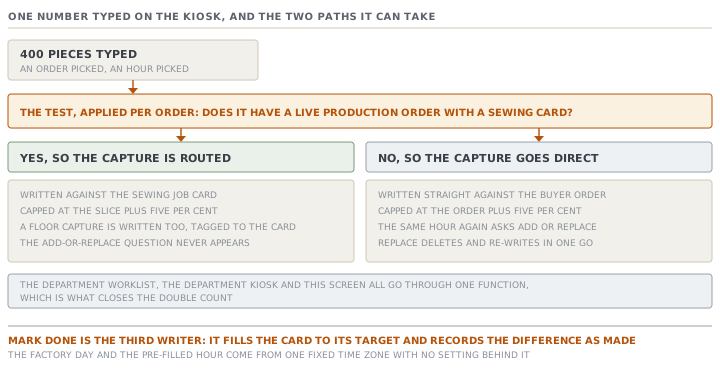
If the order has at least one live production order and at least one sewing card on it, the capture is routed. It is written against the sewing card, and the app then writes a floor capture against the order for the same pieces, tagged with the card. One physical garment, one number, recorded once and reflected in both places.
If the order was never split into production orders, the capture is written directly against the order. Nothing else exists to write it to.
The source calls the routed path the single production-output ingest seam, and it means it. The department worklist, the department kiosk and the order-level kiosk all go through the same function. The stated reason is that any new writer touching the underlying tables directly would re-open a double count that this arrangement closed.
What the routed path does to your number
Routing is not a pass-through. Three things happen to the number you typed.
It is capped. A sewing card accepts pieces up to its own target plus five per cent, and no further. The Rinse slice, PRD-1041, has a target of 8,400 pieces, so its sewing card accepts up to 8,820. The five per cent exists because real lines sew slightly over a slice to cover rejects. The source says that cutting it off would silently under-record what the factory made.
It may be capped quietly, with a note. If you ask for more than the headroom left, the app applies what fits and says so in the success message. A bracket names the remaining amount and says it includes the overage allowance. You have to read the confirmation to know you were capped.
It flips the status at the target, not at the cap. The card reads Done the moment pieces done reaches 8,400. It stays capturable up to 8,819, because done and full are not the same thing here.
If the order has more than one open sewing card, the kiosk will not guess. It asks you to pick, and the message names how many production orders the order runs on. If every sewing card has reached its cap it refuses. The message carries the sewn total, the target, and an instruction to issue another production order, or to correct a card on the order's Production tab.
Add or replace, and where that question does not exist
On the direct path only, capturing against an order and hour that already has output does not overwrite it. The screen stops and asks: this hour already has some pieces, do you want to add yours or replace the hour?
Replace deletes that hour's captures and writes the new one in a single write, so a crash can never leave the hour deleted but not re-recorded. The activity line it writes says the hour was replaced, and gives both the old and the new figure.
That question never appears on the routed path. A forged attempt to reach it is refused, with a message saying the order runs on production orders and is logged cumulatively against the sewing card. There is no such thing as replacing an hour on a routed order, because the card holds a running total rather than a set of hours.
There is also a small guard you will never see working. Two identical captures for the same order, hour and piece count within ten seconds collapse into one, on the assumption that the second was a double tap.
Mark done is a production record, not a tick
The department kiosk gives every card a Mark done button beside its number field. It is the single most consequential control on either floor screen, and it does not look like it.
Marking a card done, without typing a quantity, sets its pieces done to the full card target. If that card is a sewing card, the app also writes a floor capture for the difference, labelled as pieces completed with the stage marked done.
Hendra taps Mark done on a card showing 6,150 of 8,400. The card jumps to 8,400, and a capture for 2,250 pieces is written against the buyer order. Nobody counted those 2,250 garments. The reasoning in the source is sound and worth understanding. A card marked done while reading zero made would let a production order derive itself complete from a bare flag, which is a worse lie. So done means made, and the number follows the flag.
The consequence for a supervisor is simple. Mark done when the card really is finished. If the line stopped short, type what was made and leave the card open.
Two ceilings on one card
The two kiosks do not agree about the overage, and this is worth checking on your own screen.
The department kiosk works out what is left as the target minus the pieces done, held at zero. At the target the number field is disabled and the log button with it. Type more than that and it refuses in the browser, with a message naming what is left.
The order-level kiosk goes through the server function, which accepts up to the target plus five per cent.
So the same sewing card at 8,400 of 8,400 is closed on the department screen and open for another 419 pieces on the order-level screen. Neither is wrong about the rule it enforces. They are enforcing two different rules, and only one of them is the server's.
What has to be true before any of this
Every capture path checks the same materials gate first, and it is made of three tests in a fixed order.
- If the factory runs receiving in its own ERP rather than here, the gate steps aside entirely and production is allowed. The app has no receipt data, so it has no jurisdiction and does not invent a block.
- Otherwise an order with no purchase orders is refused and told to raise a purchase request. An order with purchase orders but nothing received is refused, with the purchase order and the supplier named.
- Once something is in, the primary body fabric must be received to the factory's cut threshold, which defaults to 80%. The refusal names the fabric, what was received, what the threshold needs, and the total.
One further lock sits outside that sequence. An order tracked by Garment.io cannot be captured by hand at all, on either screen, because its output arrives from the machine feed. The message says so, and tells you to turn tracking off on the order if you want to type it.
Defects, and the two places they land
The defect form on the order-level kiosk takes several lines at once, each with a type, a quantity and a severity. The six built-in types are skipped stitch, broken stitch, shade variation, stain, measurement out, and other. Other requires a description.
Saving is all or nothing. If any line fails validation, nothing is written.
What is written goes to two places. One is the shared quality log, with its source recorded as the floor, so it rolls up on the Quality screen. The other is an older per-line row, so the order's Production tab keeps showing them. Knowing that saves you an argument, because the same defect can be counted from two tables, and the follow-up board flags it when the two disagree.
Check yourselfYudi captures 300 pieces against ORD-1442 at ten in the morning. An hour later he captures 300 again for the same hour by mistake. What does the screen do, and does the answer depend on anything about the order?Show the answer
It depends entirely on whether the order has live production orders with sewing cards. If it does, the capture is routed to the sewing card, which holds a running total. The second 300 is simply added and the card advances by 600, with no question asked. Hours are not a unit the card understands. If the order was never split, the direct path applies and the app stops to ask, because that order and that hour already have output. It offers Add, which takes the total to 600, or Replace, which deletes the hour and leaves 300. There is one narrow case where neither happens. Two identical captures within ten seconds of each other collapse into one, on the assumption of a double tap. An hour apart is far outside that window.
Check yourselfA finishing card reads 8,400 of 8,400 and the department kiosk will not let Hendra type anything. He is certain another 200 pieces went through. What is true, and what should he do?Show the answer
The department kiosk works out what is left as the target minus the pieces done, and disables its field at zero. It is enforcing the plain target, not the server's rule. The server would accept those pieces, because a card takes its target plus five per cent, which on 8,400 is 8,820, leaving 419 pieces of headroom. So the pieces are not impossible, they are unreachable from that screen. For a sewing card the order-level kiosk would take them, since it goes through the server function directly. For a finishing card there is no such route. The honest answers are to record them from the department worklist on the office side, or to treat the extra pieces as a slice that was never issued and ask for another production order. What he should not do is mark the card done twice or invent a card. What somebody should do is note that two screens enforce different ceilings.
Prompt · Trace where my floor capture was written
When a produced total does not match what the floor says it made.
Help me work out where a floor capture in MerchandiserOS was actually recorded, and whether a number I am looking at is complete.

I will give you: the buyer order number and status; whether it has live production orders, and if so their codes and quantities; the sewing job cards with their target and pieces done; the pieces I captured, the hour, and which screen I captured them on; and the exact success or error message I saw.

Answer in this order.

First, the routing. Does this order have at least one live production order with a sewing card on it? If yes, my capture went to the sewing card and a matching floor capture was written against the order. If no, it went straight to the order. Say which, and say what that means for whether an add-or-replace question could ever have appeared.

Second, the cap. A sewing card takes its target plus five per cent. Tell me that card's ceiling, its headroom before I captured, and whether my number was applied in full or trimmed. If my success message carried a parenthesis about a remaining amount, tell me that is the app saying it trimmed me.

Third, the date and hour. The app computes the factory day and the default hour in one fixed time zone, Africa/Cairo, with no setting behind it. Ask me my factory's time zone. If it differs, work out the hours of drift and tell me which captures near the start or end of a shift will be filed under the wrong day.

Fourth, mark done. Ask me whether anybody pressed Mark done on a card that was not finished. If they did, tell me how many pieces that wrote and that nobody counted them.

Do not reassure me that the totals look right. Tell me which of them was typed by a person, which was derived, and which was written by a button.
AI can make mistakes — check anything you act on.