Lessons · Lesson 5 of 5
Three boards, and the signal that is silence
What each follow-up board tests before it colours a row, and which three of those signals ever reach your home screen.
Lesson 5 of 5 · 20 min
What this lesson is about
Three screens tell you how production is going, and they do not agree by design. Each answers a different question, and each has its own test written into the source.
The one worth learning properly is the last. It does not look for something wrong. It looks for nothing happening, which is how delays actually start. A line stops, nobody says so, and the first anyone hears is a missed date.
The three questions
| Screen | Question |
|---|---|
| Plan production | Is this order fully booked onto lines, and does the booking finish before the ship date? |
| Production followup | Is this order moving along its route, and will it be delivered on time? |
| My Work | What must somebody act on today? |
They read different records, which is why they can disagree without either being wrong. The first reads allocations. The second reads route stages, job cards and floor output. The third reads everything and shows almost none of it.
Plan production: four verdicts about a booking
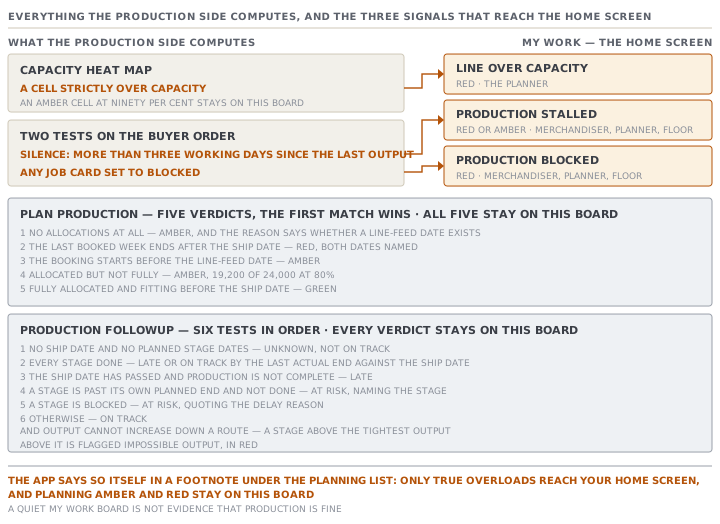
The status against each order on the planning list comes from one function with a fixed order of tests. The first one that matches wins.
- No allocations at all, so amber. The reason says whether a line-feed date exists.
- The last booked week ends after the ship date, so red. Both dates are named.
- The booking starts before the line-feed date, so amber, on the ground that materials will not be in the building yet.
- Allocated but not fully, so amber, with the percentage and both quantities named.
- Otherwise green, fully allocated and fitting before the ship date.
Two details in that list earn their keep.
The date test uses the Sunday at the end of the last booked week, whatever the factory's rest days are. Booking the last pieces into a week whose Sunday falls one day after the ship date turns the row red, even if the factory would have finished on the Friday.
And green is earned rather than assumed. ORD-1442 with 19,200 of 24,000 pieces booked reads amber at 80%, with both figures quoted, and it will read amber until the allocation covers the whole order. A partial booking that fits the date is still a partial booking.
Production followup: five tests in order
The on-time signal on the follow-up board is one of four words. The tests are applied in a fixed sequence, and the last line is not a test but the answer left when none of them matched.
- No ship date and no planned stage dates, so unknown. Genuinely unknown, not on track.
- Every stage done, so late or on track by comparing the last actual end against the ship date.
- The ship date has passed and production is not complete, so late.
- A stage is past its own planned end and not done, so at risk, naming the stage.
- A stage is blocked, so at risk, quoting the delay reason if one was given.
- Otherwise on track, because no stage is past its planned date.
Then one overlay is folded in. A stalled line, which the next section defines, raises the signal and never lowers it. A date-driven late stays late.
That board also runs a check with no equivalent anywhere else in the app. Output cannot increase down a route. You cannot sew more than you cut, or pack more than you finished. So each stage's output is compared against the tightest known output above it, and any stage that exceeds it is flagged in red as impossible output.
Two properties of that check are deliberate and worth knowing. An unknown output is skipped rather than assumed to be zero. And a stage that breaks the rule does not become the new bound, so one bad figure cannot hide a second one below it.
The signal that is silence
The stalled-line exception is the only thing in this module that fires because nothing happened. Its conditions are strict, and every one of them exists to stop it crying wolf.
- The order is In production.
- It has produced something. Output greater than zero, so an order that never started is not started, never stalled.
- It is not finished. Produced is below the ordered quantity.
- There is a last output date to measure silence from.
- More than three working days have passed since that date.
Working days, not calendar days, and the count skips the factory's rest days. That is what stops a weekend reading as a stall.
It is red when the ship date is within fourteen days or already past, and amber otherwise. The description names the idle days, the percentage produced, the ship date and how far away it is, and it ends by telling you to go and check the floor.
Now watch the setting from lesson 2 bite a second time. Ranca's floor works Monday to Saturday, but its workspace still holds the Saturday-and-Sunday default. Line 2 logs its last output on a Tuesday and then stops.
Counting Ranca's real working days, the fourth idle day is Saturday, and the exception should appear on Saturday morning. Counting the app's, Saturday and Sunday are both skipped, so the fourth idle day is Monday. The alert arrives two calendar days late, on an order whose ship date is three weeks out and whose line has been dark since Tuesday.
What actually reaches My Work
This is the shortest and most useful list in the course. Three production signals become items on the home screen.
| Exception | Severity | Who sees it | Raised by |
|---|---|---|---|
| Line over capacity | Red | The planner | Any heat-map cell strictly over capacity |
| Production stalled | Red or amber | Merchandiser, planner, floor | The silence test above |
| Production blocked | Red | Merchandiser, planner, floor | Any job card set to blocked |
Everything else stays where it was computed. An amber cell at ninety per cent stays on the board. A partly allocated order stays on the planning list. An at-risk on-time signal stays on the follow-up board.
The app says so itself, in a footnote under the planning list: only true overloads reach your home screen, and planning amber and red stay on this board.
That is a defensible design, and it has one consequence you should hold on to. A quiet My Work board is not evidence that production is fine. It is evidence that no line is over capacity, no card is blocked, and no line has been silent for four working days. Those three things can all be true of an order that is quietly going to miss its date, and the only way to see that one is to open the board that computes it.
Check yourselfAn order shows green on Plan production and at risk on Production followup on the same morning. A colleague says one of the two must be broken. Who is right?Show the answer
Neither screen is broken, and the disagreement is the two of them doing their jobs. Green on Plan production means one thing only: the whole order quantity is booked onto lines or subcontractors, and the last booked week ends on or before the ship date. It is a statement about the booking ledger, and it reads no production data at all. At risk on Production followup means a stage is past its own planned end date and not done, or a stage is blocked, or the line has gone silent for more than three working days. It is a statement about what has actually happened. A perfectly booked plan that nobody has started is exactly the case that produces both readings at once, and it is the most useful thing either screen could tell you that morning.
Check yourselfA production order has one job card set to blocked. Name everything that changes, and the one thing that does not.Show the answer
The production order takes its own status as blocked, because a blocked card raises the whole document rather than hiding inside an in-progress. That turns its chip red on the production orders list and on the buyer order's Production tab. The buyer order raises a Production blocked exception, which is red and reaches the merchandiser, the planner and the floor on My Work, naming the production order and linking to it. The follow-up board's on-time signal moves to at risk when it reaches the blocked-stage test, quoting the delay reason if one was entered. What does not change is the capacity board, which reads only allocations and never looks at job cards, so the line carries on showing exactly the load it showed yesterday while the work on it has stopped.
Prompt · Tell me what my quiet board is not showing
Any morning your My Work board is empty and you are about to report that production is fine.
My MerchandiserOS My Work board is quiet this morning. Help me work out whether that means anything.

Only three production signals ever reach that board: a heat-map cell strictly over capacity, which only a planner sees; an order whose floor output has been silent for more than three working days; and a job card set to blocked. Everything else stays on the board that computed it.

I will paste three things. From Plan production: every active order with its coverage state and its ship date. From the capacity board: every cell that is amber or grey in the next four weeks. From Production followup: each order's on-time signal and the reason line underneath it.

Give me three lists.

First, the things that are wrong and are NOT on my home screen. An amber capacity cell. A partly planned order. An at-risk on-time signal. For each one, quote the reason line and tell me which screen it lives on.

Second, the things my home screen COULD NOT have raised even if they were true. Tell me which exception kinds my sign-in role does not see, and whose board they are on instead.

Third, the silence. For every order in production, tell me the date of its last floor output and how many working days ago that was against my factory's real rest days, not the app's setting. Flag any order where those two counts differ, because the app's stall detector uses its own setting and will fire late if the setting is wrong.

End with one sentence in one of two forms. Either: the three boards are clean, so an empty home screen is evidence. Or: the home screen is empty and these specific things are wrong, in this order of urgency.

Never treat an absent exception as evidence that something is going well.
AI can make mistakes — check anything you act on.