Lessons · Lesson 5 of 5
The papers, and the gaps
Which shipping documents the application prints, which fields have a reader, and where the paperwork has to leave the system.
Lesson 5 of 5 · 18 min
What a document is for
A garment crossing a border travels with paper. Some of it tells a warehouse what to do. Some of it tells a customs officer what is in the box. Some of it tells a bank to release money.
These are different jobs, and a system that produces one of them is not producing the others. This lesson maps what the application actually prints against what a shipment actually needs, and it is mostly a lesson about the gap. Reading it wrong is expensive, because paperwork that nobody owns is discovered at the worst moment.
At Chincha Knitworks this is Elsa Paredes's work. She books the vessel, chases the forwarder and assembles the file that goes to the bank. Most of what she needs is not in the application, and the useful thing is knowing precisely which parts are.
The basis. Every document, field and message below was read out of the application's source. Where the lesson says nothing reads a field, that comes from following every reference to it in the code.
What the application prints
There are eleven printable documents in the whole application. Every one of them carries the factory's own letterhead from the company identity you set once.
| Document | Belongs to |
|---|---|
| Quotation | Selling |
| Order confirmation, marked proforma | Selling |
| Standard cost sheet | Costing |
| Tech pack | Product |
| Purchase requisition | Buying |
| Purchase order | Buying |
| Goods received note | Receiving |
| Material issue slip | Store |
| Job card | Production |
| Inspection sheet | Quality |
| Packing instruction | Shipping |
One of the eleven is a shipping document, and it is an instruction rather than a record. The application prints nothing at all that describes a shipment after it has happened.
The packing instruction sheet
Reach it from the packing panel or from /orders/ORD/packing/print. It is genuinely good at its job.
Five numbered sections: folding and polybag, assortment and cartons, the carton plan from the order's breakdown, the shipping marks with where they are printed, and any special instructions. A suffocation warning, if ticked, prints as its own line in capitals. Three signature lines close it, for the merchandiser who prepared it, the warehouse that packed it and the QC who checked it.
If the order has no instruction, the sheet says so and tells you where to go rather than printing empty boxes. If the carton plan cannot compute, the gaps print in the same words the screen uses.
Then, at the foot of the shipping-marks section, one sentence gives the whole game away:
Carton numbering "n of N" must match the packing list.
There is no packing list. Nothing in this application produces one. The sheet is instructing a warehouse to reconcile its carton numbering against a document the system does not make.
The same claim appears in a second place, and this one is a settings screen. Under company identity, the app says its letterhead is "Printed on every buyer-facing document (order confirmation / proforma, packing list, cost sheet, GRN…)". Three of those four exist. Worse, the packing sheet's own letterhead prints the company name and nothing else. Not the registration and bank details the same settings screen calls required for a valid export invoice.
The default marks
There is one more thing to check before printing, and it will surprise a factory outside one country.
The main mark box pre-fills from the order, and it never overwrites what you have typed. The pre-fill is five lines: the buyer's name in capitals, the buyer's PO or the order number, the style, then a blank destination line reading DEST: ____________, and then a fixed last line. The fixed line is MADE IN EGYPT.
It is a constant in the code. Chincha Knitworks is in Peru, and if nobody edits that box the cartons are marked as made in Egypt. A country-of-origin mark is a customs declaration, so this is not a cosmetic default.
The blank destination line is the second half of the same oddity. The order already holds a destination country, on the Overview tab under Reference numbers. The pre-fill does not use it, and leaves a line of underscores instead.
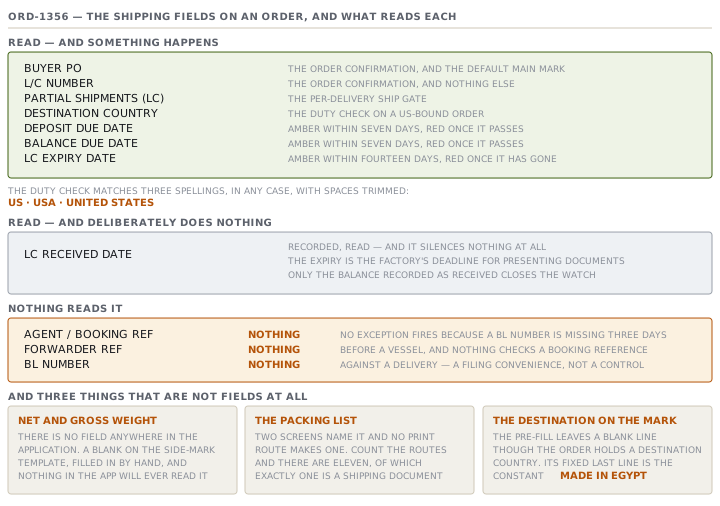
The side mark pre-fills as a template of blanks: carton number of total, colour and size, quantity, net and gross weight, and dimensions. Those blanks are honest, because they are per-carton facts. But note the two weights. The application has no net weight field and no gross weight field anywhere, so those two blanks can only ever be filled in by hand, and nothing in the app will ever know what was written.
Which reference numbers have a reader
The Overview tab carries a section called Reference numbers, introduced as "The other parties' references on this shipment — all optional; leave blank when there isn't one." Seven fields sit in it, and they are not equal. Four of them are read by something in the application. Three are storage.
| Field | What reads it |
|---|---|
| Buyer PO | The order confirmation, the default main mark, and a readiness warning when it is blank |
| L/C number | The order confirmation only |
| Partial shipments (LC) | The per-delivery ship gate |
| Destination country | The QIZ duty check |
| Agent / booking ref | Nothing |
| Forwarder ref | Nothing |
| BL number | Nothing |
That is not an argument for deleting the last three. A reference number a person can find in four seconds is worth recording, and the section says plainly that these are other parties' references. It is an argument against expecting them to do anything. No exception fires because a BL number is missing three days before a vessel, and nothing checks a booking reference against a delivery.
The destination country deserves one caution. It feeds a real decision, the duty check for US-bound orders, and the matching is a short list. The check recognises US, USA and UNITED STATES, in any case, with spaces trimmed. A free-text field feeding a duty rule through three accepted spellings is a place to be exact.
The dates that do fire
Payment is the one part of the paperwork the app watches, and it watches dates rather than money. The Payment section at the top of the Shipping tab says so: "the app tracks the dates and flags what's due or overdue on My Work; the money itself moves in your ERP."
Seven date fields sit there. Three of them raise exceptions.
- A deposit due date, unpaid, raises an amber card within seven days and a red one once it passes.
- A balance due date behaves the same way.
- An LC expiry date raises amber within fourteen days and red once it has gone.
The LC rule has a subtlety the source spells out. Receiving the letter of credit does not silence the expiry watch, because the expiry is the last date for the factory to present its documents. The clock runs against the party holding the credit. So the app records an LC-received date, reads it, and deliberately does not use it to quiet anything. The only thing that closes the LC watch is the balance being recorded as received.
Blank means absent throughout. A missing date raises nothing at all, and the section says so: clearing a date makes it absent again, and it is never treated as today.
What shipping does and does not silence
One last behaviour, because it catches people out in the week after a container leaves.
Marking an order Shipped stops its operational exceptions. The cockpit's rule is blunt: a Shipped order produces none. The ship-date-passed fire, the overdue purchase orders and the at-risk warnings all go quiet at once.
The payment and LC exceptions are produced somewhere else entirely, and that producer skips only cancelled orders. So a Shipped order keeps raising its LC-expiry card until the balance is recorded as received. That is correct, and it is the right way round. The goods have gone. The documents have not been presented, and the deadline that can still cost real money is the one that stays on the board.
Check yourselfAn order is Shipped and the board still shows a red card against it. A colleague says that must be a bug. Is it?Show the answer
Almost certainly not. Two different producers build the feed, and they have different rules about a shipped order. The cockpit's exceptions return nothing at all for an order whose status is Shipped, so a ship-date or purchase-order fire cannot survive shipping. The payment and LC producer skips only cancelled orders, so a deposit, a balance or an LC expiry keeps firing after the goods leave. Read the card. If it is about money or a letter of credit, the app is behaving as designed and telling you something that is still true. The way to close it is to record the payment date, not to close the order, because the order is already closed.
Check yourselfElsa wants the app to warn her when a bill of lading has not been received two days before an LC expires. What would that take, and what does the answer tell you about the seven reference fields?Show the answer
It cannot be built from what is there. The BL field is free text with no date beside it, so the app cannot tell a BL that arrived today from one recorded a month ago, and nothing reads the field in any case. The LC half already works, because the expiry date drives a real watch at fourteen days and at zero. So the warning would need two new things: a date on the BL, and a rule joining it to the LC clock. The general point is that a field becomes useful to a system when something reads it, and reading needs more than text. It usually needs a date, a state, or a rule that names the field. Three of the seven are read by nothing at all, and a fourth, the L/C number, is only ever printed and never joined to a date, a state or a rule. That is why those fields are a filing convenience rather than a control.
Prompt · Who makes each document on this shipment
Once per buyer, and again the first time you ship to a new destination or under a new letter of credit.
Help me build the document list for one shipment and say, for each document, who produces it and where it will live.

I will give you: the buyer, the destination country, the incoterm, whether payment is on a letter of credit, and what my system prints.

List the documents this shipment is likely to need. For each one, give me four things: what it is for, who produces it, whether my system can produce it, and where the signed copy will be filed. Be exact about the difference between a document that instructs my warehouse and a document that satisfies a bank or a customs officer.

Then name the gaps as gaps. If my system prints an instruction for packing but no record of what was packed, say so in those words rather than describing a workaround as though it were a feature.

Then do the consistency check, because this is where money is lost. List every figure that appears on more than one of these documents: total cartons, total pieces, net and gross weight, and the order or credit reference. For each, tell me which document is the source and which ones copy it, so a change in one place has a known list of places to follow it.

Two rules. Do not tell me what documents are usually required — ask me what this buyer and this destination actually require, and say plainly when you do not know. And never assume a system produces a document because a system of that type usually does.
AI can make mistakes — check anything you act on.