Lessons · Lesson 2 of 5
The cube and the container
How the app turns carton dimensions into a shipment volume and a container to book, and the three assumptions inside that answer.
Lesson 2 of 5 · 22 min
The number a forwarder asks for first
A forwarder does not ask how many garments you have. The first question is how much space they take.
Space is quoted in cubic metres, written CBM, and a whole ocean booking hangs off it. Book too small and cartons stay on the quay. Book too large and you pay for air. The app can do this arithmetic for you. This lesson is about the three assumptions buried in the answer it gives. None of them is hidden. None of them is obvious either.
The order is still ORD-1356 for Vollmar Sport: 7,800 brushed-fleece hoodies, solid packed twenty-four to a carton, which lesson 1 turned into 328 cartons. Percy Quiroz has typed the carton spec into the order's Shipping tab. The cartons are 60 by 40 by 40 centimetres, and he has put the max gross weight at 16 kilograms.
The basis, again. Every constant, label and rounding rule below was read out of the application's source. Every figure came from running the application's own volume engine on that carton spec. Where a value can be edited by your factory, the lesson says where it lives.
Four numbers become one
The Container loading section sits directly under Packing instructions on the Shipping tab. It computes from two things only: the carton dimensions, and the carton count the plan produced.
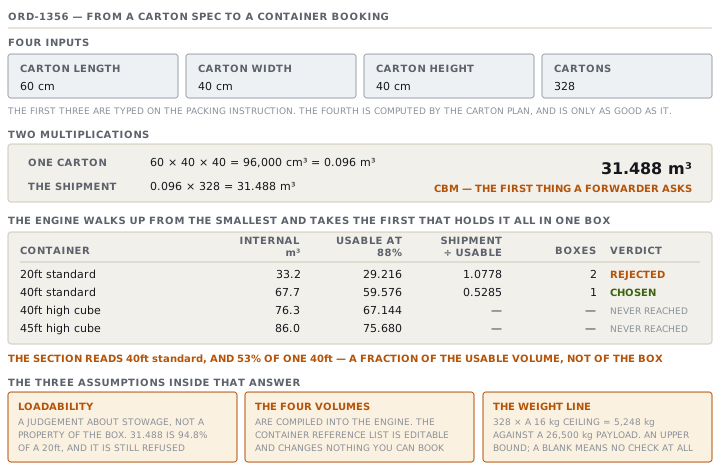
One carton is 60 times 40 times 40, which is 96,000 cubic centimetres. A cubic metre is a million of those. So one carton is 0.096 cubic metres, and three hundred and twenty-eight of them are 31.488 cubic metres. That is the whole of the volume arithmetic, and the panel prints its own working underneath the figures so you can check it.
If any one of the three dimensions is blank, the section does not guess. It says so, and it names the fix:
Carton size not set — add the carton length × width × height in the packing instructions above, and this fills in the shipment volume (CBM) and the container to book.
The 88 per cent
Now the part that decides the booking. The app holds four ocean containers with their true internal geometric volumes. It holds a loadability factor separately, because nobody ever packs a box to its geometric maximum.
| Code | Label | Internal volume | Usable at the default factor | Payload |
|---|---|---|---|---|
| 20ft | 20ft standard | 33.2 m³ | 29.216 m³ | 28,000 kg |
| 40ft | 40ft standard | 67.7 m³ | 59.576 m³ | 26,500 kg |
| 40HC | 40ft high cube | 76.3 m³ | 67.144 m³ | 26,500 kg |
| 45HC | 45ft high cube | 86.0 m³ | 75.680 m³ | 27,000 kg |
The default factor is 88%. The source describes it as what a real container packs to.
The engine then picks a container by a rule worth stating in full, because it explains an answer people find odd. It sorts the four by volume, walks up from the smallest, and takes the first one that holds the whole shipment in a single box. If none does, it falls back to the largest and multiplies.
Run ORD-1356 through it. The shipment is 31.488 cubic metres.
- A 20ft gives 29.216 usable. 31.488 divided by 29.216 is 1.0778, which rounds up to two containers. So the 20ft is rejected.
- A 40ft gives 59.576 usable. 31.488 divided by 59.576 is 0.5285, which rounds up to one container. So the 40ft is chosen.
The section reads 40ft standard, and beside it 53% of one 40ft. That percentage is the fraction of the usable volume, not of the box.
Here is the thing to notice. The shipment is 94.8% of a 20ft's true internal volume, and the app will not offer you a 20ft. That is not a bug. It is the loadability factor doing its job, and it is a judgement rather than a measurement. A forwarder with a good stow plan and square cartons might well get 31.488 cubic metres into a twenty-foot box. The app declines to bet on it.
The container list you can edit, and the one that counts
Follow that reference list a step further, because it produces a real trap. The four container rows can be edited like any other reference list, and the engine's own comment calls them a mirror seeded from the code. They are a mirror in one direction only.
Two places compute volume: the Container loading section and the Packing board. Both call the engine without passing it a container set, so both use the four values compiled into the code. Editing the reference list changes what you can browse and changes nothing you can book. If your factory ships in 45ft high cubes at a different rated capacity, editing the row will not move the answer.
Weight, and why the warning is pessimistic
Under the volume figures there may be a second line, about weight. Dense cargo can hit a container's payload limit before it fills the space. The trade calls that weighing out rather than cubing out, and the app checks for it.
It cannot check it properly. The reason is that the app never records what a carton actually weighs. There is no net weight field and no gross weight field. There is only max gross weight, the ceiling on the packing instruction, and the estimate is that ceiling multiplied by the carton count.
For ORD-1356 that is 328 times 16, so 5,248 kilograms against a 40ft payload of 26,500. One container by weight, one by volume. So the line reads as follows.
At the carton max weight (~5,248 kg total) the cargo cubes out before it weighs out — book by volume.
Note the tilde and the phrase at the carton max weight. The app is telling you which number it used.
Two consequences follow, and they pull in opposite directions.
- Leave max gross weight blank and there is no weight line at all. Not a warning, not an unknown, simply nothing. So a genuinely heavy shipment gets no check whatsoever.
- Fill it in with a hopeful ceiling and the check runs against a total nobody will ever load. So the weighs-out warning fires earlier than it should.
The honest reading is that the weight line is a screening question, not an answer. It is useful for spotting the dense order that deserves a proper calculation. It is not the calculation.
| Input | Where it comes from | What kind of number |
|---|---|---|
| Carton dimensions | Typed on the packing instruction | A measurement, if somebody measured a carton |
| Carton count | Computed from the assortment and the breakdown | Derived, and only as good as lesson 1's plan |
| Container volumes | Compiled into the engine | Fixed, and not the editable reference list |
| Loadability | The engine's default | A judgement about stowage, not a property of the box |
| Total weight | Carton count times max gross weight | An upper bound, never a weighing |
Where lesson 1's defect goes
Now put the two lessons together, because this is where the ratio-pack under-count stops being an arithmetic curiosity.
Change nothing about ORD-1356 except the assortment, from solid to a four-eight-eight-four ratio. Same garments, same cartons, same 24 pieces in each. The plan drops from 328 cartons to 302, because the app allowed two odd cartons for 600 loose garments.
- 302 cartons is 28.992 cubic metres. Against a 20ft's 29.216 usable, that is 0.9923 of one box, so the section reads 99% of one 20ft.
- The honest 325 cartons is 31.2 cubic metres. That needs 1.0679 twenty-foots, so the answer flips to a 40ft at 52%.
One field on one screen moves the booking from a twenty-foot box that is almost full to a forty-foot box that is half empty. The first answer is wrong, and it is wrong in the most expensive direction. 99% of a 20ft reads like a beautifully efficient booking, and it is a booking that will leave roughly twenty-three cartons on the ground.
Check yourselfAn order computes to 68 cubic metres. Which container does the app offer, and why is that answer surprising if you know the container list?Show the answer
It offers one 45ft high cube, at 90% of that container's usable volume. Walk the rule. A 20ft gives 29.216 usable and needs three. A 40ft gives 59.576 and needs two. A 40HC gives 67.144 and needs two. A 45HC gives 75.680 and needs one. So the 45HC is the first type in ascending order that holds the whole load in one box, and the app stops there. The surprise is the 40HC. Its geometric internal volume is 76.3 cubic metres, comfortably more than 68, and it is still rejected. That is because 88% of it is 67.144, which is less than 68. The whole decision turns on the loadability factor, not on the container.
Check yourselfElsa asks why the Packing board shows a container label for one order and a dash for another, when both have complete packing instructions and both are ready to pack. What is the difference?Show the answer
Carton dimensions. Ready to pack tests two things only: a carton plan that computes, and a main shipping mark that is set. Neither of those involves the carton spec. So an order can be green on the board with the length, width and height boxes empty. The volume column and the container label both come from the dimensions, so they show nothing at all on that row while the status column shows green. The two columns on that one line are answering different questions, and the reassuring one is not the one a forwarder needs.
Prompt · Is this the right container, and what is the answer assuming
Before you send a volume to a forwarder, and any time the container the system suggests looks larger or smaller than you expected.
I want to interrogate a container recommendation rather than accept it. Treat the software's answer as a hypothesis.

I will give you: my carton dimensions in centimetres, my carton count, my order quantity, the container and percentage my system suggested, and my carton max weight if I have set one.

Start by reproducing the volume. Multiply the three dimensions, divide by one million for cubic metres per carton, multiply by the carton count. Show both numbers. If your total differs from mine by more than a rounding, stop and tell me which input is likely wrong.

Then separate the three assumptions and label each one. Which container capacities are you using, and are they geometric internal volumes or practical loading capacities. What loadability fraction is being applied, and by whom. Whether the weight figure is a measurement or an upper bound taken from a maximum. Say plainly that a loadability factor is a judgement about stowage and not a property of the box.

Then give me the decision at two factors, not one. Work out the containers needed at the factor my system uses, and at a factor five points either side, and tell me whether the answer changes. If it does, that booking is resting on the factor rather than on the cargo, and I need a forwarder's opinion rather than a calculation.

Two rules. Never present an estimated weight as a weighed one. And if my carton dimensions are missing or look like a guess, say so instead of computing a confident number from them.
AI can make mistakes — check anything you act on.