Lessons · Lesson 4 of 5
The two ship gates
The whole-order Mark shipped and the per-delivery ship, the four kinds of refusal, who may override which, and what each gate does not check.
Lesson 4 of 5 · 22 min
Two doors out of the building
Marking something shipped is the most consequential button in an order. It closes the record, stops the exception feed, and stamps dates on things. So the app guards it.
What is easy to miss is that there are two separate buttons, on two separate records, guarded by two separate sets of rules. One closes the whole order. The other closes one delivery, and enough of those close the order behind your back. The two do not enforce the same things, and this lesson is about the difference.
Back at Chincha Knitworks, ORD-1356 has 7,800 hoodies to move. Vollmar Sport has asked for the Charcoal early and the Ecru later, so Milagros has split it into two deliveries. Aldo Chirinos is the only one of the four who signs in as an Owner, which turns out to matter twice.
The basis. Every message, threshold, role rule and log line below was read out of the application's source. Where a rule can be configured, the lesson names the screen the setting lives on and the value the app uses when nothing is set.
Door one: Mark shipped on the order
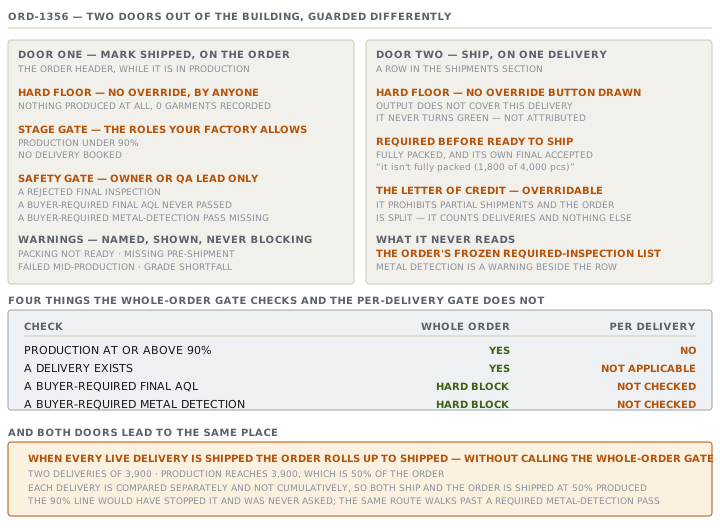
On an order that is In production, the header carries a Mark shipped button. The app computes the gate first and then decides what to render. So a blocked order shows a greyed button with the reason beside it, never a modal that only refuses. There are four tiers, and they behave very differently.
| Tier | Trigger | Overridable? |
|---|---|---|
| Hard floor | Nothing produced at all | Never, by anyone, and no override button is drawn |
| Stage gate | Production under 90%, or no delivery booked | Yes, by the roles your factory allows |
| Safety gate | A rejected final inspection, or a buyer-required check missing | Yes, but only an Owner or a QA lead |
| Warning | Packing not ready, missing pre-shipment, failed mid-production, grade shortfall | Nothing to override — these never block |
Understand the hard floor first, because it is the only rule in the gate with no exit. Its message is unusually long and says why:
Nothing has been produced on this order — 0 garments recorded. An order with no production can't be shipped by anyone, even with an override. Record the real output first (Production tab / Floor Capture).
The stage gate is the familiar one. Production must be at or above 90 per cent, and there must be at least one delivery that is not cancelled. Both are hard blockers on the meter, and both can be overridden in practice, because shipping early or shipping a partial is a legitimate factory decision. A missing quality record sits in the same stage as an advisory rather than a blocker, on the reasoning that no inspection is not the same as a failed inspection.
The safety gate is where the buyer's own requirements enter. Two of them can hard-block: the final AQL and metal detection. Whether they apply is not a global setting. It is the order's own frozen requirement list, so the same factory can have one order gated on metal detection and the next one not.
- A recorded final inspection with a reject verdict always blocks, whether or not the buyer required one.
- If the buyer requires a final AQL and none has an accept verdict, that blocks. Absence never counts as a pass.
- If the buyer requires metal detection, a missing pass blocks. So does a fail with no later re-screen pass behind it.
- A failing row stays in the log for good. Only its effect on the gate can be cleared.
Warnings are the fourth tier and they are easy to under-read. They are named, they are shown, and they change nothing. Packing readiness is one of them, deliberately. The cartons are physical and the instruction form is a planning aid, so an incomplete form must never stop a real shipment. The warning says as much, ending "(advisory — you can still ship)".
Who may override what
Two override rules run, in a fixed order, and the surprise is in how they interact.
The safety override is fixed in the code: only an Owner or a QA lead may ship past a required safety gate, whatever else is configured.
The general override is a factory setting, on Settings → Sign-off rules, with four choices: anyone on the order team, Owner or GM only, Owner or GM plus Merchandiser, or nobody at all. When nothing is stored, the app uses Owner or GM only.
Now the interaction. The general check only runs when the block is not a safety block. So a QA lead who overrides a lot with a failed final inspection passes the safety check and is never asked the general question. The same QA lead, on an order with no safety problem that is merely 60% produced, is refused with "Your role can't ship … your factory limits this to Owner / GM only."
Read that twice. On the default setting, a QA lead may ship a lot that failed its final inspection and may not ship a lot that is merely unfinished. The stricter gate is passable by a role that cannot pass the looser one.
Whatever the route, the log tells the truth afterwards. A clean ship writes Status: In production → Shipped. An override writes the same line with the gaps added in brackets, beginning "override — ship gate not met". Marking the order shipped also stamps today onto its deliveries. Any planned delivery becomes shipped, and any ex-factory date that is missing or still in the future is replaced with today's.
Door two: shipping one delivery
Each row in the Shipments section has its own status control, and its own gate. The vocabulary is different and so are the rules.
A delivery moves planned to shipped to delivered, and planned or shipped to cancelled. Nothing else, at either layer. Its gate has three parts.
A hard production floor, per delivery
The app compares this delivery's allocated quantity with the order's produced total. If too little is sewn to cover it, the delivery cannot ship at all, and no override is offered.
The app is careful about what it claims here. The floor never turns green, because a sewn garment is not tagged for a particular shipment. The strongest thing it will say is that production covers this delivery "on a first-come basis, not attributed to this delivery".
Ready to ship is earned
A delivery is ready only when it is fully packed and its own final inspection has an accept verdict. With either half missing the button is disabled and the reason is spelled out, such as "it isn't fully packed (1,800 of 4,000 pcs)".
The letter of credit
Suppose the order's LC prohibits partial shipments and the order has more than one live delivery. Shipping one of them is then refused, in these words:
the order's letter of credit prohibits partial shipments and it's split into 2 deliveries — shipping one of them is a partial shipment
This is contractual rather than physical, so it can be overridden. The override is what a buyer waiver or an LC amendment looks like in the app.
That rule counts deliveries and nothing else. It does not care which delivery you are shipping, or whether the others have already gone. So the final delivery of a split order trips it too.
What only one door checks
Put the two gates beside each other and the gaps appear.
| Check | Whole order | Per delivery |
|---|---|---|
| Nothing produced at all | Hard, no override | Hard, no override |
| Production at or above 90% | Yes | No — it asks only whether output covers this delivery |
| A delivery exists | Yes | Not applicable |
| Rejected final inspection | Hard block, Owner or QA to override | Blocks, overridable by the general rule |
| Buyer-required final AQL never passed | Hard block | Not checked |
| Buyer-required metal detection | Hard block | Not checked — a warning only |
| Fully packed | Warning only | Required |
| LC prohibits partial shipments | Not checked | Blocks, overridable |
The two rows in bold are the ones to take away. Every order carries a frozen list of the inspections this buyer demands. The whole-order gate reads that list. The per-delivery gate does not read it at all. On the delivery path, metal detection produces a warning and nothing more.
The rollup, and the gate that never runs
That would matter less if the two doors led to different places. They do not.
When every live delivery on an order has been shipped, the app rolls the order itself up to Shipped. It writes the status directly and logs "all 2 deliveries are shipped". It does not call the whole-order gate on the way, and the source says why: each delivery already passed its own gate, so a re-gate would pass anyway.
Work through ORD-1356 and that reasoning does not hold. Two deliveries of 3,900 pieces each. Production reaches 3,900, which is 50% of the order. Delivery one is packed, has an accepted final, and covers its own 3,900, so it ships. Nothing else is made. Delivery two is packed, has an accepted final, and the order's 3,900 still covers its 3,900, because the comparison is per delivery and not cumulative. So it ships too.
The order is now Shipped at 50% produced. The whole-order gate would have stopped that at the 90% line, and it was never asked. The same route walks past a buyer-required metal-detection pass without either gate raising it.
Check yourselfPercy asks why the Ship button on a delivery is grey with no Ship anyway beside it, when the same order's Mark shipped offers an override. What single condition produces that, and what would clear it?Show the answer
A hard production block on that delivery. The app compares the delivery's allocated quantity against the order's produced total. If the output does not cover it, or the delivery has no contents at all, the delivery cannot ship by any route. The override button is deliberately not drawn in that case. The two clearing paths match the two causes. If the delivery has no contents, allocate its colours and sizes and the comparison becomes possible. If it does and output is short, the only fix is recording real output on the Production tab. The whole-order button can still offer an override because the order-level floor is only that something has been produced, and something has.
Check yourselfAn order ships past a required metal-detection pass. Two routes could have produced that. Name both, and say which one leaves a usable trail.Show the answer
The first is the whole-order button with a deliberate override, which needs an Owner or a QA lead because a required metal-detection check is a safety gate. That route leaves a good trail. The activity log carries the status change with the gaps named in the same line, so a reader months later can see exactly what was overridden and by whom. The second is the per-delivery route, and it leaves almost nothing, because the per-delivery gate does not read the order's required-inspection list at all. Metal detection appears there as a warning beside the row and never as a blocker. So the delivery ships as an ordinary ready delivery, the order rolls up to Shipped, and no override is recorded, because none was needed. The second route is the dangerous one precisely because it is quiet.
Prompt · Walk me through the gate before I ship
Before pressing Mark shipped, and before shipping the last delivery of a split order.
I am about to mark something shipped and I want the refusal reasons before I meet them, not after.

I will tell you: whether I am shipping a whole order or one delivery, the order quantity, the produced quantity, the deliveries and their allocated and packed quantities, the inspections recorded and their verdicts, which inspections this buyer requires, and whether the letter of credit allows partial shipments.

Work the whole-order gate and the per-delivery gate separately, and do not let one stand in for the other. For each, list what passes, what blocks, and what is only a warning. Mark each blocker as one of three kinds. A hard floor with no override. A judgement gate that a permitted role may override, and that gets logged. Or a safety gate tied to a buyer requirement.

Then do the part I will not think of. If I am shipping the last delivery of a split order, tell me that the order will roll up to shipped on its own, and check by hand whether the whole-order gate would have passed at that moment. Compare the produced quantity against the order quantity as a percentage, and check every inspection this buyer requires against what is actually recorded.

End with one line: ship, ship with a named override, or do not ship. If it is an override, tell me exactly what will be written to the activity log and who has to press it.

Two rules. Never treat a missing inspection as a passed one. And do not tell me a delivery is ready because the button is enabled — say what evidence makes it ready.
AI can make mistakes — check anything you act on.