Lessons · Lesson 3 of 5
Two records of the same carton
The scan log and the delivery packing confirmation — what each one proves, which one the ship gate reads, and why they never meet.
Lesson 3 of 5 · 20 min
One box, two ledgers
A carton leaves the packing bay once. In this application it can be written down twice, in two places, by two people, with no link between them.
Neither place is wrong. They were built for different jobs and they answer different questions. The trouble starts when somebody assumes that filling one of them fills the other. This lesson is about telling them apart, and about which one a ship gate will actually look at.
At Chincha Knitworks, Percy Quiroz stands at the packing bay with a barcode scanner. Milagros Zevallos sits in the office with the order's Shipping tab open. Both are recording the packing of ORD-1356. Only one of them is producing evidence the app will use.
The basis. Every message, column and button below was read out of the application's source. Where the lesson says a field is never written, that comes from following the write path in the code and finding nothing that sets it.
Ledger one: the packing station
Reach the station from the Packing board, from a button on the packing instructions, or straight from /packing/station.
Without an order in the address it lists the orders you can scan. It only lists an order whose effective pieces per carton is set, because a scan has to know how many pieces it just recorded.
If you arrive at a specific order that is not ready, the station refuses in words rather than by disappearing. It says the order "has no carton size yet, so a scan can't know how many pieces are in each carton", tells you to set the packing instructions, and gives you a link straight to that order's Shipping tab.
Once you are in, the station is one input box and a running total. What a scan records is worth listing exactly.
| Column | Written by the station? |
|---|---|
| Order | Yes |
| Carton code | Yes, trimmed and upper-cased |
| Pieces in the carton | Yes, always the order's effective pieces per carton |
| Who scanned it | Yes |
| When | Yes |
| Shipment | No — the column exists and the station never sets it |
| Colour | No — same |
| Size | No — same |
| Weight | There is no such column |
Four rules govern what the station accepts, and all four are in the code rather than in a convention.
- A carton code is any non-empty token up to 64 characters with no control characters. There is no format, because the factory prints its own labels.
- A code already scanned against this order is refused with "Already packed — CODE was scanned before." A unique index behind it catches a genuine double-scan from two stations at once.
- Undo deletes the most recent row outright, so a mis-scanned carton can be scanned again. It is a hard delete, not a reversal entry.
- Every accepted row carries who scanned it and when, and the screen says so: "Duplicate scans are rejected and the carton count can't be inflated by a double-scan. Each scan is recorded with who scanned it and when."
That is a genuinely good audit record of physical work. It is also, for reasons that follow, invisible to the rest of the application.
Ledger two: the delivery's packed figure
An order can ship in more than one delivery. Each delivery is a row in the Shipments section at the bottom of the Shipping tab. Each row carries a quantity, a mode, dates, and a status. Each row also carries its own contents, an allocation of the order's colour and size breakdown, so the app knows which garments are in which delivery.
Under a delivery sits a small control: a box labelled Packed pcs, the delivery's required quantity beside it, and a Confirm packing button. Pressing it opens a confirmation panel that spells out what will happen. Its three lines are worth quoting, because the second and third are doing real teaching.
- It records the number you typed, of the delivery's required pieces, as packed for this delivery.
- "This is a packing confirmation — it does NOT ship the delivery."
- "A delivery reads "Ready to ship" only when it's fully packed AND its own final QC passed."
The server bounds the figure. It refuses a negative, and it refuses more than the delivery holds, naming the arithmetic: "Can't pack 700 — this delivery only holds 600 pcs. Pack up to 600." The ceiling is the sum of the delivery's allocations. On an old delivery with no allocations it is the typed header quantity. Every confirmation writes a line to the order's activity log.
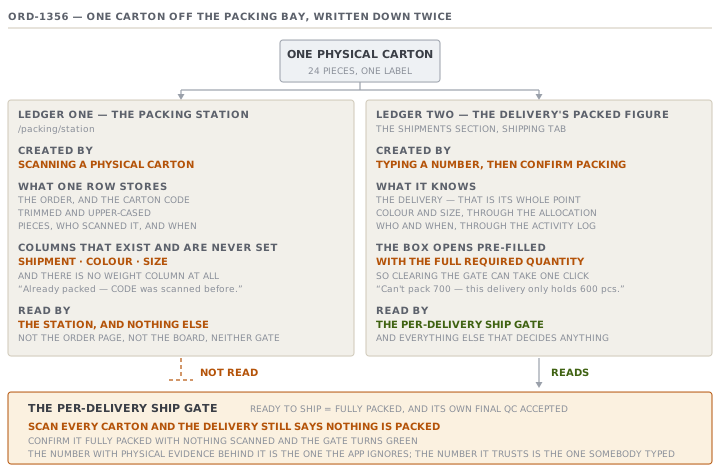
They do not meet
Now the finding. You can check it in a couple of minutes on your own installation.
The station's summary of an order, cartons scanned and units scanned, is read in exactly two places, and both of them are the station itself. The order page does not read it. The Packing board does not read it. The per-delivery gate does not read it. The order-level ship gate does not read it. Nothing that decides anything reads it.
The delivery's packed figure is written in exactly one place: a person typing a number into the box and pressing Confirm packing.
So the two ledgers face in opposite directions.
| Scan log | Delivery packed figure | |
|---|---|---|
| Created by | Scanning a physical carton | Typing a number |
| Knows which delivery | No | Yes, that is its whole point |
| Knows colour and size | No | Through the delivery's allocation |
| Names a person | Yes, per carton | Through the activity log |
| Read by the ship gate | No | Yes |
| Read by anything else | No | Yes |
Percy can scan all 328 cartons and the delivery still says nothing is packed. Milagros can confirm the delivery fully packed with no carton scanned at all, and the gate turns green. The number that has physical evidence behind it is the one the app ignores. The number the app trusts is the one somebody typed.
The pre-filled attestation
There is a second, smaller thing in the same control. It is easy to miss because it looks like a convenience.
The Packed pcs box does not open empty. It opens with the delivery's full required quantity already in it, unless a figure has been confirmed before. So the shortest possible path is to open the panel and press Confirm packing, which records the entire delivery as packed without anybody typing a digit.
This matters because of what the confirmation earns. A delivery may only be marked shipped when it is fully packed and its own final inspection passed, and this box is the whole of the packing half of that test. The control offers the answer that clears the gate as its default, and clearing the gate takes one click.
Compare it with the quantity control elsewhere in the app, where a figure stays estimated until a human confirms it and the confirmation records who and when. The packing confirmation does record who and when, in the activity log. What it cannot record is whether anybody looked.
Why the seam exists
It is worth being fair to the design, because the gap is not carelessness.
The scan log is order-level for a real reason. On the day, a packer does not know which delivery a carton will end up on. Deliveries get split and merged after the goods exist. Attaching a shipment to a scan would force a decision at the wrong moment, and the column is there, unwritten, precisely because somebody expected to fill it later.
The delivery figure is typed for a real reason too. It is a commitment, not an observation. Someone is asserting that this delivery's allocation is complete and ready to go, and that assertion is what the ship gate is entitled to rely on. A scan count could not carry it, because a scanned carton is not yet assigned to a delivery.
The honest summary is that the app has the evidence and the commitment, and no bridge between them. Knowing that is worth more than either half.
Check yourselfAn audit asks how you know a delivery of 4,000 pieces was fully packed. What can you produce from the app, and what is the weakest link in it?Show the answer
Two things, and they do not join up. From the activity log you can produce a line saying the delivery's packing was confirmed at 4,000 of 4,000 pieces, with the actor and the timestamp the log records. From the packing station you can produce a list of scanned cartons for the order, each with its code, its piece count, who scanned it and when. The weakest link is that nothing connects the second to the first. The scan list is order-level and carries no delivery, so it cannot prove those particular cartons were the ones in this delivery. The confirmation carries no cartons, so it cannot prove anybody counted anything. If the two totals disagree, the app will not notice, and only the typed one had any effect.
Check yourselfA supervisor scans the same carton twice by accident, then scans a carton that was already packed last week under a code the label printer reused. What does the app do in each case, and which one is the dangerous one?Show the answer
Both are refused with the same message, that the code was scanned before, because the check is on the order and the code and nothing else. The accidental double-scan is exactly what that check is for, and it behaves perfectly. The reused code is the dangerous one, because the refusal is right for the wrong reason. The second carton is a real, different, unscanned box, and the app has just declined to record it. Nothing tells the supervisor that. The count will be one carton light, and the only trace is a rejection message that has already gone. A code is any non-empty token by design, so the app has no way to tell a duplicate label from a duplicate scan. The defence has to be the label printer.
Prompt · Reconcile what was scanned with what was confirmed
Before confirming a delivery packed, and whenever an audit or a buyer asks how you know a delivery was complete.
Help me reconcile two packing records that my system keeps separately and never compares.

I will give you: the order, its deliveries with each one's allocated quantity, the packed figure confirmed on each delivery, and the packing station's totals for the order in cartons and units. I will also tell you the pieces per carton.

First state the two records in their own terms, without mixing them. The scan log is order-level physical evidence with no delivery on it. The confirmed figure is a per-delivery commitment typed by a person. Say which one my system's ship gate reads.

Then do the arithmetic that joins them, and be explicit that I am the join. Multiply scanned cartons by pieces per carton to get scanned units. Sum the confirmed packed figures across deliveries. Put the two totals side by side and give me the difference in units and in cartons.

Then read the difference in both directions rather than one. More confirmed than scanned means somebody has attested to packing that has not been scanned. More scanned than confirmed means real packed output that no delivery has claimed, which usually means an allocation is missing. Name which of the two I have.

Finally, tell me what I can and cannot evidence. Be blunt about the fact that the scan log carries no delivery, so it can never prove that these particular cartons are the ones in that particular delivery.

One rule. Do not suggest I change either figure to make them agree. The point is to find out which one is wrong.
AI can make mistakes — check anything you act on.