Lessons · Lesson 3 of 5
Nineteen rows, and what your role gets
The reports catalogue read row by row: four cadences, two rows that are honestly not built, and why the hub is a different length for every account.
Lesson 3 of 5 · 26 min
What a report is here
A report is a table you can take out of the building. That is the whole difference between it and a dashboard. A dashboard is a glance at now, and it stays inside the screen. A report has a shape, a filter, a date on it and a download. This lesson reads the catalogue of them. Knowing which reports exist is most of knowing what you can answer.
The Reports hub at Deduru Apparel is /reports, and every staff account can open it. What each account finds there is not the same list.
The catalogue
There are nineteen rows, grouped under four headings, and seventeen of them are built.
| Report | Cadence | Audience besides the Owner | Built |
|---|---|---|---|
| WIP / production status summary | Daily | Merchandiser, Planner | Yes |
| Daily Production Report (DPR) | Daily | Planner, Floor supervisor | Yes |
| Hourly efficiency board | Daily | Planner, Floor supervisor | Yes |
| Cutting room report | Daily | Planner | Yes |
| Daily dispatch report | Daily | Merchandiser | Yes |
| Buyer / agent order-status report | Weekly | Merchandiser | Yes |
| Sourcing / materials follow-up | Weekly | Merchandiser, Sourcing officer | Yes |
| Capacity / line loading | Weekly | Planner | Yes |
| Production plan | Weekly | Merchandiser, Planner, Floor supervisor | Yes |
| T&A milestone tracker | Weekly | Merchandiser, Planner | Yes |
| Sample and development status | Weekly | Merchandiser | Yes |
| Performance / OTD | Monthly | Merchandiser, Planner, QA lead | Yes |
| Quality — DHU and defect analysis | Monthly | QA lead | Yes |
| AQL inspection summary | Monthly | QA lead | Yes |
| Costing / margin analysis | Monthly | Nobody | Yes |
| Supplier performance scorecard | Monthly | Sourcing officer | Yes |
| Order book / pipeline value | Periodic | Nobody | Yes |
| Brand WSSI / weekly trade | Periodic | Nobody | No |
| Brand OTB / buy-sheet | Periodic | Nobody | No |
The short names in that table are worth spelling out. WIP is work in progress, the garments already started and not yet finished. DPR is the daily production report. T&A is time and action, the plan of dated milestones an order has to hit. OTD is on-time delivery. DHU is defects per hundred units. AQL is the acceptable quality limit, the sampling rule that decides whether a finished lot passes or fails. WSSI and OTB are retail planning tools that belong to a brand rather than to a factory, which is why both of their rows are not built.
The two unbuilt rows are not hidden. They show with a dashed border, no link, and a tag naming what will bring them. For both of them that is the brand phase. The hub's own introduction promises exactly this: nothing here is a dead link or an empty file.
The hub is a different length for every account
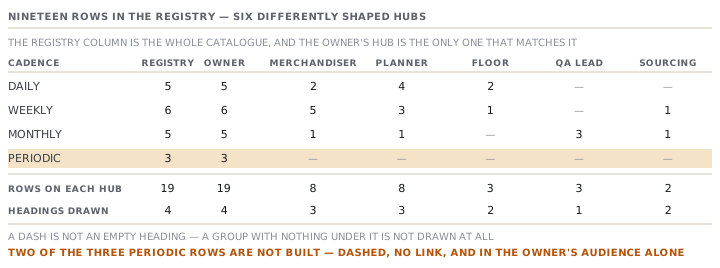
The hub keeps only the rows your role is in. Then it drops any heading left with nothing under it.
| Role | Rows | Headings, and how many under each |
|---|---|---|
| Owner / GM | 19 | Daily 5, Weekly 6, Monthly 5, Periodic 3 |
| Merchandiser | 8 | Daily 2, Weekly 5, Monthly 1 |
| Planner | 8 | Daily 4, Weekly 3, Monthly 1 |
| QA lead | 3 | Monthly 3 |
| Floor supervisor | 3 | Daily 2, Weekly 1 |
| Sourcing officer | 2 | Weekly 1, Monthly 1 |
Three things in that table are worth saying out loud.
Sanduni's entire Reports hub is one heading. Everything a QA lead may open is monthly. There is no daily quality report and no weekly one. So on a Tuesday morning there is nothing in the hub that is about Tuesday.
Kasun has no Monthly heading at all, because a floor supervisor is in the audience of no monthly report. An empty group is not drawn as an empty group. It is simply absent. That is why two people describing the same screen can disagree about how many headings it has.
Ishara's two rows are the sourcing follow-up and the supplier scorecard. Both are hers by name. She is also the person who would most like the order book, and that one is the Owner's alone.
Only one person ever sees an unbuilt row
Both of the unbuilt rows are in the Owner's audience and nobody else's. So the dashed border, the missing link and the honest coverage tag are visible to Chamath and to no one else in the building.
That is worth knowing before somebody redesigns it. The careful, honest treatment of a report that does not exist yet, never a dead link and never an empty file, is doing its work for exactly one account.
Two guards, not one
The hub filters rows by role, and that is the visible half. Each built report page checks again on its own when you open it. If your role is not in that report's audience, it sends you back to the hub.
That matters because a report address is a plain one: the hub's key with a slash in front of it. Somebody pastes a link into a message, a colleague clicks it, and the second guard decides what happens. A link in a message is not a grant.
What a built report is made of
Under every one of the seventeen is the same object: a set of columns, a set of rows, and an optional pointer to the column that holds the identifier.
- A column may be marked numeric. That right-aligns it and sets its figures in even-width numerals.
- A column may be marked as the health column. That draws a coloured badge in place of the plain word.
- A column may be marked as a bar column. That draws a faint bar under each value, scaled to the largest value in the column.
- A row is a list of cells that are already text, not numbers waiting to be formatted.
- A row may carry a health value. It is read from the one order-health source, and the report never works it out again.
- A row may be flagged as a total. That pins it to the bottom and keeps it out of the sorting.
- A row may carry a link. That turns its identifier cell into a way into the record underneath.
- A missing value is the dash, passed through exactly as the builder wrote it. No report invents a zero.
The page around it adds a header block: your factory's name, the report title, when it was generated and against what filters, and one line saying the figures came from live data. Some reports add a strip of headline figures above the table, and a chart above that. Both are optional. A report with neither is not a lesser report.
The letterhead that is not the letterhead
The report registry exports a factory name as a fixed value. In this build it reads BG Group, and the comment above it says it is the header line on every report.
It is not. The report frame reads your live factory profile instead, and the comment where it does so says plainly that it never uses a hardcoded name. Nothing in the application reads that fixed value. It is exported, it is documented in the module's own index, and it is used nowhere.
Check yourselfDilhani sends Sanduni a link to the sourcing and materials follow-up report. Sanduni clicks it. What happens, and what would have happened if Dilhani had sent the T&A tracker instead?Show the answer
Sanduni lands back on the Reports hub. A QA lead is not in the sourcing report's audience, and the report page re-checks the role rather than trusting that she arrived from a filtered hub. The T&A tracker would have done the same thing, for the same reason: its audience is the merchandiser and the planner. Sanduni's three rows are all monthly, and a link into any of the other sixteen bounces.
Prompt · Work out who in my factory can open which report
When you are setting up accounts, or when somebody keeps asking you to send them the same file.
Help me map the reports catalogue against the people in my factory, so I can stop being the person who forwards files.

I will list my staff and the role each one signs in as, and I will tell you the reports I currently send by hand and to whom.

For each report I send by hand, tell me whether the recipient's own role can open it. If it can, the fix is to show them the Reports hub once, and I want the one sentence to say to them. If it cannot, say so plainly and give me the two honest options: change their role, or keep forwarding.

Then do it the other way round. For each of my people, tell me which reports their role opens that they are probably not using, and what question each one answers. Be concrete about the question, not the title.

Then flag the commercial ones separately. Tell me which of the reports I send contain cost, price or margin, and ask me to confirm that every recipient is meant to see them.

Finally, warn me about the buyer-facing report specifically. Ask me whether anything I add to a buyer pack alongside it contains cost, because the report itself deliberately does not.

Do not guess at a report that is not in my list. If I mention one you do not recognise, ask me for its title on the hub rather than assuming what it holds.
AI can make mistakes — check anything you act on.