Lessons · Lesson 5 of 5
One click, three files that can disagree
What the Export menu actually produces, when the spreadsheet and the printout stop matching, and what the download log does and does not record.
Lesson 5 of 5 · 24 min
Why this is the last lesson
A report becomes real when it leaves the building. Until then it is a screen somebody looked at. The moment it is a file in an email it is evidence. Somebody will act on it without ever seeing the screen it came from. This lesson is about that gap. It is short, and it is the one to remember.
Every built report at Deduru Apparel carries the same Export button, and behind it the same three choices.
The three choices
| Choice | What happens | Built from |
|---|---|---|
| Excel | A preview opens, then the file downloads | The table the server built |
| CSV | A preview opens, then the file downloads | The table the server built |
| PDF (print) | The browser's print dialog opens | The page in front of you |
The Excel and CSV preview is a real preview: the headers and the rows, in a box you can scroll, with a row count above it. It shows the first fifty rows. If there are more, one line under them says how many more, and that the full set is in the download. You can cancel from there and nothing is written.
The PDF choice has no preview of its own, because the print dialog is the preview. The toolbar, the back link and the search box are all marked never-to-print. So what reaches the paper is the header block, the headline figures, the chart and the table.
The search box, and where it does not reach
Every report grid has a quick search above it and column headers you can sort by. They are good, and they are careful.
- Type into the search and the row count beside it reads how many of how many rows you are seeing.
- The total row at the bottom is worked out again over the rows you can see. So it is an honest subtotal, not a leftover.
- Its label gains the word filtered, in brackets, so nobody mistakes it for the whole.
- A percentage total is never added up again, because adding percentages together is not a thing.
- Sorting knows what a column holds, and missing values sort last instead of sorting as zero.
None of that reaches the Excel or the CSV. Those two are built from the table object the server produced, which went to the export menu before the grid ever ran. The search and the sort live inside the grid.
The PDF is the opposite, because it is the browser printing the page. What is on the page is what is in the file.
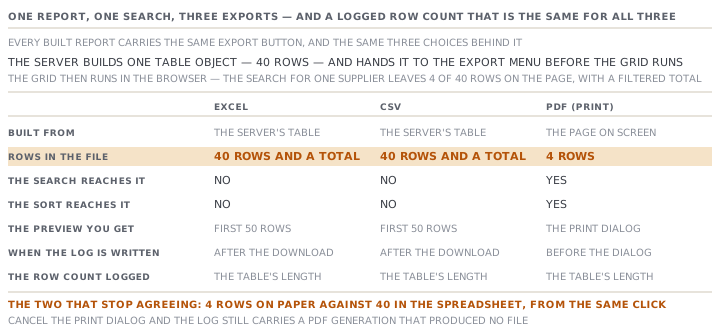
So there is a state in which the three disagree. Ishara opens the sourcing follow-up, types a supplier's name into the search, and sees four rows out of forty. She takes a PDF and gets four rows. She takes a CSV and gets forty rows and a total.
Neither file is wrong for what it is. What is wrong is the sentence on the preview. It tells her the file is exactly what is on screen. The file is exactly what the server sent, which is not the same claim.
The report whose spreadsheet leaves out its own headline
The Performance report is the sharpest case, and it goes the other way.
Its exportable table has four columns: buyer, defects, produced, defect rate. Everything else on that page sits below the table as extra page content. That is the on-time delivery percentage, the on-time and late counts, the shipments with no date, the live at-risk picture, and the six-month output chart.
All of it prints. None of it is in the spreadsheet.
So a colleague who asks for the on-time delivery report and gets the Excel receives a defect-rate table with no on-time figure anywhere in it. Nothing warns them. The file is named for the report, and it contains a true part of it.
What the download log records
Every generation writes one row. Not one row per record in the report. One row for the act of taking it.
| Stored | Example at Deduru |
|---|---|
| Which report | The order book |
| Scope | All buyers |
| Filters | The filter values the page passed, as a short text |
| Format | Excel, CSV, PDF or screen |
| Row count | The number of rows in the table object |
| Who | The signed-in account |
| When | The moment it was recorded |
Three things about that row are worth knowing precisely.
The row count includes the total row. The order-book report counts its own buyers, and deliberately leaves the total it adds at the end out of that count. The log takes the length of the table instead. So on a report with a total row, the log reads one higher than the report says.
A PDF is logged before the dialog opens. The record is written, and then the browser is asked to print. Cancel the dialog and the log still carries a PDF generation that produced no file. Excel and CSV are logged after the download has begun.
A failure is silent. The write goes through a server action with four refusals in it. No session, a supplier account, an unknown report key, or a report your role may not see. Each one returns a quiet no instead of raising an error. The page does not wait for the answer, and does not show one.
The log nobody can read
There is a table for it, with an index on the report key. There is a function that writes to it, and a function that reads it back, either filtered by report or in full.
No screen in the application calls the reader. The only thing in the repository that does is a test.
Two rules to take away
The file is not the screen, and the log is not the file. One click produces three different things, and each one can be right about something different. Before you send anything, know which of the three you are holding.
An export is an act somebody can ask you about. It is recorded with your name on it, and the record survives long after you have forgotten which filter was in the box. That is a good thing, and worth behaving as though it were visible, because one day it will be.
Check yourselfDilhani sorts the buyer-status report by ship date, searches for one buyer, exports a CSV and sends it. What does the buyer receive, and which part of the application misled her?Show the answer
The buyer receives every active order in the workspace, in the report's own most-urgent-first order. Not the one buyer she searched for, and not her sort. The search and the sort are grid behaviour and never reach the spreadsheet. What misled her is the preview's own sub-line. It describes the file as exactly what is on screen, while showing her rows the screen was hiding. The fix is the report's filter bar, which the server obeys, or clearing the search first.
Prompt · Check an export before it leaves the building
Any time you are about to attach a report to an email that goes outside your own team.
Run me through a short check on a report file before I send it.

I will tell you which report it is, which format I took, whether I had typed anything into the search box, whether I had sorted a column, and who is receiving it.

First, tell me what is actually in the file. A spreadsheet is built from what the server produced, so a search I typed and a column I sorted are not in it. A printed file is the page as I left it, so both of those are in it. Say which of the two I am holding and what that means for the rows.

Second, ask me whether anything important on that report lives outside the table. Some reports carry headline figures and a chart above or below the grid, and those are printed but are not in a spreadsheet. If I say I do not know, tell me to look at the page and count what is not in a row.

Third, ask about cost. Does this report carry price, margin or a pipeline value, and is the recipient meant to see it.

Fourth, write me the covering sentence. It must name the report, the real scope of the file, and the period, in my own plain words rather than the label on the page.

Finally, remind me that the download was recorded with my name on it. Ask whether I would be comfortable explaining this send in six months, and if not, tell me what to change.
AI can make mistakes — check anything you act on.