Lessons · Lesson 1 of 5
Three screens that look like a dashboard
What My Work, the Dashboard and the Reports hub each answer, and why the Dashboard is a different screen for every role.
Lesson 1 of 5 · 24 min
The room this course happens in
A dashboard answers a question you never asked. That makes it easy to trust and hard to check. This course is about three such screens. Each one shows you a number. Each one counts something slightly different. Get the difference wrong and you act on a figure that was never about what you thought.
Deduru Apparel is a knitted childrenswear and baby-jersey factory in Kuliyapitiya, Sri Lanka. It runs three sewing lines and employs 240 people. It ships to the United Kingdom and the Netherlands. Its MerchandiserOS workspace went live on 4 March 2024, and everything in this course happens inside it.
Five people appear.
- Chamath Weerakoon owns the business and signs in as Owner / GM.
- Dilhani Jayasuriya is the merchandiser. She owns the buyers and the orders.
- Ishara Rathnayake is the sourcing officer. She owns suppliers, materials and purchase orders.
- Sanduni Wickramasinghe is the QA lead.
- Kasun Alwis is the floor supervisor on the day shift.
Two buyers matter: Ossington and Vale, a British childrenswear label, and Culzean Kids in Rotterdam.
Say the basis once. All money in this course is US dollars. That is the currency the order-book report converts everything into. Where the application does not do something yet, the lesson says so plainly instead of promising it.
Three screens, three questions
All five of Deduru's staff accounts can reach these three screens. They are not three views of the same thing.
| Screen | Route | What it answers | What it is not |
|---|---|---|---|
| My Work | / | What is going wrong that is mine to fix | Not a summary of the business |
| Dashboard | /dashboards | How the areas I touch are standing right now | Not a history, and not exportable |
| Reports | /reports | What happened, in a table I can take away | Not live attention — you go looking |
The application opens on My Work, not on the Dashboard. That is deliberate. The first screen of the day is a list of things that need a person, not a wall of figures. You go to the Dashboard when you want the shape of the week instead of this morning's fires.
External supplier accounts reach none of the three. A supplier signs in to the portal and stays there.
The Dashboard is a different screen for every role
Open /dashboards and the page builds only the cards your role is listed for. There are seven cards in the application. No role except the Owner sees all of them.
| Role | Cards | Which ones |
|---|---|---|
| Owner / GM | 7 | My Work / Exceptions, Order Cockpit, Performance, Efficiency, Production, Quality, Quotations |
| Merchandiser | 4 | My Work / Exceptions, Order Cockpit, Performance, Quotations |
| Planner | 4 | My Work / Exceptions, Order Cockpit, Efficiency, Production |
| Floor supervisor | 4 | My Work / Exceptions, Efficiency, Production, Quality |
| QA lead | 3 | My Work / Exceptions, Performance, Quality |
| Sourcing officer | 1 | My Work / Exceptions |
| Supplier (portal) | 0 | The portal never reaches the factory dashboard |
Read the bottom of that table twice. Ishara owns every purchase order, every supplier and every material in the building. She has one card on her Dashboard, and it is the same My Work feed she already lands on. That is not a permission she is missing. There is no sourcing card in the application at all, not for her and not for Chamath either. The seven cards are My Work, the order cockpit, performance, efficiency, production, quality and quotations. None of them is about buying things.
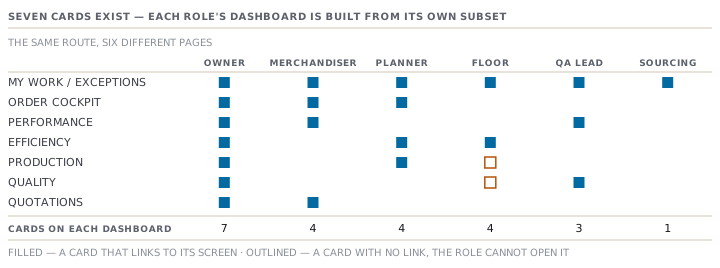
The two cards Kasun can see and cannot open
Every card ends with an Open link to its full screen. The link is drawn only when the role is allowed to reach that screen. So the Dashboard can never become a side door into a module.
Kasun's four cards are My Work, Efficiency, Production and Quality. The Efficiency card points at the Reports hub, which he may open. The Production card points at /production and the Quality card points at /quality. A floor supervisor's account reaches neither.
So two of his four cards show their figures and stop there. He can read the factory's defect rate, its count of open CAPAs (corrective and preventive actions — the fixes raised after a quality problem), and the decision on the latest inspection. No link on the page will take him to any of them. He is the only role this happens to.
A dash is not a zero, on a dashboard too
Every card works its figures out from live data. Any figure that needs to divide by something, and has nothing to divide by, shows a dash instead of a number.
- Defect rate is a dash until the floor has recorded some output. The card says why underneath: no production yet.
- Average SAM is a dash until at least one style has operations with minutes on them. SAM is standard allowed minutes, the time one garment is meant to take.
- Daily capacity is a dash until at least one production line exists. The line under it reads: no lines set up.
A count is different. Zero open CAPAs is a real answer, and it prints as a zero. The rule the code follows is simple. A count of nothing is a fact. A rate with nothing underneath it is not.
The fourth dashboard, which has no screen
There is a second dashboard in this application. It builds four sections: Orders, Production, Quality and Quotations. Each has its own figures, its own view-all link and its own honest note for when there is nothing to show.
Nothing renders it. No page imports it and no route reaches it. The only thing in the repository that calls it is a test.
Two rules to take away
Ask what your role is being shown, not what the app can show. Two people at Deduru can sit side by side, open the same address, and see a different page with different figures on it. Neither is broken. Before you compare notes with a colleague, agree which screen and which account you are each looking at.
A card is an invitation, not a report. Nothing on the Dashboard exports. Nothing on it covers a period. Every figure on it is as of right now. When you need something to send, something to keep, or something with a date range on it, go to the Reports hub. It is a different screen with different rules.
Check yourselfIshara asks why her Dashboard is nearly empty when Chamath's is full. What is the accurate answer, and what is the inaccurate one that sounds right?Show the answer
The accurate answer is that no sourcing card exists in the application, so nobody sees one. The Owner's Dashboard is full of other functions' cards, not of hers. The inaccurate answer that sounds right is that her role has been given too little access. Her single card is not a permission problem. Granting her more access would not add a card, because there is nothing to add.
Prompt · Tell me which of my three screens can answer this
When somebody asks you for a number and you are not sure where it lives.
Help me work out which screen in MerchandiserOS can answer a question I have been asked, and which cannot.

I will paste the question exactly as it was asked me, and tell you my role in the app: Owner, merchandiser, sourcing officer, planner, QA lead or floor supervisor.

First, decide what kind of question it is. A question about right now, a question about a period, or a question about one record. Say which, and say what gave it away.

Then route it. My Work answers what needs a person right now. The Dashboard answers how an area is standing at this moment, and nothing on it is exportable or has a period. The Reports hub answers what happened over a stated scope, and its output is a table I can send. A question about one order or one purchase order belongs on that record, not on any of the three.

Then tell me whether my role can actually reach the answer. If the screen you routed me to is one my role does not open, say so plainly and name who in a factory would normally hold it, rather than telling me to ask an administrator.

Finally, write me the one-sentence reply I should send if the honest answer is that the app cannot answer the question as asked. Do not invent a screen. If you are not sure a screen exists, say you are not sure and tell me what to look for in the left-hand menu.
AI can make mistakes — check anything you act on.