Lessons · Lesson 2 of 5
The badge, and three ways to quiet it
What the number on the sidebar counts, what it stops counting after sixty days, and what each way of silencing an alert writes down.
Lesson 2 of 5 · 26 min
What an alert is, and what it is not
An alert is something that comes and finds you. A number sitting on a screen only reaches the people who open that screen. This lesson is about the small circle on the sidebar, and about the three decisions that make one go away. Each decision means something different. Each one comes back at a different moment. Each one writes down a different amount.
At Deduru Apparel that circle sits beside My Work in the left-hand rail. It is the closest thing in the application to somebody tapping you on the shoulder. So it is worth knowing exactly what it counts before you trust it as the size of your morning.
The badge is not a count of exceptions
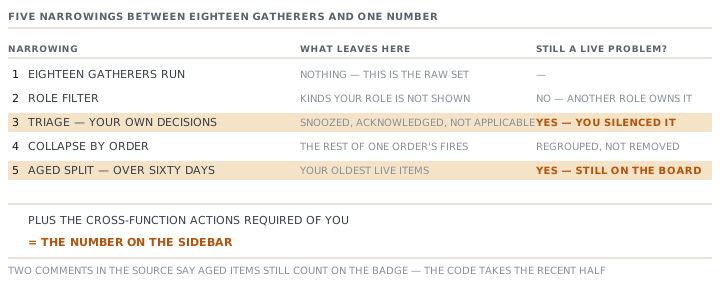
The number is built again every time the page frame renders. It passes through five narrowings before it is drawn.
- Eighteen separate gatherers run at once. Each one produces exceptions of its own kinds. Beside them a nineteenth read counts the cross-function actions required of you.
- The result is filtered to the exception kinds your role is shown. Kasun is never offered a late purchase order to chase.
- It goes through triage, and only what is still live survives.
- Everything left that belongs to an order is folded into one card per order, carrying a count of the rest.
- Items older than sixty days are peeled off. Then the required actions are added on. That total is the badge.
The eighteen cover orders, sourcing, planning and milestones. They cover stalled lines, corrective actions, inbound messages, measurements and extraction reviews. They cover approvals, quote chases, the disruption radar, blockers and costing chases. And they cover lot evidence, incoming-inspection failures, materials to source and payments.
The fourth step is the one people misread. Take an order carrying a late purchase order, an overdue payment and a slipped milestone. It adds one to the badge, not three. The badge counts records that need you, not problems that exist.
The oldest problems are the ones it drops
Any live item whose driving date is more than sixty days in the past folds out of the main board. It goes into a single strip that reads: so many items over sixty days old, review or retire. Open the strip and they are all still there, each with its full set of triage controls.
They are not on the badge.
This is worth saying flatly, because two comments in the application's own source say the opposite. The file that defines the sixty-day rule and the component that draws the strip both describe aged items as staying live and still counting on the badge. The code that builds the badge takes the recent half and adds the required actions. The aged half never reaches it. A third comment, in the page frame itself, explains why it changed: otherwise the badge counted one more than the worklist the screen led with.
Three ways to quiet an alert
Every card offers the same three decisions. They are not one decision with three labels.
| Decision | What it needs | Where it goes | What brings it back |
|---|---|---|---|
| Acknowledged | Nothing, but the severity is remembered | A quiet expandable strip, out of the badge | A new occurrence, or the same one turning red after being acknowledged while amber |
| Snoozed | A date | Hidden until that date | The date passing, automatically |
| Not applicable | A short note, required | Hidden for this occurrence only | A new occurrence |
The snooze menu offers three days, one week and two weeks, with a custom date beside them. All three decisions are reversible. The quiet strips list what you silenced, and each row offers a restore that deletes the stored decision outright.
Why an acknowledgement can vanish overnight
The three decisions are stored against a key made of three parts. The kind of exception, the record it is about, and a generation. The generation is the exception's own driving date.
Ishara acknowledges the late purchase order on the interlock jersey for Ossington and Vale. The purchase order is PO-1042 and its required-by date is 2 June. So the stored key is the overdue kind, the purchase-order record, and 2 June. The next morning the mill agrees a new date, and somebody moves required-by to 16 June.
The alert is back. Nobody undid Ishara's acknowledgement, and it is still in the table. But the exception now has a different generation. That makes it a different occurrence, and an occurrence nobody has decided anything about is live by definition.
That is the intended behaviour, and it is a good rule. It is also the most confusing thing about triage the first time you meet it. So say it out loud to whoever asks. An acknowledgement is about one occurrence on one date. Move the date and you make a new one.
The severity rule works the same way. Acknowledge something while it is amber and it goes quiet. If that same occurrence later turns red, the stored decision was taken about a smaller problem, so it fires again.
What each decision writes down
All three write a row into the triage table: the kind, the record, the generation, the state, the date or note, who decided, and when.
They also try to write a line on the record's own history, so the decision shows up where somebody reading the purchase order would find it. That second write is a dispatcher. It knows five kinds of subject: an order, a milestone on an order, a purchase order, a goods-received note, and an extraction run.
The application produces more subject types than that. An inspection, a production order, a message, a material, a style component, a corrective action, a blocker and an approval all raise exceptions. None of those eight has a branch in the dispatcher. The switch falls through and returns.
The badge that reads nothing when it cannot read
The whole assembly sits inside one guard. If any of those reads fails, the count is set to zero and the error is reported to the developers.
The badge is drawn only when the count is above zero. So a failed read gives you a sidebar with no circle on it. That is pixel for pixel the sidebar of a factory with nothing wrong. There is no warning triangle, no grey badge and no message.
That is the shape of failure worth training yourself to notice. Not a wrong number, but the absence of one. If your morning board normally carries a handful of items and the badge is simply gone, reload the page before you celebrate.
Nothing here leaves the screen
This application can send email. It sends account verification and password resets. It sends a support request to us. It sends a trial request. And it sends a message that a person sat down and wrote.
There is no path in it by which a late order, an overdue purchase order, a failed inspection or a red exception sends anybody anything. No digest, no summary, no escalation to the person above you.
Five scheduled jobs do run on their own: a currency-rate refresh, a price-intelligence refresh, a demand-intelligence refresh, a drain of the extraction queue, and a disruption scan. Every one of them fetches or processes. None of them delivers.
So every alert in MerchandiserOS is a pull. It exists, it is correct, and it waits. On a Friday afternoon when the factory closes at noon, it waits until Monday.
Check yourselfA red exception on ORD-1044 has been live since March. Chamath's badge reads four. Is the exception being counted, and is the badge wrong?Show the answer
It is not being counted, and the badge is not wrong. An item whose driving date is more than sixty days old folds into the review-or-retire strip and leaves the badge. That is deliberate, so the number matches the worklist the screen leads with. The item is still live, still on My Work, and you can still triage it. The trap is reading four as the size of the problem. The honest reading is four recent things plus whatever is inside the aged strip, and only one of those two numbers is on the sidebar.
Prompt · Which of the three should I use on this alert
Before you acknowledge, snooze or mark anything not applicable on My Work.
Help me pick the right triage decision for one exception, and predict when it will come back.

I will describe the exception: its title, the record it is about, the date it is driven by, whether it is red or amber, and what I have actually done about the underlying problem.

Ask me one question first: has the underlying thing been fixed, scheduled, or neither. Do not proceed until I answer it, because the whole decision turns on that.

Then recommend one of three, and only one. Acknowledged, meaning I have seen it and I am carrying it. Snoozed to a date, meaning nothing can happen before then. Not applicable with a note, meaning this occurrence does not apply to us.

Then tell me exactly when it will fire again. It fires when the driving date moves, because the decision is stored against that date. It fires if it turns red having been acknowledged while amber. A snooze fires on the day I named.

Then make me commit to the follow-up. If I chose a snooze, ask me what I expect to be true on that date and who is doing it. If I chose not applicable, draft the note in one sentence, because the note is required and it is written onto the record.

Finally, warn me if my choice looks like avoidance: a red item acknowledged with nothing scheduled, or a third snooze on the same thing.
AI can make mistakes — check anything you act on.