Lessons · Lesson 4 of 5
Getting it out of a workspace nobody else can enter
Why a link to your own screen is the one link that will stall your review, and the three routes evidence can actually take.
Lesson 4 of 5 · 24 min
The gap between doing the work and handing it in
Everything so far has been about producing evidence. This lesson is about moving it. That sounds like a small step. It is where most of the avoidable delay in this exercise lives, because the two systems involved are sealed off from one another on purpose.
A reviewer is a stranger with an academy account. They have no login to your company. There is no way to give them one, and no reason to. So the question is not what your workspace can show you. It is what you can put in front of somebody who will never be inside it.
Read this before you start collecting anything.
Three doors, and none of them opens
Start with the plainest mistake, because it is the one the submission page warns about in its own words. Pasting the address of a screen in your workspace does not hand anybody your work.
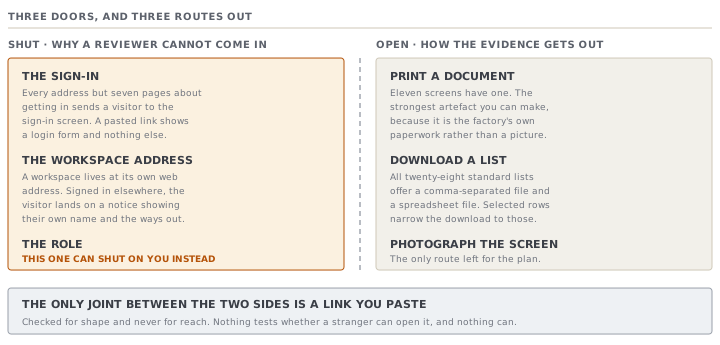
The first door is the sign-in. Every address in the product goes through a check, and only a short list of pages render for somebody who is not signed in. They are the sign-in and registration pages, the address confirmation, the two password screens, the wrong-workspace notice and the ended-session notice. Seven pages, all of them about getting in. Everything else sends a visitor to the sign-in screen. A reviewer following your link sees a login form and nothing else.
The second door is the workspace address. Even a person who does have a MerchandiserOS account of their own does not get in. A workspace lives at its own web address, and being signed in to one does not admit you to another. A visitor in that position lands on a notice telling them they are signed in to a different workspace, and that page is deliberately built to show nothing but their own name and the two ways out.
The third door is the role. This one can shut on you rather than on the reviewer, and lesson 3 already met it. The printed cost sheet checks the role before it gathers a single figure, and a role that may not see cost is sent to a refusal page. The comment beside that check states the principle: the gate is on the payload, not only on the buttons.
What the academy will accept
Now the other side, which is narrower than people expect.
The submission carries a link. Not an upload. The application says so plainly on the form: put the file wherever you already keep files, and paste a link the reviewer can open. The code says why, and says it as a limitation rather than a feature. There is no storage set up for the academy, so inventing an upload that wrote into a temporary filesystem would appear to work and would lose the work.
The link is checked for its shape, not for where it reaches. It must start with the usual web prefix and it must fit in the field. Nothing tests whether it opens, and nothing can. From the outside, a link that needs a login looks identical to one that does not.
There is a second field, optional, for anything the reviewer should know, and it holds up to 4,000 characters. It is a covering note, not the pack.
The three routes out
Given all that, there are exactly three ways evidence leaves a workspace, and they are the same three for everybody.
Print to a document. Eleven screens have a printable version, listed in lesson 3. Each one prints as a clean sheet on a letterhead, with the print styling held to a light background so it does not come out inverted. These are the strongest artefacts you can produce, because they are the factory's own documents rather than a picture of a screen.
Download a list. Every one of the twenty-eight standard lists offers a comma-separated file and a spreadsheet file. If you have selected rows, the download narrows to just those. This is how the materials, the purchase orders and the inspections travel.
Take a picture of the screen. For the Time and Action plan there is no other option, because that table is neither a printable document nor a downloadable list. A picture is weaker evidence and a reviewer will read it that way, so caption it. Name the order, name the anchor date, and say in the pack what the reader should be looking at.
| Deliverable | Route out | Strength |
|---|---|---|
| Backward plan | A picture of the screen, retyped into the pack | Weakest: no document, no download |
| Costed BOM and FOB | The printed standard cost sheet | Strongest: the arithmetic is on the sheet |
| The order records | Printed documents and list downloads | Strong: the factory's own paperwork |
| Judgement note | Written into the pack directly | The application holds no copy a reviewer can read |
Assemble the pack, then host it
Ruba ends up with a folder: three printed documents saved as files, two downloaded lists, one picture of a screen, and a written note. That folder is not a submission until it is one file, or one place a stranger can open.
Two practical rules, both taken from what the application says rather than from general advice.
The first is the submission page's own sentence: a link nobody can open is the one thing that will stall your review. A sharing link set to people in your organisation is exactly that link. Check it the way a reviewer would, in a browser that is not signed in to anything.
The second is that the link is the only thing that travels, so it has to keep working for as long as the review takes. That is at least the five working days you were promised, plus whatever a revision round adds.
Check yourselfRuba pastes the address of her order screen as the pack link, reasoning that it shows more than any document could. What will the reviewer see, and what do they know?Show the answer
They see the product's sign-in form, because every address except the seven pages about getting in sends a visitor there. Having an account of their own would not help either. A workspace sits at its own web address, so being signed in elsewhere lands them on a wrong-workspace notice instead. What the reviewer learns from that is nothing at all about the work. The practical cost is worse than a bad pack: the submission is locked while it is with them, so Ruba cannot fix the link until they reply.
Check yourselfWhich of the four deliverables should you write into the pack in full rather than evidencing with an artefact, and why is that true for two different reasons?Show the answer
The judgement note. The first reason is the one from lesson 3: the application can hold it as a comment on the record, and it has no route that carries a comment out, so no printed document and no download contains it. The second reason is the rubric itself, which asks for reasoning and for what was traded away. That is prose about choices, and an artefact showing the choice cannot show why it was made. The backward plan is the near case, because it has no export either, but a picture of the screen at least evidences it. A comment thread has nothing equivalent.
Prompt · Check my pack opens for a stranger
In the last hour before you hand in, when the folder is full and the link is not tested.
I am about to submit a capstone pack as a single link. The reviewer has no account on any system of mine and no way to be given one. A link they cannot open is the one thing that will stall the review, and once I hand in I cannot edit the submission until they reply.

Walk me through a check, one step at a time, waiting for my answer before the next:
- What exactly is at the end of the link, and is it one thing or a folder
- Who can open it, in the sharing settings' own words
- Have I opened it myself in a browser signed in to nothing
- Does every file inside open, including the ones exported from another system
- Is anything in it confidential to an employer
- Will it still be there and unchanged in two weeks

At the end, give me a short list of what to fix before I press the button.
AI can make mistakes — check anything you act on.