Lessons · Lesson 1 of 5
From a bill line to a priced line
Where a cost sheet's numbers come from, which of them the style supplies and which it never touches, and the four things the engine does to a line before it becomes money.
Lesson 1 of 5 · 28 min
What this lesson is about
A cost sheet is not a form you fill in. Most of it arrives from somewhere else. The style's bill of materials — the list of every material the garment needs — supplies the quantities. The material library supplies the prices. Your own settings supply the rates. This lesson covers what arrives, what does not, and what the engine then does to each line. Get that wrong and a price goes blank for a reason nobody on the screen can see.
Yenice Denim Works is a jeans factory in Tarsus, Turkey. It runs four sewing lines, employs 410 people, and sells to Europe and Australia. Everything in this course happens inside its MerchandiserOS workspace.
Three people appear.
- Emre Dalman owns the business and is the workspace Owner. The costing settings are his.
- Devrim Aksu is the merchandiser. He builds the cost sheets.
- Nihal Erten is the industrial engineer. She owns the minutes.
The garment is STY-418, a men's rigid five-pocket jean in 11 ounce denim. The enquiry is RFQ-1067 from Kurrajong Outfitters, an Australian retailer. It asks for two quantities.
Say the basis once. Every figure in this course is US dollars per garment, because that is the reporting currency on the sheet. Where a number depends on a setting, the lesson names the setting. Where the application does not do something, the lesson says so instead of implying that it does.
Where a cost sheet lives
There is a Costing screen. It is a list, not a workshop. Its own explainer says what it is: "Every cost sheet across your RFQs — style, quantity band, ex-factory, FOB and margin. Open one to view or edit its full build. New cost sheets are created from a quotation." Eight columns, and every row is a link into an editor. Nothing is created here.
Sheets are created on an RFQ's Cost sheets tab. Under each style line sits a short row of buttons, preceded by the words "Build a cost sheet:". Each button carries one of the quantities the line offers. Press one and the sheet is created and opened.
That tells you the shape of the record before you see a single number. A cost sheet is keyed to a style line, a quantity and a variant. The variant is Standard or Actual. One style line with three quantities is three sheets. Each one stores its own ex-factory cost — the cost at the factory gate — its own FOB price, and its own margin. FOB is free on board: the price with the goods loaded at the port of shipment.
If the line offers nothing to press, the panel says why: "Add a quantity band or target quantity on the Style lines tab to build a cost sheet." The server agrees. Asked for a sheet at a band of zero, it falls back to the line's target quantity. With neither, it refuses: "Set a quantity band or a target quantity on the line first."
What the style sends across
Pressing that button runs a pull from the style. The pull is a mapping, and knowing it is the difference between reading a cost sheet and guessing at it.
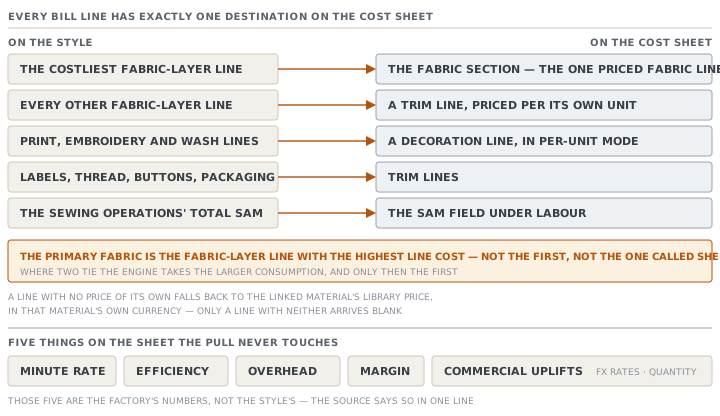
The bill's lines are sorted into three cost layers first, by the same rule the style's own bill tab uses. Then:
| On the style | On the cost sheet |
|---|---|
| The costliest fabric-layer line | the fabric section, as the one priced fabric line |
| Every other fabric-layer line | a trim line, priced per its own unit |
| Print, embroidery and wash lines | a decoration line, in per-unit mode |
| Labels, thread, buttons, packaging | trim lines |
| The total SAM of the sewing operations | the SAM field under Labour |
SAM stands for standard allowed minutes: how long the garment should take to sew.
Read the first row again. The primary fabric is the fabric line with the highest line cost. Not the first one, and not the one called Shell. Where two tie, the engine takes the larger consumption, and only then the earlier row. On a jean with a body denim and a pocketing, that is obvious. On a garment whose contrast fabric costs more than its body it is not, and the sheet will quietly cost the contrast as the fabric and the body as a trim.
A line with no price of its own does not arrive priceless. The pull falls back to the linked material's library price, in that material's own currency. Only a line with neither arrives blank.
Five things on the sheet are never touched by any pull: the minute rate, the efficiency, the overhead, the margin, and the commercial uplifts, with the exchange rates and the quantity beside them. Those are the factory's numbers, not the style's. The source says so in one line, and it is the cleanest statement of the division in the whole module.
Estimated, or confirmed
Every value on the sheet carries a second field beside its number. The sheet shows it as a small tag reading Estimated in amber or Confirmed in green.
The pull does not hand out "confirmed" for free. A pulled value is confirmed only when the matching section of the style has been signed off. The bill section confirms the fabric line, the trims section confirms the trim lines, and the sewing-operations section confirms the minutes. Everything else arrives estimated.
Two refinements matter, and both are the honest kind.
- A value the engine worked out for itself stays estimated, whatever anybody signed. A signature on a section is not a signature on a number nobody entered.
- The minutes are confirmed only when the section is signed and the minutes are above zero. A signature on an empty section confirms nothing.
A component's tag is the worst of its lines, and the sheet's tag is the worst of everything on it. One estimated trim makes the whole sheet read Estimated, which is the correct answer to the question the tag is asking.
Four things happen to every line
Now the arithmetic. A material line — fabric, trim or extra yarn, the same function handles all of them — passes through four steps, in this order.
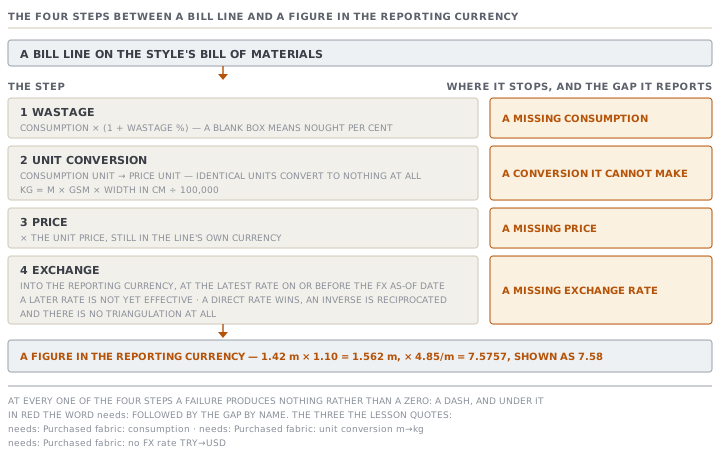
- Wastage. The consumption is multiplied by one plus the wastage percentage. A blank wastage box means nought per cent, which is a real default rather than a coerced zero.
- Unit conversion. The result is converted from the consumption unit into the price unit. Identical units convert to nothing at all. Going from a weight to a length needs both the GSM — the fabric's weight in grams per square metre — and the cuttable width.
- Price. The converted quantity is multiplied by the unit price, still in the line's own currency.
- Exchange. That amount is converted into the sheet's reporting currency. The engine uses the latest rate dated on or before the sheet's FX as-of date, which is the date the sheet fixes its exchange rates to.
The bridge in step two is one relation. Kilograms equal metres times GSM times width in centimetres, divided by one hundred thousand.
The exchange step has three properties worth knowing. A rate dated after the as-of date is not yet in force, so it is ignored. A direct rate wins, and where only the opposite direction exists the engine turns that rate upside down rather than guessing. And there is no routing through a third currency at all: with no direct and no inverse rate for the pair, the line fails.
At every one of those four steps, a failure produces nothing rather than a zero. The line shows a dash and, underneath it in red, the word needs: followed by the gap by name. A fabric line with no consumption reads "needs: Purchased fabric: consumption". A line the engine cannot convert reads "needs: Purchased fabric: unit conversion m→kg". A line with no rate reads "needs: Purchased fabric: no FX rate TRY→USD".
The unit that came from somewhere else
Here is the failure that catches people. It is entirely a units problem.
When the pull finds a real consumption on the bill line, it uses the line's unit for both the consumption and the price. Nothing can disagree. But when the bill line has no consumption, the engine works one out from the style's measurements on the spot, and that estimate arrives with a unit of its own: kilograms for a knit, metres for a woven. The price unit does not follow it. The price unit stays whatever the bill line said, and where the bill line says nothing the engine recognises, that default is kilograms.
So a woven line with no consumption and no unit set produces metres against kilograms. Now the line needs a GSM and a cuttable width before it can produce any number at all. Denim usually has a width on the material and often has no GSM. So the line goes blank, the fabric component goes blank, and so does the price.
The estimate that caused it is never written to the bill, either. It is worked out for this sheet and thrown away.
What the detail line shows, and what it hides
Under each priced line the sheet prints a short build string. On STY-418's denim it reads 1.42 m × 4.85/m (+10% wastage).
Read it carefully. It shows the consumption before wastage, the price, and the wastage as a note. It never shows the quantity that was actually multiplied. On a line that converted, the two units in that string are genuinely different units, and the multiplication you are looking at is not the multiplication that happened.
The denim line does not convert, so its arithmetic is all visible: 1.42 metres times 1.10 is 1.562 metres, times 4.85 a metre is 7.5757, and the screen rounds that to 7.58.
Check yourselfA jean's pocketing line was set up in metres with a price of 1.15 a metre and a wastage of 5%. Somebody later blanks the consumption, meaning to retype it, and does not. What does the cost sheet show for that line, and why is it a trim line rather than a fabric one?Show the answer
It is a trim line because the pull sends only the costliest fabric-layer line to the fabric section, and on a jean the body denim outcosts the pocketing by a wide margin. Every other fabric-layer line becomes a trim, priced per its own unit. As for the blank: a trim's consumption unit and price unit are always the same field, so nothing can disagree and nothing gets worked out for you. A trim line never gets a measurement estimate. The line simply reads a dash and, beneath it, "needs:" followed by the line's name and the word consumption. The trims component then reads a dash too, because a sum with an unknown in it is unknown. So does the ex-factory cost, and so does the price. The whole sheet goes blank for one empty box, and the box is named on the screen.
Check yourselfDevrim signs off the style's bill section, expecting the cost sheet to stop saying Estimated. The fabric line still says Estimated. Give the two possible reasons and say how to tell them apart.Show the answer
Either the fabric consumption was worked out by the engine rather than entered, or something else on the sheet is still estimated. A value the engine worked out stays estimated no matter what has been signed. A signature on a section is not a signature on a number nobody typed, so if the bill line has no consumption of its own, signing changes nothing for that line. The second reason is that the tag you are reading may not belong to the line you think. A component's tag is the worst of its lines, and the sheet's tag is the worst of everything, so one unsigned trim holds the whole sheet at Estimated. Tell them apart by looking at the fabric line's own tag rather than the header. If the line itself still reads Estimated after the bill is signed, its consumption came from the engine, and the fix is to apply the estimate on the style so a real value is stored.
Prompt · Read a cost sheet back to me and tell me what it is not saying
On any cost sheet you did not build yourself, and before you quote from one you did.
Help me read a MerchandiserOS cost sheet honestly, rather than confirming that it looks finished.

I will paste or describe: the fabric line with its consumption, unit, price, price unit and wastage; every trim line with its consumption, unit, price and any nominated or supplied-by-buyer flag; the decoration lines; the SAM, efficiency and minute rate; the overhead mode and value; the margin basis and percentage; the quantity the sheet is costed at; anything in a commercial, export, testing or landed section; and the whole of the Not-yet-costable list if there is one.

Work in this order.

First, the gaps. For every line that shows a dash, say which of the four steps stopped it — a missing consumption, a missing price, a unit conversion it cannot make, or a missing exchange rate — and say plainly that the line is absent rather than zero. If any component total is a dash, remind me that the ex-factory and the price are dashes for that one reason alone.

Second, the units. For the fabric line specifically, compare the consumption unit against the price unit. If they differ, tell me what the sheet needs in order to bridge them and where that data lives.

Third, the flags. List every line marked as nominated and confirm that each of them IS being charged for. List every line marked as supplied by the buyer and confirm that each is NOT. Tell me if any line looks like it has the wrong one.

Fourth, the basis. Tell me what the margin percentage means given the basis it is on, and what the price would be on the other basis. If there is an agent commission, tell me what fraction of the margin it takes.

Three rules. Never invent a price, a consumption or a rate to fill a gap. Never treat a filled field as a confirmed one — say which values are estimated and what would confirm them. And do not tell me whether to send the quote; tell me what the quote would be resting on.
AI can make mistakes — check anything you act on.