Lessons · Lesson 5 of 5
The same style, two sheets
The difference between the style's own standard cost sheet and a quotation cost sheet, the five structural reasons they disagree, and what the app checks when they drift apart.
Lesson 5 of 5 · 26 min
What this lesson is about
One style can produce two quite different cost sheets, and both are correct. One belongs to the style and is worked out afresh every time you look. The other belongs to an enquiry and is stored. Knowing which you are reading matters. The app compares them and reports the gap. This lesson lines them up, and names the five reasons they differ before anybody has done anything wrong.
STY-418 now has a stored quotation sheet and a standard sheet of its own. They do not agree.
The style's own sheet
On the style sits a panel headed Standard cost sheet, with the subtitle "Estimated from this style · per garment" followed by the currency. It runs the same engine as a quotation sheet — one source, so the two can never disagree about the arithmetic — and it needs no enquiry to exist.
Its footer states its own assumptions in one sentence, which is the most useful line on the panel. It names the fabric it pulled, the number of trims, the SAM, and then: "Labour 0.09 USD/min ÷ 60%, overhead 14% — factory defaults, confirm when you quote."
Three of its honest empty states are worth recognising, because each is a dash where a lazier screen would print a zero.
- No trims, and the style has not declared that it has none: "— · no trims entered yet".
- No decoration lines: "— · none entered".
- A buyer-supplied fabric: "— · provided by buyer".
Where the fabric consumption came from the engine rather than from a person, a warning strip runs across the top of the panel. It reads: "Fabric consumption is a rough estimate from the measurements (the BOM line has none yet) — this FOB is an estimate, not a firm price. Confirm the consumption on the BOM before quoting."
Five reasons the two sheets differ
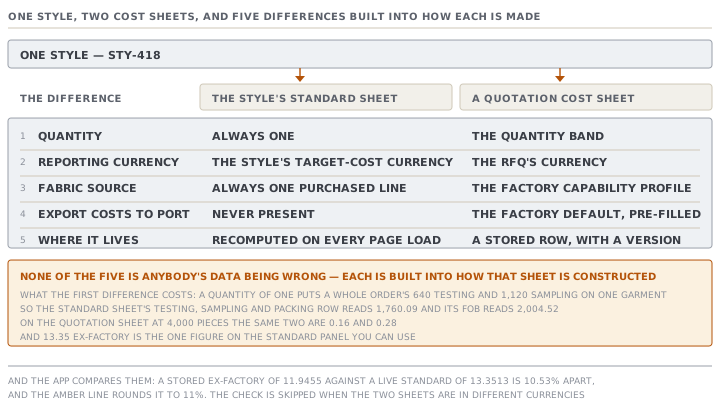
| The style's standard sheet | A quotation cost sheet | |
|---|---|---|
| Quantity | always one | the quantity band |
| Reporting currency | the style's target-cost currency | the RFQ's currency |
| Fabric source | always one purchased line | from the factory capability profile |
| Export costs to port | never present | pre-filled from the factory default |
| Where it lives | recomputed on every page load | a stored row, with a version |
Take the last one first, because it changes how you read everything else. The standard sheet is not saved anywhere. It is gathered and worked out each time the page renders, from the style's data as it stands right now and from today's exchange rates. A quotation sheet is a row in a table with its inputs frozen, its own FX as-of date, and a version number that goes up every time it is saved. One is a live reading. The other is a record of a decision.
The third row has a real consequence for a knitting factory. The standard sheet always shows the fabric as one purchased line, whatever the factory does. A new quotation sheet asks the factory capability profile, and a factory that both knits and dyes in house gets the in-house build-up instead, with yarn, knitting, dyeing and finishing as separate lines started from the factory's per-kilogram rates. The same style, on the same day, therefore shows one fabric line on its own page and four on a quotation.
The quantity of one, and what it does to two lines
The first row of that table is the one that surprises people, and it only bites a factory that has filled in two particular settings.
Testing and sampling are per-order lumps. The engine spreads them across the sheet's quantity, exactly as lesson 3 described. The standard sheet's quantity is one.
So a factory that has set a testing default and a sampling default sees both of them, whole, on a single garment. Yenice has set 640 for testing and 1,120 for sampling. On the quotation sheet at four thousand pieces those become 0.16 and 0.28. On the style's own standard sheet they arrive as 640.00 and 1,120.00, the packing line adds 0.09, and the row reads:
| Line | Amount |
|---|---|
| Ex-factory cost | 13.35 |
| Commercial | 0.47 |
| Testing, sampling and packing | 1,760.09 |
| Margin (13% on cost) | 230.61 |
| FOB price | 2,004.52 |
Nothing there is a bug in the arithmetic. Every line is doing exactly what it is documented to do. What is wrong is the pairing, because a per-order cost and a per-garment sheet do not belong together. The source comment above that function still says the reference price "doesn't depend on an assumed order size". That sentence was true before the per-order lines were added, and it is not true now.
What the app checks when they drift
A cost sheet's editor carries one panel headed This quote vs. the style today, and it merges what used to be several banners. It can raise five kinds of concern at once, each with an icon and each in its own words.
- The RFQ line has no style behind it, so nothing can be pulled or checked.
- A fabric line on the style cannot be priced yet, named with its gap.
- The fabric consumption is a rough estimate, so this price is an estimate.
- The style's bill or measurements changed after the sheet was costed, with both dates.
- One of the cost validations has fired.
The validations are worth listing on their own, because two are red and mean never correct while the rest are amber and mean look at this.
| Check | Level | When it fires |
|---|---|---|
| Ex-factory cost is zero or negative | red | always wrong |
| Price is not above the ex-factory cost | red | the margin is zero or negative |
| Margin outside the usual range | amber | below 0% or above 80% |
| The style moved after costing | amber | the spec's timestamp is later than the sheet's |
| Diverges from the standard cost | amber | more than 10% apart, same currency only |
| Not yet fully costable | amber | the engine named a missing input |
The divergence check is the one that catches a stale price. Suppose Devrim's sheet was built when the denim was 3.95 a metre, and the fabric mill has since moved to 4.85. The sheet's stored ex-factory is 11.9455 and the style's live standard is 13.3513, which is 10.53% apart. That clears the threshold, and the amber line reads:
This sheet's ex-factory (11.95 USD) is 11% below the style's standard cost (13.35 USD). Check the captured inputs — SAM, fabric, trims, minute rate and margin — against the current style.
Two details in that one sentence. The percentage is rounded to a whole number, so a real 10.53% is reported as eleven. And the check is deliberately skipped when the two sheets are in different currencies, because subtracting across currencies would produce a number that means nothing.
Comparing every sheet at once, layer by layer
The style also carries a variance view, and it does the same comparison for every stored sheet at once. Each row is labelled with its enquiry reference and its quantity, and it compares the five production components plus the ex-factory and the price.
The direction is fixed and worth memorising. The delta is today's live cost minus what was quoted, so a positive delta means the garment now costs more than the price was built on, which is margin risk. On our stale sheet exactly one component moves: fabric, by 1.41, and the ex-factory by the same, because nothing else changed.
Two honesty notes are built into it, and both are stated in the source rather than implied.
A sheet in a different currency from the standard is listed but its deltas are withheld, rather than shown as a meaningless subtraction. And the panel is careful about the word actual. It compares two costings — what you quoted against what the style costs to make today. A true production actual, built from what the fabric receipts and the floor really came to, is a larger piece of work that does not exist yet, and nothing on this panel is dressed up as one. The Actual variant you can pick on a cost sheet is just a second sheet with a label, which somebody fills in by hand.
One consequence follows from the previous section, and it is the reason to read the components rather than the bottom line. The variance panel's price delta is worked out against the standard sheet's price, so on a factory with per-order defaults set it inherits the quantity of one. The component deltas and the ex-factory delta stay meaningful. The price delta does not.
Check yourselfA merchandiser opens a style and reports that the app says the jean costs over two thousand dollars. Nothing is broken. Walk through what she is looking at and tell her which number on that panel she can use.Show the answer
She is looking at the style's own standard cost sheet, which is always costed at a quantity of one garment. Two of the factory's settings are per-order lumps rather than per-garment amounts — the testing and compliance figure and the sampling figure — and the engine spreads a per-order lump across the sheet's quantity. Divided by one, they arrive whole, so the testing, sampling and packing row carries the entire order's lab and sample budget on a single jean, and the margin then marks that up too. The number she can use is the ex-factory cost. On a purchased-fabric sheet the ex-factory total contains no spread charge at all, so it is the same figure a quotation sheet at any quantity would produce. Everything below it on that panel is only meaningful once a real quantity is supplied, which means going to a quotation cost sheet.
Check yourselfTwo amber lines appear together on one sheet: the style changed after costing, and the sheet diverges from the standard cost by 14%. Are these the same finding twice, and does either one stop you quoting?Show the answer
They are two different mechanisms that happen to agree here, and either can fire without the other. The staleness check is about time. It compares the timestamp of the style's last costing-data change against when the sheet was last saved, and it fires even when the change made no difference to the price. The divergence check is about money. It compares this sheet's stored ex-factory against the style's live standard cost and fires when they are more than a tenth apart, in the same currency, regardless of when either was touched. A style edited yesterday that changed nothing important raises the first and not the second. A sheet built months ago at a margin nobody would use today can raise the second and not the first, since the style itself never moved. Neither one blocks anything. Both are informative by design, because a quote may legitimately differ from the standard cost, and the app surfaces the gap and the likely reason so a person decides.
Prompt · Two cost sheets for one style disagree — tell me which reasons are structural
When a style's standard cost sheet and a stored quotation sheet give different answers.
A style in MerchandiserOS shows one cost on its own page and a different cost on a stored quotation sheet. Help me separate the differences that are built into how the two are constructed from the ones that mean something is wrong.

I will give you both sheets: for each one, the quantity it is costed at, its reporting currency, whether the fabric is one purchased line or an in-house build, whether an export-to-port figure is present, the five component figures, the ex-factory, the total, the margin basis and rate, and the price.

Start with the five structural differences and check each one against what I gave you.

One. The style's standard sheet is always costed at a quantity of one, and a quotation sheet at its quantity band. Tell me whether either sheet carries a per-order line — testing or sampling — because at a quantity of one those arrive whole and the standard sheet's price becomes unusable.

Two. The standard sheet reports in the style's target-cost currency and a quotation sheet in the enquiry's currency. If they differ, no comparison below the component level is meaningful.

Three. The standard sheet always shows the fabric as one purchased line. A quotation sheet may show an in-house build-up instead, with separate yarn, knitting, dyeing and finishing lines.

Four. A quotation sheet may carry an export-to-port figure. The standard sheet never does.

Five. The standard sheet is recomputed from today's data. The quotation sheet is a stored record with its own exchange-rate date.

Only after all five, tell me what is left. For each component still differing, say what input must have changed and where it is entered. Then tell me whether the remaining gap is large enough to matter, and which sheet is the one I should act on.

Two rules. Compare ex-factory against ex-factory before you compare any price. And never describe the difference as one sheet being wrong until the five structural reasons have been ruled out.
AI can make mistakes — check anything you act on.