Lessons · Lesson 3 of 5
What the quantity actually moves
Which lines on a cost sheet change when the order gets bigger, which ones never do, and why a real volume price has to be typed rather than expected.
Lesson 3 of 5 · 28 min
What this lesson is about
Every cost sheet is costed at one quantity. A buyer who asks for two quantities gets two sheets. It is easy to assume the bigger one comes out cheaper. The software knows nothing about volume. It knows about spreading a fixed lump over more pieces, which is a much smaller thing. This lesson finds every line the quantity touches. Then it measures what the difference is worth.
Kurrajong asked Yenice for two quantities. Devrim has built both sheets, and they differ by less than he expected.
The field labels itself
At the top of the editor, in the Sheet basis card, sits a number box. Its label is not "Quantity". It is Quantity (amortises flat charges), and that bracket is the whole lesson. To amortise a charge is to spread it over the pieces. So the quantity is a divisor. It is not an input to any price, any rate, any consumption or any percentage.
Four lines, and only four
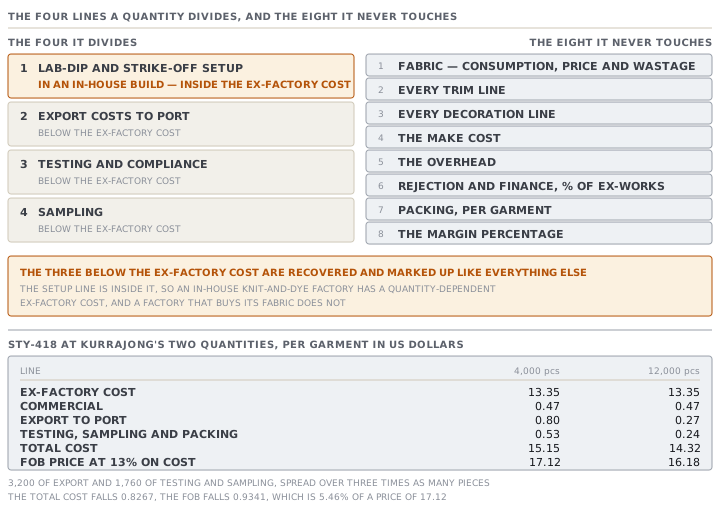
| Part of the sheet | Does the quantity move it |
|---|---|
| Fabric consumption, price and wastage | no |
| Every trim and every decoration line | no |
| The make cost and the overhead | no |
| Rejection and finance, as percentages of ex-works | no |
| Packing, per garment | no |
| The margin percentage | no |
| Lab-dip and strike-off setup, in an in-house build | yes |
| Export costs to port | yes |
| Testing and compliance | yes |
| Sampling | yes |
Three of the four sit below the ex-factory cost and are added to it before the margin, so they are recovered and marked up like everything else. The fourth is different and worth knowing about. The lab-dip and strike-off setup lives inside the fabric build-up, which means it is inside the ex-factory cost. On a factory that knits and dyes in house, the ex-factory cost is itself quantity-dependent. On a factory that buys its fabric, it is not.
The three amortised lines show their own division in the build detail. Testing reads 640 per order ÷ 4,000 pcs, and the setup line reads its charge divided by the quantity in the same shape. Export to port does not. It shows only the per-garment result, and the lump behind it is visible only in its own field, labelled Per shipment (USD).
Both bands, side by side
| Line | 4,000 pcs | 12,000 pcs |
|---|---|---|
| Ex-factory cost | 13.35 | 13.35 |
| Commercial | 0.47 | 0.47 |
| Export to port | 0.80 | 0.27 |
| Testing, sampling and packing | 0.53 | 0.24 |
| Total cost | 15.15 | 14.32 |
| FOB price at 13% on cost | 17.12 | 16.18 |
Nine of the sheet's lines are identical down to the last decimal. The two that move do so for one reason: 3,200 of export costs and 1,760 of testing and sampling are spread over three times as many pieces.
The arithmetic ties out exactly, and it is worth doing once, because it tells you what to expect for any pair of quantities. The total cost falls by 0.8267. The FOB falls by 0.9341, which is the cost fall multiplied by one plus the margin, because the margin marks up the saving too. On a price of 17.12, the entire effect of tripling the order is 5.46%.
What the engine will not do for you
That number is the point of the lesson. Nothing in the engine gives you a volume price. It does not fetch a cheaper fabric rate at a bigger quantity. It does not improve the minute rate because a longer run means fewer changeovers. It does not thin the margin. It divides four lumps by a bigger divisor and stops.
Every one of those things is real, and none of them is automatic. If a three-times order genuinely buys you a better denim price, somebody has to open the twelve-thousand sheet and type it. If the longer run raises the line's efficiency from sixty per cent to sixty-eight, somebody has to type that too, on that sheet.
And the sheets do not talk to each other. Each band is its own record with its own stored inputs, and refreshing one from the style refreshes one. Change the fabric price on the style and every band's sheet has to be refreshed on its own, or two of your three quoted prices are built on last month's denim.
Where the export band comes from, and when it does not
The export line is pre-filled once, when the sheet is created, from a factory default. Two things gate it.
It only pre-fills when the factory has actually set a figure above zero. And it is skipped when the RFQ's incoterm says the buyer bears export logistics. An incoterm is the code that says who pays for which leg of the journey. Exactly two codes do that — EXW, where the buyer collects at your gate, and FCA, where the buyer's carrier takes over at a named place. Everything else pre-fills, including an absent or unrecognised incoterm. The reasoning is stated in the source and is the honest-when-unknown rule again. Never silently drop a real cost: offer it as an estimate and let the merchant confirm or zero it.
The card changes its own words to match. On an FCA enquiry it says the buyer books the main carriage but you still pay export clearance and the haulage to the handover place, so enter just those legs. On EXW it says leave it at nought. And on every sheet it ends with a warning against a double count: the buyer's agent commission stays in the commercial section above, because this is the clearing and logistics cost and not that.
The divisor that cannot be nought
Both amortised groups carry a message for a quantity of zero: "Export to port: order quantity unknown — can't amortise the per-shipment cost", and for the others "order quantity unknown — can't amortise the per-order cost". The line goes to a dash rather than to a zero, which is the same honesty as everywhere else.
You are unlikely to meet either. Creating a sheet at a band of zero falls back to the line's target quantity, and refuses if there is none. Saving an edited sheet is refused with "Quantity must be more than 0." These messages are a floor under a forged or malformed call, not a state the editor will put you in.
Check yourselfA buyer asks for 2,000, 6,000 and 20,000. Your factory buys its fabric, sets no testing or sampling defaults, and has an export-to-port default of 2,400 per shipment. Before building anything, what will the three FOBs differ by, and what should you do about it?Show the answer
Only one line will move. The three prices will differ by the export lump spread three ways: 1.20 a garment at two thousand, 0.40 at six thousand and 0.12 at twenty thousand, each then marked up by the margin. Ex-factory will be identical on all three, because a purchased-fabric sheet has no amortised line inside it, and the commercial uplifts are percentages of an unchanging ex-factory. So the spread between the smallest and the largest quote will be about a dollar and a bit, on a garment where a real twenty-thousand-piece order would buy a materially better denim price and a better efficiency. The thing to do is decide what those two are actually worth, type them into the larger sheets, and be able to say which rate you moved and why. What you must not do is present the spreading of a fixed charge as a volume discount, because the buyer can work out that it is not one.
Check yourselfDevrim renegotiates the denim from 4.85 to 4.55 a metre and refreshes the 12,000 sheet from the style. A week later the 4,000 quote and the 12,000 quote are compared side by side and the smaller one looks oddly good value. Why, and what does the app do about it?Show the answer
Because refreshing one sheet refreshes one sheet. Each quantity band is a separate cost-sheet record with its own stored inputs, and nothing passes between them, so the four-thousand sheet is still costed on denim at the old price while the twelve-thousand one is on the new. The per-garment gap between the two bands has therefore stopped being a spreading of fixed charges and has become that plus a fabric price change, which is not a story anybody can tell a buyer. The app is not silent about it, but it does not connect the two sheets either. Each sheet is separately compared against the style's live standard cost. The stale one will be flagged in its own editor as diverging from the standard once the gap passes the threshold, and flagged again as costed before the style's data last changed. Both signals appear on the sheet that is wrong, and neither mentions the other band.
Prompt · Price a second quantity band and say what actually justifies the difference
Whenever a buyer asks for more than one quantity and you are about to build the second sheet.
I am pricing the same garment at more than one quantity in MerchandiserOS, and I want the difference between the prices to be defensible rather than automatic.

I will give you: the quantities the buyer asked for, the sheet's five component figures at the first quantity, any export-to-port lump, any testing or sampling per-order figures, the packing per garment, the commercial percentages, and the margin basis and rate.

First, tell me what the engine will do on its own. Only four kinds of line divide by the quantity: a lab-dip or strike-off setup inside an in-house fabric build, the export-to-port lump, the testing figure and the sampling figure. Everything else is per garment and will not move. Work out, for each quantity I gave you, what those lines come to, and therefore what the total cost and the price will be if I change nothing else. Give me the difference in money per garment and as a percentage of the price.

Second, tell me whether that difference is worth quoting. If it is small, say so plainly.

Third, ask me the questions that would justify a real difference: does the larger run get a better material price, and how much; does it raise the line efficiency, and by how many points; does it change the margin I am willing to take. For each one I answer, work out what it is worth per garment and add it.

Fourth, give me a short paragraph I could say out loud to the buyer that names the reasons for the gap between the two prices.

Two rules. Do not assume any volume discount I have not given you. And remind me at the end that each quantity is a separate stored sheet, so anything I change on one has to be changed on the others by hand.
AI can make mistakes — check anything you act on.